مقدمة
This manual provides comprehensive instructions for the safe and proper installation, operation, and maintenance of your Vogel's MA4000 Flat Screen Wall Mount. Please read all instructions carefully before installation and retain this manual for future reference.
The Vogel's MA4000 is designed to securely mount flat screen televisions ranging from 40 to 80 inches (102-203 cm) with a maximum weight capacity of 80 kg (176 lbs). It features a slim profile and a tilt function to optimize viewزوايا الإضاءة وتقليل الوهج.
معلومات السلامة
تحذير:
- تأكد من أن سطح التثبيت يمكنه تحمل الوزن الإجمالي للحامل والتلفزيون بشكل آمن.
- Always use appropriate tools and follow all installation steps precisely.
- لا تتجاوز الحد الأقصى للوزن وهو 80 كجم (176 رطل).
- Verify VESA compatibility with your television before installation.
- إذا كنت غير متأكد من أي جزء من عملية التركيب، فاستشر متخصصًا مؤهلًا.
محتويات الحزمة
Before beginning installation, please verify that all components are present and undamaged. Refer to the included parts list in your product packaging for a complete inventory.

وصف الصورة: النفقات العامة view of the Vogel's MA4000 Flat Screen Wall Mount, showing the main wall plate and the two vertical TV brackets. The mount is black and designed for flat panel televisions.
The image above displays the primary components of the Vogel's MA4000 wall mount: the wall plate and the two TV interface bars. Additional hardware such as screws, washers, and spacers are included in the retail package.
تحديد
| رقم الموديل | MA4000 (8554000) |
| ماركة | فوجل |
| نوع التركيب | Flat, Tilting |
| مادة | الفولاذ المقاوم للصدأ |
| لون | أسود |
| أحجام التلفزيون المتوافقة | 40 - 80 بوصة (102 - 203 سم) |
| الحد الأقصى لوزن السعة | 80 كجم (176 رطل) |
| التوافق مع VESA | الحد الأدنى 100 × 100 مم، الحد الأقصى 600 × 400 مم |
| أقصى زاوية الميل | 12 درجة |
| مسافة الجدار | حوالي 30 ملم (1.2 بوصة) |
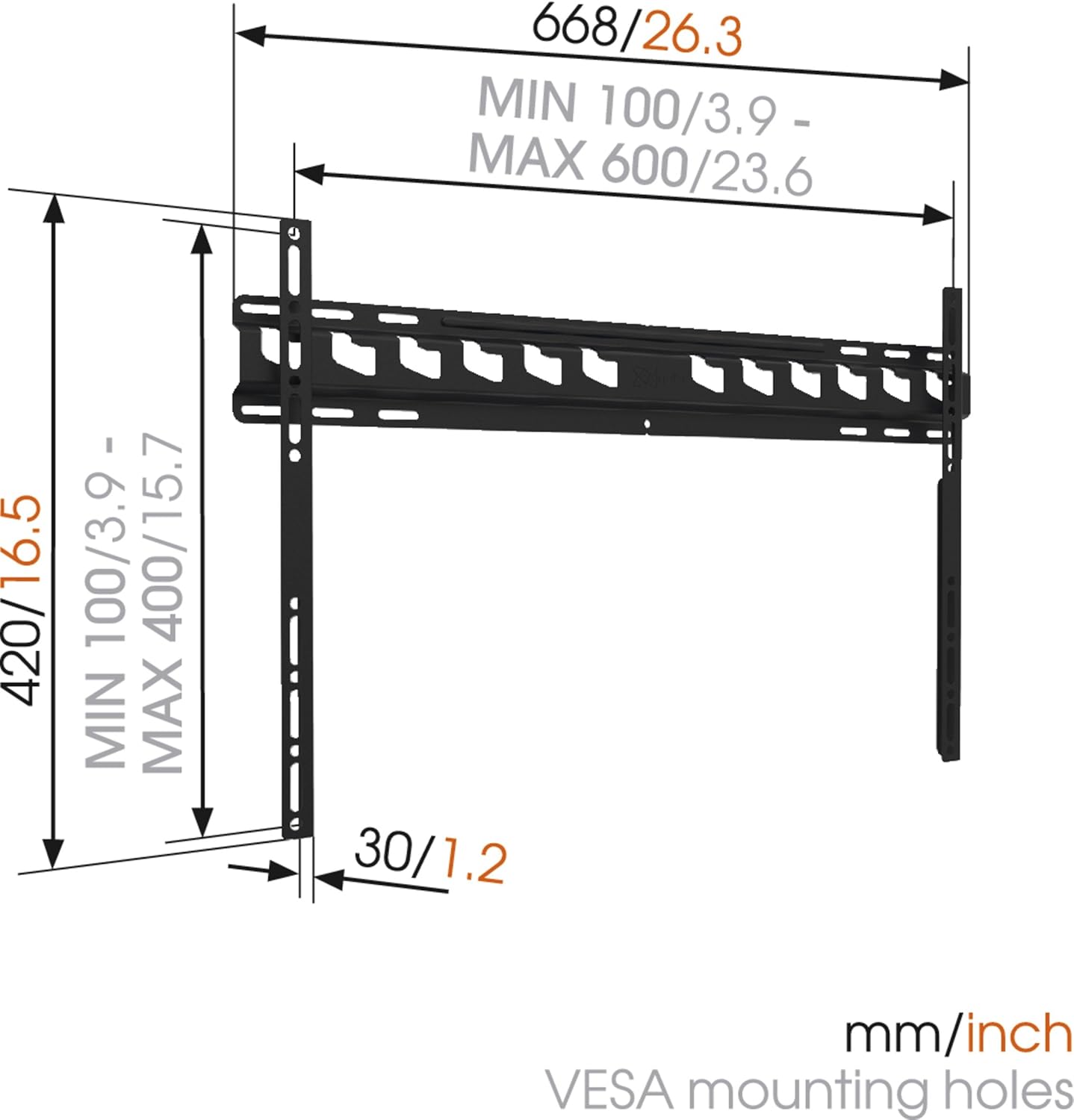
وصف الصورة: A technical diagram illustrating the dimensions of the Vogel's MA4000 wall mount. It shows the overall width (668mm / 26.3 inches), height (420mm / 16.5 inches), and the minimum and maximum VESA mounting hole patterns (100-600mm horizontally, 100-400mm vertically). The distance from the wall is indicated as 30mm (1.2 inches).
الإعداد والتثبيت
This section outlines the general steps for installing your Vogel's MA4000 wall mount. Always refer to the detailed graphical instructions included with your product for specific drilling templates and hardware usage.
الأدوات المطلوبة (غير متضمنة):
- حفر
- Drill bits appropriate for your wall type (wood, concrete, brick, etc.)
- جهاز كشف العوارض الخشبية (للجدران الخشبية)
- مستوى
- قلم رصاص
- شريط قياس
- مفك أو مفتاح
خطوات التثبيت:
- تحديد موقع التركيب: Choose a suitable location on your wall, ensuring it is structurally sound and free from electrical wires or plumbing. Use a stud finder if mounting to wood studs.
- تحديد أماكن حفر الثقوب: Hold the wall plate against the wall at the desired height and use a level to ensure it is straight. Mark the drilling holes with a pencil.
- ثقوب الحفر: Drill pilot holes according to the marked positions and your wall type. Insert wall anchors if required.
- تثبيت لوحة الحائط: Secure the wall plate to the wall using the provided screws and washers. Ensure it is firmly attached and level.
- قم بتثبيت حوامل التلفزيون على التلفزيون: Attach the two vertical TV interface bars to the back of your television using the appropriate screws, washers, and spacers from the hardware kit. Ensure the brackets are centered and securely fastened to the VESA mounting points.
- تثبيت التلفزيون على لوحة الحائط: Carefully lift the television and hook the TV brackets onto the wall plate. Ensure both brackets are properly seated.
- تلفزيون آمن: Engage the safety locking mechanism (if applicable) to prevent the TV from accidentally dislodging from the wall plate.

وصف الصورة: محترف جانبيfile view of a flat screen television mounted flush against a white wall, demonstrating the slim design and minimal wall distance achieved with the Vogel's MA4000 wall mount. The mount itself is barely visible behind the television.
Operating Instructions (Tilting Function)
The Vogel's MA4000 wall mount allows for a slight tilt to optimize your viewتحسين تجربة المستخدم وتقليل الوهج.
- ضبط الإمالة: Gently push or pull the bottom edge of the television to achieve the desired tilt angle. The mount supports a maximum tilt of 12 degrees.
- Securing Tilt: Some models may have a locking mechanism for the tilt. Refer to your product's specific instructions for details on securing the tilt position if available.
صيانة
The Vogel's MA4000 wall mount requires minimal maintenance to ensure long-term performance and safety.
- التفتيش الدوري: افحص جميع البراغي والوصلات دوريًا للتأكد من إحكامها. أعد ربطها إذا لزم الأمر.
- تنظيف: نظّف الحامل بقطعة قماش ناعمة وجافة. تجنّب استخدام المنظفات الكاشطة أو المذيبات التي قد تُتلف الطلاء.
- الوزن المحدد: Never exceed the maximum weight capacity of 80 kg (176 lbs).
استكشاف الأخطاء وإصلاحها
| مشكلة | السبب المحتمل | حل |
|---|---|---|
| التلفزيون ليس مستوياً بعد تركيبه. | Wall plate was not installed level. | Remove TV, adjust wall plate, and remount. Ensure a level is used during installation. |
| يبدو التلفزيون غير مستقر على الحامل. | Screws are loose; TV not properly seated; safety lock not engaged. | Ensure all screws are tightened. Verify TV brackets are fully engaged with the wall plate. Engage safety lock. Do not exceed weight capacity. |
| Cannot achieve desired tilt angle. | Obstruction; maximum tilt angle reached. | Check for cables or other obstructions. The mount has a maximum tilt of 12 degrees. |
الضمان والدعم
For warranty information and customer support, please refer to the documentation included with your product or visit the official Vogel's webالموقع. احتفظ بإثبات الشراء الخاص بك لتقديم مطالبات الضمان.
Vogel's Official Webموقع: www.vogels.com


