مقدمة
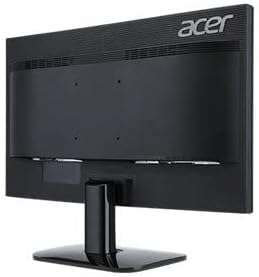
This manual provides essential information for the safe and efficient use of your Acer KA240H 24-inch Full HD Monitor. Please read this manual thoroughly before operating your monitor and retain it for future reference. This monitor is designed for general computing tasks, offering a 1920x1080 resolution display.
معلومات السلامة
- ضع الشاشة دائمًا على سطح ثابت ومستوٍ لمنعها من السقوط.
- لا تسد فتحات التهوية. تأكد من وجود مساحة كافية حول الشاشة لضمان تدفق الهواء بشكل صحيح.
- Use only the power adapter and cables supplied with the monitor or specified by Acer.
- أبقِ الشاشة بعيدة عن الماء والرطوبة ودرجات الحرارة القصوى.
- If smoke, strange noises, or unusual odors occur, immediately unplug the monitor and contact qualified service personnel.
- لا تحاول صيانة الشاشة بنفسك. أحل جميع أعمال الصيانة إلى فني صيانة مؤهل.
محتويات الحزمة
Verify that all items are present and in good condition upon unpacking. If any items are missing or damaged, contact your retailer.
- Acer KA240H Monitor Display Panel
- قاعدة حامل الشاشة
- حامل شاشة الرقبة
- سلك الطاقة
- كابل HDMI (قد يختلف حسب المنطقة)
- دليل المستخدم (هذا المستند)
يثبت
1. تجميع حامل الشاشة
- Carefully place the monitor display panel face down on a soft, clean cloth to prevent scratches.
- Attach the stand neck to the monitor display panel by aligning the tabs and pushing until it clicks into place.
- ثبّت قاعدة الحامل على عنقه. ثبّتها ببرغي التثبيت الموجود أسفل القاعدة.

2. توصيل الكابلات
تأكد من إيقاف تشغيل الشاشة وجهاز الكمبيوتر قبل إجراء أي توصيلات.
- توصيل الطاقة: قم بتوصيل سلك الطاقة بمدخل الطاقة الخاص بالشاشة ثم بمأخذ كهربائي مؤرض.
- اتصال الفيديو:
- HDMI: قم بتوصيل أحد طرفي كابل HDMI بمنفذ HDMI الموجود على شاشتك والطرف الآخر بمنفذ HDMI الموجود على جهاز الكمبيوتر الخاص بك.
- VGA: Connect one end of the VGA cable to the VGA port on your monitor and the other end to the VGA port on your computer. Tighten the screws on the VGA connector.
- دي في آي: Connect one end of the DVI cable to the DVI port on your monitor and the other end to the DVI port on your computer.
Note: The monitor supports HDMI, VGA, and DVI inputs. Use only one video connection at a time.
3. التشغيل الأولي
After connecting all cables, power on your computer, then press the power button on the monitor. The monitor should automatically detect the input signal. If no image appears, refer to the Troubleshooting section.
تشغيل الشاشة
Power Button and OSD Controls
The power button and On-Screen Display (OSD) control buttons are typically located on the bottom right bezel of the monitor. Refer to the diagram below for button identification.

- تشغيل/إيقاف التشغيل: اضغط على زر الطاقة لتشغيل الشاشة أو إيقاف تشغيلها.
- قائمة OSD: Press any OSD button (usually indicated by icons) to bring up the On-Screen Display menu.
- ملاحة: Use the arrow buttons to navigate through menu options.
- اختيار: Press the 'Menu' or 'Enter' button to select an option or confirm a setting.
- مخرج: Press the 'Exit' button to close the OSD menu.
Common OSD Settings
- صورة: اضبط السطوع والتباين والحدة ودرجة حرارة اللون.
- لون: Fine-tune color settings, including gamma and color space.
- مدخل: Manually select the input source (HDMI, VGA, DVI) if auto-detection fails.
- OSD: ضبط لغة OSD والشفافية ووقت الانتظار.
- إدارة: Access information about the monitor, reset settings to factory defaults.
صيانة
تنظيف الشاشة
- افصل الشاشة دائمًا عن مأخذ الطاقة قبل التنظيف.
- شاشة: استخدم قطعة قماش ناعمة وخالية من الوبر برفق دampened with water or a specialized screen cleaner. Do not spray cleaner directly onto the screen.
- الخارج: استخدم قطعة قماش ناعمة وجافة لمسح الشاشة.asinز. تجنب استخدام المنظفات أو المذيبات الكاشطة.
تخزين
If storing the monitor for an extended period, unplug it, disconnect all cables, and store it in a cool, dry place, preferably in its original packaging.
استكشاف الأخطاء وإصلاحها
| مشكلة | الحل المحتمل |
|---|---|
| لا توجد صورة على الشاشة |
|
| الصورة ضبابية أو مشوهة |
|
| وميض الشاشة |
|
| لا يوجد ضوء مؤشر الطاقة |
|
تحديد
| ميزة | التفاصيل |
|---|---|
| رقم الموديل | UM.FX0EE.005 |
| حجم الشاشة | 24 بوصة (61 سم) |
| دقة | دقة عالية كاملة 1080 بكسل (1920 × 1080 بكسل) |
| نسبة العرض إلى الارتفاع | 16:9 |
| معدل التحديث | 60 هرتز |
| وقت الاستجابة | 5 ميلي ثانية |
| نوع العرض | قاد |
| تكنولوجيا الاتصال | HDMI, VGA, DVI |
| نوع التركيب | حامل حائط (متوافق مع VESA) |
| لون | أسود |
| أبعاد المنتج (العمق × العرض × الارتفاع) | 18"D x 0.78"W x 12"H (approximate, without stand) |
| وزن العنصر | 3.74 كيلوغرام |
| الشركة المصنعة | أيسر |
معلومات الضمان
Your Acer KA240H monitor comes with a standard warranty. The warranty covers 1 سنة قطع الغيار والعمالة from the date of purchase. Please retain your proof of purchase for warranty claims. For detailed terms and conditions, refer to the warranty card included with your product or visit the official Acer support webموقع.
This warranty does not cover damage caused by accident, misuse, abuse, improper installation or operation, natural disaster, or unauthorized modifications or repairs.
يدعم
If you encounter issues that cannot be resolved using the troubleshooting guide, or if you require further assistance, please contact Acer customer support. You can typically find support contact information, FAQs, and driver downloads on the official Acer webموقع.
للحصول على أحدث موارد الدعم، يرجى زيارة: www.acer.com/support


