1. المقدمة
The Eurolite DMX Move Control 512 PRO is a sophisticated DMX light control panel designed for managing a wide range of DMX light effects devices, including moving heads, scanners, and LED headlights with RGBW color mixing capabilities. This controller offers precise control over up to 24 DMX light effect devices, each with up to 34 control channels. Its compact design makes it suitable for both fixed installations and mobile applications. This manual provides essential information for the proper setup, operation, and maintenance of your DMX Move Control 512 PRO.
2. الميزات الرئيسية
- DMX light control panel for DMX light effects devices (moving heads, scanners, RGBW LED headlights).
- Controls up to 24 devices, each with a maximum of 34 control channels.
- Integrated USB port for convenient data storage of light shows and settings (FAT32 format).
- Capable of programming 30 sequences, each containing up to 485 scenes.
- Total DMX output of 512 channels.
- Designed for 19-inch rack installation (4 HE).
- Intuitive control interface with faders, buttons, and a clear display.
- Dynamic effect generator for creating complex lighting movements.
3. الإعداد
3.1 فك العبوة والتفتيش
Carefully remove the DMX Move Control 512 PRO from its packaging. Inspect the unit for any signs of damage during transit. If any damage is found, do not operate the device and contact your dealer immediately.
3.2 توصيل الطاقة
Connect the supplied power cable to the IEC power inlet on the rear of the controller and then to a suitable mains power outlet (100-240 V AC, 50/60 Hz). Ensure the power switch is in the OFF position before connecting. The unit consumes approximately 20W.
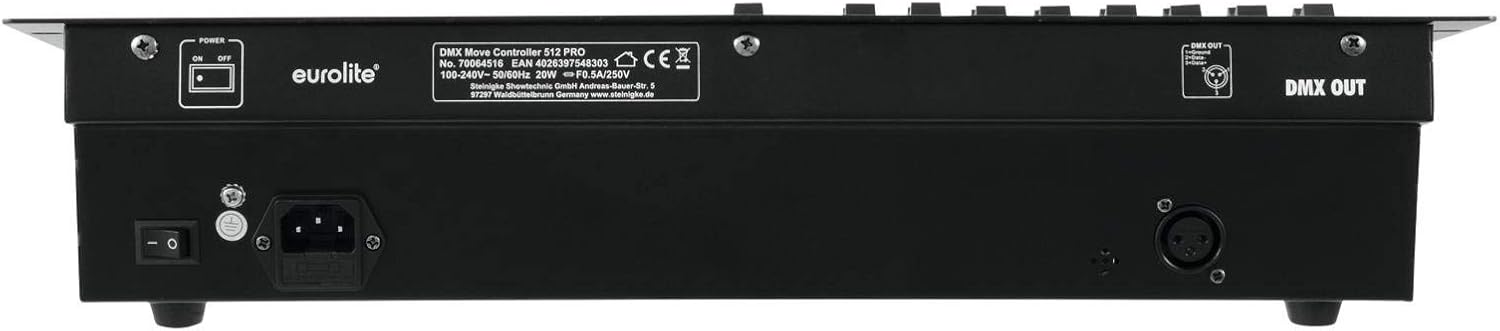
Figure 3.2: Rear panel of the DMX Move Control 512 PRO, illustrating the power input and DMX output connections.
3.3 DMX Device Connection
Connect your DMX-compatible lighting fixtures to the 3-pin XLR DMX OUT port on the rear of the controller using standard DMX cables. Ensure proper DMX chaining and termination for optimal signal integrity.
3.4 USB Data Storage
The controller features a USB Type AF port for connecting USB devices (formatted as FAT32) to store and load light shows and settings. This allows for easy backup and transfer of your programmed data.

الشكل 3.4: الجزء العلوي view of the controller, highlighting the USB port for data storage.
3.5 تركيب الرف
The DMX Move Control 512 PRO is designed for 19-inch rack installation, occupying 4 rack units (4 HE). Secure the unit using appropriate rack screws to ensure stability.
4. تعليمات التشغيل
4.1 أكثرview من الضوابط
The front panel of the DMX Move Control 512 PRO features a comprehensive set of controls for intuitive operation. These include faders for channel control, dedicated buttons for scene and chase selection, pan and tilt wheels, and a clear LCD display for menu navigation and status information.

الشكل 4.1: الجبهة view of the DMX Move Control 512 PRO, displaying the layout of faders, buttons, and the LCD screen.
4.2 Channel and Fixture Control
The faders on the left side of the panel are used to control individual DMX channels for your connected fixtures. Each fader corresponds to a specific channel, allowing for precise adjustment of parameters such as intensity, color, and gobos. The controller supports up to 24 fixtures, each with up to 34 channels.

Figure 4.2: Detail of the channel faders, used for adjusting DMX parameters.
4.3 Programming Scenes and Sequences
The DMX Move Control 512 PRO allows you to program and store up to 30 sequences, with each sequence containing up to 485 individual scenes. Use the dedicated scene and chase buttons on the right side of the panel to enter programming mode, record scenes, and arrange them into sequences. The LCD display provides feedback during the programming process.

Figure 4.3: Detail of the scene and chase programming buttons.
4.4 التحكم في الحركة الأفقية والرأسية
For controlling moving head fixtures, the controller features dedicated Pan and Tilt wheels. These wheels allow for precise and smooth adjustment of the fixture's horizontal (Pan) and vertical (Tilt) movement. The display will show the current values for these parameters.
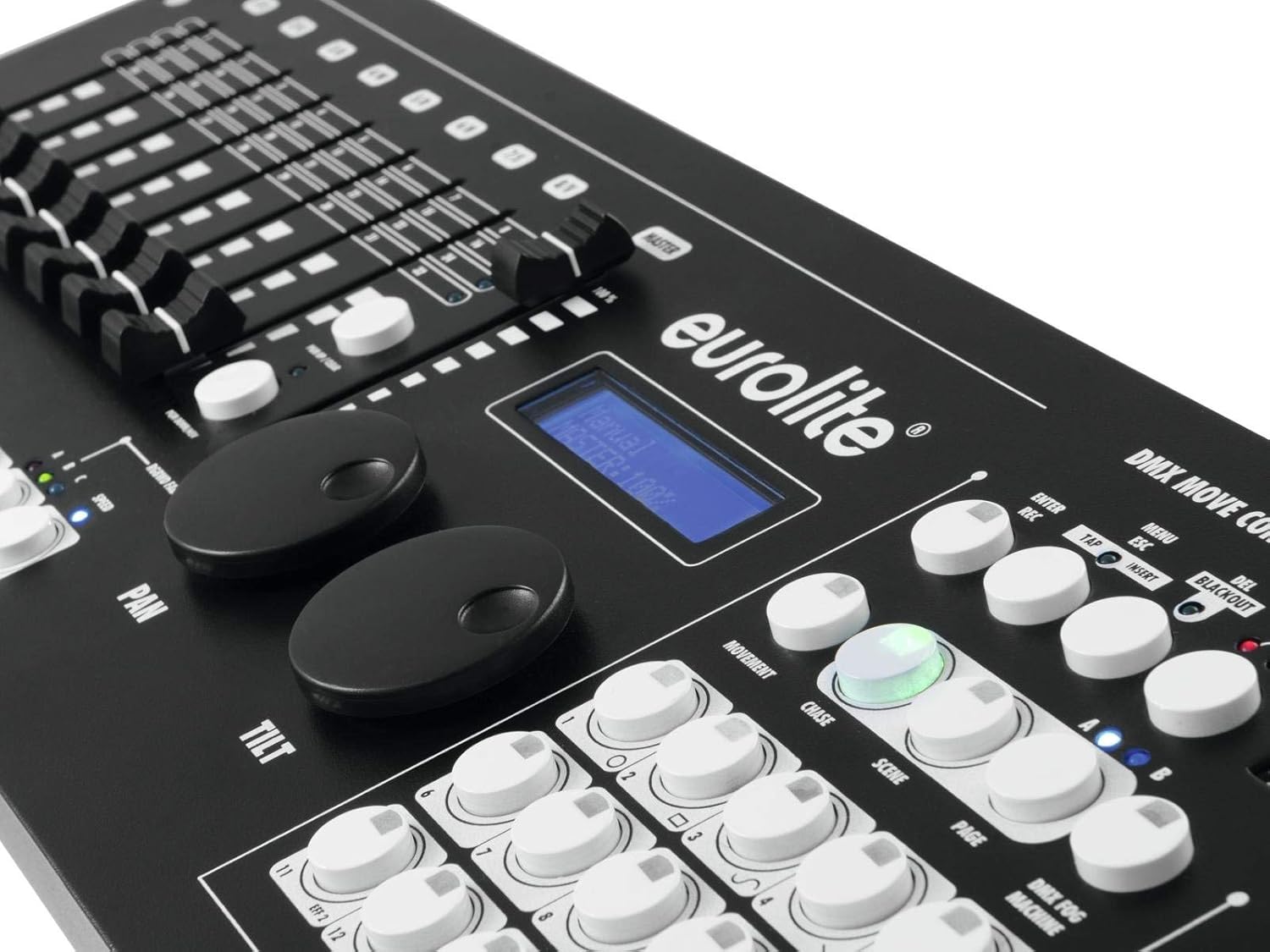
Figure 4.4: Close-up of the LCD display and the Pan/Tilt control wheels.
4.5 Dynamic Effect Generator
The built-in dynamic effect generator allows for the creation of complex and automated lighting movements and patterns. Refer to the detailed operational manual (not provided in this summary) for specific instructions on utilizing this advanced feature to enhance your light shows.
5. الصيانة
5.1 التنظيف
To maintain the appearance and functionality of your controller, regularly wipe the surface with a soft, dry, lint-free cloth. Do not use abrasive cleaners, solvents, or chemical sprays, as these can damage the finish and internal components. Ensure the unit is powered off and disconnected from the mains before cleaning.
5.2 التخزين
When not in use for extended periods, store the DMX Move Control 512 PRO in a cool, dry place, away from direct sunlight, excessive dust, and moisture. If transporting the unit, use appropriate protective casing لمنع حدوث أضرار مادية.
6. استكشاف الأخطاء وإصلاحها
| مشكلة | السبب المحتمل | حل |
|---|---|---|
| لا يوجد طاقة | Power cable disconnected; power switch off; faulty power outlet. | Check power cable connection; ensure power switch is ON; test power outlet with another device. |
| No DMX signal to fixtures | Incorrect DMX cabling; DMX chain not terminated; fixture DMX address incorrect; faulty DMX cable. | Verify DMX cable connections (IN/OUT); ensure last fixture is terminated; check fixture DMX addresses; try a different DMX cable. |
| Fixture not responding to control | Fixture DMX address mismatch; fixture DMX mode incorrect; controller channel output low. | Confirm fixture DMX address matches controller setting; check fixture DMX mode; increase channel fader level on controller. |
| لم يتم التعرف على محرك أقراص USB | Incorrect format (not FAT32); drive capacity too large; faulty USB drive. | Ensure USB drive is formatted to FAT32; try a smaller capacity drive; test with a different USB drive. |
7. المواصفات
| مزود الطاقة: | 100-240 V AC، 50 / 60 Hz |
| إجمالي قيمة الاتصال: | 20 واط |
| نوع الحماية: | IP20 |
| توصيل الطاقة: | IEC power inlet (built-in version), power connection cable with earthing contact plug (included) |
| البرامج: | Programmable, 30 sequences, each with 485 scenes |
| قنوات DMX: | إخراج شنومكس |
| إخراج DMX: | 1 x 3-pin XLR (W) installation version |
| يتحكم: | DMX; RDM |
| لون السكن: | أسود |
| Suitable Storage Media: | أجهزة USB (FAT32) |
| منفذ USB: | Type AF |
| تصميم الهيكل: | 19 inches (48.3 cm) rack installation 4 HE |
| الأبعاد (العرض × العمق × الارتفاع): | 48.3 cm (19") x 17 cm x 8.9 cm |
| وزن: | 3.82 كجم |
| رقم الموديل: | 70064516 |
| ASIN: | B01C5YBNPE |


