1. المقدمة
This manual provides instructions for the safe and effective use of your Disney Frozen Bluetooth Speaker. This portable wireless speaker allows you to stream audio from Bluetooth-enabled devices or connect via a 3.5mm audio cable. It features a built-in microphone for speakerphone functionality and a rechargeable battery for portability.
2. محتويات العبوة
يرجى التأكد من وجود جميع العناصر في الحزمة:
- Disney Frozen Bluetooth Speaker
- كابل شحن USB
- كابل صوت 3.5 ملم
3. مواصفات المنتج
- Wireless audio streaming via Bluetooth
- Wired audio connection via 3.5mm headphone port
- Integrated microphone for speakerphone calls
- بطارية قابلة لإعادة الشحن مدمجة
- USB chargeable
4. عناصر التحكم والمنافذ

الصورة 1: أمام view of the speaker with control buttons on the top panel.
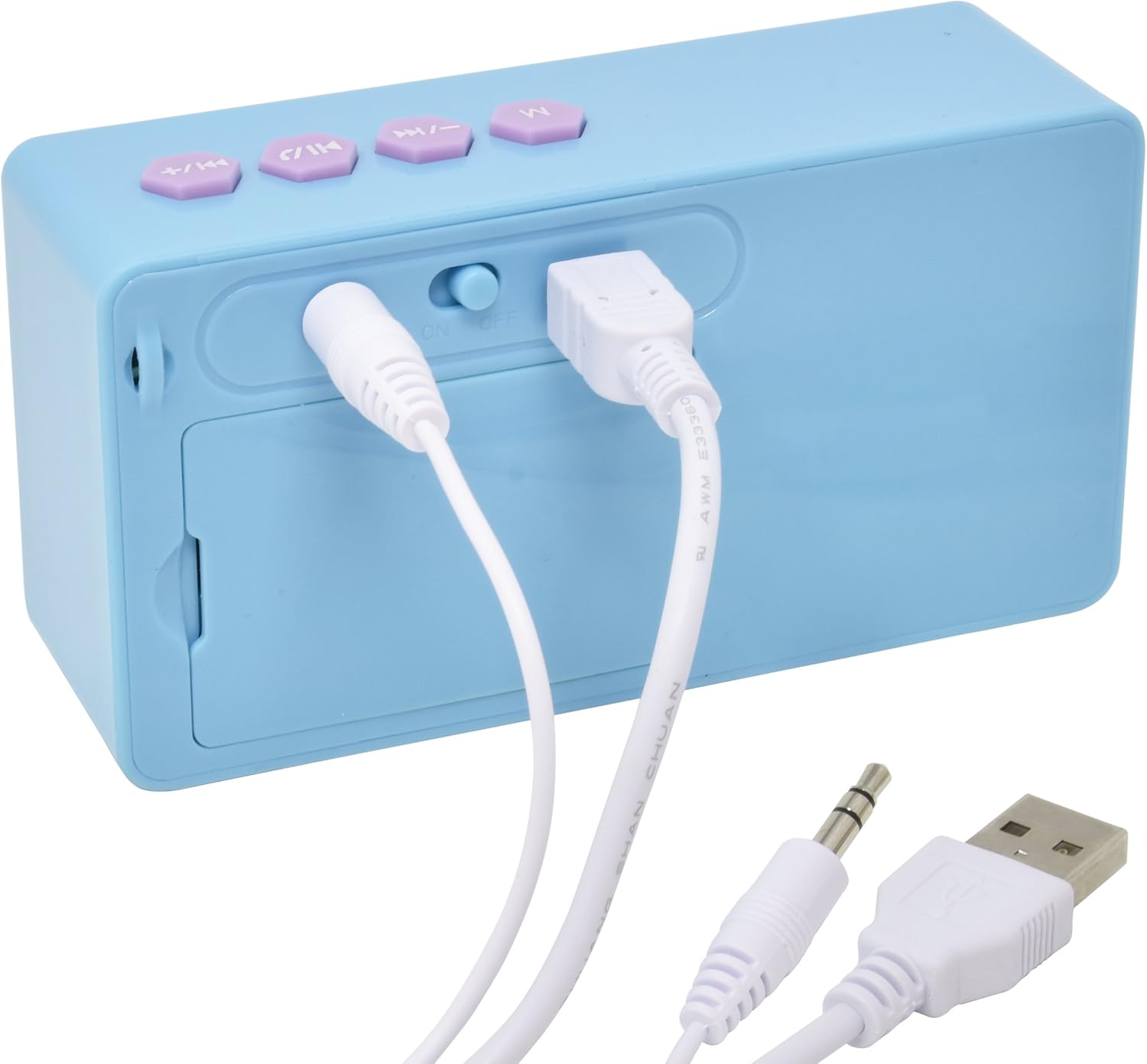
الصورة 2: مؤخرة view of the speaker showing the power switch and connection ports.
عناصر التحكم في اللوحة العلوية:
- زر M: Mode selection (Bluetooth/AUX).
- Previous Track / Volume Down Button: Press once for previous track, press and hold to decrease volume.
- زر التشغيل/الإيقاف المؤقت/الاتصال: Press once to play/pause music, press to answer/end calls.
- Next Track / Volume Up Button: Press once for next track, press and hold to increase volume.
منافذ اللوحة الخلفية:
- مفتاح تشغيل / إيقاف: يقوم بتشغيل مكبر الصوت أو إيقاف تشغيله.
- منفذ شحن USB: قم بتوصيل كابل USB للشحن.
- مدخل AUX مقاس 3.5 ملم: Connect the 3.5mm audio cable for wired playback.
5. شحن مكبر الصوت
Before first use, fully charge the speaker. The speaker charges quickly when connected to a USB port.
- Locate the USB Charging Port on the rear of the speaker (refer to Image 2).
- Connect the small end of the included USB charging cable to the speaker's USB port.
- Connect the larger end of the USB charging cable to a powered USB port (e.g., computer, USB wall adapter).
- The charging indicator light will illuminate. Once charging is complete, the light may change color or turn off.
ملحوظة: Do not use damaged cables or chargers. Ensure the charging port is dry before connecting the cable.
6. اتصال بلوتوث
To connect your speaker wirelessly to a Bluetooth-enabled device:
- تأكد من شحن مكبر الصوت.
- حرك مفتاح التشغيل/الإيقاف on the rear of the speaker to the 'ON' position. The speaker will power on and enter Bluetooth pairing mode, indicated by a flashing LED light and an audible prompt.
- On your Bluetooth-enabled device (smartphone, tablet, computer), go to the Bluetooth settings menu.
- بحث عن available devices. The speaker will appear as "Disney Frozen Speaker" or a similar name.
- Select the speaker from the list to pair. Once successfully paired, the LED indicator will stop flashing, and you will hear a confirmation tone.
- يمكنك الآن تشغيل الصوت من جهازك عبر مكبر الصوت.
ملحوظة: If prompted for a password, enter "0000". The speaker will automatically attempt to reconnect to the last paired device when powered on.
7. التوصيل السلكي (AUX)
To connect your speaker using the 3.5mm audio cable:
- تأكد من تشغيل مكبر الصوت.
- Connect one end of the included 3.5mm audio cable to the مدخل AUX مقاس 3.5 ملم port on the rear of the speaker (refer to Image 2).
- Connect the other end of the 3.5mm audio cable to the headphone jack or AUX output of your audio device.
- اضغط على زر M on the top panel to switch to AUX mode if the speaker does not automatically detect the wired connection.
- تشغيل الصوت من جهازك.
ملحوظة: When using the AUX connection, playback controls (play/pause, track skip) on the speaker may not function, and you will need to control playback directly from your connected device.
8. Using as a Speakerphone
When connected via Bluetooth to a smartphone, the speaker can be used to handle phone calls.
- الرد على مكالمة: عند ورود مكالمة، اضغط على Play/Pause / Call Button مرة للرد.
- إنهاء المكالمة: أثناء المكالمة ، اضغط على Play/Pause / Call Button once to end the call.
- رفض المكالمة: اضغط مع الاستمرار على Play/Pause / Call Button for approximately 2 seconds to reject an incoming call.
Audio will be routed through the speaker, and the built-in microphone will capture your voice.
9. الصيانة
- نظّف السماعة بقطعة قماش ناعمة وجافة. لا تستخدم منظفات أو مذيبات كاشطة.
- احتفظ بمكبر الصوت بعيدًا عن الماء والرطوبة ودرجات الحرارة العالية.
- لا تحاول تفكيك السماعة أو إصلاحها بنفسك. سيؤدي ذلك إلى إلغاء الضمان.
- قم بتخزين مكبر الصوت في مكان بارد وجاف عند عدم استخدامه لفترات طويلة.
10. استكشاف الأخطاء وإصلاحها
| مشكلة | الحل المحتمل |
|---|---|
| مكبر الصوت لا يعمل. | Ensure the speaker is charged. Connect to a power source using the USB cable. Check the ON/OFF switch. |
| لا يمكن الاقتران عبر البلوتوث. | Ensure the speaker is in pairing mode (flashing LED). Make sure Bluetooth is enabled on your device. Move the speaker closer to your device. Forget the device from your Bluetooth list and try pairing again. |
| لا يوجد صوت أو مستوى الصوت منخفض. | Increase the volume on both the speaker and your connected device. Ensure the correct input mode (Bluetooth or AUX) is selected. Check if the audio cable is fully inserted for wired connections. |
| ينقطع اتصال البلوتوث بشكل متكرر. | Ensure there are no obstructions between the speaker and your device. Move closer to the speaker. Avoid interference from other wireless devices. |
| الميكروفون لا يعمل أثناء المكالمات. | Ensure the speaker is connected via Bluetooth and not AUX. Check your phone's audio output settings during a call to ensure it's routed to the Bluetooth speaker. |
11. المواصفات
| ميزة | التفاصيل |
|---|---|
| رقم الموديل | 057-00-3417 |
| تكنولوجيا الاتصال | بلوتوث، منفذ USB (للشحن) |
| ميزة خاصة | Portable, Built-in Microphone |
| مصدر الطاقة | تعمل بالبطارية (قابلة للشحن) |
| الحد الأقصى لقوة خرج السماعة | 3 واط |
| أبعاد المنتج | 6.2 × 6.1 × 2.3 بوصة |
| وزن العنصر | 9.1 أونصات |
| رمز المنتج الموحد | 092298925264 |
12. معلومات الضمان
هذا المنتج مغطى بـ 1 YEAR FACTORY WARRANTY. Please retain your proof of purchase for warranty claims. For support or warranty inquiries, please refer to the contact information provided with your purchase documentation.


