مقدمة
The MadgeTech HITEMP140-TS-FL is a PTFE thermal shield designed to protect the HITEMP140 data logger in extreme high-temperature environments. This flush-mount shield ensures the data logger can operate effectively and safely when exposed to temperatures that would otherwise damage the device. It is manufactured from durable PTFE material, known for its excellent thermal resistance and chemical inertness.
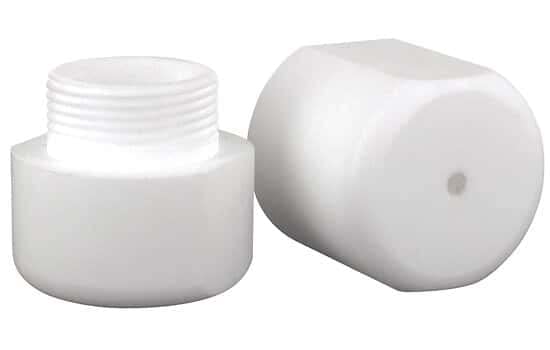
Image: The MadgeTech HITEMP140-TS-FL PTFE Thermal Shield, showing its two main components: a threaded base and a cap. These parts enclose and protect the data logger.
يثبت
Proper setup of the HITEMP140-TS-FL thermal shield is crucial for optimal performance and protection of your data logger. Follow these steps:
- Prepare the Data Logger: Ensure your HITEMP140 data logger is clean and free of debris.
- Disassemble the Shield: Separate the two components of the thermal shield (the threaded base and the cap).
- Insert Data Logger: Carefully insert the HITEMP140 data logger into the larger, open end of the threaded base component. Ensure it sits snugly at the bottom.
- تأمين الغطاء: Align the cap with the threaded end of the base. Gently screw the cap onto the base until it is finger-tight. Do not overtighten, as this may damage the threads or the data logger.
- التحقق من التجميع: Confirm that the data logger is fully enclosed within the thermal shield and that the shield components are securely fastened.
Once assembled, the data logger within the thermal shield is ready for deployment in high-temperature environments.
تعليمات التشغيل
The HITEMP140-TS-FL thermal shield operates passively by insulating the enclosed HITEMP140 data logger from extreme temperatures. Its primary function is to extend the operational temperature range and duration of the data logger in harsh thermal conditions.
- النشر: Place the assembled thermal shield with the data logger into the environment where temperature monitoring is required. Ensure the shield is positioned to allow for proper heat distribution around it.
- نطاق درجة الحرارة: The shield is designed to protect the data logger within specific temperature limits. Refer to the data logger's specifications and the shield's capabilities for maximum exposure temperatures and durations.
- تسجيل البيانات: The data logger inside the shield will continue to record data as programmed. The shield does not interfere with the data logger's functionality, only its thermal exposure.
- استرجاع: After the logging period, carefully retrieve the thermal shield from the hot environment. Allow it to cool down to a safe handling temperature before disassembling.
Always ensure the thermal shield is intact and properly assembled before each use to guarantee maximum protection for your data logger.
صيانة
Regular maintenance ensures the longevity and effectiveness of your HITEMP140-TS-FL thermal shield.
- تنظيف: After each use, especially in environments with residue, clean the exterior of the thermal shield with a soft cloth and mild detergent. Rinse thoroughly with water and dry completely before storage. Avoid abrasive cleaners or solvents that could damage the PTFE material.
- تقتيش: Periodically inspect the shield for any signs of wear, cracks, or damage to the PTFE material or threads. Damage can compromise its thermal protection capabilities.
- تخزين: Store the thermal shield in a clean, dry place at room temperature, away from direct sunlight and extreme temperatures.
If significant damage is observed, the thermal shield should be replaced to ensure continued protection of your data logger.
استكشاف الأخطاء وإصلاحها
This section addresses common issues you might encounter with the HITEMP140-TS-FL thermal shield.
| مشكلة | السبب المحتمل | حل |
|---|---|---|
| Data logger does not fit inside the shield. | Incorrect data logger model or obstruction inside the shield. | Ensure you are using a MadgeTech HITEMP140 data logger. Check for any foreign objects inside the shield. |
| Shield components do not screw together smoothly. | Misalignment of threads or damaged threads. | Ensure components are aligned correctly before screwing. Inspect threads for damage; if damaged, the shield may need replacement. |
| Data logger shows signs of heat damage despite using the shield. | Exposure beyond shield's limits, improper assembly, or damaged shield. | Verify the temperature and duration of exposure are within the shield's specifications. Ensure the shield was properly assembled and inspect it for any damage. |
تحديد
Key specifications for the HITEMP140-TS-FL Data Logger PTFE Thermal Shield:
- رقم القطعة: HITEMP140-TS-FL
- مادة: PTFE (بولي تترافلورو إيثيلين)
- بلد المنشأ: الولايات المتحدة الأمريكية
- أبعاد الحزمة: 7 L x 2 H x 3 W (inches) - Note: Product dimensions may vary slightly from package dimensions.
- وزن الحزمة: 0.41 رطل
- رقم موديل المنتج: HITEMP140-TS-FL
- ASIN: B01AIUQ9TW
- الشركة المصنعة: Cole-Parmer (for MadgeTech)
- تاريخ التوفر الأول: 14 مارس 2017
Note: The thermal performance of the shield is dependent on the specific application and the HITEMP140 data logger's capabilities. Refer to the data logger's manual for its operational temperature limits.
معلومات الضمان
Specific warranty terms for the HITEMP140-TS-FL thermal shield are provided by the manufacturer, MadgeTech, or its distributors. Please refer to the documentation included with your purchase or visit the official MadgeTech website for detailed warranty policies and registration information. Keep your proof of purchase for warranty claims.
الدعم والاتصال
For technical assistance, product inquiries, or support regarding your HITEMP140-TS-FL thermal shield, please contact MadgeTech customer support directly. Contact information can typically be found on the manufacturer's official webالموقع أو داخل عبوة المنتج.
When contacting support, please have your product model number (HITEMP140-TS-FL) and any relevant purchase details ready to facilitate a quicker resolution.


