1. المقدمة
Thank you for choosing the LTC MEGA50USB Rechargeable Megaphone. This manual provides essential information for the safe and efficient operation, maintenance, and troubleshooting of your device. Please read this manual thoroughly before using the megaphone and keep it for future reference.
2. انتهى المنتجview
2.1 الميزات الرئيسية
- Powerful 50W output with an approximate range of 600 meters.
- Integrated USB, SD, and AUX inputs for versatile audio playback.
- MP3 controls for media management.
- بطارية قابلة لإعادة الشحن للاستخدام لفترة طويلة.
- 16-second message recording and playback function.
- Built-in siren for emergency or attention-grabbing situations.
- Detachable microphone with a coiled cord for convenient handling.
- Ergonomic handle and adjustable shoulder strap for portability.
- Durable ABS body construction.
2.2 مكونات
Familiarize yourself with the main components of your MEGA50USB megaphone:
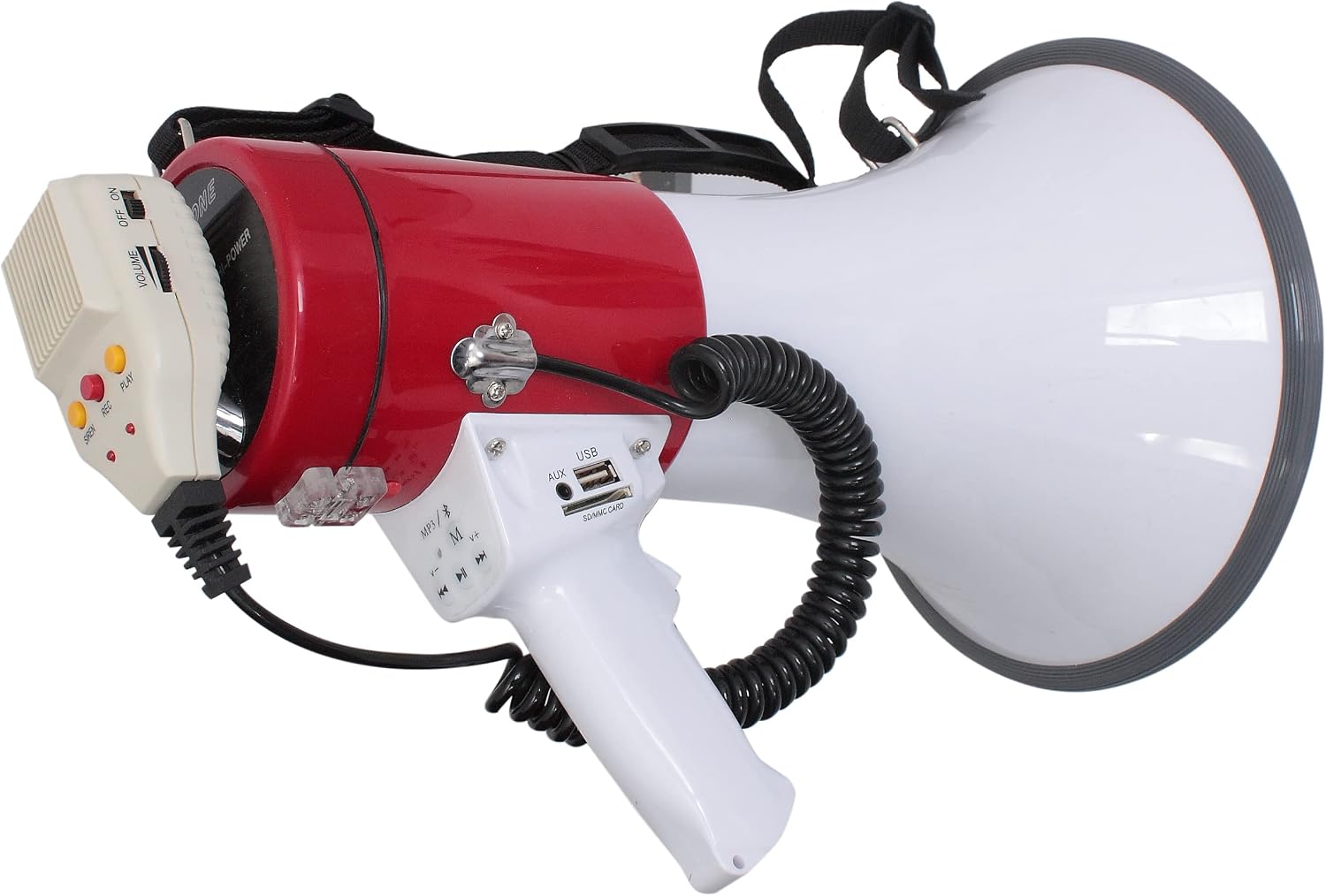
الشكل 1: The LTC MEGA50USB megaphone, showcasing its red and white body, the detachable microphone with volume and power controls, the main handle with USB, AUX, and SD card slots, and MP3 playback buttons. A coiled cord connects the microphone to the main unit, and a shoulder strap is visible at the top.
- Megaphone Horn: The large white cone for sound projection.
- النص الرئيسي: The red cylindrical section housing the electronics and battery.
- مقبض: White ergonomic grip for holding the megaphone.
- Control Panel (on handle):
- منفذ USB: لتوصيل محركات أقراص فلاش USB.
- فتحة بطاقة SD/MMC: لإدخال بطاقات الذاكرة SD أو MMC.
- مدخلات AUX: لتوصيل أجهزة الصوت الخارجية عبر كابل 3.5 ملم.
- ضوابط MP3: تشغيل/إيقاف مؤقت، المسار التالي/السابق، اختيار الوضع.
- ميكروفون قابل للفصل:
- مفتاح تشغيل / إيقاف: Powers the microphone.
- حجم المنزلق: يضبط مستوى صوت الميكروفون.
- SIREN Button: Activates the siren sound.
- زر REC: Initiates message recording.
- زر التشغيل: Plays back recorded messages.
- حزام الكتف: For hands-free carrying.
3. الإعداد
3.1 شحن البطارية
- Ensure the megaphone is switched OFF.
- Locate the charging port, typically on the side or rear of the main body.
- Connect the provided power adapter to the charging port and then to a suitable power outlet.
- An indicator light (if present) will show the charging status. Charge until fully charged (refer to the indicator light behavior in the adapter's manual if available).
- Disconnect the adapter once charging is complete.
ملحوظة: The megaphone uses a Lithium-ion battery. For optimal battery life, avoid fully discharging the battery frequently.
3.2 ربط حزام الكتف
Attach the ends of the shoulder strap to the designated attachment points on the megaphone body. Adjust the strap length for comfortable carrying.
3.3 توصيل الميكروفون
The microphone is typically pre-connected via a coiled cord. Ensure the connector is securely plugged into its port on the megaphone body.
4. تعليمات التشغيل
4.1 تشغيل/إيقاف التشغيل
حرك تشغيل/إيقاف switch on the detachable microphone to the "ON" position to power on the megaphone. Slide it to "OFF" to power off.
4.2 ضبط مستوى الصوت
استخدم مقدار slider on the detachable microphone to increase or decrease the sound output level.
4.3 الصوت Ampالتصفية
- Ensure the megaphone is powered ON.
- Hold the microphone close to your mouth.
- تحدث بوضوح في الميكروفون.
- Adjust the volume slider to your desired level.
4.4 Using the Siren
اضغط على صفارة الإنذار button on the detachable microphone to activate the siren sound. Press it again to stop the siren.
4.5 التسجيل والتشغيل
- لتسجيل: اضغط مع الاستمرار على ريك button on the microphone. Speak your message clearly. The megaphone can record up to 16 seconds. Release the button to stop recording.
- للتشغيل: اضغط على يلعب button on the microphone to listen to your last recorded message.
4.6 Using USB/SD/AUX Inputs
- تشغيل USB/SD: أدخل محرك أقراص فلاش USB في منفذ يو اس بي أو بطاقة SD/MMC في SD/MMC CARD Slot on the handle. The megaphone should automatically detect and begin playing MP3 files. Use the MP3 controls (Play/Pause, Next/Previous Track, Mode) to manage playback.
- مدخلات AUX: قم بتوصيل جهاز صوت خارجي (مثل الهاتف الذكي أو مشغل MP3) بالكمبيوتر. مدخلات AUX using a 3.5mm audio cable. Select the AUX mode using the MP3 controls (if applicable) or ensure the device is playing audio.
5. الصيانة
5.1 التنظيف
Wipe the megaphone's exterior with a soft, damp cloth. Do not use abrasive cleaners or solvents. Ensure no liquid enters the ports or openings.
5.2 العناية بالبطارية
- Recharge the battery regularly, even if not in use, to maintain its health.
- Avoid storing the megaphone in extreme temperatures.
- If the megaphone will not be used for an extended period, charge the battery to about 50% before storage.
5.3 التخزين
Store the megaphone in a cool, dry place, away from direct sunlight and moisture. Keep it in its original packaging or a protective case if available.
6. استكشاف الأخطاء وإصلاحها
| مشكلة | السبب المحتمل | حل |
|---|---|---|
| No sound from megaphone. | Megaphone is OFF. Battery is low/dead. Volume is too low. Microphone not connected properly. | Ensure ON/OFF switch is ON. Charge the battery. Increase volume. Check microphone connection. |
| صوت مشوه. | Volume too high. Microphone too close to mouth. | Decrease volume. Hold microphone slightly further away. |
| تشغيل الملفات عبر منفذ USB/SD لا يعمل. | غير مدعوم files (e.g., MP3). USB/SD card not inserted correctly. Corrupted files. | يضمن files are MP3 format. Reinsert USB/SD card. Try a different USB/SD card or files. |
| Siren not activating. | Megaphone is OFF. Siren button not pressed firmly. | Ensure megaphone is ON. Press the SIREN button firmly. |
7. المواصفات
| ميزة | التفاصيل |
|---|---|
| رقم الموديل | 95-2005 |
| انتاج الطاقة | 50 واط |
| النطاق التقريبي | 600 متر |
| الأبعاد (الطول × العرض × الارتفاع) | 34.5 × 24 × 24 سم |
| وزن | 1.47 كيلوغرام |
| نوع البطارية | 1 بطارية ليثيوم أيون (مضمنة) |
| مادة | نظام ABS |
| الاتصال | USB, SD/MMC Card, AUX (3.5mm) |
| تسجيل الرسائل | ثانيتين |
| لون | الأبيض والأحمر |
8. الضمان والدعم
This product comes with a spare parts availability period of 2 سنة من تاريخ الشراء. يرجى الاحتفاظ بإثبات الشراء الخاص بك لأية مطالبات بالضمان.
For technical support, service, or warranty inquiries, please contact your retailer or the manufacturer's customer service department. Refer to the product packaging or the retailer's webموقع لمعلومات الاتصال.


