مقدمة
This manual provides comprehensive instructions for the operation and maintenance of your ONN X5 HiFi Music Player. Please read this manual thoroughly before using the device to ensure proper functionality and to maximize your listening experience. The ONN X5 is designed to deliver high-fidelity audio playback in a compact and user-friendly format.
المنتج انتهىview
The ONN X5 is a portable HiFi music player featuring a 2.0-inch TFT screen and an aluminum alloy shell. It supports a wide range of audio formats, including lossless files, and offers expandable storage via a MicroSD card.
المميزات الرئيسية:
- صوت عالي الدقة: Supports WAV, FLAC, ALAC, APE, OGG lossless formats, and high-definition music up to 24Bit/192 KHz.
- عرض: 2.0-inch TFT screen (176x220 pixels) for clear navigation and information display.
- تخزين: 8GB internal memory, expandable up to 32GB with a MicroSD/TF card.
- تصميم متين: Lightweight aluminum alloy body (60g) for enhanced durability and reduced external interference noise.
- واجهة المستخدم: Intuitive key-based operation.
- الميزات الإضافية: FM Radio support.
- بطارية: High-capacity rechargeable lithium polymer battery.
- دعم متعدد اللغات: English, Russian, Korean, German, Japanese, Polish, Indonesian, Chinese.
تخطيط الجهاز:

الصورة: الجبهة view of the ONN X5 HiFi Music Player, showing its display and control buttons. The screen displays track information, audio quality (e.g., 24BIT, 88HHZ), and playback status.

الصورة: الجانب view of the ONN X5 HiFi Music Player, illustrating the location of the MicroSD card slot on the right side of the device.

الصورة: الأمامية والخلفية view of the ONN X5 HiFi Music Player. The back panel shows the model number "X5" and branding information.
يثبت
1. شحن الجهاز:
- Connect the ONN X5 to a power source using the provided USB cable.
- سيظهر مؤشر البطارية على الشاشة حالة الشحن.
- A full charge is recommended before first use. The device uses a high-capacity rechargeable lithium polymer battery.
2. Inserting a MicroSD/TF Card:
- Locate the MicroSD/TF card slot on the side of the player.
- Gently insert a compatible MicroSD/TF card (up to 32GB) into the slot until it clicks into place.
- Ensure the card is inserted correctly to avoid damage.

Image: Contents of the ONN X5 package, showing the player, USB charging cable, and other accessories. This illustrates the components available for setup.
3. نقل الموسيقى Files:
- Connect the ONN X5 to your computer using the USB cable.
- The device will appear as a removable storage drive.
- اسحب وأفلت ملف الصوت الذي تريده files (MP3, WMA, APE, FLAC, WAV, ALAC, OGG) into the player's internal storage or the MicroSD card.
- قم بإخراج الجهاز من جهاز الكمبيوتر الخاص بك بأمان قبل فصل كابل USB.
تعليمات التشغيل
تشغيل/إيقاف التشغيل:
- To power on, press and hold the power button (usually marked with a universal power symbol) until the screen illuminates.
- لإيقاف التشغيل، اضغط مع الاستمرار على زر الطاقة حتى يتم إيقاف تشغيل الجهاز.
ملاحة:
The ONN X5 uses physical buttons for navigation. Refer to the device layout for button identification.
- المجلد: يضبط مستوى الصوت.
- م (القائمة): Accesses menus and confirms selections.
- أزرار الأسهم (< / >): Navigate through menus, select tracks, or fast forward/rewind during playback.
- زر الطاقة: Also functions as a play/pause button during music playback.
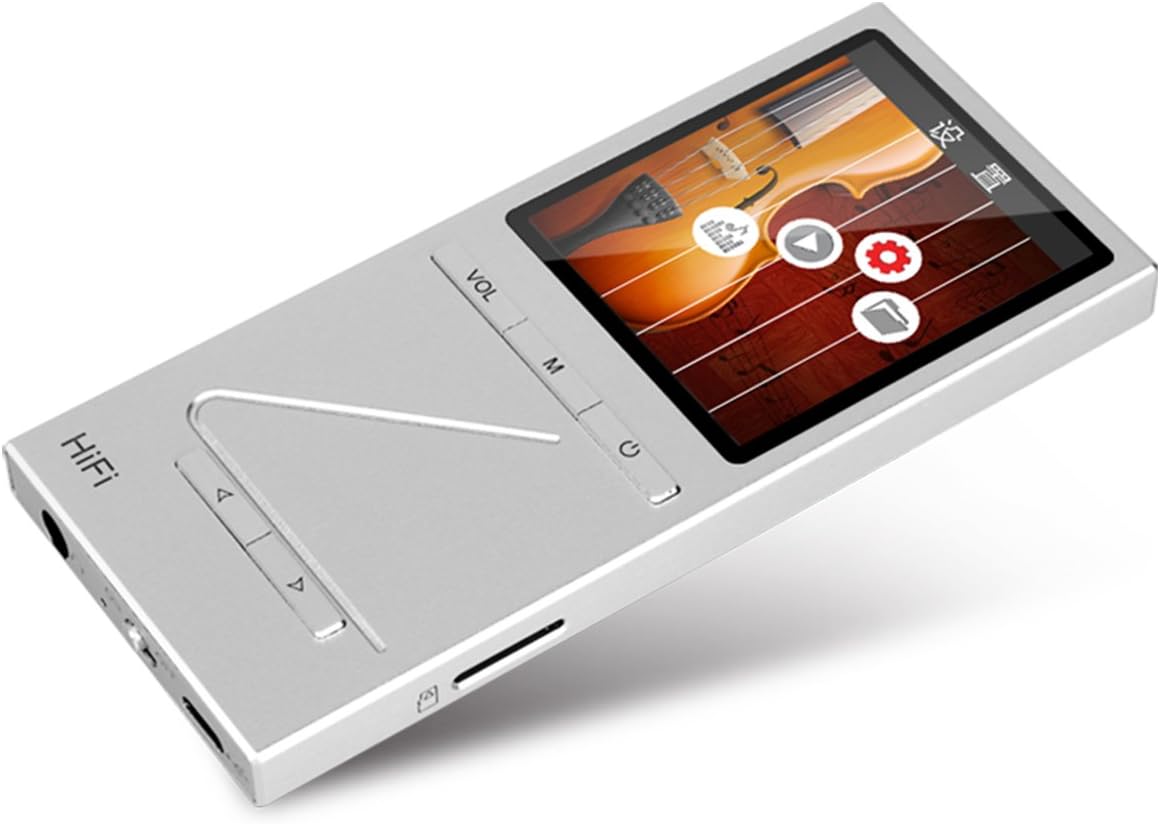
الصورة: بزاوية view of the ONN X5 HiFi Music Player, showing the screen with various menu icons, indicating the user interface for navigation.
تشغيل الموسيقى:
- From the main menu, navigate to "Music" or "Fileس".
- Browse through your folders and select a track to play.
- Press the Power/Play button to start or pause playback.
- Use the arrow buttons to skip tracks or fast forward/rewind.
- اضبط مستوى الصوت باستخدام زر VOL.
راديو FM:
- Navigate to the "FM Radio" option from the main menu.
- Use the navigation buttons to scan for stations or manually tune to a frequency.
- Ensure headphones are connected as they often act as the antenna for FM radio.
إعدادات اللغة:
يدعم الجهاز لغات متعددة. لتغيير اللغة:
- انتقل إلى "الإعدادات" من القائمة الرئيسية.
- Select "Language" and choose your preferred language from the list (English, Russian, Korean, German, Japanese, Polish, Indonesian, Chinese).
صيانة
- تنظيف: استخدم قطعة قماش ناعمة وجافة لتنظيف الجهاز. تجنب استخدام المنظفات السائلة أو المواد الكاشطة.
- تخزين: قم بتخزين المشغل في مكان بارد وجاف بعيدًا عن أشعة الشمس المباشرة ودرجات الحرارة القصوى.
- العناية بالبطارية: لإطالة عمر البطارية، تجنب تفريغها بالكامل بشكل متكرر. اشحن الجهاز بانتظام، حتى في حال عدم استخدامه لفترات طويلة.
- تجنب التأثير: The aluminum alloy shell provides durability, but avoid dropping the device or subjecting it to strong impacts.
- التعرض للماء: هذا الجهاز غير مقاوم للماء. تجنب تعريضه للماء أو الرطوبة العالية.
استكشاف الأخطاء وإصلاحها
Device Will Not Power On:
- تأكد من شحن البطارية. قم بتوصيل الجهاز بمصدر طاقة واتركه يشحن لمدة 30 دقيقة على الأقل قبل محاولة تشغيله مرة أخرى.
- Try performing a hard reset (if applicable, refer to manufacturer's specific instructions for hard reset, usually involves holding power button for an extended period).
لا يوجد صوت:
- تحقق من مستوى الصوت وتأكد من أنه ليس مكتوماً.
- Verify that headphones or external speakers are properly connected.
- Test with different headphones or audio output devices.
- تأكد من الصوت file is not corrupted or in an unsupported format.
لا يمكن التحويل Files:
- تأكد من توصيل كابل USB بشكل آمن بكل من المشغل والكمبيوتر.
- جرب منفذ USB مختلفًا على جهاز الكمبيوتر الخاص بك أو كابل USB مختلفًا.
- Verify that the device is recognized by your computer as a removable drive.
- Check if the MicroSD card is properly inserted and not full.
Screen Not Responding / Frozen:
- اضغط مع الاستمرار على زر الطاقة لمدة تتراوح بين 10 و 15 ثانية تقريبًا لإعادة التشغيل القسري.
- If the issue persists, ensure the battery is charged.
تحديد
| ميزة | التفاصيل |
|---|---|
| رقم الموديل | X5 |
| ماركة | أون |
| حجم الشاشة | 2.0 Inches TFT (176x220 PIXEL) |
| الذاكرة الداخلية | 8 جيجا بايت |
| تخزين قابل للتوسيع | MicroSD/TF card up to 32 GB |
| تنسيقات الصوت المدعومة | APE, FLAC, ALAC, WAV, WMA, OGG, MP3 (up to 24Bit/192 KHz) |
| تكنولوجيا الاتصال | مدخل إضافي، منفذ USB |
| ميزة خاصة | راديو اف ام |
| بطارية | 1 Lithium Ion battery required (High-capacity rechargeable lithium polymer) |
| وزن العنصر | 7 أونصة (حوالي 0.2 كيلوغرام) |
| أبعاد الحزمة | 6.21 × 4.7 × 1.2 بوصة |
| الشركة المصنعة | SZTZWY |
الضمان والدعم
For detailed warranty information, please refer to the warranty card included with your purchase or visit the official ONN product support website. For technical assistance or further inquiries, please contact ONN customer support through their official channels.


