مقدمة
شكرا لك على الشراءasing the SENTRY HPXBT150 Bluetooth Flat Cord Earbuds. This manual provides detailed instructions on how to set up, operate, and maintain your new wireless earbuds. Please read this manual thoroughly before use to ensure optimal performance and longevity of your device.
محتويات الحزمة
- SENTRY HPXBT150 Bluetooth Flat Cord Earbuds
- حافظة حماية
- كابل شحن USB (Micro-USB)
- Removable Ear Hooks
- دليل المستخدم
المنتج انتهىview
The SENTRY HPXBT150 earbuds feature Bluetooth wireless technology, allowing for a cord-free listening experience. They include an in-line microphone for hands-free calls and media control buttons for easy operation. Removable ear hooks provide a secure fit, especially during physical activity.
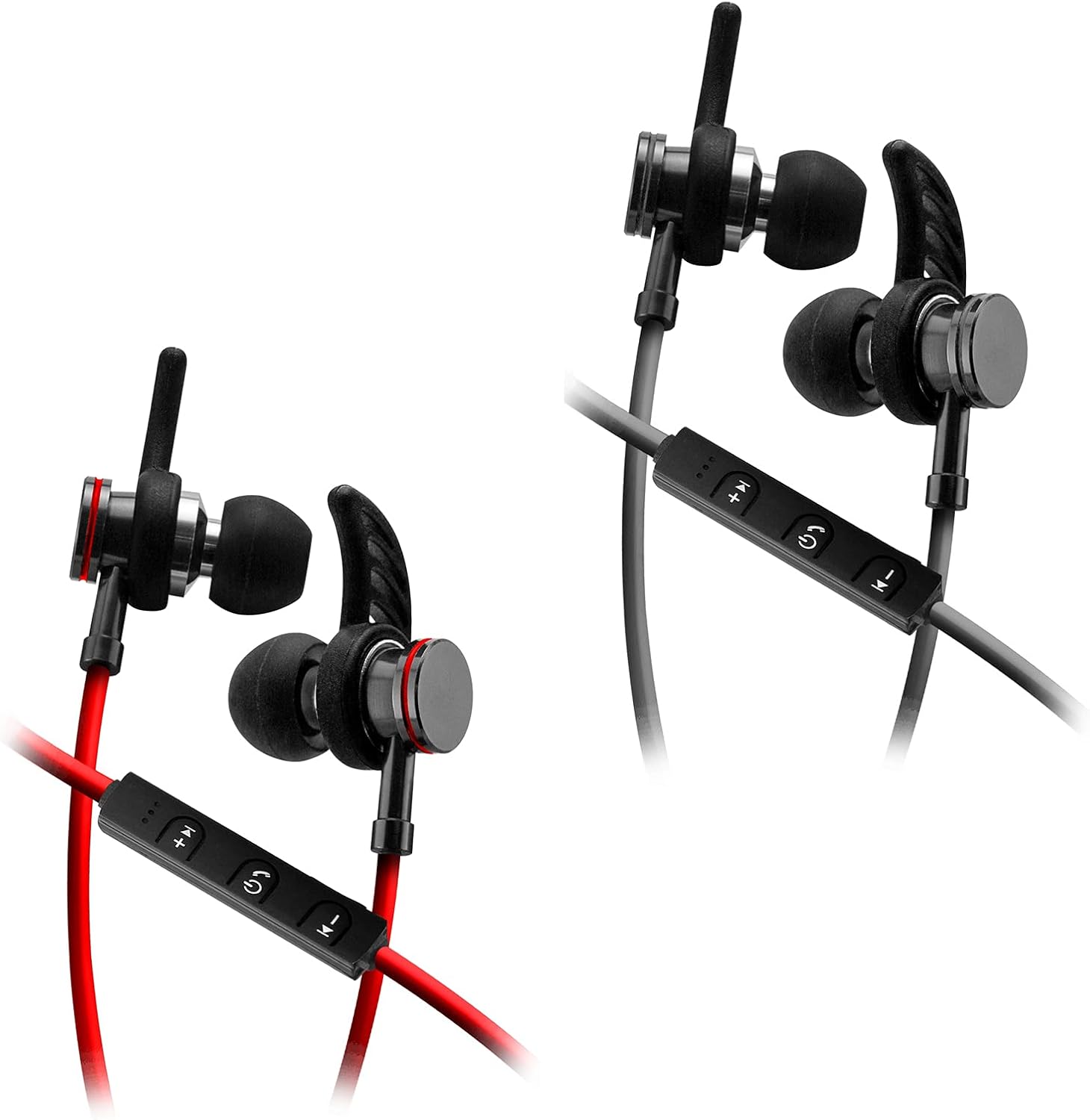
Image: SENTRY HPXBT150 Bluetooth Earbuds showing the in-line control panel and ear hooks. The control panel features volume up/next track, power/multifunction, and volume down/previous track buttons.
يثبت
1. شحن سماعات الأذن
- Locate the Micro-USB charging port on the in-line control unit.
- Connect the provided USB charging cable to the earbuds' charging port.
- قم بتوصيل الطرف الآخر من كابل USB بمصدر طاقة USB متوافق (مثل منفذ USB في الكمبيوتر، أو محول USB جداري).
- The LED indicator light will illuminate during charging. It will change color or turn off once charging is complete. A full charge typically takes approximately 1-2 hours.
2. اقتران بلوتوث
- Ensure the earbuds are fully charged before initial pairing.
- Press and hold the multi-function button (usually the center button on the in-line control) for approximately 5-7 seconds until the LED indicator light flashes red and blue alternately. This indicates the earbuds are in pairing mode.
- على جهازك المزود بتقنية البلوتوث (الهاتف الذكي، الجهاز اللوحي، الكمبيوتر)، انتقل إلى قائمة إعدادات البلوتوث.
- قم بتمكين البلوتوث وابحث عن الأجهزة المتاحة.
- Select "HPXBT150" or a similar name from the list of found devices.
- Once successfully paired, the LED indicator on the earbuds will typically flash blue slowly or turn off, and you will hear an audible confirmation.
- إذا طُلب منك إدخال كلمة المرور، أدخل "0000".
تعليمات التشغيل
تشغيل/إيقاف الطاقة
- تشغيل الطاقة: Press and hold the multi-function button for approximately 3 seconds until the LED indicator flashes blue and you hear a power-on tone.
- إيقاف التشغيل: Press and hold the multi-function button for approximately 3-5 seconds until the LED indicator flashes red and you hear a power-off tone.
تشغيل الموسيقى
- تشغيل/إيقاف مؤقت: اضغط على الزر متعدد الوظائف مرة واحدة.
- رفع الصوت: اضغط على زر "+".
- اخفض الصوت: اضغط على زر '-'.
- المسار التالي: اضغط مع الاستمرار على زر "+".
- المسار السابق: اضغط مع الاستمرار على الزر '-'.
استدعاء إدارة
- الرد/إنهاء المكالمة: اضغط على الزر متعدد الوظائف مرة واحدة.
- رفض المكالمة: اضغط مع الاستمرار على زر الوظائف المتعددة لمدة 2 ثوانٍ تقريبًا.
- إعادة الاتصال بالرقم الأخير: اضغط مرتين على زر الوظائف المتعددة.
صيانة
- تنظيف: Use a soft, dry cloth to clean the earbuds. Do not use harsh chemicals or abrasive materials.
- تخزين: When not in use, store the earbuds in the provided protective case to prevent damage.
- العناية بالبطارية: للحفاظ على عمر البطارية، تجنب تفريغ سماعات الأذن بالكامل بشكل متكرر. اشحنها بانتظام، حتى لو لم تستخدمها لفترات طويلة.
- تجنب الرطوبة: Keep the earbuds away from water and excessive moisture.
استكشاف الأخطاء وإصلاحها
| مشكلة | الحل المحتمل |
|---|---|
| سماعات الأذن لا تعمل. | Ensure the earbuds are fully charged. Connect to a power source and allow time to charge. |
| لا يمكن الاقتران بالجهاز. | Ensure earbuds are in pairing mode (flashing red/blue). Turn off and on Bluetooth on your device. Move earbuds closer to your device. Forget previous pairings on your device and try again. |
| لا يوجد صوت أو مستوى الصوت منخفض. | Check volume levels on both the earbuds and your connected device. Ensure earbuds are properly paired. Try re-pairing the earbuds. |
| اتصال متقطع. | تأكد من عدم وجود أي عوائق بين سماعات الأذن وجهازك. اقترب من جهازك. تجنب الأماكن ذات التداخل القوي لشبكة الواي فاي أو أي تداخل لاسلكي آخر. |
تحديد
- نموذج: HPXBT150
- تقنية الاتصال: لاسلكي (بلوتوث)
- وحدة التشغيل: 10 ملم
- مقاومة: 32+/-3 Ohms
- حساسية: 103dB +/- 3dB
- استجابة التردد: 20 هرتز - 20 كيلو هرتز
- الأجهزة المتوافقة: Phones, Tablets, MP3 Players, Computers, Gaming Consoles
- نوع التحكم: التحكم في وسائل الإعلام
- المميزات الخاصة: Microphone Included, USB Connectivity, Removable Ear Hooks
- وزن السلعة: 2.08 أونصات
معلومات السلامة
- Do not expose the earbuds to extreme temperatures, direct sunlight, or fire.
- لا تقم بتفكيك سماعات الأذن أو تعديلها. قد يؤدي ذلك إلى إلغاء الضمان والتسبب في تلفها.
- تجنب الاستماع إلى مستويات صوت عالية لفترات طويلة لمنع تلف السمع.
- يحفظ بعيدًا عن متناول الأطفال والحيوانات الأليفة.
- تخلص من المنتج بشكل مسؤول وفقًا للوائح المحلية.
الضمان والدعم
For warranty information and technical support, please refer to the documentation included with your purchase or contact SENTRY customer service directly. Keep your proof of purchase for warranty claims.


