مقدمة
This manual provides instructions for the proper setup, operation, and maintenance of your Motorola HKLN4601 Surveillance Earpiece Kit. This single-wire earpiece features a combined microphone and Push-to-Talk (PTT) button, designed for clear communication in various environments. It includes a clear acoustic tube and a comfortable rubber ear tip for extended wear.
المنتج انتهىview
The Motorola HKLN4601 Surveillance Earpiece Kit consists of the following components:
- Earpiece with Acoustic Tube: Delivers audio directly to the ear.
- In-line Microphone and Push-to-Talk (PTT) Button: For transmitting voice and controlling communication.
- Cable with 3.5mm Jack: Connects the earpiece to compatible two-way radios.
- Two In-line Cable Clips: لتثبيت الكابل على الملابس.
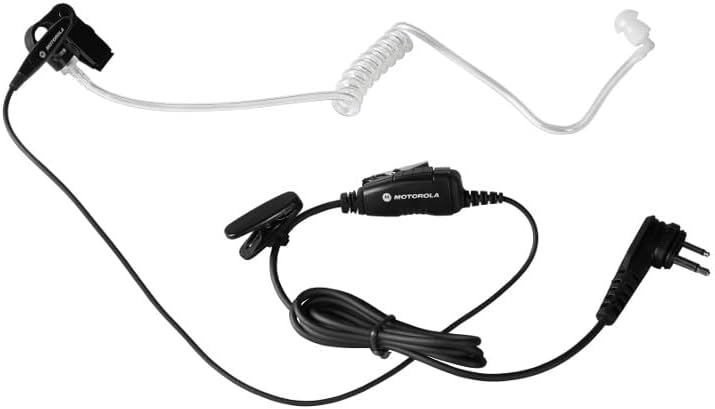
Figure 1: Complete Motorola HKLN4601 Surveillance Earpiece Kit.
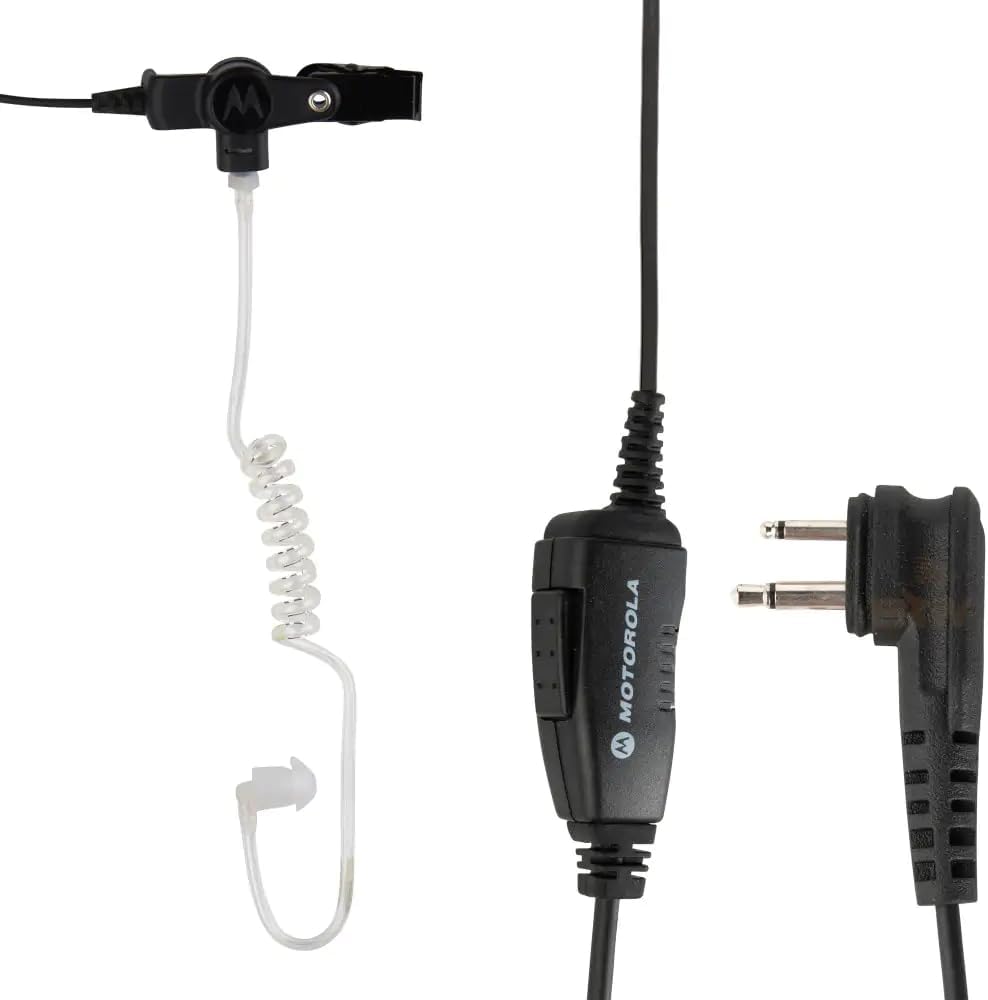
Figure 2: Detail of the in-line PTT and radio connector.
تعليمات الإعداد
- الاتصال بالراديو: Insert the 3.5mm audio jack firmly into the corresponding port on your compatible two-way radio. Ensure the plug is fully inserted to establish a secure connection.
- ارتدِ سماعة الأذن: Place the rubber ear tip comfortably over your ear. The acoustic tube should direct sound into your ear canal.
- قم بتأمين الكابل: Use the two in-line cable clips to attach the cable to your shirt, tie, or lanyard. This helps manage cable slack and prevents accidental dislodgement during movement.
تعليمات التشغيل
The HKLN4601 earpiece is designed for straightforward communication with your two-way radio.
- استقبال الصوت: Audio from your radio will be heard directly through the earpiece. The design ensures clear audio even in noisy environments.
- Transmitting Audio (Push-to-Talk): To speak, press and hold the in-line Push-to-Talk (PTT) button. Speak clearly into the microphone located on the same unit as the PTT button. Release the button when you have finished speaking to return to receive mode.
الصيانة والعناية
- تنظيف: Wipe the earpiece, acoustic tube, and cables with a soft, damp قماش. تجنب استخدام المواد الكيميائية القاسية أو المنظفات الكاشطة.
- تخزين: Store the earpiece in a clean, dry place when not in use. Avoid extreme temperatures.
- مقاومة الماء: هذا المنتج هو غير مقاوم للماء. Avoid exposing the earpiece to water or excessive moisture to prevent damage.
- العناية بالكابلات: Do not pull on the cable to disconnect the earpiece from the radio. Always grasp the plug directly. Avoid sharp bends or kinks in the cable.
استكشاف الأخطاء وإصلاحها
| مشكلة | السبب المحتمل | حل |
|---|---|---|
| No audio from earpiece. | Earpiece not fully plugged in; radio volume too low; earpiece malfunction. | Ensure the 3.5mm jack is fully inserted into the radio. Increase radio volume. Test with another earpiece if available. |
| Others cannot hear me. | PTT button not pressed; microphone blocked; radio transmission issue. | Press and hold the PTT button firmly while speaking. Ensure the microphone is not covered. Check radio's transmission functionality. |
| Earpiece is uncomfortable. | وضع غير صحيح. | Adjust the rubber ear tip and acoustic tube for a comfortable fit over your ear. |
تحديد
- رقم الموديل: HKLN4601
- تقنية الاتصال: سلكي
- مقبس سماعات الرأس: 3.5 ملم جاك
- مادة: ممحاة
- أسلوب: اضغط لتتحدث (PTT)
- نوع التحكم: Volume Control (via radio), In-line PTT
- وضع الأذن: In Ear (over-ear hook for stability)
- مستوى مقاومة الماء: غير مقاوم للماء
- وزن السلعة: حوالي 0.35 أونصة (10 جرامًا)
- أبعاد المنتج: حوالي 3 × 1.29 × 5 بوصة
- الشركة المصنعة: موتورولا
- رمز المنتج العالمي: 748091000393
معلومات السلامة
إخلاء المسؤولية القانونية: هذا المنتج مخصص للاستخدام من قبل الشركات أو المستخدمين المحترفين الآخرين فقط، وليس للمستهلكين.
Always operate the earpiece and connected radio in accordance with local regulations and safety guidelines. Avoid listening at excessively high volumes for prolonged periods to prevent hearing damage.
الضمان والدعم
For warranty information and technical support, please refer to the documentation provided with your original purchase or contact Motorola customer service directly. Keep your proof of purchase for warranty claims.


