1. انتهى المنتجview
The ORICO 9558RU3 is a 5-bay external RAID enclosure designed for 3.5-inch SATA hard disk drives. It provides a quick and simple solution for expanding storage capacity with USB 3.0 connectivity, supporting various RAID modes for data management and protection. The aluminum housing ensures effective heat dissipation, and its tool-free design simplifies drive installation.
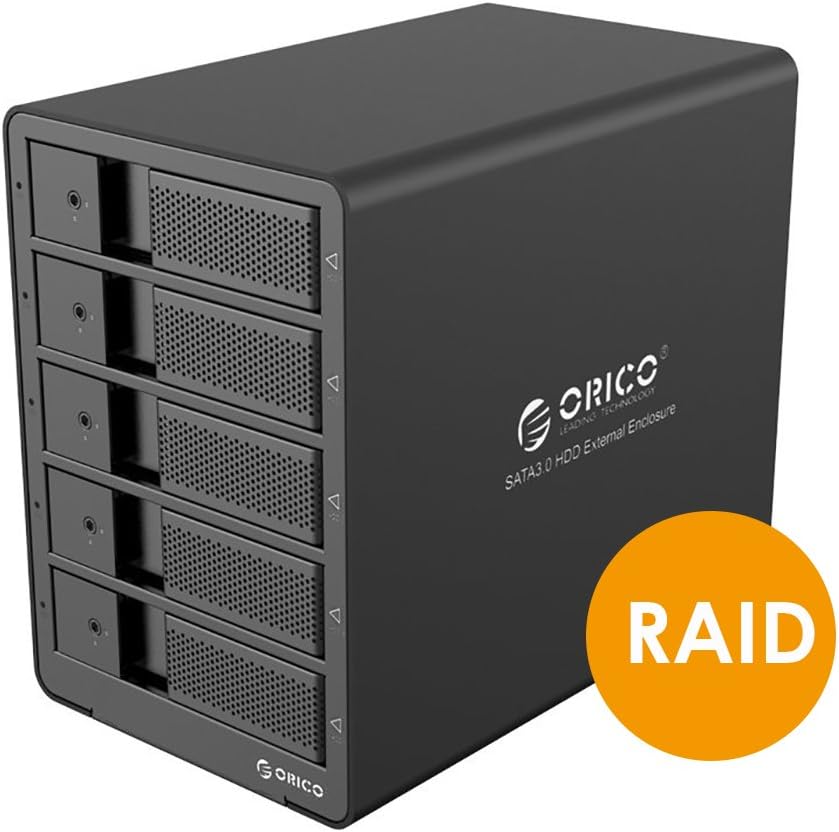
Figure 1: ORICO 9558RU3 5-Bay RAID HDD Enclosure front view.
2. محتويات العبوة
يرجى التأكد من وجود جميع العناصر في الحزمة:
- 1x ORICO 9558RU3 5-Bay Enclosure
- 1 × محول طاقة 12 فولت 6.5 أمبير
- 1x 3.3-Foot USB 3.0 Cable (Type B to Type A)
- 1x 3.3-Foot USB 3.0 Cable (Type B to Type C)
- 1x HDD Care Locking Key
- 1x دليل المستخدم (هذه الوثيقة)
3. الإعداد والتثبيت
3.1. تركيب القرص الصلب
The enclosure features a tool-free design for easy installation of 3.5-inch SATA hard drives.
- Gently pull the front door of an empty bay to open it.
- Slide a 3.5-inch SATA HDD into the open bay until it is securely seated. Ensure the SATA connectors align properly.
- Close the front door of the bay.
- Repeat for additional hard drives. The enclosure supports up to five 3.5-inch SATA HDDs.
- Use the provided HDD Care Locking Key to secure the drive bays, preventing accidental removal.

Figure 2: Inserting a 3.5-inch SATA HDD into the enclosure.

Figure 3: Front panel illustrating tool-free installation and HDD activity LEDs.
3.2. الاتصال بجهاز الكمبيوتر الخاص بك
- Connect the 12V 6.5A power adapter to the DC-IN port on the rear panel of the enclosure and then to a power outlet.
- Use either the USB 3.0 Type B to Type A cable or the USB 3.0 Type B to Type C cable to connect the enclosure's USB 3.0 port to an available USB 3.0 port on your computer.
- Flip the ON/OFF switch on the rear panel to the 'ON' position.

Figure 4: Rear panel connections including USB 3.0, DC-IN, and ON/OFF switch.
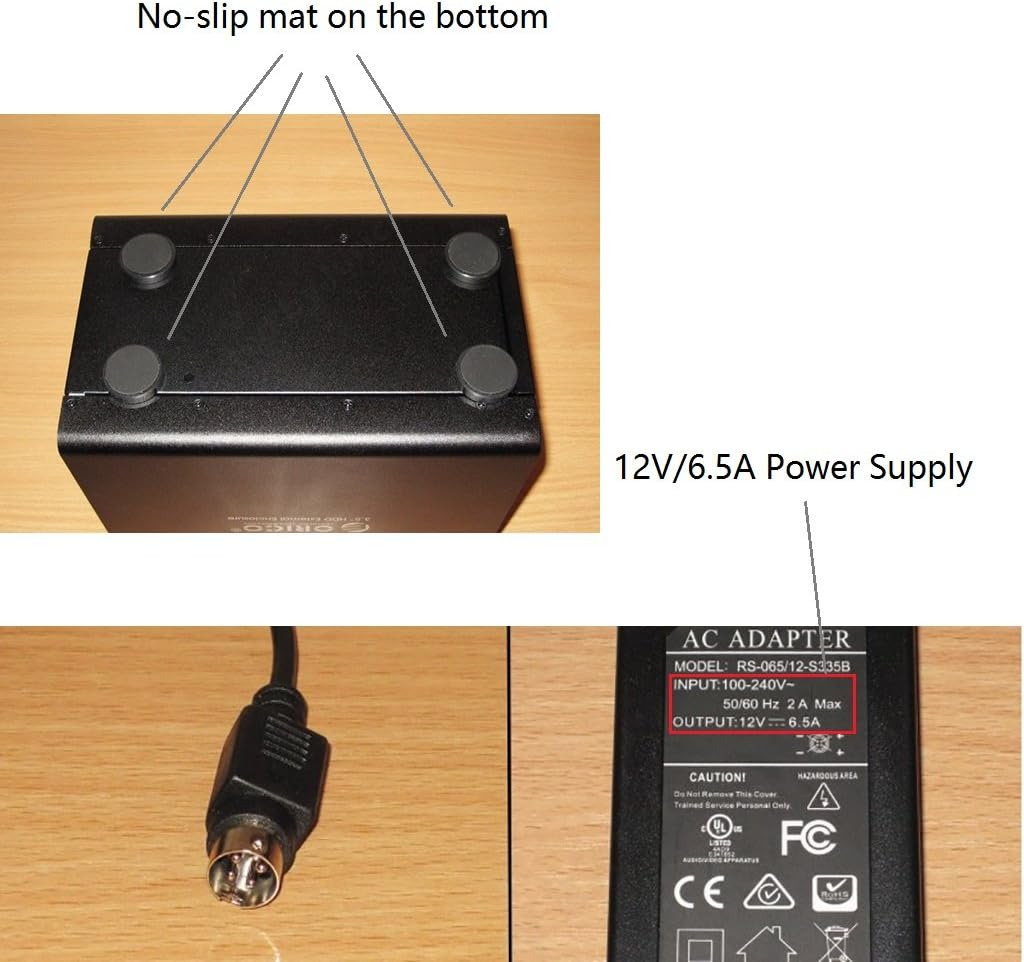
Figure 5: Power adapter details and non-slip base of the enclosure.
4. تعليمات التشغيل
4.1. تكوين RAID
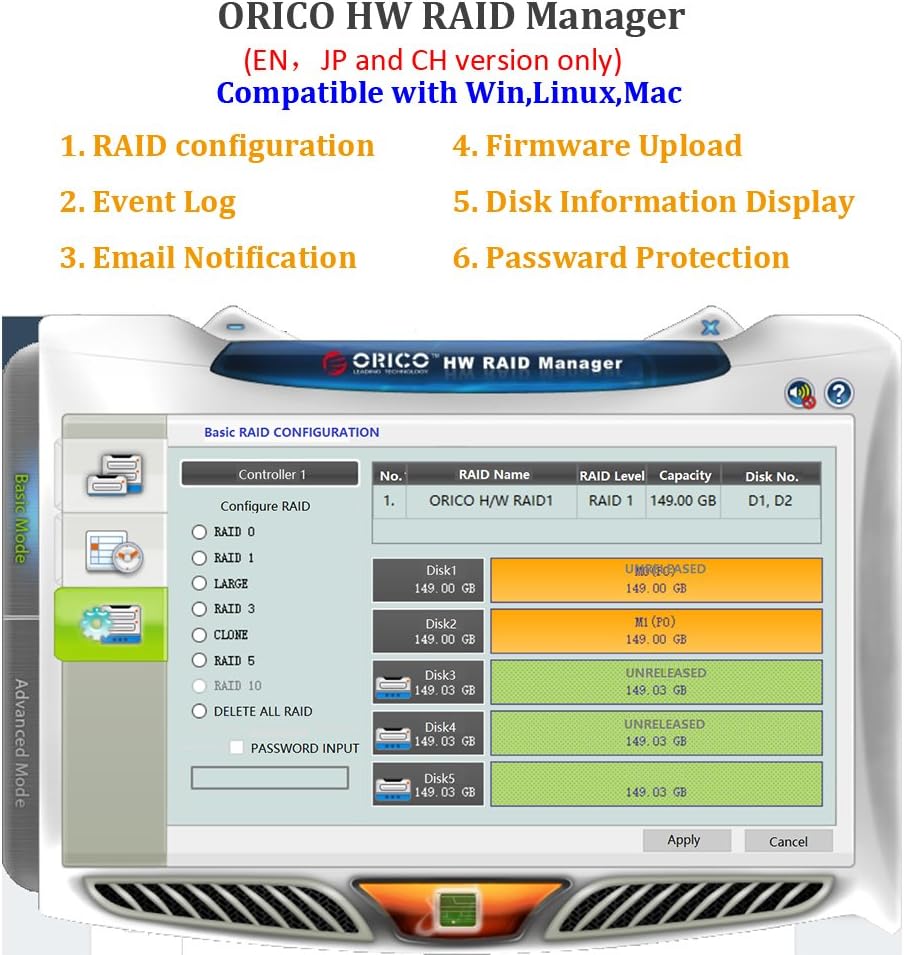
The ORICO 9558RU3 supports various RAID modes to optimize for speed, redundancy, or a combination of both. RAID configuration can be performed using the control switches on the rear panel or via the ORICO HW RAID Manager software.
Available RAID Modes:
- RAID 0 (التوزيع): يجمع بين محركات الأقراص لتحقيق أقصى سرعة وسعة، ولكنه لا يوفر أي تكرار للبيانات.
- ريد 1 (النسخ المتطابق): Duplicates data across drives for redundancy, reducing usable capacity by half.
- RAID 3 (التوزيع مع التكافؤ المخصص): Data is striped across drives, with one dedicated drive for parity information. Offers good performance and data redundancy.
- RAID 5 (التوزيع مع التكافؤ الموزع): Data and parity information are striped across all drives. Offers good performance and data redundancy with efficient storage.
- RAID 10 (RAID 1+0): Combines mirroring and striping for both performance and redundancy. Requires at least four drives.
- Combine (JBOD): Drives are concatenated to form one large volume without striping or redundancy.
- وضع واضح: Resets the RAID configuration.
Hardware RAID Configuration (Rear Panel Switches)
- إيقاف التشغيل الضميمة.
- Locate the DIP switches on the rear panel (refer to Figure 6).
- Set the DIP switches according to the desired RAID mode as indicated in the diagram.
- Press and hold the 'SET' button for approximately 5 seconds until the indicator lights confirm the change.
- تشغيل الطاقة the enclosure. The new RAID configuration will be applied.

Figure 6: RAID Mode DIP switch settings on the rear panel.
Software RAID Configuration (ORICO HW RAID Manager)
For advanced RAID management and monitoring, use the ORICO HW RAID Manager software. This software is compatible with Windows, Linux, and Mac operating systems.
- Ensure the enclosure is connected and powered on.
- Download and install the ORICO HW RAID Manager software from the official ORICO webموقع.
- Launch the software. It will detect the connected enclosure.
- Follow the on-screen instructions within the software to configure RAID, view event logs, or manage disk information.

Figure 7: ORICO HW RAID Manager software interface for RAID configuration.
4.2. إدارة الطاقة
The enclosure features an Intelligent Sleep Function. If the device does not receive data for 5 minutes, or if no data cable is connected for more than 5 minutes, it will enter Intelligent Sleep Mode to conserve energy and prolong HDD lifespan. The device will automatically wake up upon data access.
4.3. مؤشرات LED
Each drive bay has an LED indicator that shows HDD activity. A blue light typically indicates power, while a flashing light indicates data access.
5. الصيانة
To ensure optimal performance and longevity of your ORICO 9558RU3 enclosure:
- Keep the enclosure in a well-ventilated area to assist with heat dissipation.
- نظّف الجزء الخارجي بقطعة قماش ناعمة وجافة. تجنّب المنظفات السائلة.
- Do not block the ventilation fan on the rear panel.
- تجنب تعريض الجهاز لدرجات حرارة شديدة أو رطوبة أو أشعة الشمس المباشرة.
- Ensure the power adapter is securely connected to prevent power interruptions.
6. استكشاف الأخطاء وإصلاحها
If you encounter issues with your ORICO 9558RU3, please refer to the following common solutions:
- لم يتعرف الكمبيوتر على الغلاف:
- تأكد من توصيل جميع الكابلات (الطاقة وUSB) بشكل آمن.
- Verify the enclosure is powered on.
- حاول الاتصال بمنفذ USB مختلف على جهاز الكمبيوتر الخاص بك.
- اختبار باستخدام كابل USB مختلف.
- تأكد من أن برامج تشغيل نظام التشغيل لديك محدثة.
- لم يتم اكتشاف محركات الأقراص الصلبة:
- Confirm that hard drives are properly seated in their bays.
- Check if the hard drives are functional by testing them individually.
- If using RAID, ensure the RAID configuration is correctly set and initialized. New drives may need to be formatted or partitioned by your operating system.
- بطء سرعات نقل البيانات:
- تأكد من توصيل جهازك بمنفذ USB 3.0. استخدام منافذ USB 2.0 سيؤدي إلى سرعات أبطأ.
- Verify the health of your hard drives.
- Consider the performance characteristics of your chosen RAID mode.
- Enclosure enters sleep mode unexpectedly:
- The Intelligent Sleep Function activates after 5 minutes of inactivity. This is normal behavior.
- If it sleeps during active use, ensure the USB data cable is firmly connected and not faulty.
7. المواصفات
| ميزة | مواصفة |
|---|---|
| رقم الموديل | 9558RU3 |
| عامل شكل القرص الصلب | 3.5 بوصة |
| أقصى عدد من الأجهزة المدعومة | 5 |
| السعة القصوى | 40TB (5 x 8TB HDDs) |
| معدل نقل البيانات | حتى 5 جيجابت في الثانية (USB 3.0) |
| تكنولوجيا الاتصال | USB 3.0 (Type A and Type C compatible) |
| أوضاع RAID | RAID 0/1/3/5/10/Combine/Clear Mode |
| محول الطاقة | 12 فولت 6.5 أمبير |
| التوافق | Windows, Linux kernels 3.0 or Later, Mac OS |
| أبعاد المنتج (الطول × العرض × الارتفاع) | 9.06 × 5.51 × 7.87 بوصة (230 × 146 × 211 مم) |
| وزن العنصر | 5.73 رطل |
الشكل 8: أبعاد المنتج.
8. الضمان والدعم
للحصول على معلومات الضمان والدعم الفني، يرجى الرجوع إلى موقع ORICO الرسمي webالموقع أو تواصل مع بائع التجزئة. احتفظ بإيصال الشراء لطلبات الضمان.


