مقدمة
This manual provides detailed instructions for the installation, operation, maintenance, and troubleshooting of the Paradox DCTXP2/86 868 MHz Radio Magnetic Contact. This device is designed to enhance the security of your premises by detecting the opening and closing of doors and windows. Please read this manual thoroughly before using the device to ensure proper functionality and safety.
المنتج انتهىview
The Paradox DCTXP2/86 is a supervised radio magnetic contact operating at 868 MHz, specifically designed for doors and windows. It features two independent radio channels and the capability to connect one external sensor. An anti-tamper switch is integrated for enhanced security.
- تكرار: 868 MHz version.
- القنوات: Two independent radio channels.
- الاستشعار الخارجي: Possibility to connect one external sensor.
- Tampالحماية: Includes an anti-tampإيه التبديل.
- امتثال: Conforms to EN50131-2-6 Grade 2.
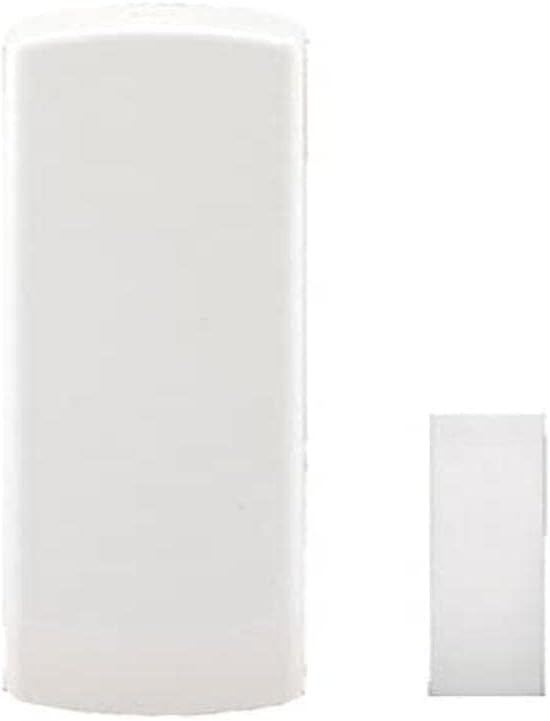
The image displays the Paradox DCTXP2/86 radio magnetic contact. It consists of two main components: a larger rectangular sensor unit and a smaller rectangular magnet. Both components are white and designed to be mounted on a door or window frame and its corresponding moving part.
الإعداد والتثبيت
1. تركيب البطارية
The DCTXP2/86 requires two AAA alkaline batteries for operation. Ensure correct polarity when inserting the batteries.
- افتح بعناية casinز من وحدة الاستشعار الرئيسية.
- Insert two AAA alkaline batteries into the designated battery compartment, observing the polarity markings (+/-).
- أغلق حرف casinج بشكل آمن.
2. Mounting the Contact
The magnetic contact consists of two parts: the main sensor unit and the magnet. They should be mounted on the door/window frame and the moving part (door/window) respectively, ensuring they are aligned and in close proximity when the door/window is closed.
- Choose a mounting location where the sensor and magnet can be securely attached and are not easily accessible to intruders.
- Mount the larger sensor unit on the fixed frame of the door or window.
- Mount the smaller magnet on the moving part of the door or window, directly opposite the sensor unit.
- Ensure the gap between the sensor and the magnet is minimal (typically less than 1 cm) when the door/window is closed for reliable detection.
- Use screws or strong adhesive pads (not included) for secure mounting.
3. Programming/Pairing with Alarm System
The DCTXP2/86 needs to be programmed into your Paradox alarm system. Refer to your alarm system's main control panel manual for specific instructions on adding wireless zones. The DCTXP2/86 offers two independent radio channels that can be assigned to different zones.
- Access the programming mode of your Paradox alarm control panel.
- Select the option to add a new wireless zone or device.
- Activate the DCTXP2/86 (e.g., by opening and closing the contact, or by triggering the tamper switch) to transmit its unique serial number to the control panel.
- Assign the contact to the desired zone(s) and configure its attributes (e.g., entry/exit, perimeter, 24-hour).
- Test the communication and detection by opening and closing the protected door/window.
تعليمات التشغيل
Once properly installed and programmed, the Paradox DCTXP2/86 operates automatically. When the protected door or window is opened, the magnetic contact separates, triggering an alarm signal to the control panel. When the door or window is closed, the contact re-establishes, and the zone returns to a normal state.
- كشف: The sensor detects the separation of the magnet from the main unit.
- الإشراف: The DCTXP2/86 is a supervised device, meaning it periodically communicates with the control panel to confirm its presence and operational status. If communication is lost, the control panel will indicate a fault.
- Tampالحماية: إذا كان جasing of the main sensor unit is opened, the integrated tamper switch will trigger an alarm, even if the system is disarmed.
- مدخلات الاستشعار الخارجية: The two independent radio channels allow for monitoring of the magnetic contact itself and an additional wired sensor connected to the DCTXP2/86's input terminals.
صيانة
استبدال البطارية
The control panel will typically indicate a low battery condition for the DCTXP2/86. Replace batteries promptly to ensure continuous protection.
- Disarm your alarm system before replacing batteries to avoid false alarms.
- افتح ملف casinز من وحدة الاستشعار الرئيسية.
- قم بإزالة بطاريات AAA القديمة.
- قم بإدخال بطاريات قلوية جديدة بحجم AAA، مع التأكد من القطبية الصحيحة.
- أغلق حرف casing securely. The tamper switch will activate briefly, and the device will re-establish communication with the control panel.
تنظيف
Clean the device periodically with a soft, dry cloth. Do not use abrasive cleaners or solvents, as these can damage the casing or internal components. Ensure the sensor and magnet surfaces are free from dirt or debris that could interfere with their operation.
استكشاف الأخطاء وإصلاحها
| مشكلة | السبب المحتمل | حل |
|---|---|---|
| Device not detecting opening/closing. |
|
|
| Control panel shows "Low Battery" for the device. | البطاريات تنفد. | استبدل كلا بطاريتي AAA فوراً. |
| Tamper alarm triggered unexpectedly. |
|
|
| Device not communicating with control panel. |
|
|
If you encounter issues not listed here or if the suggested solutions do not resolve the problem, please contact Paradox technical support or a certified alarm system installer.
تحديد
| ميزة | التفاصيل |
|---|---|
| نموذج | DCTXP2/86 |
| تكرار | 868 ميجا هرتز |
| الأبعاد (الطول × العرض × الارتفاع) | 11.2 x 3.2 x 2.5 cm (approx. 112x32x25 mm as per description) |
| وزن | 50 جرام |
| مصدر الطاقة | تعمل بالبطارية |
| نوع البطارية | 2 x AAA Alkaline batteries (not included with product, but required for operation) |
| مميزات اضافية | Dust resistant, 2 independent radio channels, external sensor input, anti-tampإيه التبديل |
| امتثال | EN50131-2-6 الدرجة 2 |
الضمان والدعم
For information regarding the warranty of your Paradox DCTXP2/86, please refer to the warranty card included with your product or visit the official Paradox webقد تختلف شروط وأحكام الضمان حسب المنطقة.
If you require technical assistance, support, or have questions about your device, please contact your authorized Paradox dealer or Paradox customer support. Contact information can typically be found on the Paradox webالموقع أو في وثائق المنتج الخاص بك.
It is recommended that installation and maintenance of security system components be performed by qualified professionals.


