1. المقدمة
This manual provides detailed instructions for the Sharp EL1750V EL-1750V Two-Color Printing Calculator. This device is designed for efficient financial and general calculations, featuring a two-color printing mechanism for clear record-keeping. It includes functions such as automatic tax keys, a change calculation feature, and a large display for enhanced usability.
تتضمن الميزات الرئيسية ما يلي:
- Two-color printing (positive numbers in black, negative in red) at 2.2 lines per second.
- 12-digit LCD display for large calculations.
- Built-in antimicrobial protection.
- Change calculation feature.
- Automatic Tax Keys (TAX+, TAX-).
- Rounding and Decimal Switches.
- Grand Total (GT) function.
- 4-key memory.
- Cost, Sell, Margin (CSM) keys.
2. انتهى المنتجview
Familiarize yourself with the components and key features of your Sharp EL1750V calculator.

الشكل 1: الجبهة view of the Sharp EL1750V calculator, showing the display, keypad, and paper roll.

الشكل 2: انتهىview of key functions including Automatic Tax Keys, Rounding Switch, Decimal Switch, Grand Total Function, 4 Key Memory, Backspace Key, and Percent Key.
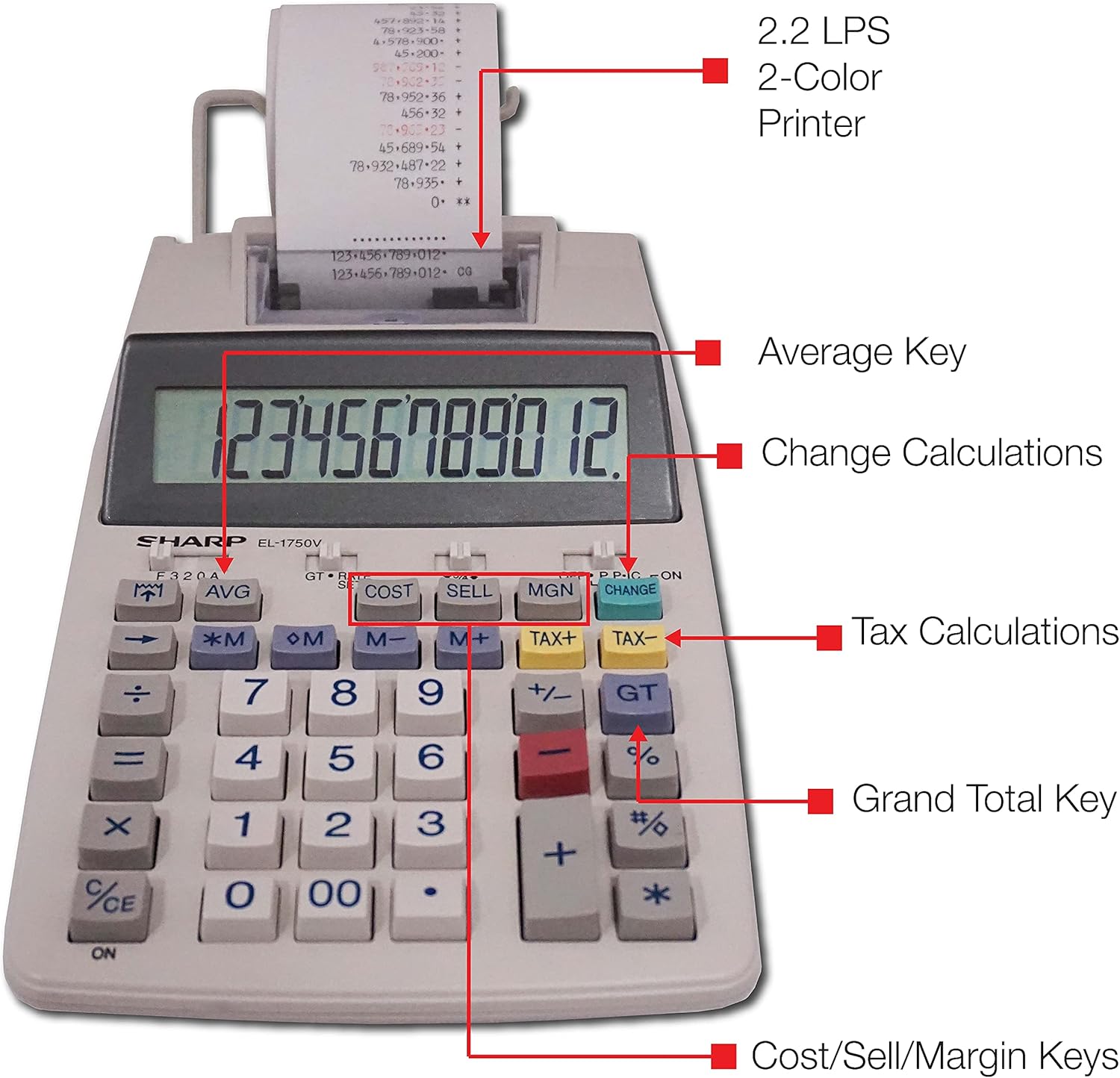
الشكل 3: مفصل view highlighting the 2.2 LPS 2-Color Printer, Average Key, Change Calculations, Tax Calculations, Grand Total Key, and Cost/Sell/Margin Keys.

Figure 4: Dimensions of the Sharp EL1750V calculator, showing a width of 5.9 inches, depth of 9.1 inches, and height of 2 inches, with a 0.75 inch 12-digit LCD display.
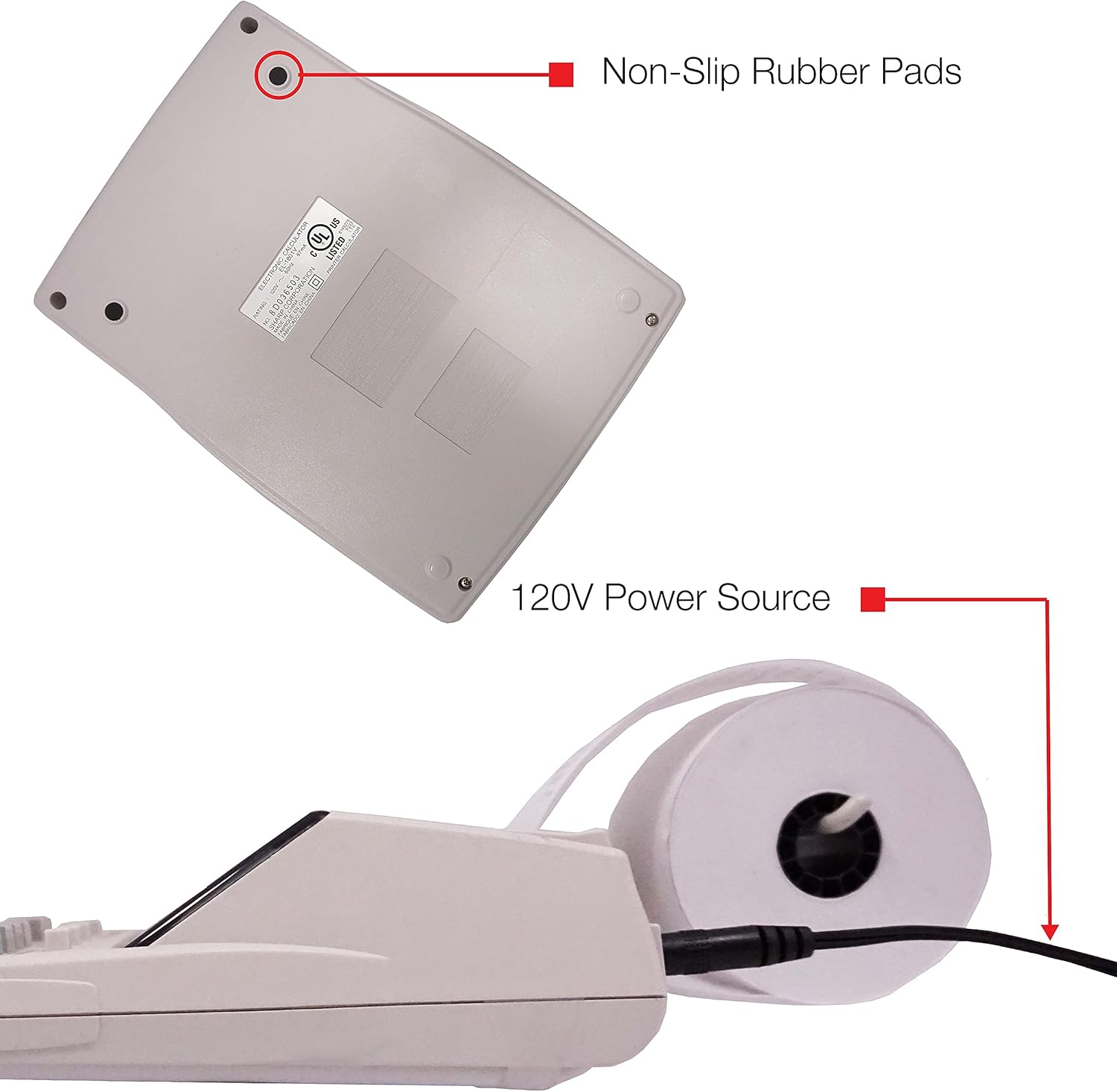
الشكل 5: القاع view of the calculator, illustrating the non-slip rubber pads and the 120V power source input.
3. الإعداد
3.1 مصدر الطاقة
The Sharp EL1750V can be powered by an AC adapter (120V) or batteries. Ensure the correct power source is connected before operation.
- محول AC: Connect the provided AC adapter to the power input port on the side of the calculator (refer to Figure 5) and plug it into a standard 120V electrical outlet.
- البطاريات: If using batteries, open the battery compartment (typically on the underside) and insert the required batteries, observing correct polarity.
3.2 Installing the Paper Roll
- Lift the printer cover to expose the paper roll compartment.
- ضع لفة ورق جديدة في الحجرة، مع التأكد من أن الورق يُسحب من أسفل اللفة.
- Feed the leading edge of the paper into the printer mechanism slot until it emerges from the top.
- أغلق غطاء الطابعة.
- Press the paper feed key (often marked with an arrow pointing up) to advance the paper and ensure it is properly aligned.
4. تعليمات التشغيل
4.1 العمليات الحسابية الأساسية
قم بإجراء العمليات الحسابية القياسية:
- إضافة (+): أدخل الرقم الأول، ثم اضغط +أدخل الرقم الثاني، ثم اضغط =.
- الطرح (-): أدخل الرقم الأول، ثم اضغط -أدخل الرقم الثاني، ثم اضغط =.
- الضرب (س): أدخل الرقم الأول، ثم اضغط xأدخل الرقم الثاني، ثم اضغط =.
- القسمة (÷): أدخل الرقم الأول، ثم اضغط ÷أدخل الرقم الثاني، ثم اضغط =.
- Clear Entry (CE/C): يمسح الرقم الأخير الذي تم إدخاله.
- الكل واضح (AC): يمسح جميع الإدخالات والحسابات.
4.2 وظائف خاصة
- حساب الضريبة (الضريبة +، الضريبة -):
- Set the tax rate using the appropriate function (refer to the calculator's specific tax rate setting procedure, usually involving a dedicated key or mode).
- Enter the amount, then press الضرائب + to add tax or ضريبة- لخصم الضريبة.
- Change Calculation (CHANGE):
- Enter the total amount of the sale.
- اضغط على يتغير مفتاح.
- Enter the amount received from the customer.
- يضعط = to display the change due.
- المجموع الكلي (طن): يضعط GT to recall the grand total of all previous calculations.
- Memory Functions (M+, M-, RM/CM):
- M+: يضيف القيمة المعروضة إلى الذاكرة.
- M-: يطرح القيمة المعروضة من الذاكرة.
- RM/CM: Recalls memory content (first press) or clears memory (second press).
- Cost, Sell, Margin (COST, SELL, MGN): These keys are used for profit margin calculations.
- Enter two of the three values (Cost, Selling Price, Margin Percentage) and press the key for the unknown value to calculate it.
- Rounding and Decimal Switches: Adjust these switches (typically located above the keypad) to control the number of decimal places and rounding method for calculations.
5. الصيانة
5.1 التنظيف
To maintain the calculator's performance and appearance:
- امسح الجزء الخارجي بقطعة قماش ناعمة وجافة.
- بالنسبة للأوساخ العنيدة، قم بإزالة الأوساخ برفق.ampاغمر قطعة القماش بالماء أو بمنظف معتدل غير كاشط.
- Do not use strong solvents or abrasive cleaners, as these can damage the surface or display.
- Avoid spraying liquids directly onto the calculator.
5.2 استبدال لفة الورق
Replace the paper roll when it runs out or the print becomes faint. Refer to Section 3.2 for installation instructions.
5.3 Ink Roller Replacement
When the print becomes faint or incomplete, the ink roller needs to be replaced. Consult your calculator's specific instructions for ink roller replacement, as the procedure may vary slightly.
6. استكشاف الأخطاء وإصلاحها
| مشكلة | السبب المحتمل | حل |
|---|---|---|
| الآلة الحاسبة لا تعمل. | No power, AC adapter not connected, or batteries depleted/incorrectly installed. | Ensure AC adapter is securely plugged in. If using batteries, check battery installation and replace if necessary. |
| لا يوجد نص مطبوع أو نص باهت. | Paper roll empty or incorrectly installed; ink roller needs replacement. | Replace paper roll (Section 3.2). Replace ink roller (Section 5.3). |
| Display shows "E" or error message. | Calculation overflow, division by zero, or incorrect operation sequence. | يضعط AC to clear the error. Re-enter the calculation carefully. |
| انحشار الورق. | Paper roll not installed correctly or paper is creased. | Open printer cover, remove jammed paper, and re-install paper roll correctly (Section 3.2). |
7. المواصفات
- نموذج: Sharp EL1750V
- عرض: 12 أرقام LCD
- سرعة الطباعة: 2.2 سطر في الثانية
- ألوان الطباعة: 2 (Black for positive, Red for negative)
- مصدر الطاقة: AC Adapter (120V) or Battery Powered
- الأبعاد (تقريبًا): 5.9 بوصة (عرض) × 9.1 بوصة (عمق) × 2 بوصة (ارتفاع)
- الوزن تقريبا.): 0.16 ounces (Note: This weight seems unusually low for a printing calculator, likely an error in source data. User should refer to product packaging for accurate weight.)
- مادة: بلاستيك
- المميزات الخاصة: Antimicrobial protection, Change calculation, Tax functions, Cost/Sell/Margin functions, Grand Total, 4-key memory.
8. الضمان والدعم
For warranty information and technical support, please refer to the documentation included with your purchase or visit the official Sharp webالموقع. احتفظ بإيصال الشراء الخاص بك كإثبات للشراء في حالة مطالبات الضمان.
الشركة المصنعة: حاد
Webموقع: www.sharpusa.com


