مقدمة
The Behringer NEKKST K8 is an ultra-linear 150-Watt reference-class studio monitor designed for accurate sound reproduction. It features an 8-inch woofer and a 1-inch silk dome tweeter, utilizing advanced waveguide technology for optimal acoustic dispersion and a wide 'sweet zone'. This monitor operates in a true bi-amping mode with two separate amplifiers for enhanced sound clarity.

الصورة: الجبهة view of the Behringer NEKKST K8 Studio Monitor, showcasing the 8-inch woofer and 1-inch tweeter.
تعليمات السلامة الهامة
Please read and follow all safety instructions before operating the Behringer NEKKST K8 studio monitor. Retain these instructions for future reference.
- خطر الصدمة الكهربائية: Do not open the device. Refer all servicing to qualified service personnel.
- لا تعرض هذا الجهاز للمطر أو الرطوبة.
- لا تستخدم هذا الجهاز بالقرب من الماء.
- نظف فقط بقطعة قماش جافة.
- لا تسد أي فتحات تهوية. ثبّت المنتج وفقًا لتعليمات الشركة المصنعة.
- لا تقم بالتثبيت بالقرب من أي مصادر للحرارة مثل المشعات أو فتحات التدفئة أو المواقد أو أي أجهزة أخرى (بما في ذلك ampالمُضخِّمات) التي تنتج الحرارة.
- احمِ سلك الطاقة من أن يدوس عليه أحد أو يضغط عليه، وخاصةً عند المقابس ومنافذ التوصيل الكهربائية ونقطة خروجها من الجهاز.
- استخدم فقط المرفقات/الملحقات المحددة من قبل الشركة المصنعة.
- افصل هذا الجهاز أثناء العواصف الرعدية أو عند عدم استخدامه لفترات طويلة من الزمن.

Image: Safety and regulatory labels found on the Behringer NEKKST K8, indicating electrical warnings and compliance information.
يثبت
فك التعبئة
Carefully unpack your NEKKST K8 monitor. Inspect the unit for any signs of damage that may have occurred during transit. Retain the original packaging for future transport or storage.
الاتصالات
The NEKKST K8 offers both balanced XLR and unbalanced RCA input options. Connect your audio source (e.g., audio interface, mixer) to the appropriate input on the rear panel of the monitor.
- مدخلات XLR: For balanced audio signals, providing optimal noise rejection.
- إدخال RCA: For unbalanced audio signals, commonly used with consumer audio equipment.
Ensure the monitor is powered off before making any connections.
Placement and Room Compensation
Proper placement of your studio monitors is crucial for accurate sound reproduction. The NEKKST K8 features 'ROOM COMPENSATION' switches on the rear panel to help optimize its performance for your specific acoustic environment.
- Free Field: Use this setting when the monitor is placed away from walls and corners.
- حائط: Select this setting if the monitor is placed close to a wall.
- ركن: Choose this setting if the monitor is placed in a corner, which typically results in increased bass response.
Experiment with these settings to achieve the most balanced sound in your listening space.
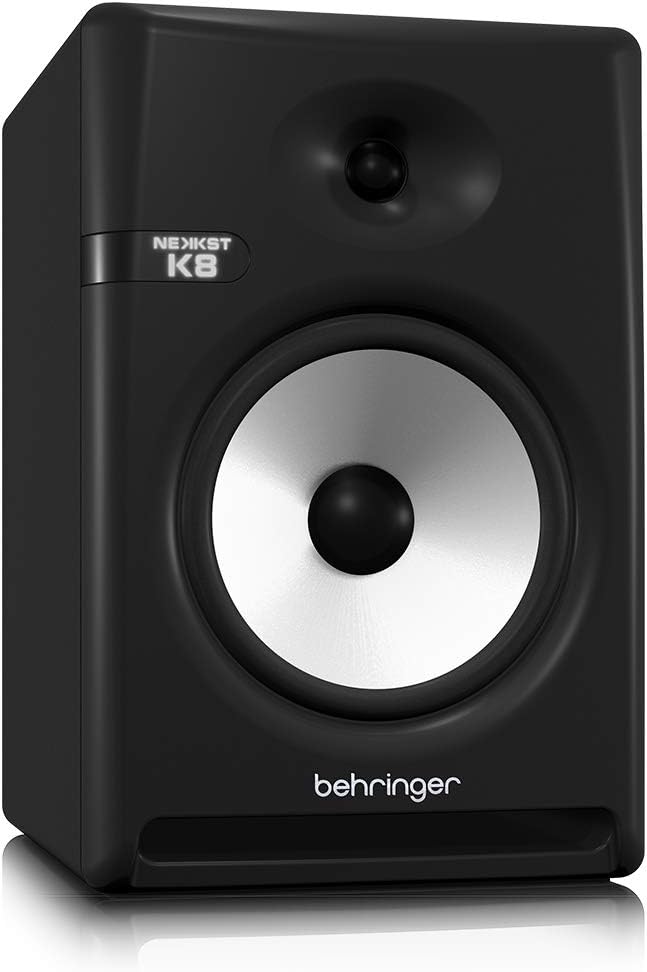
Image: Rear panel of the Behringer NEKKST K8, displaying XLR and RCA inputs, along with various control switches for room compensation and frequency adjustments.

الصورة: مفصلة view of the NEKKST K8's rear control panel, highlighting the input trim, frequency adjustments, and room compensation switches.
توصيل الطاقة
Connect the provided power cord to the AC IN socket on the rear panel and then to a suitable power outlet. Ensure the power switch is in the OFF position before connecting to power.
عملية
تشغيل/إيقاف التشغيل
After all connections are made, switch the power button on the rear panel to the ON position. It is recommended to power on your monitors last and power them off first to prevent any pops or clicks through your speakers.
Input Trim Adjustment
The 'INPUT TRIM' knob on the rear panel allows you to adjust the input sensitivity of the monitor. Start with the knob at a lower setting and gradually increase it to achieve a comfortable listening level without distortion. This control helps match the output level of your audio source to the monitor's input.
Frequency Adjustments
The NEKKST K8 provides 'HIGH FREQUENCY' and 'LOW FREQUENCY' switches for fine-tuning the monitor's response to your listening environment and personal preference. These switches allow you to cut or boost specific frequency ranges.
- التردد العالي: Adjusts the treble response. Options typically include flat, -2 dB, +2 dB.
- LOW FREQUENCY: Adjusts the bass response. Options typically include flat, -2 dB, -4 dB, -6 dB. This can be useful for compensating for room acoustics or when using a subwoofer.
Refer to the markings on the rear panel for specific dB adjustments.
صيانة
تنظيف
To clean the exterior of your NEKKST K8 monitor, use a soft, dry cloth. Do not use liquid cleaners, abrasive cleaners, or solvents, as these can damage the finish or internal components. Ensure the monitor is unplugged before cleaning.
تخزين
If storing the monitor for an extended period, it is recommended to use the original packaging to protect it from dust and physical damage. Store in a cool, dry place away from direct sunlight and extreme temperatures.
استكشاف الأخطاء وإصلاحها
| مشكلة | السبب المحتمل | حل |
|---|---|---|
| لا يوجد صوت |
|
|
| صوت مشوه |
|
|
| همهمة أو ضوضاء |
|
|
إذا استمرت المشكلة بعد تجربة هذه الحلول، فيرجى الاتصال بدعم عملاء Behringer.
تحديد
| اسم الموديل | K8 |
| نوع السماعة | شاشة |
| قطر مكبر الصوت | 8 بوصة |
| قطر مكبر الصوت عالي التردد | 1 بوصة |
| الحد الأقصى لقوة خرج السماعة | 150 واط |
| واتtage | 150 واط |
| استجابة التردد | 20000 Hz (Upper limit; full range typically wider) |
| تكنولوجيا الاتصال | RCA، XLR |
| وضع إخراج الصوت | ستيريو |
| مصدر الطاقة | كهرباء سلكية |
| أبعاد المنتج | 13.4 بوصة عمق × 13.4 بوصة عرض × 18.8 بوصة ارتفاع |
| وزن العنصر | 19.18 رطل |
| مادة | بلاستيك، معدن، قماش |
| الشركة المصنعة | ميوزيك ترايب الولايات المتحدة |
| رمز المنتج الموحد | 748252139344 |
معلومات الضمان
The Behringer NEKKST K8 Studio Monitor comes with a Limited Warranty. For detailed information regarding warranty terms, conditions, and registration, please refer to the official Behringer webالموقع أو بطاقة الضمان المرفقة مع المنتج الخاص بك.
يدعم
For further assistance, technical support, or to download the latest drivers and software, please visit the official Behringer webالموقع أو الاتصال بقسم خدمة العملاء.
يمكنك أيضًا زيارة متجر بيرينجر على أمازون للحصول على معلومات عن المنتج والملحقات.


