مقدمة
The Logitech UE Boom is a 360-degree wireless Bluetooth speaker designed for portable audio. It features a durable, go-anywhere shape and is equipped with a water and stain resistant acoustic skin. This speaker allows for wireless music playback, phone calls, and can be paired with another UE Boom for stereo sound.

الصورة: الجبهة view of the Logitech UE Boom Wireless Bluetooth Speaker in Northern Light color.
الميزات الرئيسية
- صوت 360 درجة: Delivers immersive audio in all directions.
- تصميم محمول: Versatile, cylindrical shape for easy transport.
- Water and Stain Resistant: Features a colorful acoustic skin with plasma coating for durability against water and stains.
- الربط اللاسلكي: Connects via Bluetooth from up to 50 feet away. Easy pairing via NFC for compatible devices.
- Double Up Feature: Wirelessly connect two UE BOOM speakers in stereo using the UE BOOM app for enhanced sound.
- عمر بطارية طويل: Rechargeable battery provides up to 15 hours of playback.
- مكبر صوت: Integrated crystal-clear speakerphone for calls.
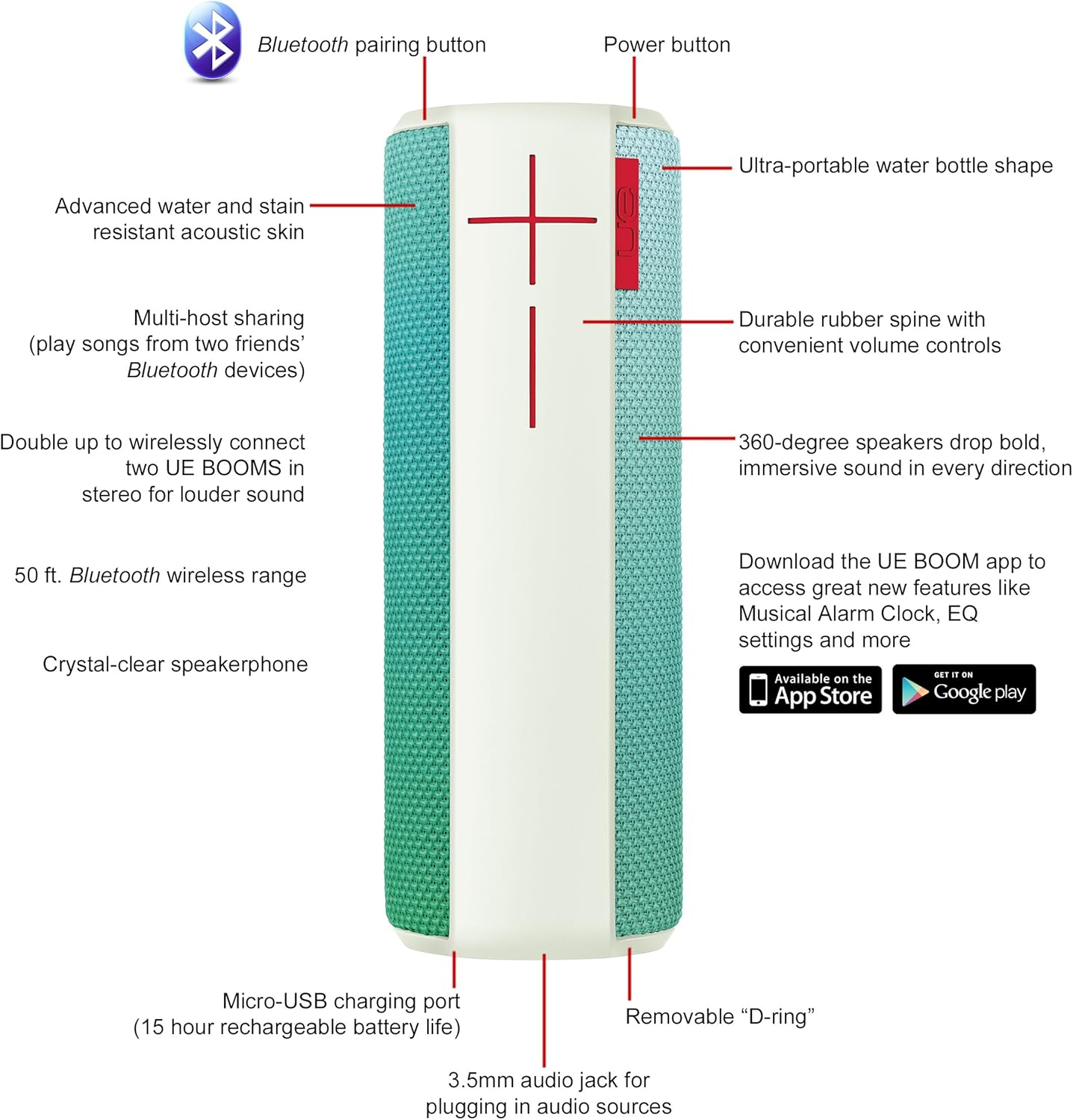
Image: Diagram highlighting key features and controls of the UE Boom speaker, including Bluetooth pairing button, power button, volume controls, micro-USB charging port, and 3.5mm audio jack.
يثبت
شحن السماعة
Before initial use, fully charge your UE Boom speaker. Connect the provided micro-USB cable to the charging port located at the bottom of the speaker and plug the other end into a USB power source. The speaker's battery provides approximately 15 hours of playback on a full charge.
بلوتوث الاقتران
- Power on your UE Boom speaker by pressing the power button.
- Press and hold the Bluetooth pairing button (usually indicated by a Bluetooth icon) until you hear an audible tone and the LED indicator flashes rapidly.
- On your mobile device (smartphone or tablet), navigate to the Bluetooth settings.
- Select "UE Boom" from the list of available devices to pair.
- Once paired, you will hear a confirmation tone from the speaker.
بالنسبة للأجهزة التي تدعم تقنية NFC، ما عليك سوى تمرير جهازك على منطقة NFC الموجودة على مكبر الصوت لإتمام عملية الاقتران بسرعة.
تعليمات التشغيل
عناصر التحكم الأساسية
- زر الطاقة: Located on the top of the speaker to turn it on or off.
- ضوابط الصوت: Large '+' and '-' buttons on the side of the speaker adjust the volume.
- زر البلوتوث: يبدأ وضع الاقتران عبر البلوتوث.
Using the UE BOOM App
Download the official UE BOOM app from your device's app store (available on App Store and Google Play) to unlock additional features:
- Musical Alarm Clock: Wake up to your favorite music.
- التنشيط عن بعد: Turn your speaker on/off from your device.
- إعدادات المعادل: تخصيص الصوت الاحترافيfile حسب تفضيلاتك.
- مضاعفة الربح: Connect two UE BOOM speakers for a stereo sound experience.
Speakerphone Functionality
When connected to a smartphone, the UE Boom can be used as a speakerphone. Incoming calls will be routed through the speaker, allowing for hands-free communication.
صيانة
The UE Boom speaker features a water and stain resistant acoustic skin. To clean, gently wipe the speaker with a damp cloth. Avoid using harsh chemicals or abrasive cleaners. Ensure all ports are dry before charging or connecting other devices.
استكشاف الأخطاء وإصلاحها
- لا يوجد طاقة: Ensure the speaker is charged. Connect it to a power source using the micro-USB cable.
- لا يمكن الاقتران عبر البلوتوث:
- تأكد من أن السماعة في وضع الاقتران (وميض مؤشر LED).
- تأكد من تمكين البلوتوث على جهازك.
- قم بتقريب جهازك من مكبر الصوت (في حدود 50 قدمًا).
- حاول إلغاء إقران الجهاز ثم إعادة إقرانه.
- انخفاض مستوى الصوت أو الصوت المشوه:
- اضبط مستوى الصوت على كل من مكبر الصوت وجهازك المتصل.
- تأكد من أن مكبر الصوت مشحون بالكامل.
- Check for any obstructions around the speaker.
- التطبيق لا يتصل: Ensure the speaker is powered on and connected via Bluetooth to your device. Update the app to the latest version.
مواصفات المنتج
| اسم الموديل | Logitech UE Boom Wireless Bluetooth Speaker |
| رقم الموديل | 980-001023 |
| ماركة | لوجيتك |
| لون | Northern Light |
| نوع السماعة | في الهواء الطلق |
| تكنولوجيا الاتصال | بلوتوث، لاسلكي |
| لاسلكي المدى | حتى 50 قدم (15.24 أمتار) |
| مصدر الطاقة | تعمل بالبطارية (بطارية ليثيوم أيون واحدة متضمنة) |
| متوسط عمر البطارية | 15 ساعة |
| مستوى مقاومة الماء | ضد للماء |
| وزن العنصر | 2.2 رطل |
| أبعاد المنتج (الطول × العرض × الارتفاع) | 2.6 × 2.6 × 7.1 بوصة |
| مادة | بلاستيك |
| رمز المنتج الموحد | 097855112125 |
فيديو المنتج الرسمي
فيديو: أكثر منview of the Logitech UE Boom speaker's features, including 360-degree sound, water resistance, wireless connectivity, and the ability to pair two speakers for louder sound. This video demonstrates the speaker's durability and portability in various environments.
الضمان والدعم
The Logitech UE Boom Wireless Bluetooth Speaker comes with a Limited Warranty. For specific warranty details, please refer to the documentation included with your product or visit the official Logitech webموقع.
For technical support or customer service, you may contact Logitech at: 646-454-3200.


