1. المقدمة
This manual provides detailed instructions for the installation, operation, and maintenance of your D-Link DCS-8350LH 2K QHD Indoor Wi-Fi Camera. Please read this manual thoroughly before using the product to ensure proper setup and functionality.
The D-Link DCS-8350LH is designed to provide precise and detailed surveillance for your home or small office. It features 2K QHD resolution, color night vision, AI-based detection, and two-way audio for comprehensive monitoring.
2. معلومات السلامة
- تأكد من تثبيت الكاميرا في مكان ثابت لمنعها من السقوط.
- استخدم فقط محول الطاقة المرفق مع الكاميرا.
- Do not expose the camera to water or moisture. This product is for indoor use only.
- تجنب وضع الكاميرا بالقرب من مصادر الحرارة أو في ضوء الشمس المباشر.
- لا تحاول فتح الكاميرا أو إصلاحها بنفسك. قم بإحالة جميع أعمال الصيانة إلى فنيين مؤهلين.
- احتفظ بالكاميرا وملحقاتها بعيدًا عن متناول الأطفال.
3. انتهى المنتجview
Familiarize yourself with the components of your D-Link DCS-8350LH camera.
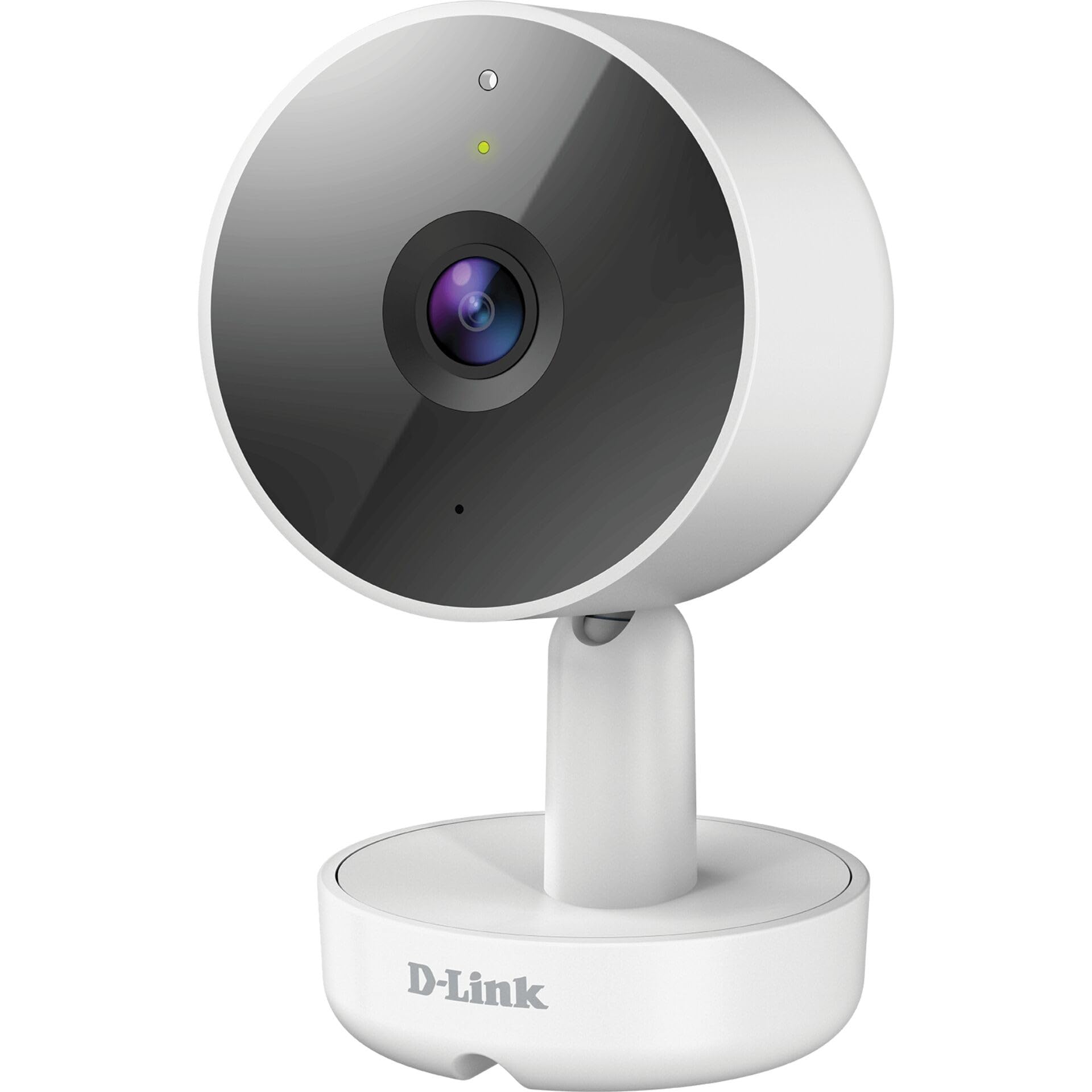
الشكل 3.1: أمام View من الكاميرا
- 1. العدسة: يلتقط الفيديو.
- 2. مؤشر LED للحالة: Indicates camera status (e.g., power, connection).
- 3. الميكروفون: يلتقط الصوت للتواصل ثنائي الاتجاه.
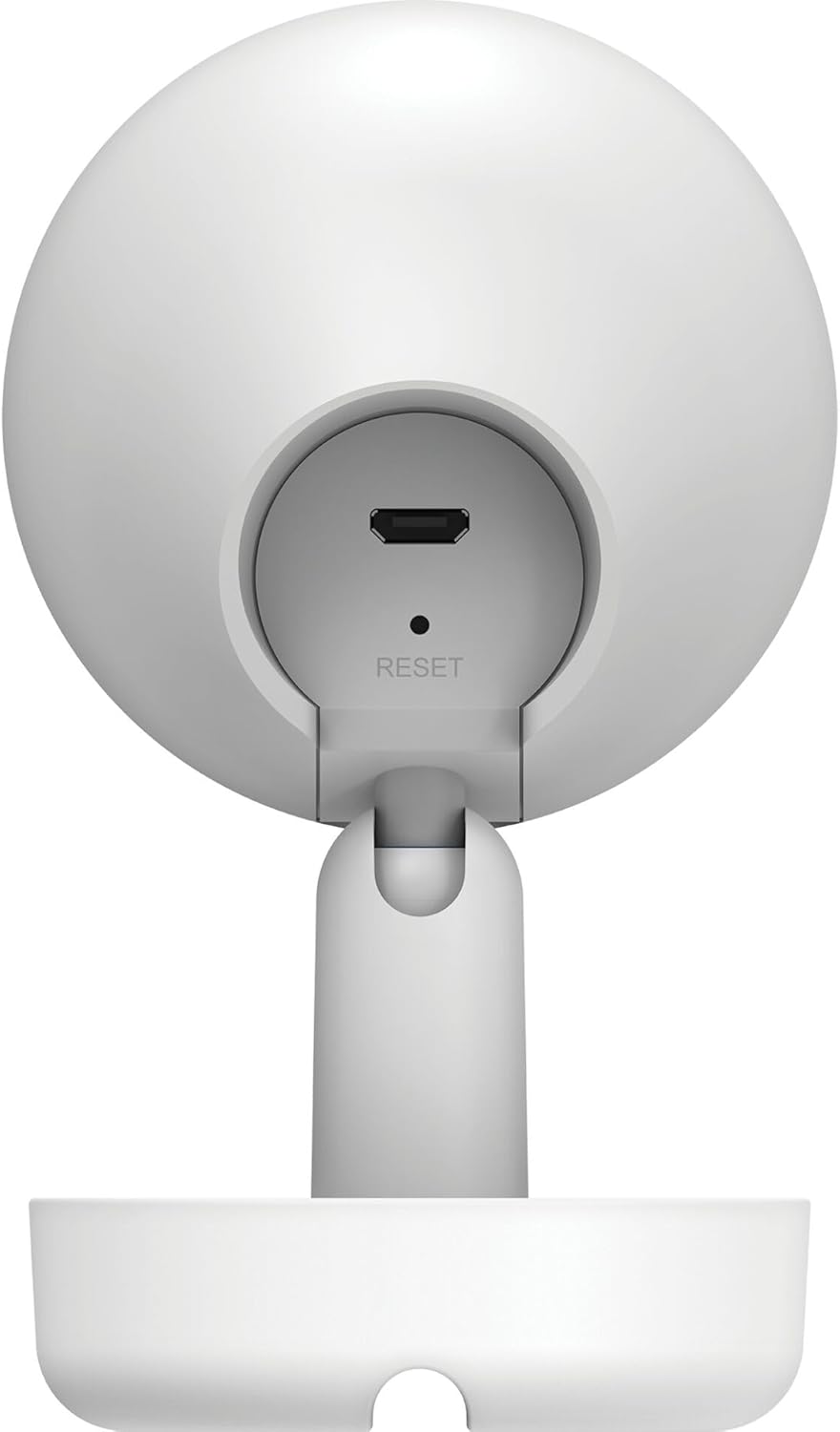
الشكل 3.2: مؤخرة View من الكاميرا
- 1. Micro USB Power Port: يتصل بمحول الطاقة.
- 2. زر إعادة الضبط: يستخدم لاستعادة إعدادات المصنع الافتراضية.
- 3. المتحدث: يُخرج الصوت للتواصل ثنائي الاتجاه.
- 4. فتحة بطاقة microSD: For local video storage (located on the side or bottom, not visible in this specific image, but mentioned in features).
4. الإعداد
اتبع هذه الخطوات لإعداد كاميرا D-Link DCS-8350LH الخاصة بك:
- تنزيل تطبيق mydlink: بحث عن "mydlink" on the App Store (iOS) or Google Play (Android) and download the official mydlink app.
- Create a mydlink Account: Open the app and follow the on-screen instructions to create a new mydlink account or log in if you already have one.
- تشغيل الكاميرا: Connect the provided power adapter to the camera's Micro USB port and plug it into a power outlet. The status LED will begin to blink.
- إضافة جهاز: In the mydlink app, tap the menu icon (usually three lines) and select "Add a Device". Scan the QR code located on the camera or its packaging.
- الاتصال بشبكة Wi-Fi: Follow the app's instructions to connect your camera to your home Wi-Fi network. Ensure your mobile device is connected to the same Wi-Fi network during setup.
- الموقع: Position your camera in the desired indoor location.

الشكل 4.1: Camera and mydlink App Integration
5. التثبيت
The D-Link DCS-8350LH camera supports wall mounting for optimal placement.
- اختر الموقع: اختر مكانًا داخليًا واضحًا view of the area you wish to monitor and within range of your Wi-Fi network.
- تصاعد السطح: Ensure the wall or surface is strong enough to support the camera.
- تأمين القاعدة: Use appropriate screws and anchors (not included) to secure the camera's base to the chosen surface.
- ضبط الزاوية: Once mounted, adjust the camera's angle to cover the desired viewing area. The camera has a 108-degree viewزاوية جي.
6. تعليمات التشغيل
Once set up, you can access and control your camera using the mydlink app.
6.1. حي View
Open the mydlink app and select your DCS-8350LH camera from the device list to view the live feed. The camera provides 2K QHD (1440p) resolution for clear images.
6.2. الرؤية الليلية الملونة
The camera automatically switches to color night vision in low-light conditions, allowing you to see detailed color video even when it's dark.
6.3. AI-based Event Detection
The camera features intelligent detection capabilities:
- كشف الشخص: Identifies human presence, reducing false alarms from pets or moving objects.
- كشف الصوت: Alerts you to specific sounds, including carbon monoxide and smoke alarm sounds.
Configure detection zones and sensitivity settings within the mydlink app to customize alerts.
6.4. الصوت ثنائي الاتجاه
Use the built-in microphone and speaker to communicate with people or pets near the camera. Tap the microphone icon in the live view within the mydlink app to speak.
6.5. تسجيل الفيديو وتخزينه
The DCS-8350LH offers multiple recording options:
- بطاقة MicroSD: Insert a microSD card (not included) into the camera's slot for local storage of recorded video clips.
- mydlink Cloud Recording: Utilize the mydlink Cloud service for secure off-site storage. Free and paid subscription plans are available.
- التسجيل عبر الهاتف الذكي: Capture snapshots and video clips directly to your smartphone via the mydlink app.
7. الصيانة
7.1. التنظيف
To clean the camera, gently wipe the lens and exterior surfaces with a soft, dry cloth. Do not use liquid cleaners or abrasive materials.
7.2. تحديثات البرامج الثابتة
Regularly check for firmware updates through the mydlink app. Keeping your camera's firmware up-to-date ensures optimal performance, security, and access to new features.
8. استكشاف الأخطاء وإصلاحها
If you encounter issues with your D-Link DCS-8350LH camera, refer to the following common solutions:
- Camera Offline / Wi-Fi Disconnection:
- تأكد من أن الكاميرا ضمن نطاق جهاز توجيه الواي فاي الخاص بك.
- Check your Wi-Fi network status.
- أعد تشغيل الكاميرا عن طريق فصل محول الطاقة وإعادة توصيله.
- If the issue persists, try resetting the camera to factory defaults (see below) and re-adding it to the mydlink app.
- جودة الفيديو رديئة:
- تأكد من أن عدسة الكاميرا نظيفة.
- Check your internet connection speed. A stable and fast connection is required for 2K QHD streaming.
- اضبط وضع الكاميرا لتجنب الوهج أو العوائق.
- إعادة ضبط الكاميرا:
To restore the camera to its factory default settings, use a paperclip or a thin object to press and hold the recessed إعادة ضبط button (refer to Figure 3.2) for approximately 10 seconds while the camera is powered on. The status LED will change, indicating a reset. You will then need to reconfigure the camera through the mydlink app.
9. المواصفات
| ميزة | التفاصيل |
|---|---|
| اسم الموديل | DCS-8350LH |
| دقة تسجيل الفيديو | 1440p (2K QHD) |
| Viewزاوية جي | 108 درجة |
| بروتوكول الاتصال | واي فاي |
| تكنولوجيا الاتصالات اللاسلكية | بلوتوث (للإعداد الأولي) |
| الاستخدام الداخلي والخارجي | داخلي |
| مصدر الطاقة | سلك كهربائي |
| استهلاك الطاقة | 8 واط |
| عامل الشكل | قبة |
| نوع التركيب | حامل الحائط |
| مادة | بلاستيك |
| أبعاد العنصر (الطول × العرض × الارتفاع) | 6.67 × 6.57 × 11.14 سم |
| وزن | 320 جرام |
| المكونات المضمنة | كاميرا داخلية |
| نوع وحدة التحكم | أمازون اليكسا |
10. الضمان والدعم
For warranty information, technical support, and further assistance, please visit the official D-Link website or contact D-Link customer service. Keep your purchase receipt as proof of purchase.
You can find the latest support resources, FAQs, and contact details at www.dlink.com.


