مقدمة
This manual provides detailed instructions for the setup, operation, and maintenance of your Astrum ELETE Combe UB USB Keyboard and Mouse Combo KC110. Please read this manual thoroughly before using the product to ensure proper functionality and longevity.
The Astrum ELETE Combe UB is designed for comfort and efficiency, featuring low-profile Quiet Touch keys and a spill-resistant design. It is a plug-and-play device, making it easy to set up for both home and office environments.
مميزات المنتج
- كتابة مريحة: Designed with low-profile Quiet Touch keys for a comfortable typing experience.
- تصميم مقاوم للانسكاب: Protects the keyboard from accidental liquid spills.
- تصميم أنيق: Suitable for various home and office setups.
- Plug and Play USB: Simple USB connection for immediate use without driver installation.
- مفاتيح الوسائط المتعددة: Features 7 hot multimedia keys for easy access to common functions and web التصفح.
- Optical Mouse: Includes a 1000dpi optical mouse for precise and smooth cursor control.
- تخطيط الولايات المتحدة: Keyboard features a standard US layout.
محتويات الحزمة
- Astrum ELETE Combe UB USB Keyboard
- Astrum ELETE Combe UB USB Mouse

Image: The Astrum ELETE Combe UB Keyboard and Mouse Combo as packaged in its retail box.
تعليمات الإعداد
- Unpack the Combo: قم بإخراج لوحة المفاتيح والماوس من عبوتهما بعناية.
- توصيل لوحة المفاتيح: Locate an available USB port on your computer. Insert the USB connector of the keyboard into the USB port.
- توصيل الماوس: حدد منفذ USB آخر متاح على جهاز الكمبيوتر الخاص بك. أدخل موصل USB الخاص بالماوس في منفذ USB.
- التعرف على النظام: Your operating system (Windows, macOS, Linux) should automatically detect and install the necessary drivers. This process typically takes a few seconds. No additional software installation is required.
- وظيفة الاختبار:
- Open a text editor (e.g., Notepad, WordPad) and type to ensure the keyboard is functioning correctly.
- Move the mouse cursor around the screen and click to verify mouse functionality.

Image: The Astrum ELETE Combe UB USB Keyboard and Mouse Combo, ready for connection.
تعليمات التشغيل
استخدام لوحة المفاتيح
The Astrum ELETE Combe UB keyboard operates like a standard USB keyboard. Its low-profile توفر المفاتيح تجربة كتابة مريحة وهادئة.
مفاتيح التشغيل السريع للوسائط المتعددة
The keyboard features 7 dedicated multimedia hotkeys located at the top right. These keys provide quick access to common functions:
- تشغيل/إيقاف مؤقت: التحكم في تشغيل الوسائط.
- توقف: إيقاف تشغيل الوسائط.
- المسار السابق: Go to the previous media track.
- المسار التالي: Go to the next media track.
- رفع الصوت: Increase system volume.
- اخفض الصوت: Decrease system volume.
- صامت: Mute/unmute system volume.
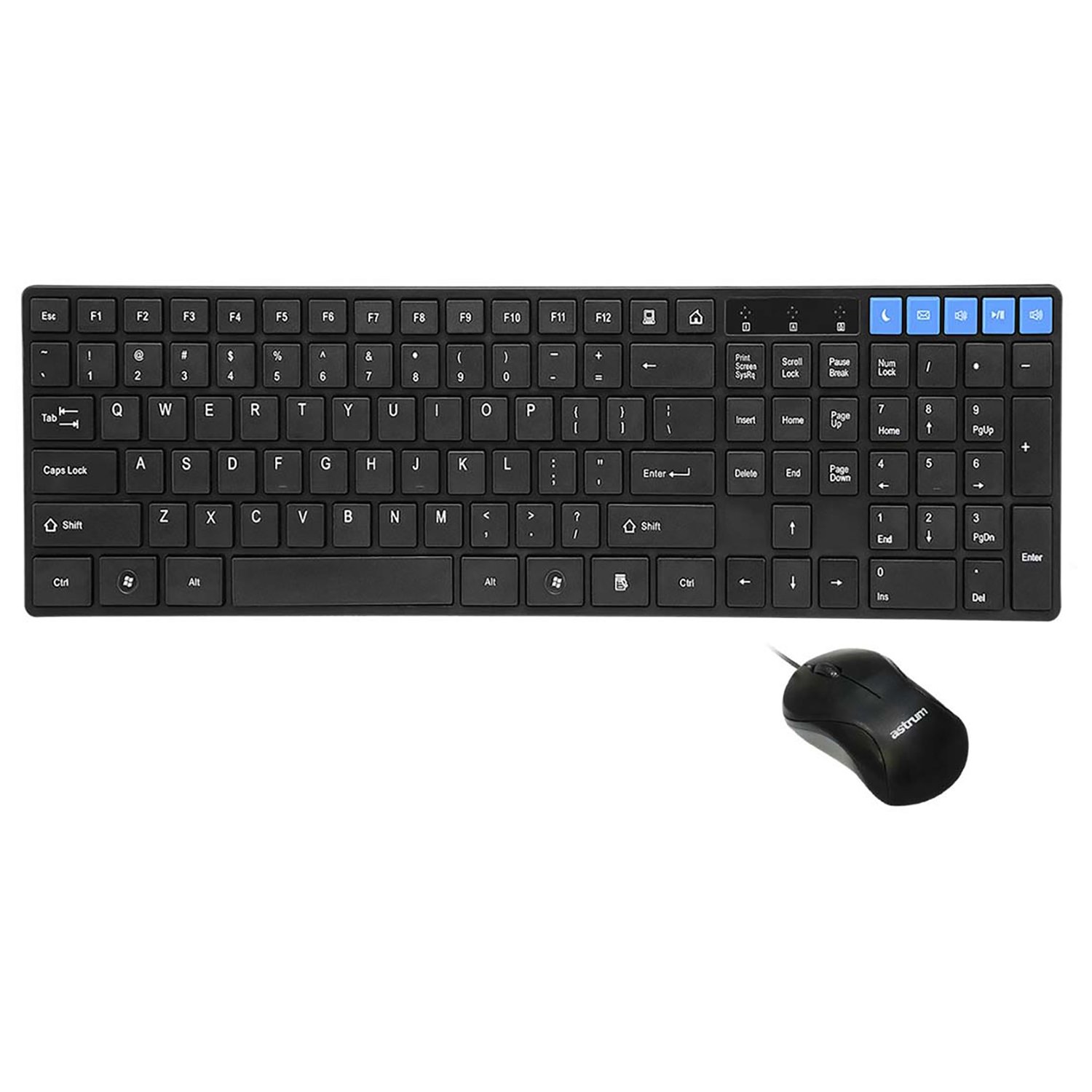
الصورة: من أعلى إلى أسفل view of the keyboard and mouse, showing the layout and multimedia keys.
استخدام الماوس
The included optical mouse provides precise cursor control. It features standard left-click, right-click, and scroll wheel functionality.
- الزر الأيسر: Primary action, selection, opening items.
- انقر على اليمين: يفتح قوائم السياق.
- عجلة التمرير: تصفح المستندات و web pages. Can also function as a middle-click button.
الصيانة والعناية
To ensure the longevity and optimal performance of your Astrum ELETE Combe UB combo, follow these maintenance guidelines:
- تنظيف:
- Disconnect the keyboard and mouse from your computer before cleaning.
- استخدم قطعة قماش ناعمة وخالية من الوبر وامسحها برفق.ampened with water or a mild cleaning solution. Avoid harsh chemicals, abrasives, or solvents.
- بالنسبة للوحة المفاتيح، يمكنك استخدام الهواء المضغوط لإزالة الغبار والحطام من بين المفاتيح.
- For the mouse, clean the optical sensor area periodically to ensure smooth tracking.
- مقاومة للانسكاب: While the keyboard is spill-resistant, it is not waterproof. In case of a spill, immediately disconnect the keyboard, wipe off the liquid, and allow it to dry completely before reconnecting.
- تخزين: Store the combo in a cool, dry place away from direct sunlight and extreme temperatures when not in use for extended periods.
- التعامل: Avoid dropping the devices or subjecting them to strong impacts. Do not attempt to disassemble the keyboard or mouse, as this will void the warranty.
استكشاف الأخطاء وإصلاحها
If you encounter issues with your Astrum ELETE Combe UB combo, please refer to the following common solutions:
- لوحة المفاتيح أو الماوس لا يستجيب:
- Ensure both USB connectors are firmly plugged into the computer's USB ports.
- جرب توصيل لوحة المفاتيح والماوس بمنافذ USB مختلفة على جهاز الكمبيوتر الخاص بك.
- أعد تشغيل الكمبيوتر الخاص بك.
- If using a USB hub, try connecting directly to the computer's USB ports.
- Keys Not Working or Typing Incorrectly:
- تحقق من وجود أي عوائق مادية أسفل المفاتيح.
- Ensure the keyboard layout in your operating system settings matches a US layout.
- قم باختبار لوحة المفاتيح على جهاز كمبيوتر آخر لاستبعاد وجود مشكلة خاصة بالنظام.
- يقفز مؤشر الماوس أو يكون غير منتظم:
- قم بتنظيف المستشعر البصري الموجود في الجزء السفلي من الماوس.
- Ensure you are using the mouse on a clean, non-reflective, and uniform surface. Mouse pads are recommended.
- حاول توصيل الماوس بمنفذ USB مختلف.
- Multimedia Keys Not Functioning:
- Ensure your media player or browser is active and supports standard multimedia key commands.
- Some operating systems may require specific settings for multimedia keys; consult your OS documentation if issues persist.
If the problem persists after trying these steps, please contact Astrum customer support.
تحديد
| ماركة | أستروم |
| رقم الموديل | ELETE-COMBE-UB |
| الشركة المصنعة | أستروم |
| منصة الأجهزة | USB |
| تخطيط لوحة المفاتيح | US Layout, Chocolate Keys Flat |
| مؤشر الماوس DPI | 1000 dpi Optical |
| أبعاد المنتج (الطول × العرض × الارتفاع) | 52.1 x 14 x 4.4 Centimeters (approx. 52.07 x 13.97 x 4.45 cm) |
| وزن العنصر | 680 جرام |
| البطاريات المطلوبة | لا |
| أول تاريخ متاح | 5 مارس 2015 |
الضمان والدعم
Astrum products are designed for reliability and performance. For information regarding warranty coverage and terms, please refer to the warranty policy provided with your purchase or visit the official Astrum webموقع.
For technical support, troubleshooting assistance beyond this manual, or inquiries about replacement parts, please contact Astrum customer service through their official channels. Details can typically be found on the product packaging or the Astrum brand webموقع.
Legal Disclaimer: The information provided in this manual is for general guidance. Specifications and features are subject to change without notice.


