1. المقدمة
Thank you for choosing the iBeam TE-CSC Chrome Push-in Camera. This manual provides detailed instructions for the proper installation, operation, and maintenance of your new vehicle backup camera. Please read this manual thoroughly before installation and use to ensure optimal performance and safety.
The iBeam TE-CSC is designed to enhance parking accuracy and help avoid obstacles when reversing, offering a wide 170-degree view. Its durable, water-resistant chrome housing ensures longevity and a sleek appearance.
2. معلومات السلامة
- افصل دائمًا بطارية السيارة قبل القيام بأي عمل كهربائي لتجنب حدوث ماس كهربائي أو صدمة كهربائية.
- Ensure all wiring is properly insulated and secured to prevent damage from vibration, heat, or moisture.
- لا تعيق حركة السائق view or interfere with the operation of any vehicle controls or safety features during installation.
- This camera is an aid for reversing and parking; it does not replace the need for careful driving and direct observation of surroundings.
- استشر فنيًا محترفًا إذا لم تكن متأكدًا من أي جزء من عملية التثبيت.
3. محتويات العبوة
يرجى التحقق من الحزمة للعناصر التالية:
- iBeam TE-CSC Chrome Push-in Camera
- 22.5mm هول المنشار
- سلك الطاقة
- 20-foot Video Cable (RCA type)
- دليل التعليمات
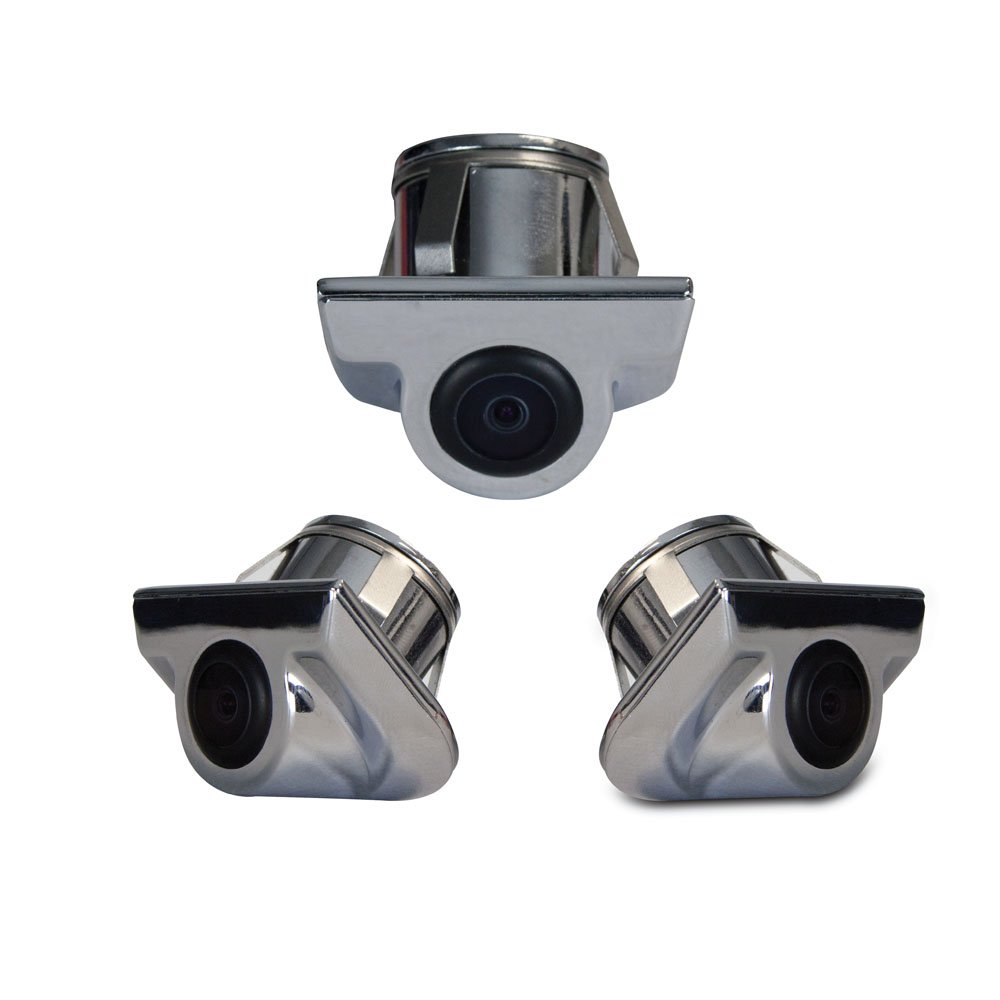
Image 1: iBeam TE-CSC Chrome Push-in Camera with its main components, including the camera unit, power cable, video cable, and hole saw.
4. الإعداد والتثبيت
The iBeam TE-CSC camera is designed for a push-in installation, typically above the rear license plate, mimicking an OEM camera setup. The camera is pre-set at a 45-degree angle for optimal viewعمل.
- اختر موقع التركيب: Identify a suitable flat surface above the rear license plate where the camera can be flush-mounted. Ensure there is enough space behind the mounting surface for the camera body and wiring.
- ثقب الحفر: Use the included 22.5mm hole saw to drill a precise hole at the chosen mounting location. Ensure the hole is clean and free of burrs.
- أدخل الكاميرا: Carefully push the camera into the drilled hole until it sits flush with the mounting surface. Ensure the camera's lens is oriented correctly (facing downwards and outwards).
- توصيل الطاقة: Connect the camera's power cord to the vehicle's reverse light circuit. This will ensure the camera activates automatically when the vehicle is put into reverse. Connect the red wire to the positive (+) lead of the reverse light and the black wire to a chassis ground (-).
- توصيل كابل الفيديو: Route the 20-foot RCA video cable from the camera to your compatible monitor or head unit. Ensure the cable is securely routed away from moving parts, heat sources, and sharp edges. Connect the yellow RCA connector from the camera to the video input of your monitor.
- نظام اختبار: Reconnect the vehicle's battery. Turn on the vehicle and engage reverse gear to test the camera's functionality. Adjust the camera's position slightly if needed (though it's fixed at 45 degrees, ensure the housing is seated correctly).
ملحوظة: For vehicles with complex wiring or if you are uncomfortable with electrical connections, professional installation is recommended.
5. تعليمات التشغيل
The iBeam TE-CSC camera operates automatically in conjunction with your vehicle's reverse gear and compatible monitor.
- التنشيط التلقائي: When the vehicle's transmission is shifted into reverse, the camera will automatically power on and transmit video to the connected monitor.
- Viewزاوية جي: The camera provides a wide 170-degree field of view, offering a comprehensive perspective of the area behind your vehicle.
- مساعدة ركن السيارة: Use the displayed image on your monitor to assist with parking maneuvers and to identify obstacles that may not be visible in your mirrors.
- التعطيل: When the vehicle is shifted out of reverse, the camera will automatically power off, and your monitor will return to its previous display mode.
6. الصيانة
To ensure the longevity and clear performance of your iBeam TE-CSC camera, follow these simple maintenance guidelines:
- تنظيف العدسات: قم بتنظيف عدسة الكاميرا بشكل دوري باستخدام قطعة قماش ناعمة.amp cloth to remove dirt, dust, or water spots. Avoid abrasive cleaners or materials that could scratch the lens.
- تفتيش السكن: Regularly inspect the camera housing for any signs of damage or loose connections. The chrome finish is designed to withstand elements, but extreme conditions may require more frequent checks.
- فحص الكابل: Ensure all cables remain securely connected and are not exposed to excessive tension or abrasion.
7. استكشاف الأخطاء وإصلاحها
| مشكلة | السبب المحتمل | حل |
|---|---|---|
| لا تظهر أي صورة على الشاشة عند الرجوع للخلف. |
|
|
| الصورة مشوهة أو تومض. |
|
|
| Camera lens is foggy or blurry. |
|
|
8. المواصفات
| رقم الموديل | TE-CSC |
| ماركة | اي بيم |
| الشركة المصنعة | iBeam USA |
| أبعاد المنتج | 40.5 × 17 × 8.5 بوصات (أبعاد التغليف/الشحن) |
| وزن العنصر | 3.76 pounds (packaging/shipping weight) |
| تقنية الاستشعار البصري | سيموس |
| حجم المستشعر البصري | 1/4 بوصة |
| نوع العدسة | Fixed, Wide Angle |
| زاوية حقيقية View | 170 درجة |
| مجال ال View | 170 درجة |
| نوع التثبيت | Surface Mount (Push-in) |
| نوع الموصل | ار سي ايه |
| الأجهزة المتوافقة | شاشة |
| ميزات العرض الأخرى | Wireless (Note: This might refer to compatibility with wireless video transmitters, but the product includes a 20ft video cable, implying wired connection for this specific model. Clarification needed if "Wireless" refers to a feature of the camera itself or a compatible accessory.) |
9. الضمان والدعم
For warranty information and technical support, please contact iBeam USA directly. Details are typically provided with your product packaging or can be found on the official iBeam USA webموقع.
When contacting support, please have your product model number (TE-CSC) and purchase date available.


