1. المقدمة
This manual provides comprehensive instructions for the proper use, setup, operation, and maintenance of the WTW pH 3310 ProfiLine Meter Kit, which includes the SenTix 41 pH Electrode. The WTW pH 3310 is a robust and reliable instrument designed for accurate pH measurements in various applications, from laboratory to field use. Please read this manual thoroughly before operating the device to ensure optimal performance and longevity.
2. انتهى المنتجview
2.1 الميزات الرئيسية
- تصميم متين ومقاوم للماء: The meter features a 100% waterproof keypad and housing, making it suitable for demanding environments.
- عرض واضح: A large graphic LCD ensures excellent readability under various lighting conditions.
- Extended Data Memory: Capable of logging up to 5000 compliant data sets.
- Time-Controlled Datalogging: Adjustable data collection intervals for long-term monitoring.
- وضع توفير الطاقة: A special "sleep" mode extends battery life during prolonged monitoring.
- ذاكرة غير متطايرة: All stored data is retained even if battery power is lost.
- واجهة USB: Waterproof mini-USB for simple data transfer to a PC.
- Broad Buffer Recognition: Supports DIN, NIST, and USA pH buffer standards for calibration.
2.2 مكونات المجموعة
The WTW pH 3310 ProfiLine Meter Kit includes the following items:
- WTW pH 3310 ProfiLine Meter
- SenTix 41 pH Electrode
- حلول المعايرة
- من الصعب حمل القضية
- Four (4) AA Batteries
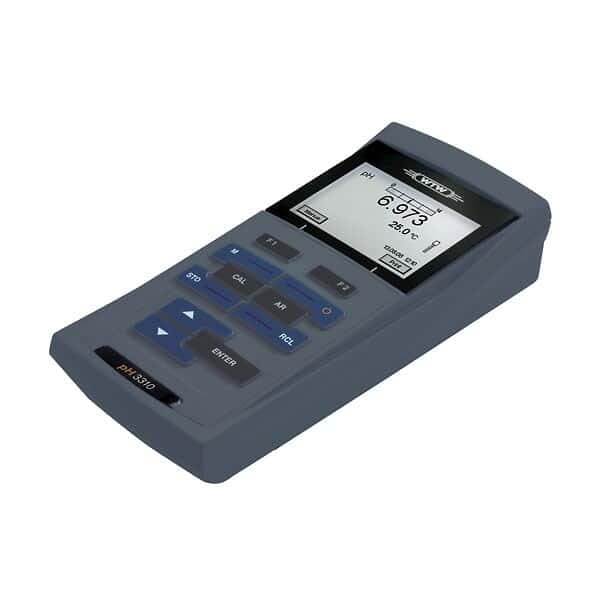
الشكل 1: The WTW pH 3310 ProfiLine Meter, a handheld device with a large LCD screen showing a pH reading of 6.973 and a temperature of 25.0°C. The keypad features buttons for functions such as 'STO' (Store), 'CAL' (Calibration), 'AR' (AutoRead), 'RCL' (Recall), and 'ENTER', along with navigation arrows. The model name 'pH 3310' is visible on the lower left of the device.
3. الإعداد
3.1 تركيب البطارية
- حدد مكان حجرة البطارية في الجزء الخلفي من العداد.
- افتح غطاء الحجرة.
- Insert four (4) AA batteries, ensuring correct polarity as indicated inside the compartment.
- Close the battery compartment cover securely to maintain the waterproof seal.
3.2 توصيل القطب
- Carefully remove the protective cap from the SenTix 41 pH Electrode.
- Connect the electrode cable to the designated port on the WTW pH 3310 meter. Ensure the connection is firm and secure.
- Rinse the electrode with distilled water before initial use.
3.3 التشغيل الأولي
اضغط على تشغيل/إيقاف button to power on the meter. The display will illuminate, and the device will perform a self-test before entering measurement mode.
4. تعليمات التشغيل
4.1 المعايرة
Regular calibration is essential for accurate pH measurements. The WTW pH 3310 supports up to 5-point calibration using DIN, NIST, or USA buffer recognition.
- Prepare fresh calibration buffer solutions (e.g., pH 4.01, 7.00, 10.00).
- اضغط على كال زر للدخول إلى وضع المعايرة.
- Rinse the electrode with distilled water and immerse it in the first buffer solution.
- Wait for the reading to stabilize, then confirm the calibration point as prompted by the meter.
- Repeat for subsequent buffer solutions.
- The meter will automatically recognize the buffer and store the calibration data.
4.2 القياس
- Ensure the meter is calibrated.
- Rinse the electrode with distilled water and immerse it in the sampلو الحل.
- Wait for the reading to stabilize on the LCD. The AutoRead (AR) function can assist in determining when the reading is stable.
- Record the pH and temperature values displayed.
4.3 تسجيل البيانات
The pH 3310 meter offers advanced data logging capabilities:
- التخزين اليدوي: اضغط على شركة ستو button to manually store the current measurement. The meter can store up to 5000 data sets.
- Time-Controlled Datalogging: Access the menu to set adjustable intervals for automatic data collection. This is ideal for long-term field monitoring.
- وضع السكون: During long-term monitoring, the special "sleep" mode conserves battery power.
- ذاكرة غير متطايرة: All logged data is saved permanently, even if the batteries are depleted or removed.
4.4 نقل البيانات إلى جهاز الكمبيوتر
To transfer stored data to a computer:
- Connect the WTW pH 3310 meter to a PC using a mini-USB cable.
- The meter's waterproof USB interface ensures reliable connection.
- Follow the instructions in the accompanying software (if applicable) or the meter's menu to initiate data transfer.
5. الصيانة
5.1 Meter Care
- Clean the meter's keypad and housing with a damp قماش. تجنب المنظفات الكاشطة.
- Ensure the battery compartment and USB port covers are securely closed when not in use to maintain waterproofing.
- Store the meter in its hard carrying case when not in use to protect it from damage.
5.2 Electrode Care (SenTix 41 pH Electrode)
- Always keep the electrode tip moist. Store it in its protective cap filled with appropriate storage solution (e.g., 3 mol/L KCl solution) when not in use. Never store in distilled water.
- اشطف القطب الكهربائي بالماء المقطر قبل وبعد كل قياس.
- If the electrode becomes sluggish or readings are unstable, refer to the electrode's specific manual for cleaning and regeneration procedures.
- Replace the electrode when it no longer calibrates correctly or provides stable readings.
6. استكشاف الأخطاء وإصلاحها
This section addresses common issues you might encounter with your WTW pH 3310 meter. For more detailed troubleshooting, refer to the full product manual or contact customer support.
| مشكلة | السبب المحتمل | حل |
|---|---|---|
| العداد لا يعمل. | البطاريات الميتة أو المثبتة بشكل غير صحيح. | تحقق من قطبية البطارية؛ ثم استبدلها ببطاريات AA جديدة. |
| Unstable pH readings. | Dirty or damaged electrode; insufficient sample immersion; air bubbles. | Clean electrode; ensure proper immersion; gently stir to remove bubbles; recalibrate. |
| Calibration fails or is inaccurate. | Expired or contaminated buffer solutions; dirty electrode; incorrect buffer recognition setting. | Use fresh buffer solutions; clean electrode; check buffer recognition settings in the menu. |
| Data transfer to PC not working. | Loose USB connection; driver issues; incorrect software settings. | Ensure USB cable is securely connected; check PC device manager for drivers; consult software manual. |
7. المواصفات
- نموذج: WTW pH 3310 ProfiLine Meter (Model Number: 2AA312)
- قطب الأس الهيدروجيني: سينتيكس 41
- مزود الطاقة: 4 × بطاريات AA (مضمنة)
- التعرف على المخزن المؤقت: DIN, NIST, and USA
- نقاط المعايرة: حتى 5 نقاط
- نوع العرض: LCD (Graphic)
- الواجهة: Waterproof Mini-USB
- ذاكرة البيانات: ما يصل إلى 5000 مجموعة بيانات
- الأبعاد (الحزمة): حوالي 16.2 × 14.4 × 7 بوصة
- الوزن (للعبوة): حوالي 6.2 رطل
- الشركة المصنعة: Cole-Parmer (for distribution/packaging)
8. الضمان والدعم
For warranty information, technical support, or service inquiries regarding your WTW pH 3310 ProfiLine Meter Kit, please refer to the documentation provided with your purchase or contact WTW customer service directly. Contact details can typically be found on the manufacturer's official webالموقع أو على عبوة المنتج.
For additional resources and product information, visit the official WTW webموقع: www.wtw.com


