Boxlight ACTG042

استبدال مصباح صندوق الإضاءة Lamp دليل مستخدم الوحدة

Models: LC-XG110, LC-XG210, LX32 (Part Number: ACTG042)

مقدمة

This manual provides essential information for the safe and effective installation, operation, and maintenance of your Boxlight replacement lamp module. This module is designed for use with Boxlight LC-XG110, LC-XG210, and LX32 projector models. Please read these instructions carefully before proceeding with installation.
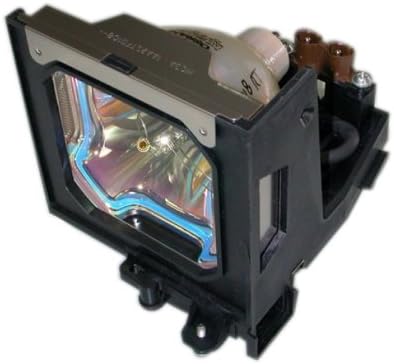
استبدال مصباح صندوق الإضاءة Lamp الوحدة

Image: Boxlight replacement lamp module, showing the bulb encased in its housing with electrical connectors.

The Boxlight replacement lamp module (Part Number: ACTG042) includes an original bulb and housing, ensuring compatibility and optimal performance with your projector. It features a 250-watt bulb with an average lamp life of 2000 hours under normal operating conditions.

معلومات هامة حول السلامة

المصباح في هذا لamp contains Mercury (Hg). Please dispose of in accordance with local, state, or federal laws. Do not dispose of with regular household waste.

تعليمات التثبيت

  1. انقطاع التيار الكهربائي وقطع الاتصال: Ensure your Boxlight projector is turned off and completely unplugged from the power source.
  2. ترطيب: اترك جهاز العرض ليبرد لمدة 30 دقيقة على الأقل.amp operates at high temperatures and can cause burns if handled while hot.
  3. حدد موقع Lamp غطاء: Refer to your projector's user manual to locate the lamp compartment cover. This is typically secured by one or more screws.
  4. إزالة L.amp غطاء: Using a suitable screwdriver, carefully remove the screw(s) securing the lamp cover and then remove the cover.
  5. Unscrew Old Lamp: القديم لamp module will be secured by one or more screws. Unscrew these fasteners.
  6. إزالة الحرف L القديمamp: Gently pull the handle on the old lamp module to slide it out of the projector. Be careful not to drop it.
  7. أدخل L جديدamp: Carefully insert the new Boxlight replacement lamp module into the projector, ensuring it slides smoothly into place. Do not force it.
  8. تأمين جديد Lamp: Fasten the new lamp module with the screw(s) you removed earlier. Ensure it is securely seated.
  9. استبدل L.amp غطاء: أعد توصيل lamp compartment cover and secure it with its screw(s).
  10. إعادة توصيل الطاقة: Plug the projector back into the power outlet.
  11. إعادة تعيين L.amp المؤقت: Consult your projector's user manual for instructions on how to reset the lamp timer. This is crucial for accurate lamp life tracking.

إرشادات التشغيل

صيانة

استكشاف الأخطاء وإصلاحها

إذا واجهت مشاكل بعد تثبيت الإصدار الجديدamp، خذ بعين الاعتبار ما يلي:

For further assistance, refer to your projector's original user manual or contact Boxlight customer support.

مواصفات المنتج

ماركةصندوق الضوء
رقم الموديلACTG042
Compatible Projector ModelsLC-XG110, LC-XG210, LX32
Lamp أرقام الأجزاء03-000712-01P; 610 305 5602; MP56T-930; POA-LMP59
واتtage250 واط
Lamp Life (Normal)2000 ساعات
نوع الضوءزينون
Lamp تكنولوجياشاشة الكريستال السائل
وزن العنصر13.3 أونصة (0.83 رطل)
أبعاد المنتج5.32 × 4.53 × 4.13 بوصة
رمز المنتج الموحد840398106805

معلومات الضمان

This Boxlight replacement lamp module is covered by a الضمان 180-يوم من تاريخ الشراء. يغطي هذا الضمان عيوب المواد والتصنيع في ظل الاستخدام العادي. يُرجى الاحتفاظ بإيصال الشراء للمطالبة بالضمان.

For warranty service or inquiries, please contact the seller or manufacturer directly.

دعم العملاء

If you require further assistance, have questions about installation, or need to report an issue, please contact the retailer where you purchased this product or the manufacturer, Arclyte Tech. (Boxlight's manufacturer).

When contacting support, please have your product model number (ACTG042) and proof of purchase readily available.

المستندات ذات الصلة - ACTG042

قبلview دليل مستخدم جهاز عرض LCD صغير محمول
دليل مستخدم شامل لجهاز العرض LCD المحمول الصغير، يغطي الميزات والإعداد والتوصيلات وعمليات قائمة OSD والصيانة واستكشاف الأخطاء وإصلاحها.
قبلview دليل مستخدم جهاز العرض BOXLIGHT Boston Series - دليل الإعداد والميزات والتشغيل
دليل مستخدم شامل لجهاز عرض بوكسلايت من سلسلة بوسطن. تعرّف على الميزات، وإرشادات السلامة، وإجراءات الإعداد، والتشغيل، والصيانة، واستكشاف الأخطاء وإصلاحها. تفضل بزيارة BOXLIGHT.com للحصول على الدعم.
قبلview دليل فتح العلبة والتركيب لشاشة العرض التفاعلية المسطحة Boxlight MimioPro G
دليل شامل لفتح صندوق وتركيب شاشة Boxlight MimioPro G التفاعلية المسطحة. يغطي الدليل إعداد الأجهزة، ووحدة Wi-Fi، وتحديثات البرامج الثابتة، والإعداد الأولي لجوجل.
قبلview دليل مستخدم BOXLIGHT ProjectoWrite5|6
دليل المستخدم الشامل لجهاز العرض BOXLIGHT ProjectoWrite5 وProjectoWrite6، يوضح بالتفصيل الإعداد والميزات والتشغيل والصيانة واستكشاف الأخطاء وإصلاحها لتحسين العروض التقديمية.
قبلview دليل مستخدم شاشة العرض التفاعلية MimioPro G | بوكسلايت
دليل مستخدم شامل لشاشة Boxlight MimioPro G التفاعلية، يغطي جوانب السلامة والإعداد والتشغيل والصيانة واستكشاف الأخطاء وإصلاحها. تعرّف على كيفية توصيل الأجهزة واستخدام جهاز التحكم عن بُعد وحل المشكلات الشائعة.
قبلview دليل ترقية البرامج الثابتة لسلسلة Boxlight ProColor Two IFPD
يوضح هذا الدليل بالتفصيل عملية ترقية البرامج الثابتة لشاشات العرض التفاعلية المسطحة من سلسلة Boxlight ProColor (IFPD)، بما في ذلك الميزات الجديدة وخطوات التنفيذ والأدوات اللازمة. ويتضمن معلومات حول تطبيقات مثل Unplug'd وChrome، وأدوات مساعدة مثل NDMS، وإجراءات الترقية اليدوية.