مقدمة
Thank you for choosing the SoundBot SB510 HD Water Resistant Bluetooth Shower Speaker. This manual provides essential information for setting up, operating, and maintaining your speaker to ensure optimal performance and longevity. Designed for convenience and durability, this speaker allows you to enjoy your favorite audio content in various environments, including the shower, without concern for water exposure.
تتضمن الميزات الرئيسية ما يلي:
- تصميم مقاوم للماء: Built to withstand steam, splashes, and humidity, ideal for bathroom use.
- الاتصال بدون استخدام اليدين: Integrated microphone and control buttons for answering and ending calls.
- محمولة وخفيفة الوزن: Compact design for easy transport and use on the go.
- وقت اللعب الممتد: يصل وقت تشغيل الصوت المتواصل إلى 6 ساعات بشحنة واحدة.
- اتصال بلوتوث مستقر: Reliable streaming up to 33 feet from your device.
- عناصر التحكم سهلة الاستخدام: Tactile buttons designed for operation even with wet hands.

The SoundBot SB510 HD speaker, showcasinيتميز بتصميمه المقاوم للماء.
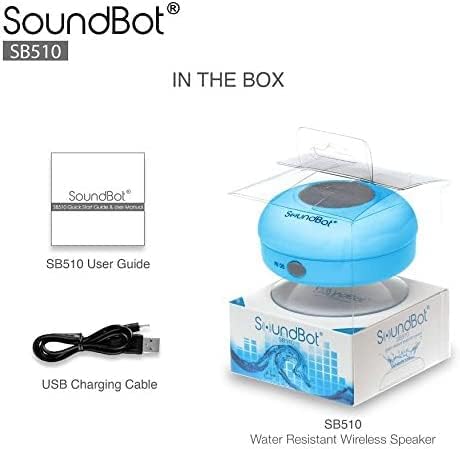
ماذا يوجد في الصندوق
Your SoundBot SB510 HD package includes the following items:
- 1 x SoundBot SB510 Water Resistant Bluetooth Shower Speaker
- 1 × دليل المستخدم
- 1 × كابل شحن USB

Included components: speaker, USB charging cable, and user guide.
يثبت
شحن السماعة
Before first use, fully charge your SoundBot SB510 HD speaker. A full charge takes approximately 3 hours and provides up to 6 hours of playtime.
- Locate the charging port on the side of the speaker, usually protected by a rubber flap.
- Connect the small end of the included USB charging cable to the speaker's charging port.
- قم بتوصيل الطرف الأكبر من كابل USB بمصدر طاقة USB (مثل منفذ USB في الكمبيوتر، أو محول USB الجداري).
- سيضيء مؤشر LED أثناء الشحن وينطفئ أو يتغير لونه عند اكتمال الشحن.

The speaker connected to its USB charging cable.
بلوتوث الاقتران
Pair your speaker with your Bluetooth-enabled device (smartphone, tablet, laptop) to begin wireless audio streaming.
- Ensure the speaker is charged and turned off.
- اضغط مع الاستمرار على زر التشغيل (⏻) on the speaker until the LED indicator light begins to flash rapidly, indicating it is in pairing mode.
- على جهازك، قم بتمكين البلوتوث وابحث عن الأجهزة المتاحة.
- Select "SB510" from the list of found devices.
- Once successfully paired, the LED indicator light on the speaker will stop flashing and remain solid blue. You will also hear an audible confirmation.
- يبلغ مدى مكبر الصوت اللاسلكي 33 قدمًا (10 أمتار).
The speaker's control panel, used for initiating Bluetooth pairing.
تعليمات التشغيل
ضوابط السماعة
The SoundBot SB510 HD features intuitive buttons for easy control of your audio and calls:
| زر | الوظيفة (الضغط القصير) | الوظيفة (الضغط لفترة طويلة) |
|---|---|---|
| ⏻ (قوة) | غير متاح | تشغيل/إيقاف الطاقة |
| ⏵⏸ (تشغيل/إيقاف مؤقت) | تشغيل/إيقاف الموسيقى مؤقتًا | غير متاح |
| ⏮ (السابق/خفض مستوى الصوت) | الأغنية السابقة | اخفض الصوت (-) |
| ⏭ (التالي/رفع مستوى الصوت) | الأغنية التالية | رفع الصوت (+) |
| 📞 (هاتف) | الرد على/إنهاء المكالمة الهاتفية | غير متاح |

مفصل view of the speaker's control buttons and their functions.
إجراء واستقبال المكالمات
The built-in microphone allows for hands-free communication:
- الرد على مكالمة: عند ورود مكالمة، اضغط على 📞 button once to answer.
- إنهاء المكالمة: أثناء المكالمة ، اضغط على 📞 button once to end the conversation.
- إعادة الاتصال: اضغط مرتين على 📞 زر لإعادة الاتصال بالرقم الأخير.
صيانة
To ensure the longevity and optimal performance of your SoundBot SB510 HD speaker, follow these maintenance guidelines:
- مقاومة الماء: The speaker is IPX4 water resistant, meaning it is protected against splashing water from any direction. It is suitable for use in showers or near pools, but it should لا be submerged in water. Ensure the charging port cover is securely closed when not charging to maintain water resistance.
- تنظيف: قم بتنظيف مكبر الصوت باستخدام قطعة قماش ناعمة.amp cloth. Do not use abrasive cleaners or solvents, as these may damage the surface or internal components.
- تخزين: احفظ السماعة في مكان بارد وجاف عند عدم استخدامها. تجنب درجات الحرارة العالية.
- العناية بكوب الشفط: For best adhesion, ensure the surface where you attach the suction cup is clean, smooth, and dry. Periodically clean the suction cup with water to remove any dust or residue.

The speaker's water-resistant design allows for use in wet environments.
استكشاف الأخطاء وإصلاحها
If you encounter any issues with your SoundBot SB510 HD speaker, please refer to the following common troubleshooting steps:
| مشكلة | السبب المحتمل | حل |
|---|---|---|
| مكبر الصوت لا يعمل. | بطارية منخفضة. | Charge the speaker fully (approx. 3 hours). |
| لا يمكن الاقتران بالجهاز. | السماعة ليست في وضع الاقتران؛ البلوتوث معطل على الجهاز؛ الجهاز بعيد جدًا. | Ensure speaker is in pairing mode (flashing LED). Turn on Bluetooth on your device. Move device closer to speaker (within 33 ft). Forget previous pairings on your device and try again. |
| لا يوجد صوت أو مستوى الصوت منخفض. | مستوى الصوت منخفض جدًا على مكبر الصوت أو الجهاز؛ مكبر الصوت غير متصل. | Increase volume on both the speaker and your connected device. Ensure speaker is successfully paired and connected. |
| تشويه الصوت. | الجهاز بعيد جدًا؛ تداخل. | Move your device closer to the speaker. Avoid obstacles between the speaker and device. Reduce interference from other wireless devices. |
| لا يلتصق كوب الشفط. | Surface is dirty, wet, or not smooth. | Clean and dry the surface thoroughly. Ensure the surface is smooth (e.g., tile, glass). Clean the suction cup itself. |
تحديد
Detailed technical specifications for the SoundBot SB510 HD speaker:
| ميزة | وصف |
|---|---|
| اسم الموديل | SB510 اتش دي |
| رقم موديل العنصر | SB510-BLU |
| تكنولوجيا الاتصال | بلوتوث، يو اس بي |
| تكنولوجيا الاتصالات اللاسلكية | بلوتوث |
| مدى البلوتوث | حتى 33 قدمًا (10 أمتار) |
| مستوى مقاومة الماء | IPX4 (مقاوم للماء) |
| نوع السماعة | Desktop / Portable |
| الحد الأقصى لقوة خرج السماعة | 3 واط |
| وضع إخراج الصوت | ستيريو |
| عمر البطارية | 6 ساعة |
| وقت الشحن | 3 ساعة |
| نوع البطارية | 1 بطارية ليثيوم أيون مطلوبة |
| ميكروفون مدمج | نعم |
| أبعاد المنتج | 3.5 بوصة عمق × 3.5 بوصة عرض × 2.3 بوصة ارتفاع |
| وزن العنصر | 1.59 أونصات |
| مادة | البلاستيك والمطاط |
الضمان والدعم
The SoundBot SB510 HD Water Resistant Bluetooth Shower Speaker comes with a Limited Warranty. For specific details regarding warranty coverage, duration, and terms, please refer to the warranty information provided in the original product packaging or contact SoundBot customer support directly.
For technical assistance, troubleshooting beyond this manual, or warranty claims, please visit the official SoundBot website or contact their customer service department. Contact information can typically be found on the product packaging or the SoundBot webموقع.


