1. المقدمة
This manual provides detailed instructions for the installation, operation, and maintenance of your Axis P1355 Surveillance/Network Camera. The Axis P13 series offers high-performance fixed cameras designed for both indoor and outdoor surveillance, delivering superb image quality with H.264 compression. These models support HDTV 720p/1080p video and are equipped with features like Wide Dynamic Range and Day/Night functionality for clear imaging in various lighting conditions. Specific models within the P13 series, including HDTV 720p, incorporate Axis Lightfinder technology for enhanced low-light sensitivity, while HDTV 1080p and 5-megapixel cameras feature P-iris control for optimized depth of field and lens resolution.
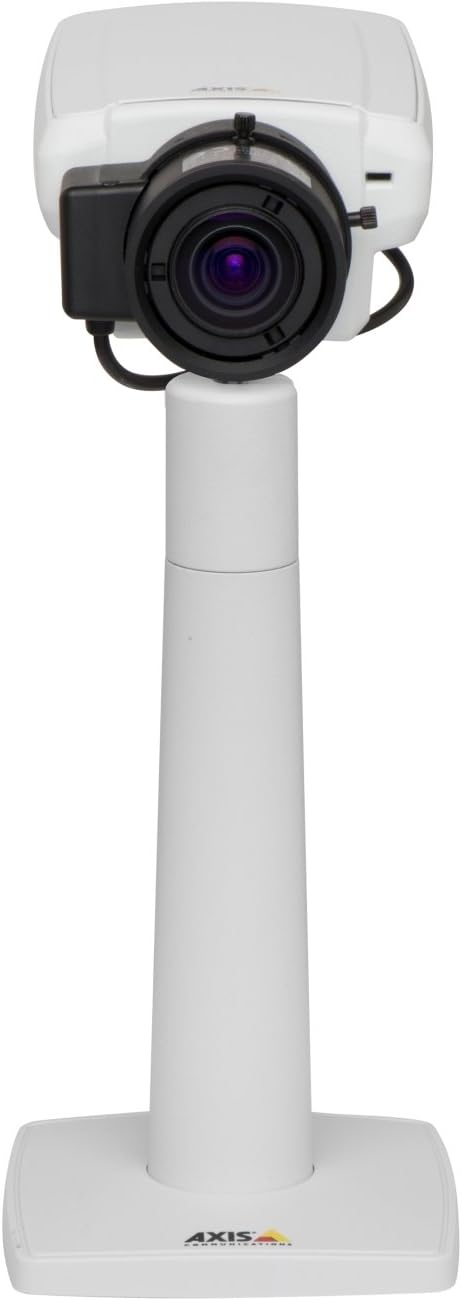
الشكل 1: The Axis P1355 Surveillance Camera shown mounted on its stand. This image illustrates the camera's physical appearance and typical mounting configuration.
2. معلومات السلامة
Please read all safety instructions before installing or operating the camera.
- Ensure the power source matches the camera's requirements to prevent electrical hazards.
- يجب أن يتم إجراء التثبيت بواسطة موظفين مؤهلين وفقًا للقوانين الكهربائية المحلية.
- لا تعرض الكاميرا لدرجات حرارة عالية أو رطوبة أو بيئات تآكلية.
- Avoid direct exposure of the lens to strong light sources, such as the sun, as this may damage the image sensor.
- Disconnect power before cleaning or servicing the camera.
3. الإعداد والتثبيت
The Axis P1355 camera is designed for both indoor and outdoor use and supports various mounting options.
3.1 التركيب
The camera is typically designed for wall mount installation. Ensure the mounting surface is strong enough to support the camera's weight (approximately 2 pounds). Use appropriate screws and anchors for the chosen surface.
- Select a suitable location for optimal surveillance coverage.
- قم بتثبيت دعامة التثبيت بإحكام على الحائط.
- Mount the camera onto the bracket, ensuring it is firmly in place.
- Adjust the camera's angle for the desired field of view.
3.2 الاتصالات
The Axis P1355 camera primarily uses wired connectivity for reliable data transmission and power.
- توصيل الطاقة: Connect the provided power adapter to the camera's power input and then to a suitable electrical outlet. The camera operates on a corded electric power source.
- إتصال شبكة: Connect an Ethernet cable from the camera's network port to your network switch or router. This provides wired connectivity for video streaming and control.
- Wireless Connectivity (Optional/Configuration): While primarily wired, the camera supports Wi-Fi for certain configurations. Refer to the Axis product documentation for specific wireless setup instructions if applicable to your model variant.
4. تعليمات التشغيل
Once installed and connected, the Axis P1355 camera can be configured and operated via a network interface.
4.1 الوصول الأولي والتكوين
- Use the Axis IP Utility or a similar network discovery tool to find the camera's IP address on your network.
- افتح web browser and enter the camera's IP address to access its web واجهة.
- Log in using the default credentials (refer to Axis documentation for default username/password, typically 'root' and 'pass' or similar, which should be changed immediately).
- Follow the on-screen prompts to set up basic network settings, date/time, and user accounts.
4.2 Video Monitoring and Features
- يعيش View: Access the live video feed through the web interface or compatible video management software.
- دقة: The camera supports video capture resolutions up to 720p and effective video resolutions of 1080 pixels, with effective still resolution of 2 MP.
- Color and Monochrome Modes: The camera can operate in both color and monochrome (black and white) modes, automatically switching based on light conditions or configured manually.
- الرؤية الليلية: Utilize the integrated night vision capabilities for surveillance in low-light or complete darkness.
- التكبير البصري: Adjust the optical zoom for detailed views of specific areas.
- P-Iris Control: For models equipped with P-iris, this feature allows precise control over the iris position to optimize depth of field and lens resolution, enhancing image sharpness. This can be configured via the web واجهة.
- صيغة الفيديو: Video is typically captured in MP4 format.
- جهاز التحكم عن بعد: The camera supports remote control for various settings and adjustments.
5. الصيانة
Regular maintenance ensures optimal performance and longevity of your Axis P1355 camera.
- تنظيف: نظف عدسة الكاميرا وهيكلها برفق باستخدام قطعة قماش ناعمة.amp القماش. تجنب استخدام المنظفات أو المذيبات الكاشطة.
- تحديثات البرامج الثابتة: تحقق دوريًا من اتصالات المحور webموقع لتحديثات البرامج الثابتة. يضمن تحديث البرامج الثابتة الوصول إلى أحدث الميزات وتصحيحات الأمان وتحسينات الأداء.
- فحص الكابلات: افحص جميع الكابلات بانتظام بحثًا عن علامات التآكل أو التلف، وخاصة بالنسبة للتركيبات الخارجية.
- الفحص البيئي: Ensure the camera's operating environment remains within specified temperature and humidity ranges.
6. استكشاف الأخطاء وإصلاحها
This section addresses common issues you might encounter with your Axis P1355 camera.
- لا يوجد طاقة:
- Verify the power adapter is securely connected to both the camera and a working power outlet.
- تحقق من كابل الطاقة بحثًا عن أي ضرر.
- لا يوجد اتصال بالشبكة:
- Ensure the Ethernet cable is properly connected to the camera and the network switch/router.
- Check network switch/router status.
- Confirm the camera has a valid IP address and is on the same network segment as your viewجهاز ing.
- ضعف جودة الصورة:
- تنظيف عدسة الكاميرا.
- Adjust focus and zoom settings via the web واجهة.
- Check lighting conditions; enable night vision or adjust exposure settings if necessary.
- Ensure P-iris control is correctly configured for optimal sharpness (if applicable).
- لا يمكن الوصول Web الواجهة:
- Verify the camera's IP address.
- تأكد من أن جهاز الكمبيوتر الخاص بك متصل بنفس الشبكة التي تتصل بها الكاميرا.
- Try restarting the camera and your network equipment.
7. المواصفات
| ميزة | التفاصيل |
|---|---|
| ماركة | أكسيس كوميونيكيشنز |
| رقم الموديل | المحور P1355 |
| الاستخدام الداخلي والخارجي | داخلي، خارجي |
| تكنولوجيا الاتصال | Wired (Wi-Fi capable for certain configurations) |
| ميزة خاصة | الرؤية الليلية |
| مصدر الطاقة | كهربائي سلكي (7.1 واط) |
| دقة التقاط الفيديو | 720 بكسل |
| دقة الفيديو الفعالة | 1080 بكسل |
| دقة ثابتة فعالة | 2 ميجا بكسل |
| نوع التكبير | Optical Zoom (2.9x Optical) |
| نوع وحدة التحكم | Iris (P-iris control) |
| نوع التركيب | حامل الحائط |
| أبعاد المنتج (الطول × العرض × الارتفاع) | 3.07 × 5.94 × 1.69 بوصة |
| وزن العنصر | 2 رطل |
| تصنيف الحماية الدولية | IP54 |
| تنسيق التقاط الفيديو | إم بي 4 |
8. الضمان والدعم
For detailed warranty information and technical support, please refer to the official Axis Communications webالموقع أو اتصل بخدمة العملاء الخاصة بهم مباشرة.
الشركة المصنعة: AXIS COMMUNICATION INC.
Webموقع: www.axis.com (يرجى زيارة الموقع الرسمي website for the most current support resources, drivers, and documentation.)


