1. المقدمة
This manual provides essential instructions for the proper use and care of your Transcend 32GB microSDHC Memory Card with SD Adapter. This product is designed to expand the storage capacity of compatible electronic devices such as smartphones, tablets, and digital cameras, allowing you to store more photos, videos, music, and other data.
2. انتهى المنتجview
Your Transcend memory card package includes:
- Transcend 32GB microSDHC Memory Card: A small, high-capacity flash memory card.
- SD Adapter: An adapter that allows the microSDHC card to be used in devices with a standard SD card slot.
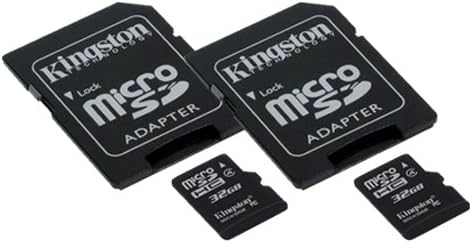
الصورة 1: A Transcend 32GB microSDHC memory card shown next to its larger SD adapter. The microSDHC card is small and black, with "microSDHC" and "32GB" printed on it. The SD adapter is also black, designed to house the microSDHC card, and features a lock switch on the side.
3. الإعداد والتثبيت
Follow these steps to properly install your memory card:
- Identify Card Slot: Locate the memory card slot on your device (e.g., smartphone, camera). This is typically a small slot, sometimes covered by a flap.
- أدخل بطاقة microSDHC: For devices with a microSDHC slot, gently insert the 32GB microSDHC card into the slot with the gold contacts facing down (or as indicated by your device's manual) until it clicks into place. Do not force the card.
- استخدام محول SD: If your device uses a standard SD card slot, first insert the 32GB microSDHC card into the SD adapter. Ensure it is fully seated. Then, insert the SD adapter (with the microSDHC card inside) into your device's SD card slot.
- التعرف على الجهاز: Power on your device. The device should automatically detect the new memory card. You may receive a notification or be prompted to format the card.
- Formatting (Optional but Recommended): For optimal performance and compatibility, it is often recommended to format the memory card using your device's built-in formatting function. تحذير: Formatting will erase all data on the card. Back up any important data before formatting.
4. تعليمات التشغيل
Once installed, your Transcend 32GB microSDHC card functions as additional storage for your device.
- تخزين البيانات: Photos, videos, documents, and applications can be saved directly to the memory card, depending on your device's settings. Consult your device's manual for specific instructions on how to manage storage locations.
- نقل البيانات:
- To/From Device: استخدم جهازك file manager or gallery application to move files between internal storage and the memory card.
- To/From Computer: Connect your device to a computer via USB, or remove the microSDHC card (using the SD adapter if necessary) and insert it into a computer's card reader. The card will appear as a removable drive, allowing you to drag and drop files.
- Write Protection (SD Adapter): The SD adapter has a small lock switch on its side. Sliding this switch to the "Lock" position will prevent new data from being written to the card and existing data from being deleted. Slide it to the "Unlock" position to enable writing. The microSDHC card itself does not have a lock switch.
5. الصيانة والعناية
Proper care ensures the longevity and reliability of your memory card:
- التعامل معها بحذر: Avoid bending, dropping, or applying excessive force to the memory card or adapter.
- حافظ على نظافة جهات الاتصال: Do not touch the gold contacts on the card. If necessary, gently clean them with a soft, dry, lint-free cloth.
- الظروف البيئية: Store the card in a cool, dry place, away from extreme temperatures, direct sunlight, moisture, and strong magnetic fields.
- إزالة آمنة: Always safely eject the memory card from your device or computer before physically removing it to prevent data corruption.
- النسخ الاحتياطي للبيانات: قم بعمل نسخ احتياطية منتظمة للبيانات المهمة من بطاقة الذاكرة الخاصة بك إلى جهاز تخزين آخر (مثل القرص الصلب للكمبيوتر أو التخزين السحابي) لمنع فقدان البيانات.
6. استكشاف الأخطاء وإصلاحها
If you encounter issues with your memory card, try the following solutions:
- لم يتم اكتشاف البطاقة:
- تأكد من إدخال البطاقة بالكامل وبشكل صحيح في الفتحة.
- If using the SD adapter, check that the microSDHC card is properly seated within the adapter.
- أعد تشغيل جهازك.
- Try the card in another compatible device to determine if the issue is with the card or the device.
- Cannot Write/Delete Files:
- If using the SD adapter, check if the lock switch is in the "Lock" position. Slide it to "Unlock".
- Ensure the card is not full. Delete unnecessary files or transfer them to another storage.
- Check your device's permissions for writing to external storage.
- الأداء البطيء:
- Ensure your device supports the card's speed class.
- Avoid filling the card to its absolute maximum capacity.
- Consider formatting the card (after backing up data) to refresh its file نظام.
- تلف البيانات: If files are corrupted or inaccessible, stop using the card immediately to prevent further damage. Data recovery services may be an option, but success is not guaranteed. Regular backups are crucial.
7. المواصفات
| ميزة | التفاصيل |
|---|---|
| ماركة | تجاوز |
| نوع ذاكرة فلاش | بطاقة ذاكرة SDHC صغيرة |
| سعة تخزين الذاكرة | 32 جيجا بايت |
| الأجهزة المتوافقة | Smartphone (and other devices supporting microSDHC/SD) |
| ميزة خاصة | خفيف الوزن |
| وزن العنصر | 0.03 رطل (حوالي 0.48 أونصة) |
| رمز المنتج الموحد | 021859500275 |
| ASIN | B00F9HC9A8 |
| تاريخ أول توفر | 1 ديسمبر 2009 |
8. الضمان والدعم
For information regarding the product warranty, technical support, or service, please refer to the official Transcend website or contact Transcend customer service directly. Keep your proof of purchase for warranty claims.
يمكنك زيارة Transcend Store on Amazon لمزيد من المعلومات حول المنتج وموارد الدعم.


