1. انتهى المنتجview
The Gioteck EX-05S High Definition Headset is designed to deliver superior stereo game sound and crystal-clear voice communication. It is compatible with multiple platforms including PS4, PS3, Xbox 360, PC, and Mac. This headset features 40mm high-quality stereo drivers, a noise-isolating microphone, and breathable micro-fibre ear cups for extended comfort.
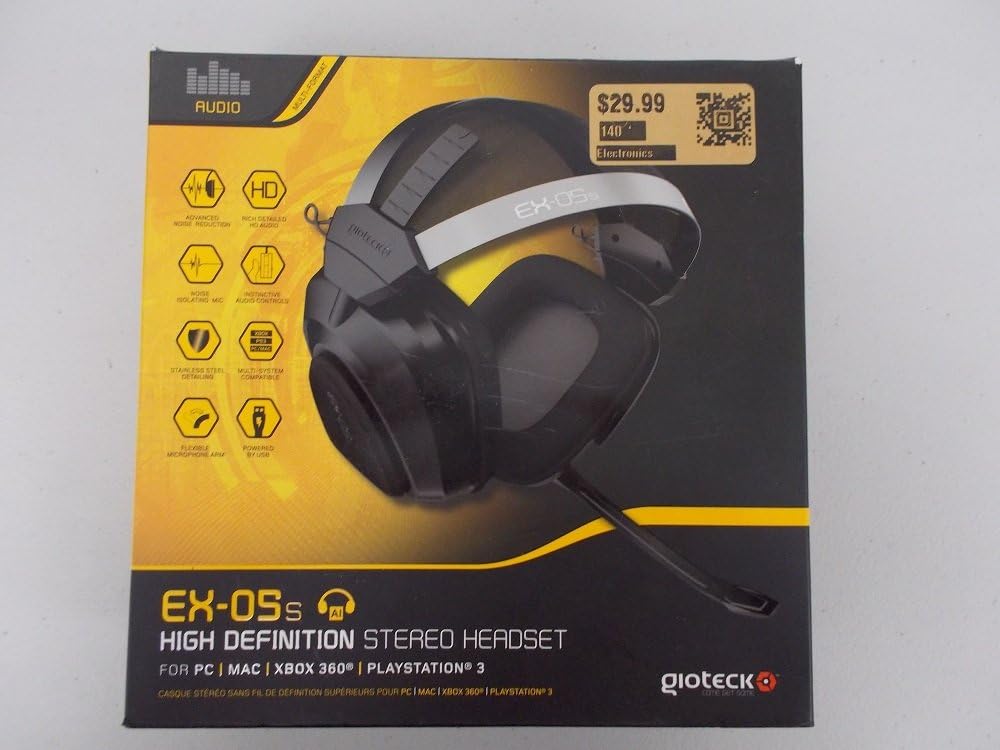
Figure 1.1: Gioteck EX-05S Headset packaging, highlighting key features and compatibility.

الشكل 1.2: الجانب view of the Gioteck EX-05S Headset, showing the ear cup and microphone arm.
2. المميزات
- 40mm High Quality Stereo Drivers: Delivering rich, detailed audio for an immersive gaming experience.
- Noise Isolating Microphone: Designed to eliminate echo and external noise for clear communication.
- Breathable Micro-Fibre Ear Cups: Ensures comfort during long gaming sessions.
- الحد من الضوضاء المتقدمة: Minimizes game sound interference from external speakers.
- Flexible and 180-Degree Rotating Microphone Arm: Allows for optimal microphone positioning.
- Instinctive and Accessible Controls: Conveniently located controls for voice and game sound adjustments.
- Stainless Steel Detailing: Provides durability and a premium finish.
- التوافق مع منصات متعددة: Works with PS4, PS3, Xbox 360, PC, and Mac.
3. محتويات العبوة
يرجى التأكد من وجود جميع العناصر التالية في طردك:
- Gioteck EX-05S Universal High Definition Stereo Headset
4. دليل الإعداد
4.1 Connecting to Gaming Consoles (PS4, PS3, Xbox 360)
- Locate the 3.5mm audio jack on your gaming controller or console.
- Insert the 3.5mm connector from the EX-05S headset firmly into the audio jack.
- Ensure your console's audio settings are configured to output game audio and chat through the connected headset. Refer to your console's system settings for specific audio output configurations.
4.2 الاتصال بجهاز الكمبيوتر الشخصي/جهاز Mac
- For PCs with separate audio and microphone jacks, you may need a PC splitter cable (not included) to connect the single 3.5mm headset jack to your computer's audio output and microphone input ports.
- For devices with a combined 3.5mm audio/microphone jack, simply plug the headset's 3.5mm connector directly into the port.
- Adjust your computer's sound settings to select the EX-05S headset as the default playback and recording device.
5. تعليمات التشغيل
5.1 التحكم في مستوى الصوت
The EX-05S headset features an inline control box on the cable. Use the volume dial to adjust the overall audio level of your game and chat sound.
5.2 كتم صوت الميكروفون
A switch or button on the inline control box allows you to quickly mute or unmute your microphone. Ensure the microphone is unmuted when you wish to communicate.
5.3 Microphone Positioning
The flexible microphone arm can be rotated 180 degrees. Position the microphone approximately 1-2 inches from your mouth for optimal voice clarity and to minimize background noise.
6. الصيانة والعناية
- تنظيف: Use a soft, dry cloth to clean the headset. For ear cups, a slightly damp يمكن استخدام قطعة قماش، ولكن تأكد من عدم دخول أي رطوبة إلى شبكات السماعات. لا تستخدم مواد كيميائية قاسية أو منظفات كاشطة.
- تخزين: خزّن سماعة الرأس في مكان بارد وجاف بعيدًا عن أشعة الشمس المباشرة ودرجات الحرارة القصوى. تجنب تشابك الكابل.
- التعامل: Always grasp the plug when disconnecting the cable, rather than pulling on the cable itself, to prevent damage to the wiring.
- وسادات الأذن: The breathable micro-fibre ear cups can be gently wiped clean. Avoid excessive pressure or stretching.
7. استكشاف الأخطاء وإصلاحها
7.1 لا يوجد صوت من سماعة الرأس
- تأكد من إدخال مقبس 3.5 ملم بالكامل في منفذ الصوت.
- Check the inline volume control on the headset cable and ensure it is turned up.
- Verify your device's (console, PC, Mac) audio output settings are configured to send sound to the headset.
- قم باختبار سماعة الرأس على جهاز آخر لاستبعاد وجود مشكلة خاصة بالجهاز.
7.2 الميكروفون لا يعمل
- Check the microphone mute switch on the inline control box and ensure it is unmuted.
- Verify your device's (console, PC, Mac) microphone input settings are configured to receive input from the headset.
- Ensure the microphone arm is positioned correctly and not obstructed.
- Test the microphone on another device or application to confirm functionality.
7.3 Static or Distorted Audio
- Ensure the connection is secure and free from debris.
- Try adjusting the volume levels on both the headset and the connected device.
- Move away from potential sources of electromagnetic interference (e.g., Wi-Fi routers, cordless phones).
- اختبر باستخدام مصدر صوت أو جهاز آخر.
8. المواصفات
| ميزة | التفاصيل |
|---|---|
| اسم الموديل | E5SUNI-11-MU |
| تكنولوجيا الاتصال | سلكي |
| المكونات المضمنة | سماعات الرأس |
| الفئة العمرية (الوصف) | بالغ |
| مادة | الفولاذ المقاوم للصدأ |
| استخدامات محددة للمنتج | الألعاب |
| الأجهزة المتوافقة | Gaming Consoles, Computers |
| نوع التحكم | التحكم في مستوى الصوت |
| ميزة الكابل | قابلة للسحب |
| وزن العنصر | 669 جرام (1.47 رطل) |
| طريقة التحكم | صوت |
| نوع برنامج تشغيل الصوت | سائق ديناميكي |
| شكل سماعة الأذن | فوق الأذن |
| مقبس سماعات الرأس | 3.5 ملم جاك |
| أبعاد المنتج | 8.46 × 7.87 × 3.94 بوصة |
9. الضمان والدعم
Gioteck products are manufactured to high standards and undergo rigorous testing. For information regarding warranty coverage, technical support, or service, please refer to the official Gioteck webيمكنك زيارة الموقع الإلكتروني أو الاتصال بخدمة العملاء مباشرةً. احتفظ بإثبات الشراء لتقديم أي مطالبات تتعلق بالضمان.
للحصول على أحدث معلومات الدعم، يرجى زيارة: www.gioteck.com/support


