مقدمة
Welcome to the user manual for your Alcatel Sigma 260 DECT Cordless Phone. This guide provides detailed instructions on how to set up, operate, maintain, and troubleshoot your new phone. Please read this manual carefully to ensure optimal performance and longevity of your device.
The Alcatel Sigma 260 is a reliable DECT cordless phone featuring a 50-entry phonebook, hands-free function, and caller ID, designed for clear communication and ease of use.
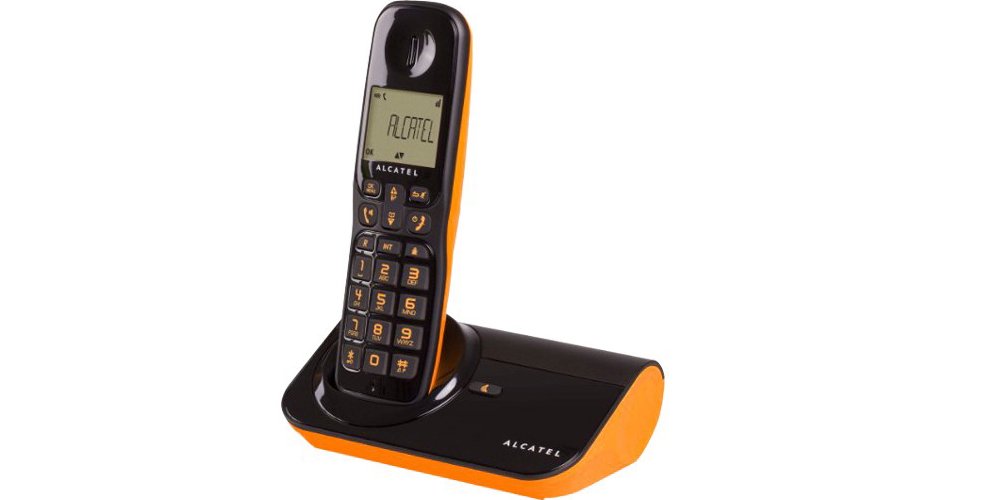
الشكل 1: Alcatel Sigma 260 DECT Cordless Phone Handset and Base Station.
1. الإعداد
Follow these steps to set up your Alcatel Sigma 260 phone.
1.1 فك الصندوق ومحتويات العبوة
Carefully unpack all items and ensure you have the following components:
- Alcatel Sigma 260 Handset
- Alcatel Sigma 260 Base Station
- محول الطاقة لمحطة القاعدة
- سلك خط الهاتف
- Rechargeable AAA Batteries (typically 2x)
- دليل المستخدم (هذا المستند)
1.2 تركيب البطارية
- حدد مكان غطاء حجرة البطارية على الجزء الخلفي من الهاتف.
- قم بسحب الغطاء أو رفعه لفتح الحجرة.
- Insert the rechargeable AAA batteries, observing the correct polarity (+ and -) as indicated inside the compartment.
- قم باستبدال غطاء حجرة البطارية، وتأكد من تثبيته بشكل آمن في مكانه.
مهم: Only use the supplied rechargeable batteries or equivalent approved replacements. Non-rechargeable batteries may damage the device.
1.3 توصيل المحطة الأساسية
- Connect one end of the telephone line cord to the TEL socket on the base station.
- قم بتوصيل الطرف الآخر من سلك خط الهاتف بمقبس الهاتف الموجود على الحائط.
- Plug the power adapter into the DC IN socket on the base station.
- قم بتوصيل محول الطاقة بمأخذ كهربائي مناسب.
- Place the handset on the base station to charge the batteries. Allow at least 12-15 hours for the initial charge.
ملحوظة: Position the base station away from other electrical appliances to avoid interference.
1.4 Handset Registration (for additional handsets or re-registration)
Your primary handset is usually pre-registered. If you have additional handsets (up to 4 connectable handsets are supported) or need to re-register a handset, follow these general steps:
- On the base station, press and hold the registration button (often marked with a signal icon or "PAGE") for approximately 5 seconds until an indicator light on the base starts flashing.
- On the handset, access the menu, navigate to "Registration" or "Register Handset" (refer to the handset display for exact menu options).
- Enter the system PIN (default is usually 0000 or 1234).
- The handset will search for the base station and register. A confirmation message will appear on the handset display once successful.
نصيحة: If registration fails, ensure the handset is close to the base station and try again.
2. تشغيل هاتفك
This section covers the basic functions of your Alcatel Sigma 260.
2.1 إجراء المكالمات
- الاتصال المباشر: ارفع السماعة أو اضغط على يتحدث button. Enter the phone number using the keypad. The call will connect automatically.
- من دليل الهاتف: اضغط على سجل الهاتف button (or navigate via menu). Use the arrow keys to scroll through entries. Press يتحدث للاتصال بالرقم المحدد.
- معاودة الاتصال: اضغط على إعادة زر ل view a list of recently dialed numbers. Use arrow keys to select, then press يتحدث.
2.2 استقبال المكالمات
- عندما يرن الهاتف، اضغط على يتحدث زر للرد على المكالمة.
- لإنهاء مكالمة ، اضغط على نهاية اضغط على الزر أو أعد وضع الهاتف على قاعدة الشحن.
2.3 Phonebook (50 Entries)
Your phone can store up to 50 names and numbers.
- إضافة جهة اتصال: Access the menu, select "Phonebook", then "Add New Entry". Enter the name and number using the keypad. Save the entry.
- تعديل بيانات جهة اتصال: Access the phonebook, select the contact, then "Edit". Make changes and save.
- حذف جهة اتصال: Access the phonebook, select the contact, then "Delete". Confirm deletion.
2.4 وظيفة التحدث الحر
لتفعيل مكبر الصوت الحر أثناء المكالمة، اضغط على المتحدث button (often marked with a speaker icon). Press it again to switch back to handset mode.
2.5 معرف المتصل
If you subscribe to Caller ID service from your telephone provider, the caller's number (and name, if available in your phonebook or provided by the service) will be displayed on the handset screen before you answer the call.
3. الصيانة
Proper care ensures the longevity of your Alcatel Sigma 260.
3.1 التنظيف
امسح الهاتف وقاعدة الشحن بقطعة قماش ناعمة و...amp cloth. Do not use abrasive cleaners, solvents, or strong chemicals, as these can damage the surfaces. Ensure no liquid enters the device openings.
3.2 العناية بالبطارية
- Always return the handset to the base station when not in use to ensure it remains charged.
- إذا لم يتم استخدام الهاتف لفترة طويلة، قم بإزالة البطاريات لمنع التسرب.
- Replace batteries when their performance significantly degrades. Use only approved rechargeable AAA batteries.
4. استكشاف الأخطاء وإصلاحها
If you encounter issues with your phone, try the following solutions before seeking professional assistance.
| مشكلة | السبب المحتمل / الحل |
|---|---|
| لا يوجد نغمة اتصال |
|
| لا يمكن إجراء أو استقبال المكالمات |
|
| جودة الصوت رديئة / ثابتة |
|
| الهاتف لا يشحن |
|
| العرض فارغ أو غير قابل للقراءة |
|
5. المواصفات الفنية
Below are the key technical specifications for the Alcatel Sigma 260 DECT Cordless Phone:
| ماركة | الكاتيل |
| رقم الموديل | سيغما 260 |
| نوع الهاتف | هاتف لاسلكي DECT |
| مصدر الطاقة | Battery Powered (Rechargeable AAA) |
| نوع لوحة المفاتيح | لوحة مفاتيح واحدة |
| معرف المتصل | نعم |
| سعة دليل الهاتف | مقالات شنومك |
| وظيفة حر اليدين | نعم |
| Connectable Handsets | حتى 4 |
| نوع العرض | أبجدية |
| جهاز الرد الآلي | لا |
6. الضمان والدعم
For information regarding warranty terms and conditions, please refer to the warranty card included with your product or contact your retailer. Specific warranty details are not provided in this manual.
For technical support or inquiries, you may contact the seller directly via email:
بريد إلكتروني: tecnotorba.amazon@gmail.com
Please provide your product model (Alcatel Sigma 260) and a detailed description of your issue when contacting support.