
1. المقدمة
The Lorex LW2231 is a wireless real-time security camera equipped with an audio microphone, designed for both indoor and outdoor surveillance. This camera utilizes MPEG4 compression for clear video at 640 x 480 VGA resolution and features Lorex Signal Guard technology to maintain a stable connection. It includes night vision capabilities for low-light conditions and is built with weatherproof and vandal-resistant housing. This manual provides detailed instructions for the proper installation, operation, and maintenance of your LW2231 camera.
2. محتويات العبوة
Verify that all components are present in your package. If any items are missing or damaged, contact Lorex customer support.
- Lorex LW2231 Wireless Real-Time Security Camera with Audio Microphone
- محول طاقة للكاميرا
- أدوات التثبيت (مسامير ومثبتات جدارية)
- دليل البدء السريع
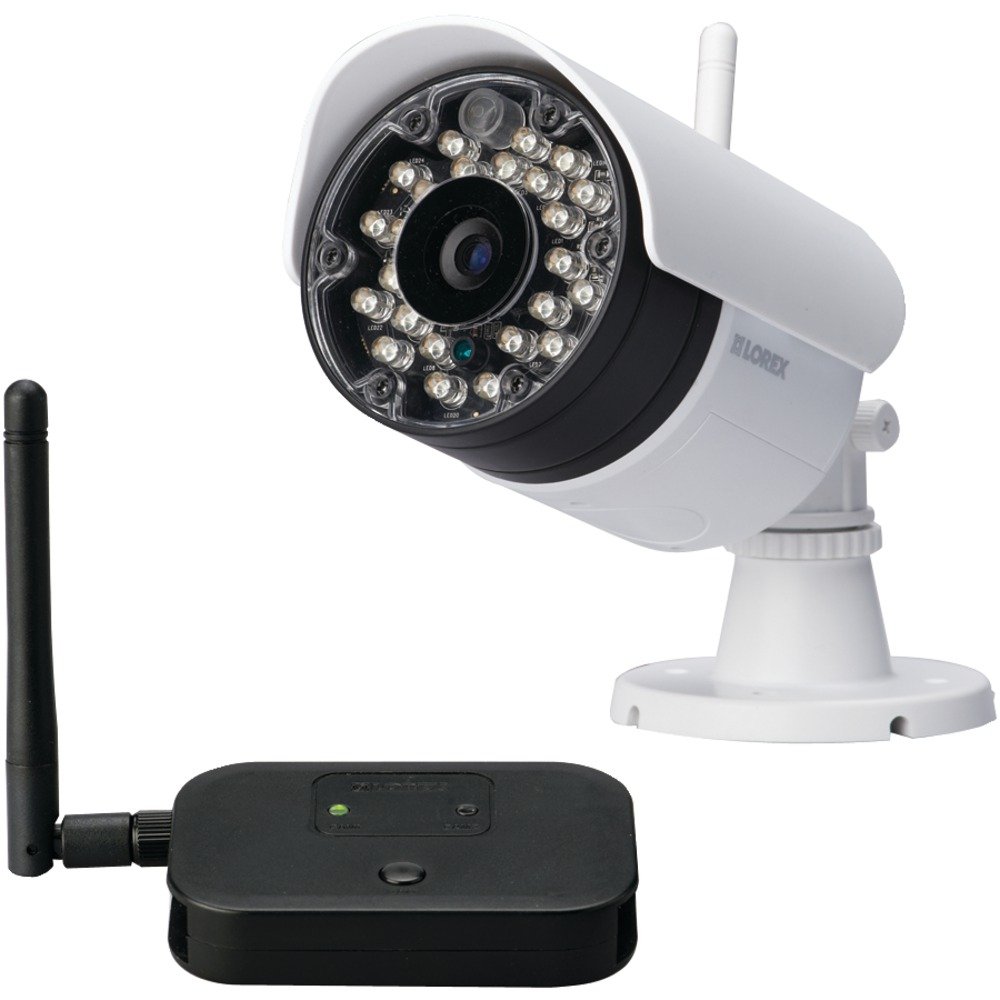
الشكل 2.1: Lorex LW2231 Wireless Security Camera with Audio Microphone. This image shows the front view of the white camera unit, highlighting its compact design and integrated antenna.
3. معلومات السلامة
Please read and follow all safety instructions to prevent damage to the product and ensure user safety.
- مزود الطاقة: Use only the power adapter supplied with the camera. Using an unauthorized power supply may damage the camera and void the warranty.
- تهوية: لا تسدّ أي فتحات تهوية. تأكد من تدفق الهواء بشكل صحيح حول الكاميرا لمنع ارتفاع درجة حرارتها.
- الماء والرطوبة: Although weatherproof, avoid submerging the camera in water. Do not install in areas where it may be exposed to extreme water pressure or prolonged submersion.
- درجة حرارة: Operate the camera within the specified temperature range. Extreme temperatures can affect performance and lifespan.
- تنظيف: Disconnect power before cleaning. Use a dry, soft cloth. Do not use liquid or aerosol cleaners.
- الخدمة: لا تحاول خدمة هذا المنتج بنفسك. قم بإحالة جميع أعمال الصيانة إلى أفراد الخدمة المؤهلين.
4. انتهى المنتجview والميزات
The LW2231 camera offers advanced features for reliable surveillance:
- MPEG4 Compression: Provides efficient video encoding with 640 x 480 VGA resolution.
- Auto-mechanical IR Camera Filter: Ensures accurate color reproduction during the day and enhanced night vision.
- Signal Guard Technology: Automatically re-establishes connection upon detecting low signal strength, ensuring continuous monitoring.
- مجال واسع من View: A 3.6mm lens provides a 55-degree field of view.
- بث الفيديو في الوقت الفعلي: Delivers smooth video with strong signal conditions at 30 frames per second.
- Audio Microphone: Integrated microphone for audio monitoring.
- الرؤية الليلية: Infrared illumination for clear viewفي ظروف الإضاءة المنخفضة.
- تصميم مانعة لتسرب الماء: حاصل على تصنيف IP65 للاستخدام الخارجي.
5. الإعداد والتثبيت
5.1 التخطيط لعملية التركيب
Before mounting, plan the camera's location. Consider the following:
- منطقة التغطية: Position the camera to cover the desired surveillance area effectively.
- قوة الإشارة: For optimal wireless performance, minimize obstacles (walls, large metal objects) between the camera and its receiver. Test the signal strength before final mounting.
- الوصول إلى الطاقة: Ensure a power outlet is within reach of the camera's power adapter cable.
- العوامل البيئية: While weatherproof, avoid direct exposure to extreme weather conditions if possible to prolong the camera's life.
5.2 تركيب الكاميرا
- Choose a suitable mounting surface (wall or ceiling).
- Use the included mounting template (if provided) or mark the screw holes using the camera base as a guide.
- Drill pilot holes for the screws. If mounting on drywall or masonry, insert the provided wall anchors.
- Secure the camera base to the surface using the screws.
- اضبط زاوية الكاميرا واتجاهها لتحقيق النتيجة المرجوة view.
5.3 توصيل الطاقة
Connect the camera's power adapter to the camera's power input port, then plug the adapter into a standard electrical outlet. The camera will power on automatically.
5.4 Pairing with a Receiver (if applicable)
If your system requires manual pairing, refer to your Lorex receiver's manual for specific instructions. Typically, this involves activating a pairing mode on both the camera and the receiver within a short timeframe.
6. تشغيل الكاميرا
6.1 مباشر View
Once the camera is powered and successfully connected to your Lorex receiver/system, you can view the live video feed. Consult your receiver's manual for instructions on selecting and viewing camera channels.
6.2 الرؤية الليلية
The LW2231 camera automatically activates its infrared (IR) LEDs in low-light conditions to provide black and white night vision. The auto-mechanical IR filter ensures optimal image quality during both day and night.
6.3 مراقبة الصوت
The integrated microphone captures audio from the camera's vicinity. Ensure your receiver or viewing device has audio output enabled to hear the sound. Audio recording capabilities depend on your connected recording device.
7. الصيانة
7.1 تنظيف الكاميرا
Periodically clean the camera lens and housing to ensure clear image quality. Use a soft, damp cloth. Do not use harsh chemicals or abrasive cleaners, as these can damage the lens or finish.
7.2 الاعتبارات البيئية
While the camera is weatherproof (IP65 rated), extreme weather conditions such as heavy snow accumulation or direct, prolonged exposure to saltwater spray can affect its performance over time. Regularly check the camera's mounting for stability, especially after severe weather.
8. استكشاف الأخطاء وإصلاحها
This section addresses common issues you might encounter with your LW2231 camera.
- لا توجد إشارة فيديو:
- تأكد من تشغيل الكاميرا وتوصيل محول الطاقة الخاص بها بشكل آمن.
- Verify that the camera is within range of its receiver and that there are no significant obstructions.
- Check the receiver/DVR settings to ensure the correct camera channel is selected.
- If using a wireless system, try re-pairing the camera with the receiver.
- Poor Video Quality / Interference:
- Wireless interference can be caused by other 2.4 GHz devices (e.g., Wi-Fi routers, cordless phones, microwaves). Try repositioning the camera or receiver, or adjust Wi-Fi channels on other devices if possible.
- Ensure the camera lens is clean and free from dirt or smudges.
- Check for strong signal conditions; weak signals can lead to choppy or pixelated video.
- لا يوجد صوت:
- تأكد من عدم وجود عائق أمام الميكروفون.
- Check the audio settings on your receiver or viewجهاز ing.
- الرؤية الليلية لا تعمل:
- Ensure the area around the camera is sufficiently dark for IR LEDs to activate.
- Check for any obstructions directly in front of the IR LEDs.
9. المواصفات
| ميزة | مواصفة |
|---|---|
| اسم الموديل | ل.و.2231 |
| الاستخدام الداخلي والخارجي | داخلي، خارجي |
| بروتوكول الاتصال | واي فاي |
| دقة التقاط الفيديو | 480p (640 x 480 VGA) |
| معدل الإطارات | 30 إطارًا في الثانية |
| عدسة | 3.6mm (55 Degree field of view) |
| تقنية الإضاءة المنخفضة | اللون الليلي (الأشعة تحت الحمراء) |
| صوتي | ميكروفون متكامل |
| تصنيف الحماية الدولية | IP65 (مقاوم للعوامل الجوية) |
| أبعاد العنصر (الطول × العرض × الارتفاع) | 10.5 × 10.1 × 4.3 بوصة |
| وزن العنصر | 0.6 جنيه (9.6 أونصة) |
| مصدر الطاقة | Wired Electric (No Batteries Required) |
| الشركة المصنعة | شركة لوريكس |
10. الضمان والدعم
Lorex products are designed for reliability and performance. For specific warranty information, please refer to the warranty card included with your product or visit the official Lorex webللحصول على الدعم الفني، أو تسجيل المنتج، أو للوصول إلى موارد إضافية، يُرجى زيارة www.lorex.com/support or contact Lorex customer service directly.