مقدمة
This manual provides essential information for setting up, operating, and maintaining your Nokia 114 Dual SIM mobile phone. Please read these instructions carefully to ensure proper use and to maximize the device's performance and longevity.
يثبت
1. تركيب بطاقة SIM
The Nokia 114 supports two Mini SIM cards. Follow these steps to install your SIM cards:
- قم بإغلاق الهاتف وإزالة الغطاء الخلفي.
- Locate the SIM card slots. The phone features an Easy Swap function for convenient SIM management.
- Insert your Mini SIM cards into the designated slots, ensuring the gold contacts face downwards and the cut corner aligns correctly.
- أعد تركيب الغطاء الخلفي.

Image: Nokia 114 with two Mini SIM cards being inserted.
2. تركيب البطارية
لتركيب البطارية:
- With the back cover removed, align the Nokia BL-5C 1020 mAh Lithium-Ion battery with the battery compartment.
- اضغط برفق على البطارية في مكانها حتى تستقر بإحكام.
- أعد تركيب الغطاء الخلفي.
3. شحن البطارية
Before first use, fully charge the battery using the provided Nokia Charger AC-11.
- قم بتوصيل الشاحن بمنفذ الشحن الخاص بالهاتف.
- قم بتوصيل الشاحن بمأخذ الحائط.
- سيظهر مؤشر البطارية على الشاشة تقدم الشحن.
- بمجرد شحنه بالكامل، افصل الشاحن.
تعليمات التشغيل
1. تشغيل/إيقاف التشغيل
- لتشغيل الجهاز، اضغط مع الاستمرار على زر الطاقة حتى يهتز الهاتف وتضيء الشاشة.
- لإيقاف التشغيل، اضغط مع الاستمرار على زر الطاقة، ثم حدد "إيقاف التشغيل" من الخيارات.
2. إجراء المكالمات وإرسال الرسائل
- Use the keypad to dial a number and press the Call key to initiate a call.
- To send a message, navigate to the 'Messages' menu, select 'Create message', type your text using the keypad, and send it to the desired recipient.
3. العرض والتنقل
The Nokia 114 features a 1.8-inch portrait QVGA LCD transmissive display with 128 x 160 pixels resolution. Navigation is primarily done using the physical keypad.
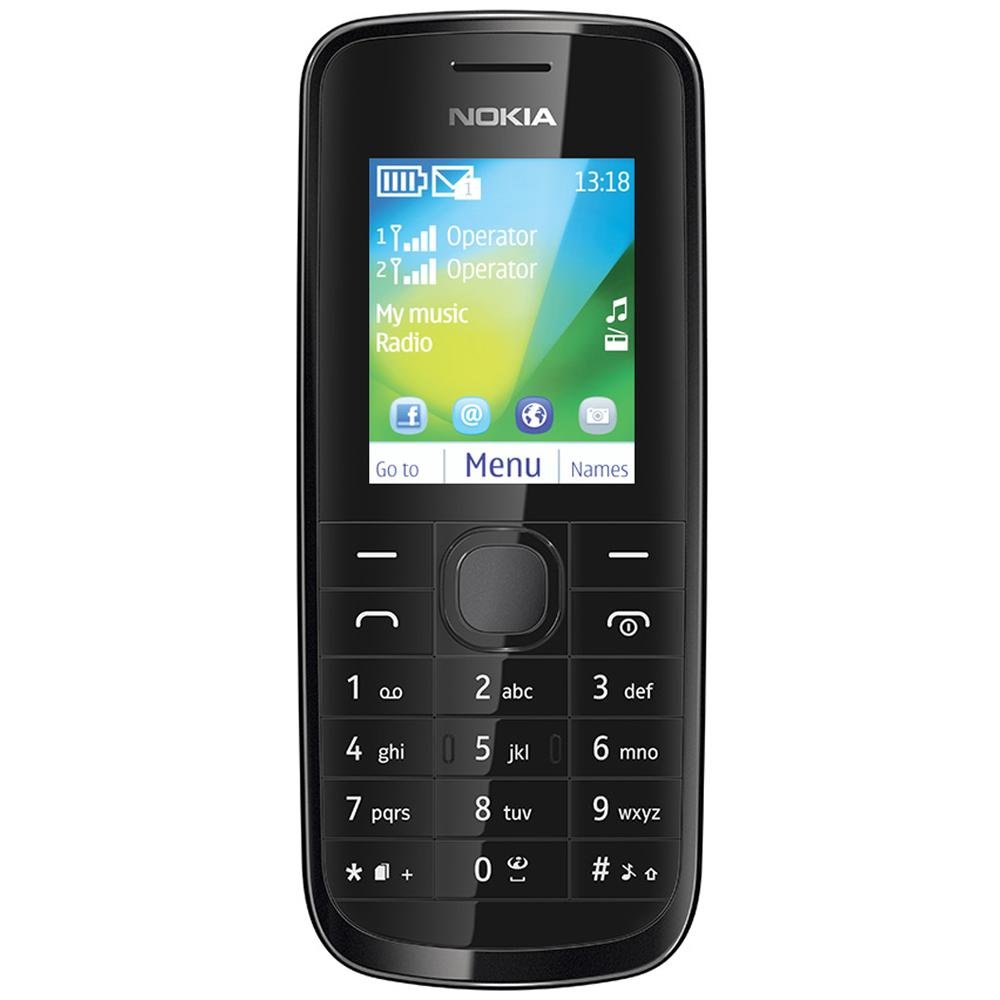
الصورة: الجبهة view of the Nokia 114 mobile phone.
4. استخدام الكاميرا
The phone is equipped with a 0.3 MP rear camera. It supports basic photography features:
- Image Editor: Basic editing functions for captured photos.
- تقريب رقمي 4x: Magnify subjects before capturing.
- تعويض التعرض: ضبط مستويات السطوع.
- اتجاه أفقي: Capture photos in a wider format.
- The screen acts as a full-screen viewمكتشف.
5. الذاكرة والتخزين
The Nokia 114 has 16 MB of internal memory and supports expandable memory up to 32 GB via a microSD card (not included). This allows for storage of photos, music, and other files.
6. الاتصال
The device supports 2G networks for calls and basic internet access. It does not support 3G or Wi-Fi connectivity.
7. الميزات الخاصة
- بريد إلكتروني: Access your email accounts on the go.
- راديو FM: استمع إلى محطات الراديو المفضلة لديك.
- Video Player & Music Player: Enjoy multimedia content.
- Internet & Facebook: أساسي web browsing and social media access.
- ألعاب: Pre-installed games for entertainment.
صيانة
1. العناية العامة
- حافظ على جفاف هاتفك. قد تحتوي الأمطار والرطوبة وجميع أنواع السوائل على معادن تُسبب تآكل الدوائر الإلكترونية.
- لا تستخدم الهاتف أو تخزنه في أماكن مليئة بالغبار أو الأوساخ.
- لا تخزّن هاتفك في درجات حرارة عالية. قد تُقصّر درجات الحرارة العالية عمر الأجهزة الإلكترونية، وتُتلف البطاريات، وتُشوّه أو تُذيب بعض أنواع البلاستيك.
- لا تخزن الهاتف في درجات حرارة منخفضة. عند عودته إلى درجة حرارته الطبيعية، قد تتراكم الرطوبة داخله وتتلف لوحات الدوائر الإلكترونية.
- Do not attempt to open the phone other than as instructed in this manual.
- لا تُسقط الهاتف أو تضربه أو تهزه. قد يُؤدي التعامل العنيف معه إلى كسر لوحات الدوائر الداخلية والأجزاء الميكانيكية الدقيقة.
- لا تستخدم كيماويات مركزة أو محاليل التنظيف أو المنظفات القوية لتنظيف الهاتف.
2. العناية بالبطارية
- Only use original Nokia batteries and chargers.
- لا تقم بتقصير دائرة البطارية.
- لا تعرض البطارية لدرجات الحرارة القصوى.
استكشاف الأخطاء وإصلاحها
If you encounter issues with your Nokia 114, try the following basic troubleshooting steps:
- الهاتف لا يعمل: Ensure the battery is correctly installed and charged. Try charging the phone for at least 30 minutes before attempting to power it on again.
- ضعف جودة المكالمة: Check your network signal strength. Move to an area with better reception. Ensure the earpiece/speaker is not obstructed.
- Keypad auto-locks: This is a standard feature. To unlock, follow the on-screen instructions, usually by pressing a specific key combination.
- Dual SIM not functioning: Verify both SIM cards are correctly inserted and activated by your service provider. Check SIM settings in the phone menu.
- Phone freezing or unresponsive: Remove the battery, wait a few seconds, and then reinsert it and power on the phone.
For more complex issues, refer to the visual user guide included in the box or contact Nokia customer support.
تحديد
| ميزة | التفاصيل |
|---|---|
| ماركة | نوكيا |
| نموذج | 114 |
| عرض | 1.8-inch QVGA LCD (128 x 160 pixels) |
| آلة تصوير | كاميرا خلفية بدقة 0.3 ميجا بكسل |
| Memory (Internal) | 16 ميجا بايت |
| ذاكرة قابلة للتوسيع | تصل سعتها إلى 32 جيجابايت (microSD) |
| عدد فتحات بطاقة SIM | Dual SIM (Mini) |
| تكنولوجيا الخلوية | 2G (جي إس إم) |
| نظام التشغيل | Nokia Series 40 Asha |
| سعة البطارية | 1020 مللي أمبير من نوع ليثيوم أيون |
| وقت التحدث | مدة تصل إلى 10.5 ساعات (630 دقيقة) |
| الأبعاد (الطول × العرض × الارتفاع) | 11 × 4.6 × 1.5 سم |
| وزن | 80 جرام |
| واجهة بشرية | لوحة المفاتيح |
| مادة | بلاستيك |
ماذا يوجد في الصندوق
تتضمن باقة Nokia 114 الخاصة بك العناصر التالية:
- نوكيا 114 الهاتف المحمول
- Nokia Charger AC-11
- Nokia Battery BL-5C 1020 mAh
- Nokia Stereo Headset WH-102
- Visual User Guide
المنتج انتهىview فيديو
شاهد هذا الفيديو للحصول على لمحة سريعةview of the Nokia 114's features and contents.
فيديو: نبذة مختصرةview of the Nokia 114 mobile phone, highlighting its display, camera, memory, connectivity, operating system, special features, and included accessories.
الضمان والدعم
The Nokia 114 comes with a 1-year manufacturer warranty for the device and a 6-month manufacturer warranty for in-box accessories, including batteries, from the date of purchase. For warranty claims or technical support, please refer to the contact information provided in your visual user guide or visit the official Nokia support webموقع.