1. المقدمة
This manual provides detailed instructions for the safe and efficient operation of your Majestic AH239K Portable 2.1 Multimedia Audio System. Please read this manual thoroughly before using the device and retain it for future reference.
The Majestic AH239K is a versatile portable audio system featuring an internal rechargeable battery, two side speakers, and a front subwoofer. It includes AUX, USB, and SD card inputs for various audio sources, two microphone inputs, and comes with one microphone and a remote control. Enjoy FM PLL radio with 50 preset stations and an LED display for clear function visualization.
2. معلومات السلامة
- مصدر الطاقة: استخدم محول الطاقة المحدد فقط للشحن. تأكد من أن مستوى الصوت مناسب.tage متوافق.
- الماء والرطوبة: لا تعرض الجهاز للمطر أو الرطوبة أو تغمره في الماء.
- تهوية: تأكد من التهوية الجيدة. لا تسد أي فتحات تهوية.
- حرارة: أبقِ الجهاز بعيدًا عن مصادر الحرارة مثل أجهزة التدفئة أو أجهزة تسجيل الحرارة أو المواقد أو الأجهزة الأخرى التي تنتج الحرارة.
- تنظيف: Unplug the device before cleaning. Use a dry, soft cloth. Do not use liquid cleaners or aerosol cleaners.
- الخدمة: لا تحاول خدمة هذا المنتج بنفسك. قم بإحالة جميع أعمال الصيانة إلى أفراد الخدمة المؤهلين.
- سلامة البطارية: The device contains a rechargeable battery. Do not expose to excessive heat or direct sunlight. Dispose of batteries according to local regulations.
3. محتويات العبوة
يرجى التأكد من وجود جميع العناصر:
- Majestic AH239K Micro Hi-Fi System
- 1 × ميكروفون
- 1 × جهاز التحكم عن بعد
- دليل المستخدم (هذا المستند)
- محول الطاقة (قد يختلف حسب المنطقة)
4. انتهى المنتجview
Familiarize yourself with the components and controls of your Majestic AH239K system.

الشكل 4.1: أمام view of the Majestic AH239K Micro Hi-Fi System, showing the main speaker, LED display, control knobs, and microphone inputs. The included microphone is positioned next to the unit.

الشكل 4.2: جانب view of the Majestic AH239K, highlighting one of the two side speakers.

الشكل 4.3: مؤخرة view of the Majestic AH239K, displaying the battery compartment cover and additional ports.
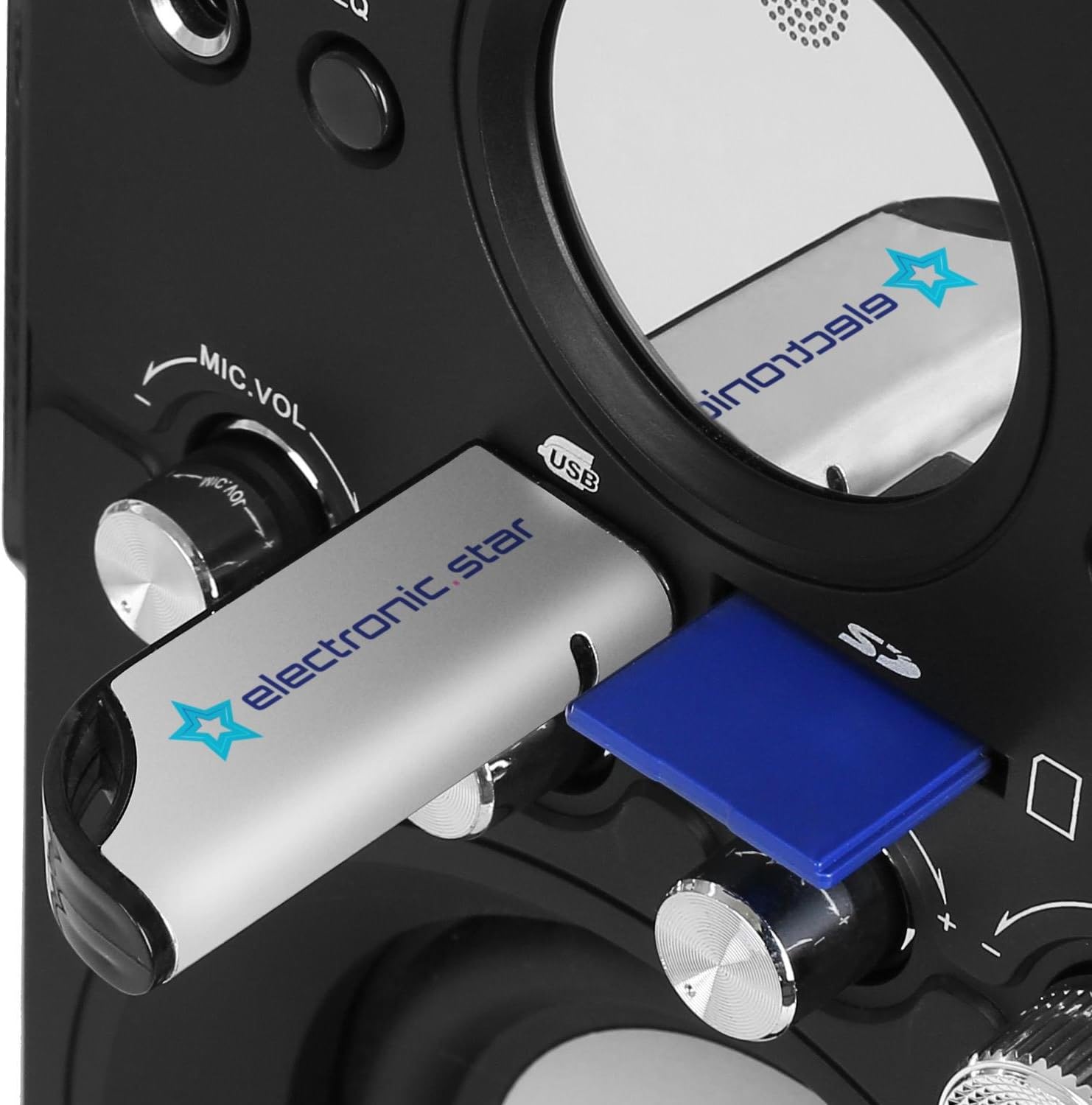
الشكل 4.4: عن قرب view of the USB port and SD card slot, located on the front panel for easy access.

الشكل 4.5: The included remote control, featuring power, mode, EQ, playback, volume, mute, and number buttons.
ضوابط اللوحة الأمامية:
- ميك1 / ميك2: مقابس إدخال الميكروفون.
- اتجاهات: Button to switch between input sources (FM, AUX, USB, SD).
- EQ: Equalizer preset button.
- Play/Pause (►/‖): تشغيل أو إيقاف تشغيل الصوت مؤقتًا.
- Previous (◀◀): Skip to the previous track/station.
- التالي (►►): Skip to the next track/station.
- ميكروفون: Microphone volume control knob.
- صوت عميق: Bass level adjustment knob.
- ثلاثية: Treble level adjustment knob.
- حجم التداول: مقبض التحكم الرئيسي في مستوى الصوت.
- منفذ USB: لتوصيل محركات أقراص فلاش USB.
- فتحة بطاقة SD: لإدخال بطاقات الذاكرة SD.
- عرض الصمام: يعرض الوضع الحالي، ورقم المسار، والتردد، وما إلى ذلك.
5. الإعداد
5.1. شحن البطارية
- Connect the power adapter to the DC IN port on the rear of the unit.
- قم بتوصيل محول الطاقة بمأخذ الحائط المناسب.
- The LED display will indicate charging status. Allow sufficient time for a full charge before first use (typically 3-4 hours).
5.2. تشغيل / إيقاف التشغيل
- To power on the unit, rotate the VOLUME knob clockwise until it clicks and the LED display illuminates.
- To power off, rotate the VOLUME knob counter-clockwise until it clicks and the LED display turns off.
5.3. توصيل الميكروفون
- Insert the microphone cable into either the MIC1 or MIC2 jack on the front panel.
- Ensure the microphone is switched to the 'ON' position if it has a power switch.
6. تعليمات التشغيل
6.1. تحديد وضع الإدخال
اضغط على وضع button repeatedly to cycle through available input sources: FM Radio, AUX, USB, and SD. The current mode will be displayed on the LED screen.
6.2. تشغيل USB/بطاقة SD
- أدخل ذاكرة فلاش USB في منفذ USB أو بطاقة SD في فتحة بطاقة SD.
- سيتحول النظام تلقائيًا إلى وضع USB أو SD وسيبدأ في تشغيل الصوت المتوافق file(مثلاً، MP3). إذا لم يكن كذلك، فاضغط على وضع زر لاختيار المصدر الصحيح.
- استخدم تشغيل/إيقاف مؤقت, سابق، و التالي أزرار للتحكم في التشغيل.
6.3. تشغيل راديو FM
- قم بالتبديل إلى وضع FM باستخدام وضع زر.
- To auto-scan and save stations: Press and hold the تشغيل/إيقاف مؤقت button. The system will scan for available FM stations and save them as presets.
- To manually tune or select presets: Use the سابق و التالي buttons to navigate through saved stations or fine-tune the frequency.
6.4. مدخلات AUX
- Connect an external audio device (e.g., smartphone, tablet, CD player) to the AUX IN port using a 3.5mm audio cable (not included).
- قم بالتبديل إلى وضع AUX باستخدام وضع زر.
- يمكنك التحكم في التشغيل من جهازك الخارجي المتصل.
6.5. استخدام الميكروفون
- Once the microphone is connected (as per Section 5.3), adjust the microphone volume using the ميكروفون.VOL مقبض الباب.
- اضبط مستوى الصوت الرئيسي باستخدام مقدار مقبض الباب.
6.6. استخدام جهاز التحكم عن بعد
يوفر جهاز التحكم عن بعد وصولاً سهلاً إلى وظائف متنوعة:
- زر الطاقة: يقوم بتشغيل الوحدة أو إيقاف تشغيلها.
- اتجاهات: تبديل مصادر الإدخال.
- EQ: التنقل عبر إعدادات مسبقة للمعادل.
- عناصر التحكم في التشغيل: Play/Pause, Previous, Next.
- حجم+/حجم-: يضبط مستوى الصوت الرئيسي.
- صامت: كتم الصوت أو إلغاء كتمه.
- أزرار الأرقام (0-9): For direct track selection in USB/SD mode or direct station selection in FM mode.
7. الصيانة
7.1. التنظيف
- Always unplug the device from the power source before cleaning.
- استخدم قطعة قماش ناعمة وجافة لمسح الأسطح الخارجية.
- لا تستخدم المنظفات الكاشطة أو الشمع أو المذيبات لأنها قد تؤدي إلى إتلاف الطبقة النهائية.
7.2. العناية بالبطارية
- لإطالة عمر البطارية، تجنب تفريغ البطارية بالكامل بشكل متكرر.
- If the unit will not be used for an extended period, charge it periodically (e.g., every 3 months) to maintain battery health.
8. استكشاف الأخطاء وإصلاحها
| مشكلة | السبب المحتمل | حل |
|---|---|---|
| لا يوجد طاقة | Battery is discharged; Power adapter not connected; Unit is off. | Charge the battery; Connect the power adapter; Turn the VOLUME knob clockwise to power on. |
| لا يوجد صوت | Volume is too low; Mute function is active; Incorrect input mode selected; External device not playing. | Increase VOLUME; Press Mute on remote; Select correct MODE; Ensure external device is playing. |
| الميكروفون لا يعمل | Microphone not connected properly; MIC.VOL is too low; Microphone is off. | Ensure microphone is fully plugged in; Increase MIC.VOL; Switch microphone to 'ON'. |
| مشاكل تشغيل USB/SD | غير صحيح file تهيئة؛ لم يتم إدخال بطاقة USB/SD بشكل صحيح؛ تالفة files. | يضمن files are MP3 format; Re-insert USB/SD card; Try a different USB/SD card or files. |
| جهاز التحكم عن بعد لا يعمل | Battery is dead or inserted incorrectly; Obstruction between remote and unit; Remote too far. | Replace remote battery; Remove obstructions; Operate remote within range. |
9. المواصفات
- رقم الموديل: 100239_BK
- ماركة: مهيب
- أبعاد المنتج (الطول × العرض × الارتفاع): 14.5 × 16.2 × 26.5 سم
- وزن المنتج: 2.5 كجم
- تقنية الاتصال: منفذ AUX، منفذ USB
- نوع الموصل: مساعد ، USB
- الأجهزة المتوافقة: USB, SD, CD players, MP3 players
- عدد القنوات: 2.1 (Two side speakers, one front subwoofer)
- لون: أسود
- رمز المنتج العالمي: 8000191808050
10. الضمان والدعم
This product is covered by a standard manufacturer's warranty. For specific warranty terms and conditions, please refer to the warranty card included with your purchase or contact your retailer.
For technical support or service inquiries, please contact the Majestic customer service department through your point of purchase or visit the official Majestic webموقع لمعلومات الاتصال.


