1. المقدمة
This manual provides detailed instructions for the proper use and maintenance of your Hytera TC-320U-1 UHF Analog 2-Watt Radio. The TC-320 is a cost-effective business two-way radio designed for reliable communication. It features a robust design, long battery life, and user-friendly operation.
2. ماذا يوجد في الصندوق
Carefully unpack your radio and check that all items listed below are present and in good condition. If any item is missing or damaged, please contact your dealer.
- Antenna (AN0460H11)
- Li-ion Battery (1700mAh) (BL1715)
- Switching Power Adapter (PS0602)
- Belt Clip (BC16)
- Nylon Strap (RO01)

Image 2.1: Contents of the Hytera TC-320U-1 package, including the radio, antenna, battery, power adapter, belt clip, and nylon strap.
3. انتهى المنتجview
The Hytera TC-320U-1 radio is designed for ease of use and durability. Key features include 16 channel capacity, wide communication range, double injection molding for anti-skid design, and a long-lasting battery with an indicator. The radio also supports switchable high/low power output.
3.1 Radio Controls and Components

الصورة 3.1: الجبهة view of the Hytera TC-320U-1 radio, showing the speaker grille and microphone area.

الصورة 3.2: الجانب view of the Hytera TC-320U-1 radio, highlighting the orange Push-To-Talk (PTT) button.
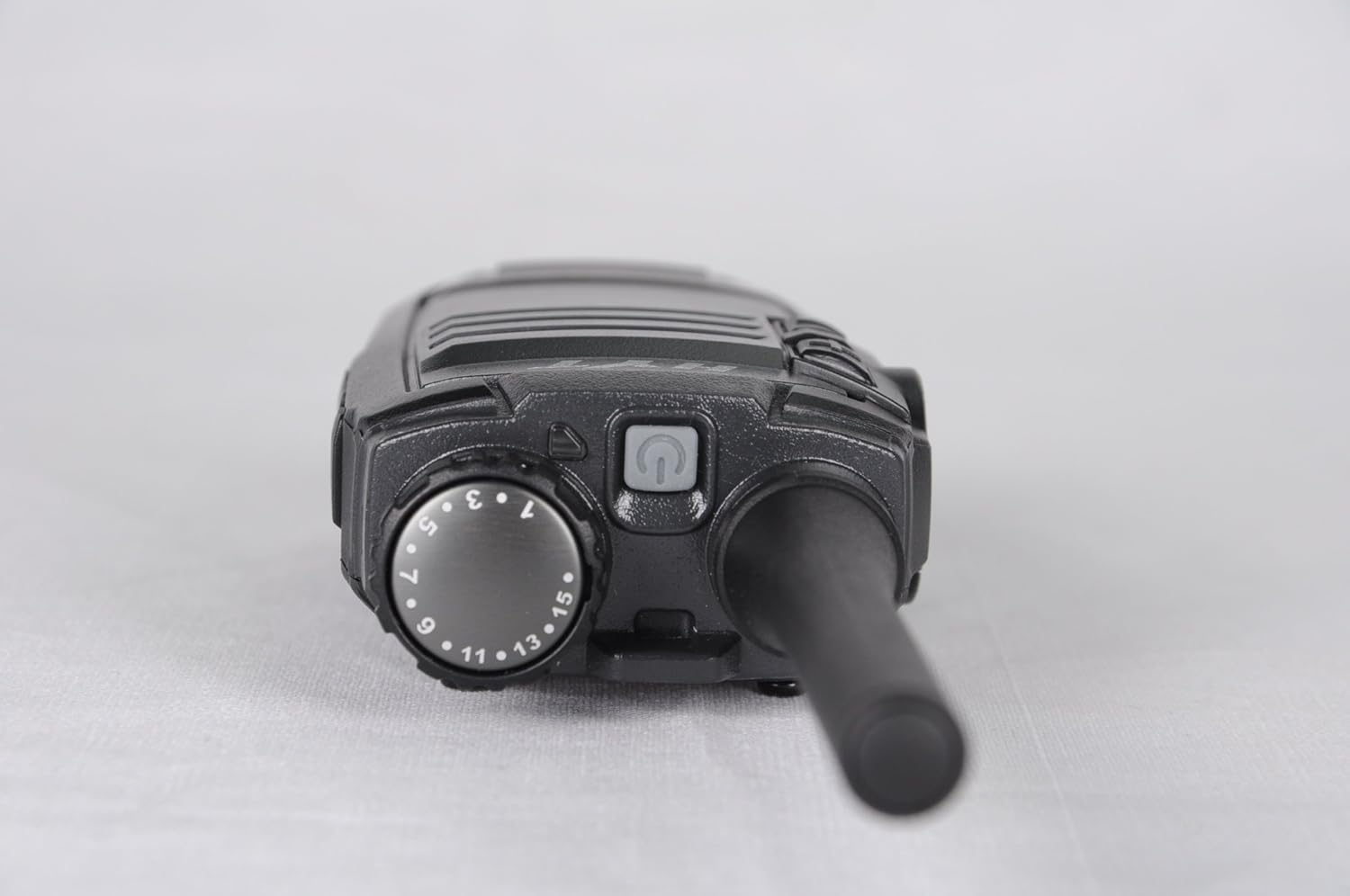
الصورة 3.3: الأعلى view of the Hytera TC-320U-1 radio, showing the channel selector knob (numbered 1-16) and the power/volume knob.
4. الإعداد
4.1 توصيل الهوائي
- قم بمحاذاة الطرف الملولب للهوائي مع موصل الهوائي الموجود أعلى جهاز الراديو.
- Turn the antenna clockwise until it is securely fastened. Do not overtighten.
4.2 تركيب البطارية
- تأكد من إيقاف تشغيل الراديو.
- قم بمحاذاة مجموعة البطارية مع الأخاديد الموجودة في الجزء الخلفي من الراديو.
- حرك حزمة البطارية لأعلى حتى تستقر في مكانها.
- لإزالتها، قم بتحريك مزلاج البطارية (إن وجد) ثم حرك البطارية إلى الأسفل.
4.3 شحن البطارية
Before initial use, fully charge the battery. Use only the provided Hytera switching power adapter (PS0602) and charging accessories.
- قم بتوصيل محول الطاقة بمنفذ تيار متردد.
- Insert the charging cable into the radio's charging port or place the radio in its charging cradle.
- The charging indicator will typically show red during charging and green when fully charged.
4.4 Attaching the Belt Clip and Nylon Strap
- قم بمحاذاة مشبك الحزام مع فتحات البراغي الموجودة في الجزء الخلفي من الراديو.
- قم بتأمين مشبك الحزام باستخدام البراغي المتوفرة.
- Thread the nylon strap through the designated loop on the radio for added security.
5. تعليمات التشغيل
5.1 تشغيل/إيقاف التشغيل وضبط مستوى الصوت
Rotate the power/volume knob (located on the top of the radio, see Image 3.3) clockwise to power on the radio. Continue rotating clockwise to increase the volume. Rotate counter-clockwise to decrease volume and fully counter-clockwise to power off the radio.
5.2 اختيار القناة
Rotate the channel selector knob (located on the top of the radio, see Image 3.3) to choose one of the 16 available channels. The selected channel number is indicated on the knob.
5.3 الإرسال والاستقبال
- استلام: When the radio receives a signal, the LED indicator will illuminate, and you will hear the audio through the speaker.
- الإرسال: To transmit, press and hold the Push-To-Talk (PTT) button on the side of the radio (see Image 3.2). Speak clearly into the microphone, holding the radio approximately 2.5 to 5 cm (1 to 2 inches) from your mouth. Release the PTT button to stop transmitting and return to receive mode.
5.4 مفتاح الطاقة العالية/المنخفضة
The TC-320U-1 allows you to switch between high and low power output. Refer to your radio's specific controls for the location of this switch, typically a dedicated button or a programmable function. Using low power conserves battery life when communicating over short distances.
6. الصيانة
6.1 العناية العامة
- حافظ على جفاف جهاز الراديو. تجنب تعريضه للمطر أو الرطوبة أو السوائل المسببة للتآكل.
- لا تعرض الراديو لدرجات الحرارة القصوى.
- نظف سطح الراديو بقطعة قماش ناعمة و...amp قماش. لا تستخدم مواد كيميائية قاسية أو منظفات كاشطة.
- تأكد من أن نقاط توصيل الهوائي والبطارية نظيفة وخالية من الشوائب.
6.2 العناية بالبطارية
- Always use genuine Hytera batteries and chargers.
- لا تقم بتقصير أطراف البطارية.
- لا تتخلص من البطاريات بإلقائها في النار.
- If the battery is not used for an extended period, store it in a cool, dry place after partially charging it.
7. استكشاف الأخطاء وإصلاحها
إذا واجهت مشاكل مع جهاز الراديو الخاص بك، فراجع المشاكل والحلول الشائعة التالية:
| مشكلة | السبب المحتمل | حل |
|---|---|---|
| الراديو لا يعمل | Battery is depleted or not installed correctly | اشحن البطارية أو أعد تركيبها بإحكام. |
| لا يمكن الإرسال أو الاستقبال | Incorrect channel selected; out of range; antenna loose | تحقق من اختيار القناة؛ اقترب من أجهزة الراديو الأخرى؛ تحقق من توصيل الهوائي. |
| مستوى الصوت منخفض | Volume set too low; speaker obstructed | Increase volume; clear any obstructions from the speaker. |
| مدى اتصال قصير | Low power mode selected; environmental obstructions | Switch to high power mode; move to an open area. |
8. المواصفات
The following table outlines the technical specifications for the Hytera TC-320U-1 radio:
| ميزة | مواصفة |
|---|---|
| رقم الموديل | TC-320 |
| نطاق التردد | أوف شنومكس-شنومكسمز |
| عدد القنوات | 16 |
| تباعد القنوات | 25/12.5 كيلو هرتز |
| طاقة الإخراج | 2 واط |
| نوع البطارية | بطارية ليثيوم أيون واحدة (1700 مللي أمبير/ساعة) |
| المجلدtage | 3.8 فولت (تيار مستمر) |
| أبعاد المنتج | 5.91 × 1.57 × 1.57 بوصة |
| وزن العنصر | 0.71 أونصة (20 جرامًا) |
| الحد الأقصى لمدى التحدث | 2 Miles (approximate, varies by terrain) |
| مستوى مقاومة الماء | غير مقاوم للماء |
9. معلومات الضمان
The Hytera TC-320U-1 radio comes with a ضمان المصنع لمدة عام. Please retain your proof of purchase for warranty claims. For specific terms and conditions, refer to the warranty card included with your product or contact Hytera customer service.
10. الدعم
For further assistance, technical support, or service inquiries regarding your Hytera TC-320U-1 radio, please contact your authorized Hytera dealer or visit the official Hytera webموقع إلكتروني لمعلومات الاتصال والموارد.


