مقدمة
Thank you for choosing the Zebronics ZEB-SW2800RUCF Hero 2.1 Speaker System. This manual provides essential information for the proper setup, operation, and maintenance of your speaker system. Please read this manual thoroughly before using the product to ensure optimal performance and longevity.
المنتج انتهىview
The Zebronics ZEB-SW2800RUCF Hero is a 2.1 channel multimedia speaker system designed to deliver clear and powerful audio. It features a subwoofer for deep bass and two satellite speakers for balanced sound. The system includes multiple connectivity options and an integrated FM radio.
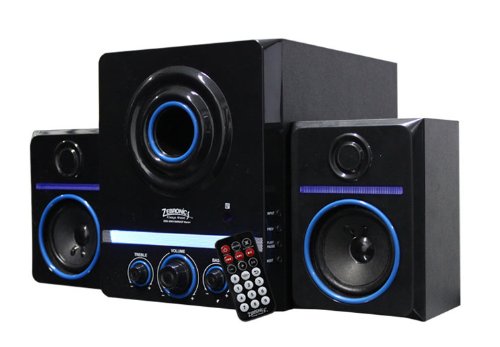
This image displays the Zebronics ZEB-SW2800RUCF Hero 2.1 speaker system. It features a central subwoofer unit with a large speaker and control knobs for treble, volume, and bass. Two satellite speakers are positioned on either side of the subwoofer. A remote control is also visible in the foreground.
الميزات الرئيسية
- 2.1 قناة صوتية: Provides a balanced sound experience with a dedicated subwoofer and two satellite speakers.
- إخراج قوي: Total output power of 38 Watts (18W Subwoofer + 10W x 2 Satellites).
- راديو FM مدمج: Enjoy your favorite radio stations directly through the speaker system.
- دعم الوسائط المتعددة: Supports USB pen drives and SD/MMC memory cards for direct playback of MP3 and WMA audio files.
- عناصر تحكم المستخدم: Features on/off switch, volume, bass, and treble controls for personalized audio.
- جهاز التحكم عن بعد: عملية مريحة من مسافة بعيدة.
- وحدات السائق: 4-inch magnetically shielded subwoofer driver and 3 x 2-inch full-range magnetically shielded satellite drivers.
- نسبة الإشارة إلى الضوضاء العالية: ≥80dB for clear audio.
- تشويه منخفض: ≤0.3% at 1W output @1KHz.
تعليمات الإعداد
- فك التعبئة: Carefully remove all components from the packaging. Ensure all parts are present: one subwoofer unit, two satellite speakers, and a remote control.
- الموقع: Position the subwoofer on a stable surface, preferably on the floor for optimal bass. Place the satellite speakers on either side of your listening area, ensuring they are facing towards you for the best stereo effect.
- توصيل مكبرات الصوت الفضائية: Connect the cables from the two satellite speakers to the corresponding output ports on the rear panel of the subwoofer unit. Ensure a secure connection.
- توصيل مصدر الصوت (اختياري): If connecting an external audio device (e.g., computer, smartphone, TV), use an appropriate audio cable (not included) to connect its audio output to the input port on the subwoofer.
- توصيل الطاقة: Plug the power cord of the subwoofer unit into a standard electrical outlet.
- تشغيل الطاقة: Turn on the main power switch, usually located on the rear or front panel of the subwoofer.
تعليمات التشغيل
التشغيل الأساسي
- تشغيل/إيقاف التشغيل: Use the power switch on the subwoofer or the remote control to turn the system on or off.
- التحكم في مستوى الصوت: Adjust the main volume knob on the subwoofer or use the volume buttons on the remote control.
- التحكم في الجهير: Use the bass knob on the subwoofer to adjust the level of low-frequency sound.
- التحكم في الترددات العالية: Use the treble knob on the subwoofer to adjust the level of high-frequency sound.
أوضاع الإدخال
The speaker system supports various input sources. Use the "Mode" button on the subwoofer or remote control to switch between them.
- وضع كابل التوصيل: Insert a USB pen drive into the USB port on the subwoofer. The system will automatically detect and play supported audio file(MP3، WMA).
- SD/MMC Card Mode: Insert an SD or MMC memory card into the card slot on the subwoofer. The system will automatically detect and play supported audio file(MP3، WMA).
- وضع راديو FM: Switch to FM mode. The system will automatically scan and store available radio stations. Use the previous/next track buttons on the remote or subwoofer to navigate between stations.
- وضع AUX: If an external device is connected via the AUX input, switch to AUX mode to play audio from that device.
وظائف التحكم عن بعد
The remote control provides convenient access to all major functions:
- قوة: تشغيل/إيقاف النظام.
- وضع: Switch between USB, SD/MMC, FM, and AUX inputs.
- الحجم +/-: اضبط مستوى الصوت الرئيسي.
- تشغيل/إيقاف مؤقت: Play or pause audio playback in USB/SD mode.
- السابق التالي: Skip tracks in USB/SD mode or change FM stations.
- صامت: كتم صوت الإخراج الصوتي أو إلغاء كتمه.
- EQ: (If available) Cycle through equalizer presets.
صيانة
- تنظيف: Use a soft, dry cloth to clean the speaker surfaces. Do not use liquid cleaners or abrasive materials, as they may damage the finish.
- تهوية: تأكد من وجود تهوية كافية لمضخم الصوت ومكبرات الصوت الفرعية. لا تسد أي فتحات تهوية.
- بيئة: Avoid exposing the speakers to direct sunlight, high temperatures, humidity, or dusty environments.
- إيقاف التشغيل: Always turn off and unplug the speaker system from the power outlet when not in use for extended periods or during electrical storms.
استكشاف الأخطاء وإصلاحها
| مشكلة | السبب المحتمل | حل |
|---|---|---|
| لا يوجد طاقة | سلك الطاقة غير موصول؛ مفتاح الطاقة مطفأ؛ مقبس الطاقة معطل. | Ensure power cord is securely plugged in; Turn on the power switch; Test the power outlet with another device. |
| لا يوجد صوت | Volume too low; Mute function active; Incorrect input mode; Audio cables not connected properly. | Increase volume; Deactivate mute; Select the correct input mode (USB, SD, FM, AUX); Check all audio cable connections. |
| صوت مشوه | مستوى الصوت مرتفع للغاية؛ جودة الصوت المصدرية رديئة؛ مشاكل في وضع السماعات. | خفّض مستوى الصوت؛ جرّب مصدر صوت مختلف؛ اضبط موضع السماعات. |
| بطاقة USB/SD لا تعمل | غير صحيح file تهيئة؛ لم يتم إدخال بطاقة USB/SD بشكل صحيح؛ تالفة files. | يضمن files are MP3 or WMA format; Reinsert USB/SD card; Try a different USB/SD card or files. |
| استقبال ضعيف لراديو FM | إشارة ضعيفة؛ الهوائي غير ممتد. | Adjust the position of the speaker system; Extend the FM antenna fully; Perform an auto-scan for stations again. |
تحديد
| ميزة | التفاصيل |
|---|---|
| نوع السماعة | ستالايت ، مضخم صوت |
| تكوين قناة الصوت المحيطي | 2.1 |
| طاقة الخرج (RMS) | 38 Watts (Subwoofer: 18W, Satellites: 10W x 2) |
| Subwoofer Driver Unit | 4-inches, magnetically shielded |
| Satellite Driver Unit | 3 x 2-inches full range, magnetically shielded |
| نسبة الإشارة إلى الضوضاء (S / N) | ≥80 ديسيبل |
| تشويه | ≤0.3% at 1W output @1KHz |
| عناصر التحكم | On/Off switch, Volume, Bass, Treble |
| تكنولوجيا الاتصال | USB |
| الوسائط المدعومة | USB pen drive, SD/MMC memory cards |
| تنسيقات الصوت المدعومة | ام بي 3، دبليو ام ايه |
| المميزات الخاصة | Built-in FM radio, Remote controller |
| الأجهزة المتوافقة | FM Radio, MP3 Player, Smartphone, Tablet, Television |
| الاستخدامات الموصى بها | For Smartphones or Tablets, For Televisions, Home Entertainment, Portable Audio |
| الشركة المصنعة | زيبرونكس |
| رقم الموديل | ZEB-SW2800RUCF Hero |
| تاريخ أول توفر | 2 نوفمبر 2012 |
الضمان والدعم
For warranty information and technical support, please refer to the warranty card included with your product or visit the official Zebronics webموقع. احتفظ بإيصال الشراء الخاص بك لمطالبات الضمان.
For further assistance, you may contact Zebronics customer service through their official channels.


