1. المقدمة
Thank you for choosing the Hama 95236 8-inch LCD Digital Photo Frame. This manual provides important information regarding the safe operation, setup, and maintenance of your device. Please read it thoroughly before using the product and keep it for future reference.
2. تعليمات السلامة
- Do not open the device. Incorrect assembly or repair can lead to electric shock.
- لا تقم بتشغيل المنتج إذا كان تالفًا بشكل واضح.
- احمِ المنتج من الأوساخ والرطوبة والحرارة الزائدة. استخدمه فقط في بيئات جافة.
- لا تسقط المنتج أو تعرضه لاهتزازات قوية.
- استخدم المنتج للغرض المخصص له فقط.
- احتفظ بهذا المنتج، مثل جميع المنتجات الكهربائية، بعيدًا عن متناول الأطفال.
- تخلص من مواد التغليف على الفور وفقًا للوائح المحلية المعمول بها.
3. محتويات العبوة
يرجى التأكد من أن العبوة تحتوي على العناصر التالية:
- Hama 95236 8-inch LCD Digital Photo Frame
- محول الطاقة
- دليل المستخدم (هذا المستند)
4. انتهى المنتجview
تعرف على مكونات وعناصر التحكم في إطار الصور الرقمية الخاص بك.
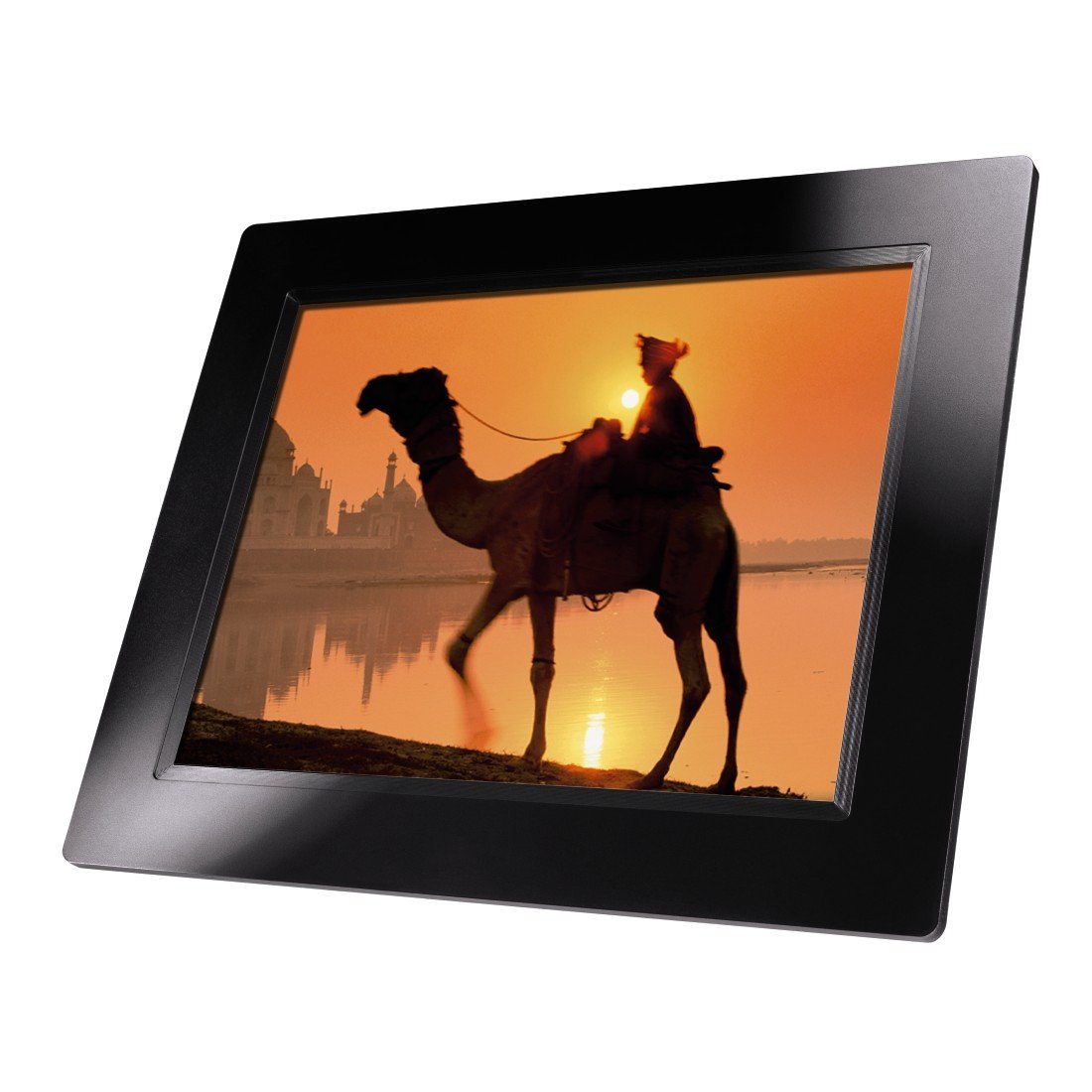
الشكل 4.1: أمام view of the Hama 95236 Digital Photo Frame, showing the 8-inch LCD screen.

الشكل 4.2: جانب view of the digital photo frame, highlighting the various input ports including the SD/MMC/MS card slot, USB port, and DC IN power port.

الشكل 4.3: مؤخرة view of the digital photo frame, showing the stand attachment point, ventilation grilles, and the control panel with power, navigation, and menu buttons.
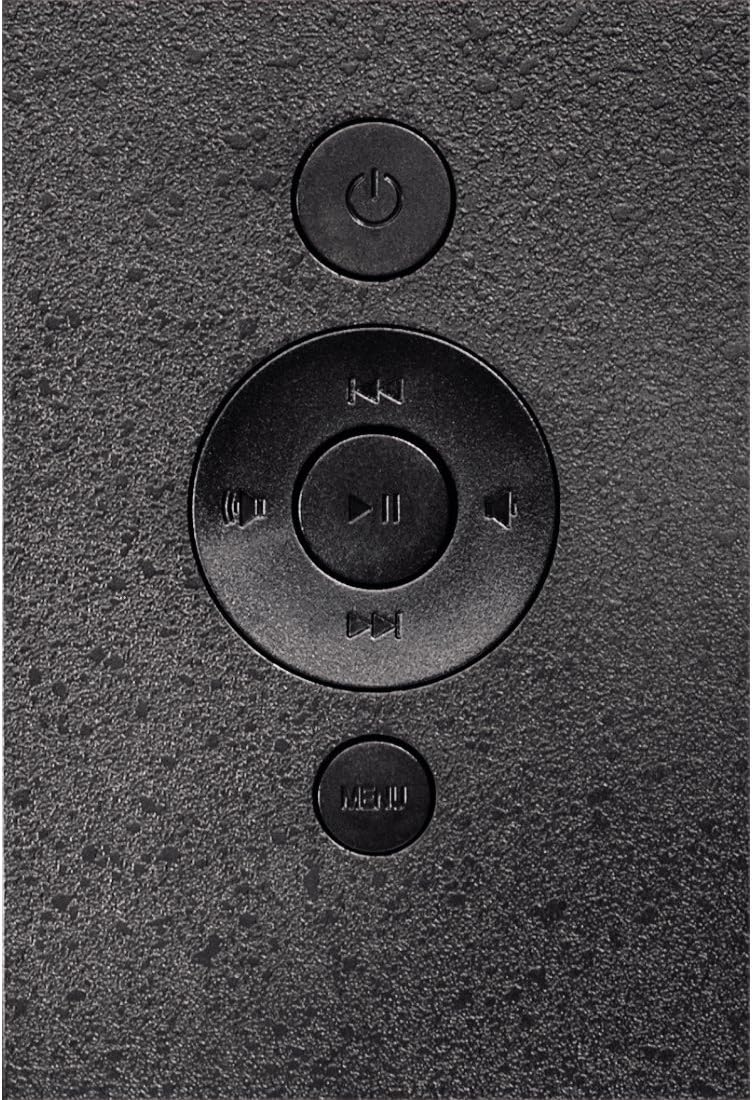
الشكل 4.4: Close-up of the control buttons located on the back of the frame. These include the power button, directional navigation buttons (up, down, left, right), play/pause/enter button, and the menu button.
4.1. المنافذ وأدوات التحكم
- SD/MMC/MS Card Slot: For inserting memory cards to display photos and videos.
- منفذ USB: For connecting USB flash drives or other compatible USB storage devices.
- التيار المباشر الداخل: Power input for connecting the provided power adapter.
- زر الطاقة: يقوم بتشغيل الجهاز أو إيقاف تشغيله.
- أزرار التنقل (أعلى/أسفل/يسار/يمين): Used to navigate through menus and select options.
- Play/Pause/Enter Button: Confirms selections or controls media playback.
- زر القائمة: الوصول إلى القائمة الرئيسية للإعدادات والخيارات.
5. الإعداد
5.1. تركيب الحامل
Insert the metal stand into the designated slot on the back of the digital photo frame. Ensure it is securely fastened to provide stable support for the frame.
5.2. توصيل الطاقة
- قم بتوصيل محول الطاقة بمنفذ DC IN الموجود في الجزء الخلفي من إطار الصورة.
- قم بتوصيل محول الطاقة بمأخذ كهربائي مناسب.
- The frame will typically power on automatically or can be turned on using the power button.
5.3. Inserting a Memory Card or USB Drive
The Hama 95236 supports SD/MMC/MS memory cards and USB flash drives.
- Locate the SD/MMC/MS card slot or the USB port on the side of the frame (refer to Figure 4.2).
- Carefully insert your memory card or USB drive into the corresponding slot/port. Ensure it is inserted correctly to avoid damage.
- The frame should automatically detect the storage device and prompt you to view its contents or start a slideshow.
6. تعليمات التشغيل
6.1. التنقل الأساسي
Use the navigation buttons on the back of the frame to move through menus and options. The Play/Pause/Enter button confirms your selection.
6.2. القائمة الرئيسية
اضغط على قائمة طعام button to access the main menu. From here, you can select different modes and settings:
- صورة: View photos in a slideshow or individually.
- موسيقى: تشغيل الصوت files.
- فيديو: تشغيل الفيديو files.
- التقويم/الساعة: Display the calendar and time.
- إعدادات: Adjust various device parameters.
6.3. Photo Playback
- من القائمة الرئيسية، حدد صورة.
- Navigate to your desired folder or select all photos.
- اضغط على تشغيل/إيقاف مؤقت/إدخال button to start the slideshow.
- During a slideshow, you can use the navigation buttons to skip photos or pause playback.
6.4. إعدادات النظام
الوصول إلى إعدادات menu to customize your photo frame:
- اعدادات العرض: Adjust brightness, contrast, and display mode.
- إعدادات عرض الشرائح: Configure transition effects, display time per photo, and repeat mode.
- التاريخ والوقت: تعيين التاريخ والوقت الحاليين. Note: Some users have reported that date and time settings may reset after power loss.
- لغة: اختر لغتك المفضلة لواجهة القائمة.
- معلومات التخزين: View details about connected storage devices.
7. الصيانة
7.1. تنظيف الجهاز
- قم دائمًا بفصل الجهاز عن مصدر الطاقة قبل التنظيف.
- Clean the screen and exterior surfaces with a soft, dry, lint-free cloth.
- Do not use aggressive cleaning agents, solvents, or abrasive materials.
7.2. التخزين
في حالة تخزين الجهاز لفترة طويلة، افصله عن مصدر الطاقة وخزنه في مكان بارد وجاف بعيدًا عن أشعة الشمس المباشرة ودرجات الحرارة القصوى.
8. استكشاف الأخطاء وإصلاحها
| مشكلة | السبب المحتمل | حل |
|---|---|---|
| الجهاز لا يعمل. | محول الطاقة غير متصل أو معيب. | Ensure the power adapter is securely connected to both the frame and the power outlet. Test the outlet with another device. |
| لم يتم عرض أي صور. | No memory card/USB drive inserted or fileغير مدعوم. | Insert a compatible memory card or USB drive with supported image formats (e.g., JPEG). Check if the storage device is properly inserted. |
| Date and time reset after power off. | No internal battery backup for clock. | This model may not retain date/time settings without continuous power. Re-enter settings if necessary after power interruption. |
| تشغيل الفيديو متقطع أو مشوه. | Unsupported video format or high bitrate. | تأكد من الفيديو files are in a supported format and resolution. Convert videos to a lower resolution or bitrate if issues persist. |
| الأزرار لا تستجيب. | خلل مؤقت في البرنامج. | Disconnect the power adapter, wait a few seconds, then reconnect it to restart the device. |
9. المواصفات
| ميزة | التفاصيل |
|---|---|
| رقم الموديل | 00095236 |
| حجم الشاشة | 8 بوصة |
| دقة العرض | 800 × 600 بكسل |
| نسبة العرض إلى الارتفاع | 4:3 |
| التخزين الداخلي | 2 جيجابايت (2048 ميجابايت) |
| الاتصال | USB, SD/MMC/MS Card Slot |
| الأبعاد (الطول × العرض × الارتفاع) | 2.6 × 22.2 × 17.8 سم |
| وزن | 550 جرام |
| الشركة المصنعة | حماه |
10. معلومات الضمان
Hama GmbH & Co KG provides a manufacturer's warranty for this product. The specific terms and conditions of the warranty period and coverage are subject to the purchase date and the region of purchase. Please retain your proof of purchase (receipt) for any warranty claims.
For detailed warranty information, please refer to the official Hama webالموقع أو اتصل بدعم العملاء مباشرة.
11. دعم العملاء
Should you have any questions regarding this product, please contact Hama Customer Support:
- Webموقع: قم بزيارة موقع حماة الرسمي website for FAQs, drivers, and further product information. www.hama.com
- اتصال: Refer to the contact section on the Hama website for phone numbers or email support in your region.
يرجى إحضار رقم الموديل الخاص بك (00095236) وإثبات الشراء عند الاتصال بالدعم.


