1. المقدمة
Thank you for choosing the TFA 30.5027.02 Digital Thermometer/Hygrometer. This device is designed to accurately measure and display indoor temperature and humidity, providing a clear indication of the comfort level in your environment. Its ultra-flat design and high-gloss surface make it a discreet and functional addition to any room. Please read this manual carefully to ensure proper setup and operation.
2. معلومات السلامة
- احتفظ بدليل التعليمات هذا للرجوع إليه في المستقبل.
- هذا الجهاز مخصص للاستخدام الداخلي فقط.
- Do not expose the device to extreme temperatures, direct sunlight, moisture, or strong vibrations.
- لا تغمر الجهاز في الماء أو أي سوائل أخرى.
- Do not attempt to open or modify the device. This will void the warranty.
- احتفظ بالبطاريات بعيدًا عن متناول الأطفال. في حالة الابتلاع ، اطلب عناية طبية فورية.
- تخلص من البطاريات المستخدمة وفقا للوائح المحلية.
- قم بتنظيف الجهاز باستخدام قطعة قماش ناعمة.amp القماش. لا تستخدم المنظفات أو المذيبات الكاشطة.
3. محتويات العبوة
يرجى التأكد من أن جميع المكونات موجودة وغير تالفة:
- 1x TFA 30.5027.02 Digital Thermometer/Hygrometer
- بطارية ليثيوم CR2 واحدة (مثبتة مسبقًا أو منفصلة)
- 1x دليل التعليمات (هذه الوثيقة)
4. انتهى المنتجview
The TFA 30.5027.02 features a clear digital display showing current temperature and humidity. It also includes a comfort level indicator and a maximum/minimum value memory function.

الشكل 1: أمام view of the TFA 30.5027.02 Digital Thermometer/Hygrometer. The display shows temperature in Celsius and relative humidity percentage, along with a comfort level icon.
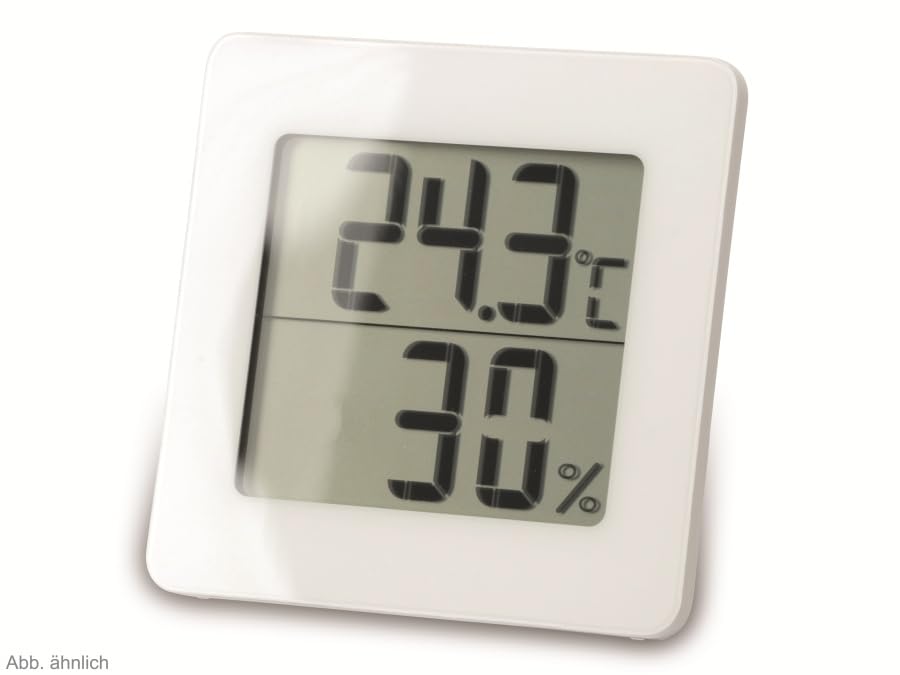
الشكل 2: البديل view of the TFA 30.5027.02 showing different temperature and humidity readings, demonstrating the device's clear digital display.
المميزات الرئيسية:
- Digital display for temperature (°C) and humidity (% RH)
- Ultra-flat design with high-gloss finish
- Comfort level indicator (smiley icon)
- Maximum and minimum value memory function
- قابلة للتثبيت على الحائط
5. الإعداد
5.1 تركيب البطارية
- حدد مكان غطاء حجرة البطارية على الجزء الخلفي للجهاز.
- قم بإزالة الغطاء عن طريق سحبه أو فتحه برفق.
- Insert one CR2 Lithium battery, ensuring the correct polarity (+/-) as indicated inside the compartment.
- أعد تركيب غطاء حجرة البطارية بشكل آمن.
- The device display should activate, showing current temperature and humidity readings.
5.2 التعيين الأولي
For accurate readings, place the thermometer/hygrometer in a location free from direct sunlight, drafts, or heat sources. The device can be placed on a flat surface or mounted on a wall using the integrated mounting hole on the back.
- التثبيت على الحائط: Use a small screw (not included) suitable for your wall type. Hang the device securely.
- وضع الطاولة: Ensure the device is stable on a flat, level surface.
6. تعليمات التشغيل
6.1 عرض أكثرview
The large digital display shows two main values:
- العرض العلوي: Current temperature in degrees Celsius (°C).
- العرض السفلي: Current relative humidity in percentage (% RH).
- مؤشر مستوى الراحة: A small icon (e.g., a smiley face) indicates the current indoor climate comfort level based on temperature and humidity.
6.2 وظيفة كحد أقصى / دقيقة
The device records the maximum and minimum temperature and humidity values measured since the last reset. To access these values:
- اضغط على الحد الأقصى/الحد الأدنى button (if present, typically on the back or side). The display will show the maximum recorded temperature and humidity.
- اضغط على الحد الأقصى/الحد الأدنى الزر مرة أخرى ل view the minimum recorded temperature and humidity.
- اضغط على الحد الأقصى/الحد الأدنى اضغط على الزر للمرة الثالثة للعودة إلى القراءات الحالية.
To reset the MAX/MIN values, press and hold the الحد الأقصى/الحد الأدنى button for a few seconds while viewing the MAX or MIN values. The memory will clear, and new maximum and minimum values will begin recording from that point.
6.3 مؤشر مستوى الراحة
The comfort level indicator provides a quick visual reference for indoor climate conditions:
- وجه سعيد: Indicates optimal comfort (e.g., 20-25°C and 40-70% RH).
- وجه محايد: Indicates acceptable but not optimal conditions.
- وجه حزين: Indicates uncomfortable conditions (e.g., too dry, too humid, too hot, or too cold).
Note: Specific ranges for comfort levels may vary slightly by model. Refer to the device's display for the exact icon representation.
7. الصيانة
7.1 التنظيف
قم بتنظيف الجهاز بشكل ناعم وقليل دamp cloth. Do not use abrasive cleaning agents, solvents, or alcohol, as these can damage the surface and display.
7.2 استبدال البطارية
When the battery power is low, a low battery indicator (if available) will appear on the display. Replace the battery as follows:
- افتح غطاء حجرة البطارية الموجود في الجزء الخلفي من الجهاز.
- قم بإزالة بطارية الليثيوم CR2 القديمة.
- Insert a new CR2 Lithium battery, observing the correct polarity (+/-).
- أغلق غطاء حجرة البطارية.
Note: After battery replacement, the device may reset, and MAX/MIN values will be cleared.
8. استكشاف الأخطاء وإصلاحها
| مشكلة | السبب المحتمل | حل |
|---|---|---|
| لا يوجد عرض أو عرض خافت | البطارية ميتة أو تم إدخالها بشكل غير صحيح. | Replace the battery with a new CR2 Lithium battery, ensuring correct polarity. |
| قراءات غير دقيقة | Device is placed in an unsuitable location (e.g., near a window, heat source, or vent). | Relocate the device to a stable indoor environment away from direct influences. Allow 15-30 minutes for readings to stabilize. |
| Comfort indicator always shows the same face | Environmental conditions are consistently outside or within a specific comfort range. | This indicates the device is functioning correctly. Adjust your indoor environment if desired. |
9. المواصفات
- رقم الموديل: 30.5027.02
- ماركة: TFA
- لون: أبيض
- أبعاد المنتج (الطول × العرض × الارتفاع): 10 x 1.2 x 8.2 cm (3.94 x 0.47 x 3.23 inches)
- وزن السلعة: 70 جرام (2.47 أونصة)
- بطارية: 1 x CR2 Lithium (included)
- نوع التركيب: حامل الحائط
- Operational Humidity Range: 20% إلى 95% رطوبة نسبية
- Upper Rated Temperature: 50 درجة مئوية (122 درجة فهرنهايت)
- دقة درجة الحرارة: ±1 درجة مئوية
- دقة قراءة درجة الحرارة: ±1 درجة مئوية
10. الضمان والدعم
For warranty information and customer support, please refer to the terms and conditions provided by your retailer or contact the manufacturer directly. Keep your proof of purchase for any warranty claims.
الشركة المصنعة: TFA Dostmann GmbH & Co. KG
For further assistance, please visit the official TFA webالموقع أو الاتصال بقسم خدمة العملاء.


