1. المقدمة
This manual provides detailed instructions for the installation, operation, and maintenance of your Gewiss GW10701 Programmable Thermostat. This device is designed to control heating and air conditioning systems, allowing you to manage room temperature efficiently and comfortably. Please read this manual thoroughly before installation and use to ensure proper functionality and safety.
2. معلومات السلامة
يرجى دائمًا مراعاة احتياطات السلامة التالية لمنع الإصابة الشخصية أو تلف الجهاز:
- يجب أن يتم إجراء التثبيت بواسطة موظفين مؤهلين فقط وفقًا للقوانين واللوائح الكهربائية المحلية.
- Disconnect power to the heating/cooling system at the main circuit breaker before installing or servicing the thermostat.
- لا تعرض منظم الحرارة للماء أو الرطوبة الزائدة.
- Use only the specified battery type and ensure correct polarity during installation.
- Keep batteries out of reach of children. Do not dispose of batteries in fire.
- Do not attempt to open or repair the thermostat yourself. Contact qualified service personnel.
3. انتهى المنتجview
The Gewiss GW10701 is a wall-mounted programmable thermostat featuring an LCD display and intuitive controls for temperature management.
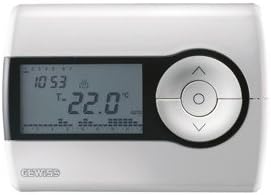
الشكل 1: أمام view of the Gewiss GW10701 Thermostat. It features a clear LCD screen displaying time and temperature, alongside a circular control panel with directional buttons and a central confirmation button for easy navigation and setting adjustments.
3.1. المكونات
- شاشة LCD: Shows current time, temperature, operating mode, and programming settings.
- أزرار التحكم: Typically include UP/DOWN arrows for temperature adjustment, MODE button for selecting operating modes (e.g., Heat, Cool, Auto, Off), and a SET/PROG button for accessing programming menus. (Note: Specific button functions may vary slightly; refer to on-screen prompts.)
- حجرة البطارية: Located on the rear or side, houses the power supply batteries.
- تصاعد لوحة: لتركيب آمن على الحائط.
4. التثبيت
4.1. اختيار الموقع
Select a central location on an interior wall, approximately 1.5 meters (5 feet) above the floor. Avoid locations near heat sources (lamps, direct sunlight, fireplaces), drafts (windows, doors), or areas with poor air circulation.
4.2. تركيب منظم الحرارة
- فصل الطاقة: Turn off the power to your heating/cooling system at the main circuit breaker.
- Separate Base Plate: Carefully detach the front cover of the thermostat from its base plate.
- علامة وحفر: Hold the base plate against the wall at your chosen location. Mark the drilling points. Drill holes and insert wall anchors if necessary.
- Secure Base Plate: Fasten the base plate to the wall using the provided screws.
- Wiring (if applicable): Connect the system wires to the appropriate terminals on the base plate. Refer to the wiring diagram provided with your heating/cooling system or consult a qualified electrician. Note: While the thermostat is battery-powered, it controls a 230V system. Ensure correct wiring.
- تركيب البطاريات: Insert the required batteries into the battery compartment, observing correct polarity (+/-).
- قم بتوصيل منظم الحرارة: Carefully reattach the thermostat front cover to the base plate, ensuring it clicks securely into place.
- اعادة الطاقة: Turn on the power to your heating/cooling system at the main circuit breaker.
5. التشغيل
5.1. الإعداد الأولي
Upon first power-up or after battery replacement, you may need to set the current time and date. Follow the on-screen prompts or refer to the programming section.
5.2. ضبط درجة الحرارة
استخدم UP و تحت arrow buttons to adjust the desired temperature. The display will show the set temperature temporarily, then revert to the current room temperature.
5.3. أوضاع التشغيل
اضغط على وضع button (or similar) to cycle through available operating modes:
- حرارة: The thermostat will activate the heating system when the room temperature falls below the set temperature.
- بارد: The thermostat will activate the air conditioning system when the room temperature rises above the set temperature.
- تلقاءي: يقوم منظم الحرارة بالتبديل تلقائيًا بين التدفئة والتبريد للحفاظ على نطاق درجة الحرارة المحدد.
- OFF: تم إيقاف تشغيل أنظمة التدفئة والتبريد.
6. البرمجة
The Gewiss GW10701 allows you to create custom heating/cooling schedules for different times of the day and days of the week. This feature helps optimize energy consumption and comfort.
6.1. ضبط الوقت والتاريخ
- اضغط على تعيين or بروغ زر للدخول إلى قائمة الإعدادات.
- Navigate using the arrow buttons to find "Time" or "Date" settings.
- Use the arrow buttons to adjust the values (hour, minute, day, month, year).
- تأكد من كل إعداد باستخدام تعيين or central button.
6.2. Creating a Program Schedule
The thermostat typically offers daily or weekly programming options. You can set different temperatures for various periods (e.g., Wake, Day, Evening, Sleep).
- اضغط على بروغ زر للدخول إلى وضع البرمجة.
- حدد اليوم أو مجموعة الأيام التي ترغب في برمجتها (على سبيل المثال، من الإثنين إلى الجمعة، أو السبت والأحد، أو أيام فردية).
- For each period (e.g., "Wake"), set the desired start time and temperature using the arrow buttons.
- Advance to the next period and repeat the process.
- Save your program and exit programming mode.
Consult the on-screen menu and specific button labels on your device for precise programming steps, as interfaces can vary.
7. الصيانة
7.1. استبدال البطارية
The thermostat is powered by batteries. When the battery indicator appears on the display, replace the batteries promptly to ensure continuous operation. Typically, 2x AA or AAA alkaline batteries are required.
- قم بإزالة الغطاء الأمامي لمنظم الحرارة بعناية.
- قم بإزالة البطاريات القديمة والتخلص منها بطريقة مسؤولة.
- أدخل بطاريات جديدة ، مع ضمان القطبية الصحيحة.
- أعد تركيب الغطاء الأمامي.
7.2. التنظيف
Clean the thermostat's exterior with a soft, dry cloth. Do not use abrasive cleaners, solvents, or spray cleaners directly onto the device, as this can damage the display or internal components.
8. استكشاف الأخطاء وإصلاحها
| مشكلة | السبب المحتمل | حل |
|---|---|---|
| العرض فارغ أو خافت. | بطاريات منخفضة أو ميتة. | استبدال البطاريات بأخرى جديدة. |
| نظام التدفئة/التبريد لا يستجيب. |
|
|
| قراءات درجة الحرارة تبدو غير دقيقة. | يتأثر موقع منظم الحرارة بالتيارات الهوائية أو مصادر الحرارة. | تأكد من عدم تعريض منظم الحرارة لأشعة الشمس المباشرة أو التيارات الهوائية أو الأجهزة التي تصدر حرارة. |
9. المواصفات
- الشركة المصنعة: جيويس
- رقم الموديل: GW10701 (جوقة)
- الأبعاد (الطول × العرض × الارتفاع): 13 × 2.3 × 9.2 سم
- وزن: 9.07 جرام
- لون: أبيض
- مادة: بلاستيك
- مزود الطاقة: تعمل بالبطارية
- تبديل حجمtage: 230 Volt (for controlled system)
- نوع العرض: LCD أو LED
- نوع التركيب: مثبت على الحائط
- ميزات التحكم: Programmable, Button control
- الاستخدام: Heating systems, Air conditioning systems
10. الضمان والدعم
For warranty information, technical support, or service inquiries regarding your Gewiss GW10701 Thermostat, please refer to the warranty card included with your product or visit the official Gewiss website. You may also contact your local Gewiss distributor or retailer for assistance.
Gewiss Official Webموقع: www.gewiss.com


