1. المقدمة
This manual provides instructions for the Perixx PX-1000 Backlit Gaming Keyboard. It covers setup, operation, maintenance, and troubleshooting to ensure optimal performance and user experience. The PX-1000 is designed for various environments, including office, home, and gaming, featuring adjustable backlighting and a Windows key lock function.
2. انتهى المنتجview
2.1 الميزات الرئيسية
- مفاتيح ذات إضاءة خلفية: Three-level adjustable backlighting for visibility in low-light conditions.
- خيارات الألوان: Switch between blue, red, and purple backlight colors.
- Windows Lock Function: Disable the Windows key to prevent accidental interruptions during gaming.
- اتصال USB: وصلة USB قياسية لتوافق واسع.
2.2 تخطيط لوحة المفاتيح
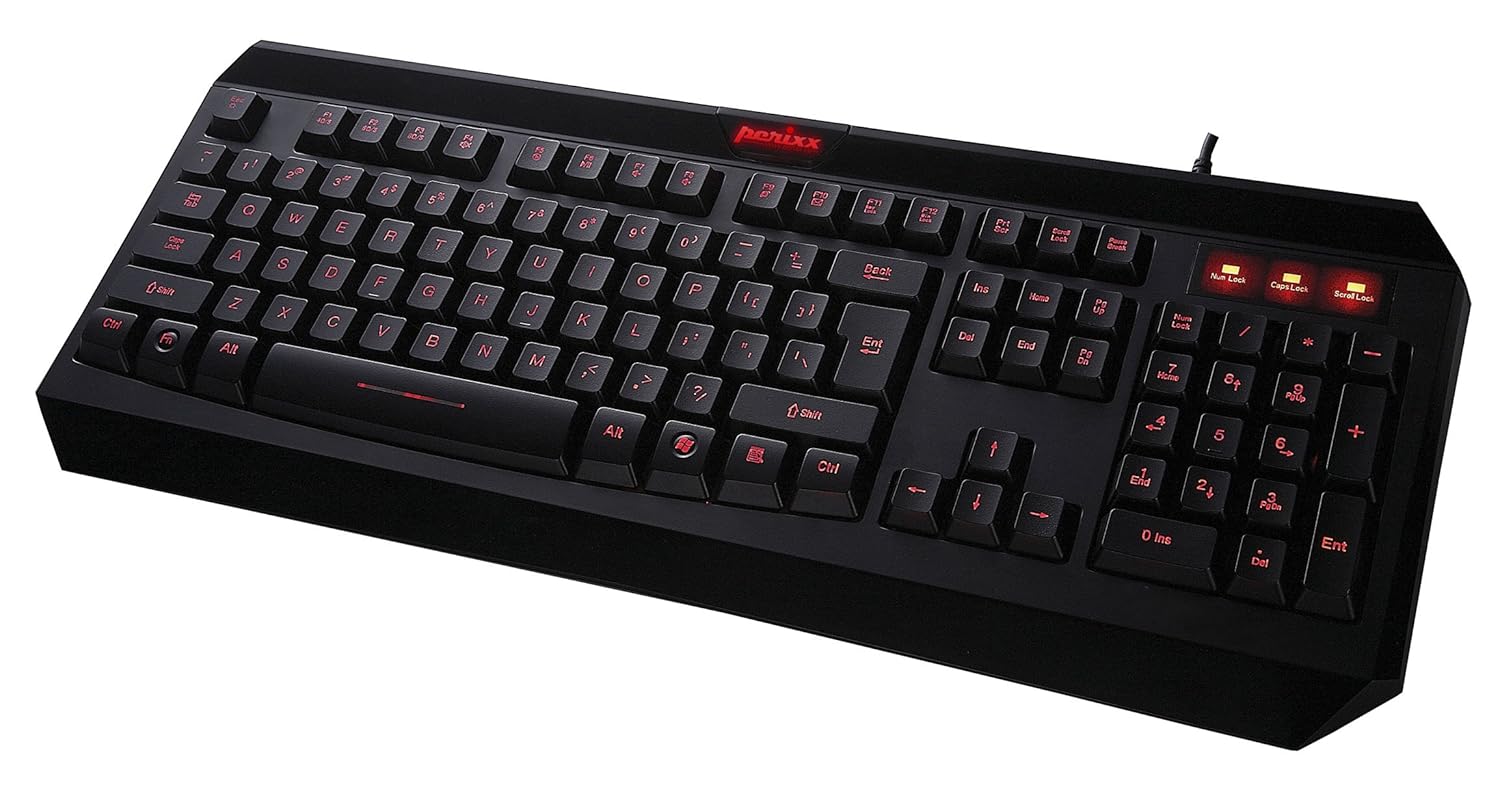
الشكل 2.1: من أعلى إلى أسفل view of the Perixx PX-1000 keyboard with red backlighting activated. This image displays the full QWERTY layout, numeric keypad, and function keys.

Figure 2.2: Technical diagram illustrating the key layout and dimensions of the Perixx PX-1000 keyboard.
3. الإعداد
- فك التعبئة: Carefully remove the keyboard from its packaging. Ensure all components, including the USB cable, are present.
- اتصال: قم بتوصيل موصل USB الخاص بلوحة المفاتيح بمنفذ USB متاح على جهاز الكمبيوتر الخاص بك.
- تثبيت برنامج التشغيل: The Perixx PX-1000 is a plug-and-play device. Your operating system (Windows) should automatically detect and install the necessary drivers. No additional software installation is typically required.
- الموقع: ضع لوحة المفاتيح بشكل مريح على مكتبك.
4. تعليمات التشغيل
4.1 التحكم في الإضاءة الخلفية
The PX-1000 features adjustable backlighting with multiple color options.
- Changing Backlight Color: اضغط على Fn مفتاح + قفل التمرير key simultaneously to cycle through the available backlight colors: Blue, Red, and Purple.
- ضبط سطوع الإضاءة الخلفية: اضغط على Fn مفتاح + صفحة لأعلى key to increase brightness, and Fn مفتاح + الصفحة لأسفل key to decrease brightness. There are three brightness levels.
- Turning Backlight On/Off: To turn off the backlight, cycle through the brightness levels until it is off, or press Fn مفتاح + قفل التمرير حتى تنطفئ الإضاءة الخلفية.
4.2 Windows Key Lock Function
To prevent accidental activation of the Windows Start menu during intensive tasks or gaming, the Windows key can be disabled.
- Activating/Deactivating Windows Key Lock: اضغط على Fn مفتاح + مفتاح الويندوز simultaneously. An indicator light (usually near the Num Lock/Caps Lock indicators) will illuminate when the Windows key is locked. Repeat the combination to unlock.
5. الصيانة
تضمن الصيانة المناسبة طول عمر لوحة المفاتيح لديك وأدائها.
- تنظيف: Use a soft, dry cloth to wipe the surface of the keyboard. For deeper cleaning, use a can of compressed air to remove dust and debris from between the keys. Avoid using harsh chemicals or abrasive materials.
- الانسكابات: In case of liquid spills, immediately disconnect the keyboard from your computer. Turn it upside down to drain any liquid and allow it to dry completely before reconnecting. Do not attempt to use the keyboard while it is wet.
- تخزين: عند عدم استخدام لوحة المفاتيح لفترات طويلة، قم بتخزينها في بيئة نظيفة وجافة بعيدًا عن درجات الحرارة القصوى.
6. استكشاف الأخطاء وإصلاحها
| مشكلة | السبب المحتمل | حل |
|---|---|---|
| لوحة المفاتيح لا تستجيب. | اتصال USB فضفاض، منفذ USB معيب، مشكلة في برنامج التشغيل. |
|
| الإضاءة الخلفية لا تعمل أو عالقة على لون واحد. | Backlight function not activated, incorrect settings. |
|
| Windows key not functioning. | قفل مفتاح Windows نشط. | يضعط Fn + مفتاح الويندوز to toggle the lock function. Check the indicator light. |
| المفاتيح ملتصقة أو لا تستجيب. | Debris under keys, liquid damage. |
|
7. المواصفات

Figure 7.1: Detailed dimensions of the Perixx PX-1000 keyboard.
| ميزة | التفاصيل |
|---|---|
| ماركة | بيريكس |
| رقم الموديل | PX-1000 (Item model number: 10992) |
| لون | Black, Red (Backlight colors: Blue, Red, Purple) |
| تكنولوجيا الاتصال | USB |
| الأجهزة المتوافقة | PC |
| نظام التشغيل | نوافذ |
| أبعاد المنتج (الطول × العرض × الارتفاع) | 46 x 19.2 x 3 cm (18.11 x 7.56 x 1.18 inches) |
| وزن العنصر | 812 جرام (1.79 رطل) |
| المكونات المضمنة | كابل يو اس بي |
| ميزة خاصة | مضاءة من الخلف |
8. الضمان والدعم
For warranty information and technical support, please refer to the documentation included with your product or visit the official Perixx website. Perixx provides customer support for product-related inquiries and assistance with troubleshooting.
الموارد المتاحة على الإنترنت: للحصول على مزيد من الدعم ومعلومات المنتج، يمكنك زيارة Perixx Store on Amazon.


