مقدمة
The Leviton Series 1000 line of revenue-grade meters is designed for accurate measurement of power consumption. These meters are suitable for both new construction and retrofit applications, providing a simple and effective process for capturing electrical usage data. The Series 1000 meters utilize highly accurate current transformers (CTs) for revenue-grade performance, certified to ANSI standards. This model, the 1K240-1W, is a 120/240V 100A 1P3W Indoor Kit featuring split core CTs.
This manual provides essential information for the safe and correct installation, operation, and maintenance of your Leviton Series 1000 1K240-1W energy meter.
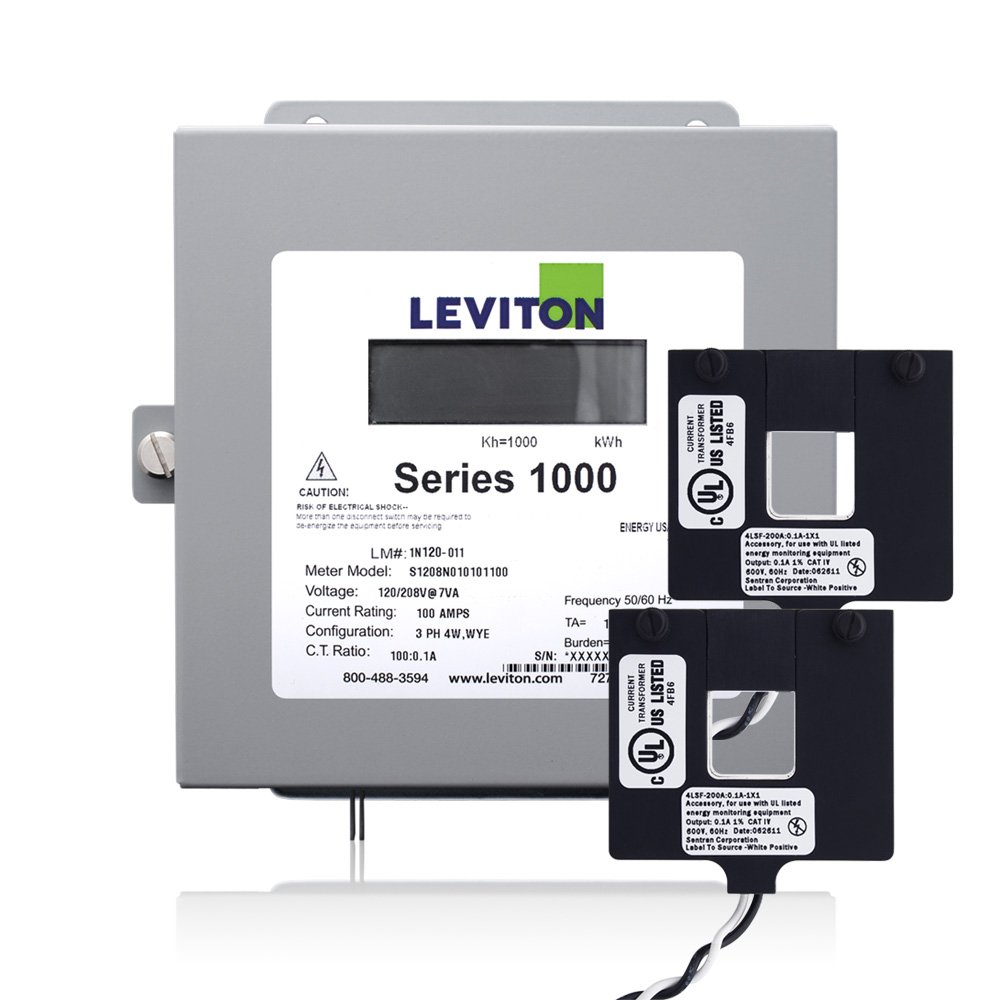
Image: Leviton Series 1000 1K240-1W Indoor Kit with split core current transformers.
الإعداد والتثبيت
WARNING: Installation should only be performed by a qualified electrician. Ensure all power is disconnected before beginning installation to prevent electric shock or equipment damage.
- السلامة أولاً: Always de-energize the electrical panel or circuit where the meter will be installed. Verify with a voltage tester that power is off.
- التركيب: Mount the Leviton Series 1000 meter in a suitable indoor location, typically within an electrical panel or enclosure. The unit is designed for surface mounting.
- Current Transformer (CT) Installation:
- This kit includes split core CTs, which can be installed without disconnecting existing wire terminations.
- Carefully open the split core CTs and place them around the appropriate current-carrying conductors (lines). Ensure the CTs close securely.
- Observe the color-coded labels on the CTs for correct line/load orientation, especially for 100 Amp و 200 Amp solid core CTs (if applicable to your specific CTs).
- Connect the CT leads to the designated terminals on the Series 1000 meter. Up to three sets of CTs per phase can be paralleled per meter.
- المجلدtagالتوصيلات الإلكترونية: Connect the meter's voltage sensing wires to the appropriate voltage points in the electrical system (120/240V).
- Communication Connections (Optional): The meter is equipped with both Isolated Pulse Output and an RS-485 Serial Port (Modbus Native) for interface with AMR and BAS systems. Connect these as required by your system.
- Power Restoration and Verification: بمجرد التأكد من سلامة جميع التوصيلات، أعد التيار الكهربائي إلى الدائرة.
- Installation Diagnostics: Observe the meter's indicators. A red reverse phase indicator will illuminate if the meter is improperly installed. Refer to the Troubleshooting section for corrective actions. A green duty cycle light will show that the meter is collecting electrical consumption data at the appropriate rate.
تعليمات التشغيل
The Leviton Series 1000 meter is designed for continuous, automatic measurement of electrical consumption. Once properly installed and powered, it begins collecting data without user intervention.
- جمع البيانات: The meter measures kilowatt-hours (kWh) and can optionally measure peak demand. This data is stored internally and can be accessed via the communication ports (Isolated Pulse Output or RS-485 Modbus).
- مؤشرات الحالة:
- Green Duty Cycle Light: A steady or flashing green light indicates that the meter is actively collecting electrical consumption data correctly.
- Red Reverse Phase Indicator: If this light is illuminated during operation, it signifies an improper installation or wiring error. Refer to the Troubleshooting section immediately.
- دقة: The meter provides revenue-grade accuracy, certified to ANSI C12.1 standards, ensuring reliable measurement of electrical usage.
صيانة
The Leviton Series 1000 meter is designed for long-term, reliable operation with minimal maintenance. However, periodic checks are recommended to ensure continued performance and safety.
- التفتيش الدوري: Periodically inspect the meter and its connections for any signs of physical damage, loose wiring, or overheating. Any such issues should be addressed by a qualified electrician.
- تنظيف: Keep the meter's exterior clean and free of dust and debris. Use a soft, dry cloth for cleaning. Do not use liquid cleaners or solvents.
- الظروف البيئية: Ensure the meter operates within its specified environmental conditions (indoor use, temperature, humidity) to prevent damage and ensure accuracy.
- الخدمة المهنية: For any internal servicing or recalibration, contact Leviton customer support or a certified service technician. Do not attempt to open or repair the meter yourself.
استكشاف الأخطاء وإصلاحها
This section provides guidance for common issues you might encounter with your Leviton Series 1000 meter.
| مشكلة | السبب المحتمل | حل |
|---|---|---|
| Red Reverse Phase Indicator is ON | Improper installation or incorrect wiring of current transformers (CTs) or voltagاتصالات هـ. | Immediately de-energize the circuit. Re-check all CT and voltage connections against the installation diagram. Ensure CTs are correctly oriented and securely closed. If the issue persists, contact technical support. |
| Green Duty Cycle Light is OFF or Irregular | No power to the meter, faulty connection, or internal malfunction. | Verify power supply to the meter. Check voltage connections. If power is present and connections are secure, but the light remains off or irregular, contact technical support. |
| No Data Output via Communication Ports | Incorrect communication wiring, incorrect settings in the connected AMR/BAS system, or meter malfunction. | Verify communication wiring according to the system's requirements. Check the settings of your AMR/BAS system. Ensure the meter's green duty cycle light is active. If issues persist, consult the communication protocol documentation or contact technical support. |
If you encounter problems not listed here, or if the suggested solutions do not resolve the issue, please contact Leviton customer support for further assistance.
المواصفات الفنية
| مواصفة | التفاصيل |
|---|---|
| رقم الموديل | 1K240-1W |
| المجلدtage | 120/240 فولت |
| التقييم الحالي | 100 Amps |
| الطور/السلك | 1 Phase, 3 Wire (1P3W) |
| نوع CT | Split Core |
| نوع التركيب | التركيب السطحي |
| مصدر الطاقة | كهرباء سلكية |
| وزن العنصر | 6 رطل (تقريبًا) |
| أبعاد المنتج | 19.25 × 6.5 × 12.5 بوصة (تقريبًا) |
| رمز المنتج الموحد | 078477597439 |
| الشركة المصنعة | ليفيتون |
| التقى المواصفات | UL, ANSI C12.1 |
| الناتج | Isolated Pulse Output, RS-485 Serial Port (Modbus Native) |
معلومات الضمان
This Leviton Series 1000 1K240-1W energy meter is covered by a manufacturer's warranty. For specific details regarding the warranty period, coverage, and terms, please refer to the documentation included with your product or visit the official Leviton webالموقع. احتفظ بإثبات الشراء الخاص بك لتقديم مطالبات الضمان.
دعم العملاء
For technical assistance, troubleshooting, or warranty inquiries, please contact Leviton customer support. You can typically find contact information, including phone numbers and online support resources, on the official Leviton webموقع.
- الموارد المتاحة على الإنترنت: Visit the Leviton website for product manuals, FAQs, and support articles.
- معلومات الاتصال: Refer to the product packaging or the Leviton webالموقع للحصول على أحدث تفاصيل الاتصال بخدمة العملاء.


