1. المقدمة
يُقدّم هذا الدليل تعليمات أساسية لتركيب وتشغيل وصيانة مجموعة خراطيش الحبر Ricoh Aficio SPC430DN بشكل صحيح. تتضمن هذه المجموعة خراطيش حبر أصلية من Ricoh باللون الأسود، والأزرق السماوي، والأرجواني، والأصفر، مصممة لتحقيق الأداء الأمثل مع طابعات Ricoh المتوافقة.
المنتج انتهىview
تضمن مجموعة خراطيش الحبر Ricoh Aficio SPC430DN جودة طباعة عالية وأداءً موثوقًا. صُممت كل خرطوشة لتلبية معايير Ricoh الصارمة لدقة الألوان وإنتاجية الصفحات.
التوافق
تتوافق مجموعة خراطيش الحبر هذه مع طرازات طابعات ريكو التالية:
- Ricoh Aficio SP C430DN
- Ricoh Aficio SP C431DN
- ريكو أفيسيو إس بي سي 431 دي إن-إتش إس
- ريكو SP C440DN
ماذا يوجد في الصندوق
تحتوي العبوة على مجموعة واحدة من خراطيش حبر ريكو الأصلية، بما في ذلك:
- خرطوشة حبر أسود واحدة
- خرطوشة حبر سماوي واحدة
- خرطوشة حبر أرجوانية واحدة
- خرطوشة حبر صفراء واحدة
2. الإعداد والتثبيت
اتبع هذه الخطوات العامة لتثبيت خراطيش الحبر. ارجع دائمًا إلى دليل المستخدم الخاص بطابعتك للحصول على تعليمات مفصلة خاصة بطرازها واحتياطات السلامة.
- أوقف تشغيل الجهاز وافتحه: تأكد من إيقاف تشغيل الطابعة. افتح الغطاء الأمامي أو لوحة الوصول الخاصة بالطابعة لكشف فتحات خراطيش الحبر.
- إزالة الخرطوشة القديمة (إن وجدت): أزل خرطوشة الحبر الفارغة بحرص عن طريق سحبها للخارج مباشرة. ضعها في كيس واقٍ لإعادة تدويرها.
- تحضير خرطوشة جديدة: قم بهز خرطوشة الحبر الجديدة برفق أفقياً 5-6 مرات لتوزيع الحبر بالتساوي.
- إزالة المواد الواقية: قم بإزالة أي أختام أو أشرطة أو أغطية واقية من الخرطوشة الجديدة. احرص على عدم لمس سطح أسطوانة التصوير.
- أدخل خرطوشة جديدة: قم بمحاذاة خرطوشة الحبر الجديدة مع الفتحة المناسبة في الطابعة. ادفعها بقوة حتى تسمع صوت طقطقة. تأكد من تثبيتها بالكامل.
- أغلق الغطاء وشغّل الجهاز: أغلق غطاء الطابعة أو لوحة الوصول. شغّل الطابعة. ستجري الطابعة عادةً اختبارًا ذاتيًا أو معايرة بعد التثبيت.
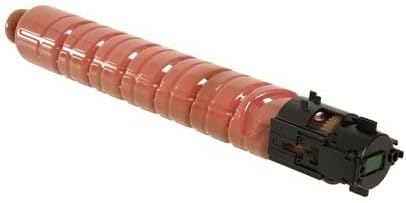
صورة: مجموعة خراطيش حبر طابعة Ricoh Aficio SPC430DN، تُظهر الخراطيش الفردية وعبوتها. توضح هذه الصورة المنتج كما هو عند استلامه وجاهزًا للتركيب.
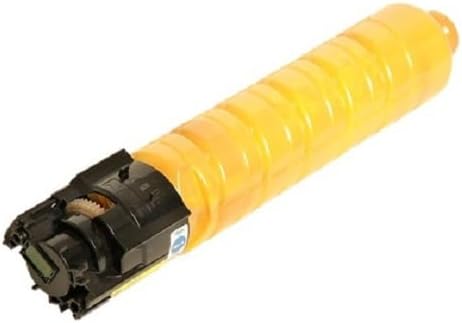


صورة: خراطيش حبر فردية من نوع Ricoh Aficio SPC430DN بألوان الماجنتا والسماوي والأصفر. توفر هذه الصور صورة واضحة view من خراطيش الألوان المميزة.
3. تعليمات التشغيل
بمجرد تركيب خراطيش الحبر، تعمل تلقائيًا مع طابعة ريكو الخاصة بك. وسيتولى برنامج الطابعة إدارة مستويات الحبر واستخدامه.
إنتاج الصفحة
عدد الصفحات التقريبي الناتج عن هذه الخراطيش الأصلية هو:
- حبر أسود: ما يقرب من 21,000 صفحة
- حبر أزرق سماوي: ما يقرب من 24,000 صفحة
- حبر ماجنتا: ما يقرب من 24,000 صفحة
- حبر أصفر: ما يقرب من 24,000 صفحة
ملاحظة: يعتمد معدل إنتاج الصفحات على معايير ISO/IEC 19798 وقد يختلف بشكل كبير اعتمادًا على الصور المطبوعة وإعدادات الطباعة وعوامل أخرى.
4. الصيانة والتخزين
تخزين
- قم بتخزين خراطيش الحبر غير المستخدمة في عبواتها الأصلية المغلقة.
- احتفظ بالخراطيش في مكان بارد وجاف، بعيدًا عن أشعة الشمس المباشرة ودرجات الحرارة القصوى.
- تجنب تخزين الخراطيش في المناطق ذات الرطوبة العالية أو البيئات المتربة.
احتياطات التعامل
- تعامل مع الخراطيش بحرص لتجنب إسقاطها، مما قد يؤدي إلى تلف المكونات الداخلية.
- لا تلمس سطح أسطوانة التصوير الخضراء الموجودة على الخرطوشة، لأن بصمات الأصابع أو الخدوش يمكن أن تؤثر على جودة الطباعة.
- احفظ خراطيش الحبر بعيداً عن متناول الأطفال.
5. استكشاف الأخطاء وإصلاحها
يتناول هذا القسم المشكلات الشائعة المتعلقة بخراطيش الحبر. أما بالنسبة لمشكلات الطابعة الأكثر تعقيدًا، فيُرجى الرجوع إلى دليل الطابعة أو التواصل مع دعم ريكو.
- جودة طباعة رديئة (طباعة باهتة أو بها خطوط أو غير متناسقة):
- تأكد من تركيب خرطوشة الحبر بشكل صحيح وتثبيتها بالكامل.
- قم بهز الخرطوشة برفق لإعادة توزيع الحبر، خاصة إذا كانت تقترب من نهاية عمرها الافتراضي.
- إذا كانت الخرطوشة قديمة أو فارغة، فاستبدلها بخرطوشة جديدة.
- قم بإجراء معايرة أو دورة تنظيف للطابعة وفقًا للتعليمات الواردة في دليل الطابعة.
- رسالة "انخفاض مستوى الحبر" أو "نفاد الحبر":
- تشير رسالة "انخفاض مستوى الحبر" إلى أن خرطوشة الحبر تقترب من النفاد. جهّز خرطوشة بديلة.
- رسالة "الحبر فارغ" تتطلب استبدال الخرطوشة المشار إليها على الفور.
- تأكد من استخدام خراطيش حبر أصلية من شركة Ricoh OEM للحصول على كشف دقيق لمستوى الحبر.
- لم يتم التعرف على الخرطوشة:
- قم بإزالة الخرطوشة وإعادة إدخالها للتأكد من تثبيتها بشكل صحيح.
- تحقق من وجود أي أختام أو أشرطة واقية ربما لم تتم إزالتها بالكامل.
- تأكد من أن خرطوشة الحبر هي الطراز الصحيح لطابعتك.
- أعد تشغيل الطابعة.
6. المواصفات
| ميزة | التفاصيل |
|---|---|
| نوع المنتج | مجموعة خراطيش حبر أصلية |
| ماركة | ريكو |
| لون الحبر | أسود، سماوي، أرجواني، أصفر |
| إنتاجية صفحة الحبر الأسود | تقريبا. 21,000 صفحة |
| إنتاجية صفحات الحبر الملون (لكل صفحة) | تقريبا. 24,000 صفحة |
| توافق طراز الطابعة | Ricoh Aficio SP C430DN، C431DN، C431DN-HS، SP C440DN |
| أرقام قطع الغيار من الشركة المصنعة | 821105 (أسود)، 821106 (سماوي)، 821107 (أرجواني)، 821108 (أصفر) |
| وزن السلعة (المجموعة) | 5.29 رطل (2.4 كجم) |
| أبعاد الحزمة | 20.2 × 13.5 × 5.5 بوصة (51.3 × 34.3 × 14 سم) |
| ميزة خاصة | جودة طباعة عالية |
7. الضمان والدعم
باعتبارها منتجات أصلية من شركة ريكو، فإن خراطيش الحبر هذه مشمولة بسياسة الضمان القياسية لشركة ريكو. للاطلاع على شروط وأحكام الضمان بالتفصيل، يُرجى الرجوع إلى الوثائق المرفقة مع طابعتك أو زيارة موقع ريكو الرسمي. webموقع.
دعم العملاء
للحصول على المساعدة التقنية، أو استكشاف الأخطاء وإصلاحها، أو تقديم مطالبات الضمان، يُرجى التواصل مع خدمة عملاء ريكو عبر قنواتهم الرسمية. يمكنك عادةً العثور على معلومات الدعم على موقع ريكو الإلكتروني. webأو في دليل مستخدم الطابعة.
للاستفسارات العامة أو لاستكشاف منتجات ريكو الأخرى، يمكنك زيارة الموقع الإلكتروني التالي: متجر ريكو على أمازون.


