1. المقدمة
This manual provides essential instructions for the safe and proper installation, operation, and maintenance of the Lennox 16C01 Fan Blade. Please read this manual thoroughly before proceeding with any installation or maintenance to ensure optimal performance and safety.
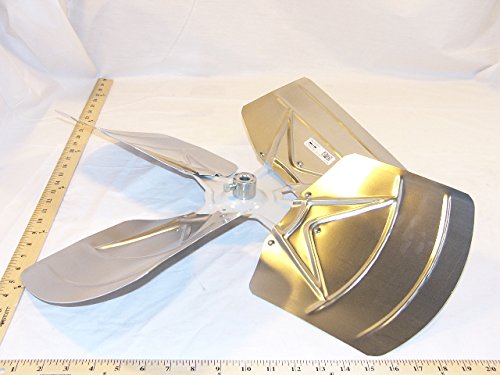
The Lennox 16C01 is a replacement fan blade designed for specific fan units. It is constructed from copper and features 4 blades, ensuring efficient air movement when properly installed.
2. معلومات السلامة
WARNING: Always disconnect power to the fan unit at the circuit breaker before attempting any installation, maintenance, or repair. Failure to do so can result in serious injury or electrical shock.
- تأكد من أن جميع التوصيلات الكهربائية تتوافق مع القوانين والأنظمة المحلية.
- Wear appropriate personal protective equipment (PPE), such as gloves and eye protection, during installation and handling.
- Handle fan blades carefully as edges may be sharp.
- Do not operate the fan unit with damaged or improperly installed blades.
- أبقِ الأطفال والحيوانات الأليفة بعيداً عن منطقة العمل أثناء التركيب.
3. التثبيت
This section outlines the steps for installing the Lennox 16C01 Fan Blade. It is recommended to have basic mechanical knowledge and tools for this procedure.
3.1 الأدوات المطلوبة
- مفك براغي (فيليبس أو ذو رأس مسطح، حسب المثبتات الموجودة)
- مفتاح ربط أو مجموعة مقبس قابل للتعديل
- قفازات العمل
- نظارات السلامة
3.2 خطوات التثبيت
- فصل الطاقة: Locate the circuit breaker controlling the fan unit and switch it to the "OFF" position. Verify power is off using a voltagه اختبار.
- Access Fan Blades: Depending on your fan unit, you may need to remove a protective grille or housing to access the fan blades.
- قم بإزالة الشفرة القديمة (إن وجدت): Carefully unbolt or unscrew the existing fan blade from the motor shaft or hub. Note the orientation for proper installation of the new blade.
- تركيب شفرة جديدة: Position the Lennox 16C01 Fan Blade onto the motor shaft or hub. Ensure it is seated correctly and align any mounting holes. Secure the blade using the appropriate fasteners (bolts, screws, washers). Do not overtighten, but ensure it is firm.
- Inspect and Balance: After installation, manually rotate the fan blade to check for any obstructions or wobbling. Ensure all fasteners are tight. For optimal performance and to prevent vibration, ensure the blade is balanced.
- Reassemble and Restore Power: Reattach any removed grilles or housing. Once the fan unit is fully reassembled, restore power at the circuit breaker.
4 عملية الاختيار
Once the Lennox 16C01 Fan Blade is installed, perform the following checks before regular use:
- الطاقة الأولية: With power restored, turn on the fan unit. Observe the blade's rotation.
- استمع إلى الأصوات غير العادية: Pay attention to any grinding, rattling, or excessive humming sounds.
- Check for Vibration: The fan blade should rotate smoothly with minimal vibration. Excessive vibration can indicate improper installation or an unbalanced blade. If vibration occurs, disconnect power and re-check installation.
- Airflow Verification: Confirm that the fan is moving air effectively in the intended direction.
If any issues are detected, refer to the Troubleshooting section or consult a qualified technician.
5. الصيانة
Regular maintenance ensures the longevity and efficient operation of your Lennox 16C01 Fan Blade.
5.1 التنظيف
- فصل الطاقة: Always disconnect power to the fan unit before cleaning.
- إزالة الغبار: Use a soft, dry cloth or a vacuum cleaner with a brush attachment to remove dust and debris from the blade surfaces.
- الأوساخ العنيدة: بالنسبة للأوساخ الأكثر عنادًا، يتم إزالة الأوساخ الزائدة قليلاً.amp cloth with mild soap can be used. Ensure the blade is completely dry before restoring power. Avoid abrasive cleaners or solvents, as they may damage the copper finish.
5.2 التفتيش
- Periodically inspect the fan blade for any signs of damage, such as cracks, bends, or corrosion.
- Check all mounting fasteners for tightness. Loose fasteners can lead to vibration and premature wear.
- If significant damage is observed, replace the blade to prevent further issues or safety hazards.
6. استكشاف الأخطاء وإصلاحها
This section provides solutions to common issues you might encounter with your fan blade.
| مشكلة | السبب المحتمل | حل |
|---|---|---|
| Excessive Vibration/Wobbling |
|
|
| Unusual Noise (e.g., rattling) |
|
|
| تدفق الهواء ضعيف |
|
|
If you are unable to resolve an issue after following these steps, contact a qualified service technician.
7. المواصفات
Key technical specifications for the Lennox 16C01 Fan Blade:
- نموذج: 16C01
- ماركة: لينوكس
- الشركة المصنعة: الجامعة اللبنانية الامريكية
- أبعاد المنتج: 24 × 7 × 24 بوصة
- وزن السلعة: 6 رطل
- مادة: نحاس
- عدد من ريش: 4
- ASIN: B0052VCVIQ
8. الضمان والدعم
For specific warranty information regarding the Lennox 16C01 Fan Blade, please refer to the documentation provided at the time of purchase or contact the retailer/manufacturer directly. Warranty terms typically cover manufacturing defects for a specified period.
For technical support or further assistance, please contact your authorized Lennox dealer or the point of purchase. When contacting support, please have your product model (16C01) and purchase details readily available.


