1. المقدمة
The Grandstream GXP2100 is an enterprise-grade IP phone designed for business communication. It features support for four lines, a backlit graphical LCD, and various programmable keys to enhance user experience. This manual provides detailed instructions for the installation, configuration, and operation of your GXP2100 IP phone.
2. محتويات العبوة
Upon unpacking your Grandstream GXP2100, verify that all items are present and in good condition. The standard package typically includes:
- وحدة هاتف بروتوكول الإنترنت Grandstream GXP2100
- سماعة يدوية مع سلك ملفوف
- حامل الهاتف
- كابل إيثرنت
- محول الطاقة
- Quick Installation Guide (this manual provides more detail)
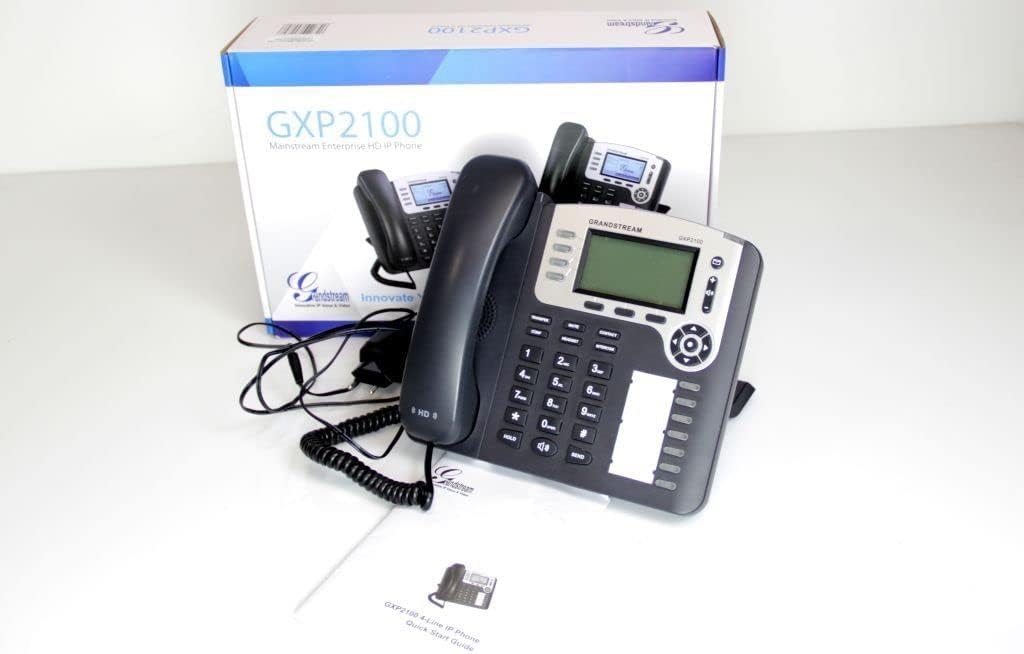
Image 2.1: Grandstream GXP2100 IP Phone unit, handset, coiled cord, power adapter, Ethernet cable, and quick start guide, displayed with its retail packaging.
3. مواصفات المنتج
The GXP2100 IP phone offers a range of features designed for efficient business communication:
- مفاتيح الخط: 4 dual-color line keys supporting up to 4 SIP accounts.
- مفاتيح لينة: 3 XML programmable context-sensitive soft keys for dynamic functions.
- BLF Extension Keys: 7 dual-color BLF (Busy Lamp Field) extension keys, supporting up to 11 call appearances.
- المؤتمر الهاتفي: Up to 5-way conference capability.
- جودة الصوت: HD wideband audio and a superb full-duplex hands-free speakerphone with advanced acoustic echo cancellation.
- الاتصال بالشبكة: Dual network ports with integrated Power over Ethernet (PoE).
- سجل الهاتف: Automated phone book synchronization with directory servers using XML.
- التطبيقات: Integrated real-time web applications (e.g., weather, stock, currency, RSS news).
- حماية: Advanced security protection for privacy.
- النشر: Supports automated provisioning for easy deployment.

الصورة 3.1: الجبهة view of the Grandstream GXP2100 IP Phone, highlighting the display, keypad, and function buttons.
4. الإعداد
4.1 اتصال فيزيائي
Follow these steps to connect your GXP2100 IP phone:
- توصيل سماعة الهاتف: Plug the coiled cord into the handset port on the side of the phone and into the handset.
- توصيل سماعة الرأس (اختياري): If using a headset, plug it into the dedicated headset port.
- الاتصال بالشبكة:
- If using PoE: Connect one end of the Ethernet cable to the LAN port on the phone and the other end to a PoE-enabled switch or hub.
- If not using PoE: Connect one end of the Ethernet cable to the LAN port on the phone and the other end to your network switch/router. Then, connect the power adapter to the phone's power jack and to an electrical outlet.
- الاتصال بالكمبيوتر الشخصي (اختياري): If you wish to connect a computer through the phone, connect an Ethernet cable from the PC port on the phone to your computer's Ethernet port.

الصورة 4.1: الجانب view of the Grandstream GXP2100 IP Phone, showing the various connection ports for handset, headset, LAN, and PC.
4.2 التكوين الأولي
After physical connection, the phone will attempt to obtain an IP address via DHCP. You can access the phone's web configuration interface for detailed setup:
- الحصول على عنوان IP: اضغط على قائمة طعام button on the phone, navigate to حالة، ثم حالة الشبكة to find the phone's IP address.
- وصول Web الواجهة: افتح web browser on a computer connected to the same network and enter the phone's IP address in the address bar.
- تسجيل الدخول: Enter the administrator username and password (default values are typically 'admin' for both, refer to your network administrator or Grandstream documentation for specific defaults).
- Configure SIP Accounts: انتقل إلى الحسابات section to configure your SIP account details provided by your VoIP service provider. This includes SIP Server, SIP User ID, Authenticate ID, and Password.
- احفظ وطبّق: After making changes, save and apply the configuration. The phone may reboot.
5. تعليمات التشغيل
5.1 وظائف الاتصال الأساسية
- إجراء مكالمة:
- ارفع سماعة الهاتف واضغط على المتحدث button, or press an available خط مفتاح.
- اطلب الرقم المطلوب.
- اضغط على يرسل button or wait a few seconds for automatic dialing.
- الرد على مكالمة:
- التقط سماعة الهاتف.
- اضغط على وامض خط مفتاح.
- اضغط على المتحدث زر.
- إنهاء المكالمة: أغلق السماعة أو اضغط على المتحدث button if using speakerphone.
5.2 Advanced Call Functions
- يمسك: أثناء المكالمة النشطة ، اضغط على يمسك button. The line key will flash. To resume, press the flashing خط مفتاح.
- نقل:
- أثناء المكالمة النشطة ، اضغط على تحويل soft key. The active call will be put on hold.
- اطلب الرقم الذي تريد تحويل المكالمة إليه.
- اضغط على تحويل soft key again to complete the transfer (blind transfer) or wait for the party to answer and announce the call before pressing تحويل (نقل حضري).
- مؤتمر:
- أثناء المكالمة النشطة ، اضغط على مؤتمر soft key. The active call will be put on hold.
- اطلب رقم المشارك التالي واضغط يرسل.
- بمجرد أن يجيب الطرف الثاني ، اضغط على مؤتمر soft key again to establish the conference call. Repeat for additional participants (up to 5-way).
- صامت: اضغط على كتم الصوت لكتم صوت الميكروفون أثناء المكالمة. اضغط عليه مرة أخرى لإلغاء كتم الصوت.
- مكبر صوت: اضغط على المتحدث زر لتشغيل وضع مكبر الصوت أو إيقاف تشغيله.
- BLF Keys: The BLF (Busy Lamp Field) keys can be programmed to monitor the status of other extensions. A green light indicates idle, red indicates busy, and flashing red indicates ringing. Pressing a BLF key can initiate a call to that extension or pick up a ringing call.
- مفاتيح لينة: The three soft keys below the LCD display change their function based on the phone's current state (e.g., during a call, idle, or in a menu). Their current function is displayed on the LCD directly above them.
6. الصيانة
- تنظيف: Use a soft, dry cloth to clean the phone's surface. Avoid abrasive cleaners or solvents.
- تحديثات البرامج الثابتة: Grandstream periodically releases firmware updates to improve performance and add features. Firmware updates are typically performed via the phone's web interface. Consult your network administrator or Grandstream's official support resources for the latest firmware and update procedures. Manual firmware updates often require downloading files from the manufacturer and hosting them on a local web الخادم.
- الظروف البيئية: Operate the phone within recommended temperature and humidity ranges to ensure optimal performance and longevity.
7. استكشاف الأخطاء وإصلاحها
This section addresses common issues you might encounter with your GXP2100 IP phone.
| مشكلة | السبب المحتمل | حل |
|---|---|---|
| الهاتف لا يعمل. | No power from adapter or PoE switch. |
|
| لا يوجد نغمة اتصال / لا يمكن إجراء أو استقبال المكالمات. | Network connectivity issue, SIP account not registered, incorrect configuration. |
|
| One-way audio (you can hear, but the other party cannot, or vice-versa). | Network firewall/NAT issues, incorrect audio codec settings. |
|
| Phone frequently loses registration. | Unstable network connection, SIP server issues, incorrect registration expiration. |
|
8. المواصفات
Key technical specifications for the Grandstream GXP2100 IP Business Phone:
| يصف | قيمة |
|---|---|
| رقم الموديل | GXP2100 |
| ماركة | جراندستريم |
| أبعاد المنتج (الطول × العرض × الارتفاع) | 8.7 × 8.3 × 3.6 بوصة |
| وزن العنصر | 2.4 رطل |
| لون | رمادي |
| نوع الهاتف | حبالي |
| مصدر الطاقة | كهرباء سلكية (قادرة على PoE) |
| نوع المسجل | لوحة مفاتيح واحدة |
| نوع نظام الرد | رقمي |
| إمكانية إجراء مكالمات مؤتمرية | 5-الطريق |
| عملية متعددة الخطوط | Multi-Line Operation (4 lines) |
| ASIN | B004PAS3SM |
| تاريخ أول توفر | 9 فبراير 2011 |
9. الضمان والدعم
For warranty information, technical support, or further assistance with your Grandstream GXP2100 IP Phone, please refer to the official Grandstream website or contact your product vendor. Keep your purchase receipt and product serial number handy when seeking support.
Official Grandstream Webموقع: www.grandstream.com


