مقدمة
The Logitech Z906 is a 5.1 surround sound speaker system designed to deliver an immersive audio experience. Certified by THX and featuring digital decoding for Dolby Digital and DTS encoded soundtracks, this system provides powerful and detailed sound for various entertainment needs. It offers versatile connectivity options and integrated controls for a customizable listening experience.
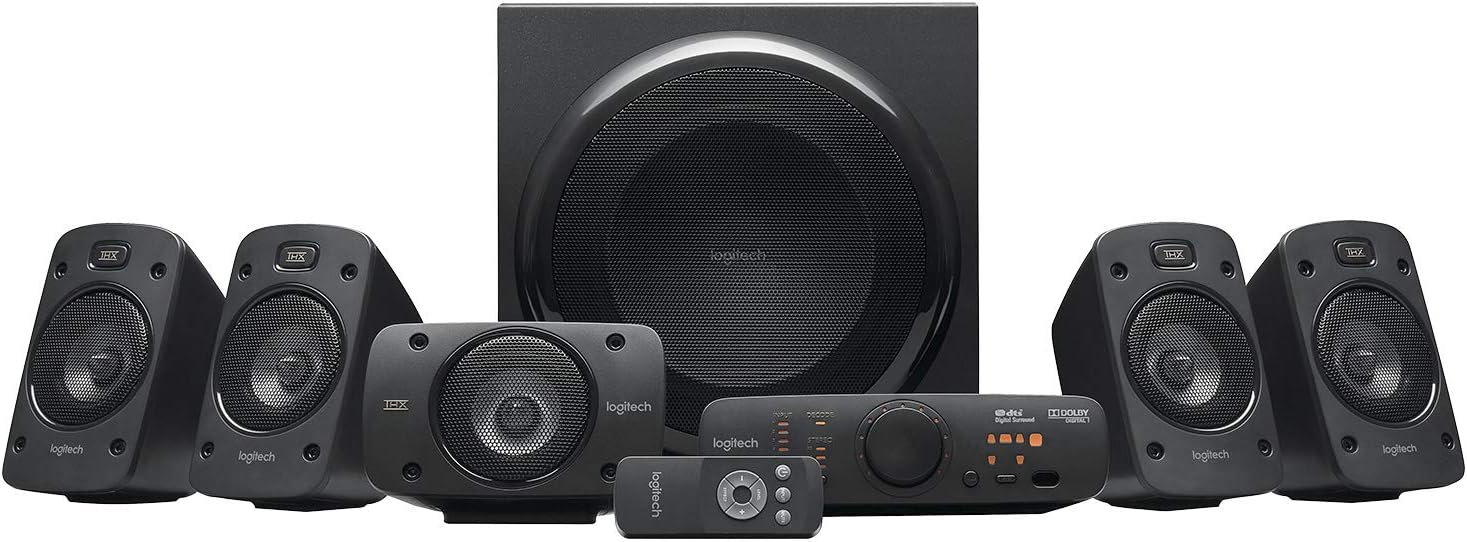
الشكل 1: انتهىview of the Logitech Z906 5.1 Surround Sound Speaker System, including the subwoofer, five satellite speakers, control console, and wireless remote.
يثبت
Follow these steps to correctly set up your Logitech Z906 speaker system.
1. فتح العلبة والمكونات
Carefully remove all components from the packaging. The box contains:
- 1 مضخم صوت
- 5 Satellite Speakers (4 for surround, 1 for center)
- 1 Control Console
- 1 Wireless Remote Control (requires 3 AAA batteries)
- كابلات مكبر الصوت
- Audio Cables (e.g., 3.5mm, RCA)

الشكل 2: جميع المكونات المضمنة في حزمة Logitech Z906.
2. وضع مكبر الصوت
للحصول على أفضل صوت محيطي 5.1، ضع السماعات على النحو التالي:
- المتحدث المركز: Directly in front of your listening position, usually above or below your display.
- مكبرات الصوت الأمامية اليسرى/اليمنى: To the left and right of your display, equidistant from the center speaker and your listening position.
- Rear Left/Right Speakers: To the left and right of your listening position, slightly behind you.
- مضخم الصوت: On the floor, preferably in a corner or near a wall for enhanced bass response. Experiment with placement for best results.

الشكل 3: مثالample of a 5.1 surround sound speaker setup with the Logitech Z906 system.
3. توصيل مكبرات الصوت
Connect the satellite speakers to the subwoofer using the provided color-coded speaker cables. Ensure correct polarity (red to red, black to black) for each speaker.

Figure 4: Rear panel of the Z906 subwoofer showing speaker terminals and input connections. Connect the satellite speakers to the corresponding terminals.
4. توصيل مصادر الصوت
The Z906 system offers multiple input options for various devices:
- البصريات الرقمية: For high-quality audio from TVs, Blu-ray/DVD players, game consoles.
- Digital Coaxial: Another digital option for compatible devices.
- Six-Channel Direct: For connecting to a 5.1 sound card in a PC.
- السبب الجذري: Standard stereo connection for various audio devices.
- 3.5 مم إضافي: For connecting smartphones, tablets, or other portable devices.
Connect your desired audio sources to the corresponding inputs on the control console or directly to the subwoofer's rear panel.

Figure 5: The Z906 control console with various input options for connecting multiple devices.
5. توصيل الطاقة
Connect the subwoofer's power cable to a wall outlet. The system is now ready for operation.
فيديو فتح العلبة
Video 1: An unboxing demonstration of the Logitech Z906 speaker system, showing the contents and initial setup steps.
التشغيل
1. Control Console Functions
The control console provides easy access to all system functions:
- زر الطاقة: يقوم بتشغيل النظام أو إيقاف تشغيله.
- اختيار الإدخال: Cycle through available audio inputs (Optical, Coaxial, Six-Channel Direct, RCA, Aux).
- التحكم في مستوى الصوت: Large rotary knob to adjust overall system volume.
- اختيار التأثير: Choose between various sound effects like Stereo 3D, 4.1, 2.1, or no effect.
- تعديل المستوى: Adjust individual speaker levels (front, rear, center, subwoofer) for balanced surround sound.
- زر كتم الصوت: كتم الصوت أو إلغاء كتمه.

Figure 6: Close-up of the Z906 control console, highlighting the main controls and indicators.
2. جهاز تحكم عن بعد لاسلكي
The included wireless remote provides convenient control from a distance. It duplicates most functions available on the control console, including power, volume, input selection, and sound effects.

Figure 7: The wireless remote control for the Logitech Z906 system.
3. استخدام سماعات الرأس
A headphone jack is available on the control console for private listening. Plugging in headphones will automatically mute the speakers and divert audio to your headphones.
صيانة
لضمان طول عمر نظام مكبرات الصوت Logitech Z906 وأدائه الأمثل، اتبع إرشادات الصيانة التالية:
- تنظيف: Use a soft, dry cloth to clean the speaker surfaces. Avoid abrasive cleaners or solvents.
- الموقع: Keep speakers away from direct sunlight, heat sources, and excessive moisture. Ensure adequate ventilation for the subwoofer.
- إدارة الكابلات: Ensure all cables are securely connected and not pinched or strained.
- البطاريات عن بعد: Replace AAA batteries in the wireless remote when performance degrades.
استكشاف الأخطاء وإصلاحها
If you encounter issues with your Z906 system, refer to the following common solutions:
- لا يوجد صوت:
- Check all cable connections, including power, speaker wires, and audio input cables.
- تأكد من تحديد مصدر الإدخال الصحيح على وحدة التحكم.
- Verify that the system is not muted and the volume is turned up.
- If using a PC, check your computer's sound settings and ensure the Z906 is selected as the output device.
- Distorted Sound/Static:
- Reduce the volume of the audio source or the speaker system.
- تحقق من وصلات الكابلات المفكوكة.
- Ensure the audio source is not sending a distorted signal.
- If static occurs when adjusting the volume knob, this may indicate wear over time.
- لا يوجد صوت محيطي:
- Ensure your audio source is providing a 5.1 signal (e.g., Dolby Digital, DTS).
- Select the appropriate sound effect mode on the control console (e.g., Stereo 3D, 4.1, 2.1).
- Verify correct speaker placement and connections.
- جهاز التحكم عن بعد لا يعمل:
- استبدل بطاريات AAA.
- تأكد من عدم وجود أي عوائق بين جهاز التحكم عن بعد ووحدة التحكم.
تحديد
| ميزة | مواصفة |
|---|---|
| ماركة | لوجيتك |
| اسم الموديل | زد906 |
| رقم موديل العنصر | 980-000469 |
| نوع السماعة | صوت محيطي 5.1 |
| Total Watts (RMS) | 500 واط |
| الطاقة القصوى | 1000 واط |
| استجابة التردد | 20 هرتز - 20 كيلوهرتز |
| إشارة إلى نسبة الضوضاء | 6E+1 dB |
| تكنولوجيا الاتصال | Optical, Coaxial, Six-Channel Direct, RCA, 3.5mm |
| طريقة التحكم | بعيد |
| تكنولوجيا الاتصالات اللاسلكية | Bluetooth (Note: Product specifications list Bluetooth, but primary connectivity is wired for 5.1 audio) |
| قطر الصبووفر | 29.2 سنتيمترًا (11.5 بوصة) |
| وزن العنصر | 8.54 كيلوجرام (18.79 رطل) |
| أبعاد المنتج | 11.02 بوصة عمق × 13.78 بوصة عرض × 11.5 بوصة ارتفاع |
| البطاريات المطلوبة | بطاريتان AAA (لجهاز التحكم عن بعد) |

Figure 8: The Logitech Z906 system is capable of 1000 Watts Peak Power output.

Figure 9: The Logitech Z906 speaker system is THX Certified for premium sound quality.
الضمان والدعم
For warranty information, technical support, or service inquiries, please refer to the official Logitech website or contact Logitech customer support directly. Keep your purchase receipt for warranty claims.


