المنتج انتهىview
The Casio SA-76 is a compact and portable 44-key mini keyboard designed for beginners and enthusiasts. It features a wide range of tones, rhythms, and built-in songs to facilitate musical exploration and learning. Its lightweight design and versatile power options make it suitable for use in various settings.

الشكل 1: من أعلى إلى أسفل view of the Casio SA-76 keyboard, highlighting its 44 mini keys and control panel.
يثبت
تشغيل لوحة المفاتيح
يمكن تشغيل جهاز Casio SA-76 باستخدام البطاريات أو محول التيار المتردد الاختياري.
- تركيب البطارية: The keyboard requires 6 AA batteries. Locate the battery compartment on the underside of the unit. Open the cover, insert the batteries according to the polarity indicators, and securely close the cover.
- محول التيار المتردد (اختياري): For extended use, an optional AC adapter (not included) can be connected to the DC 9.5V input jack located on the side of the keyboard. Ensure the adapter meets the specified voltagالمتطلبات.
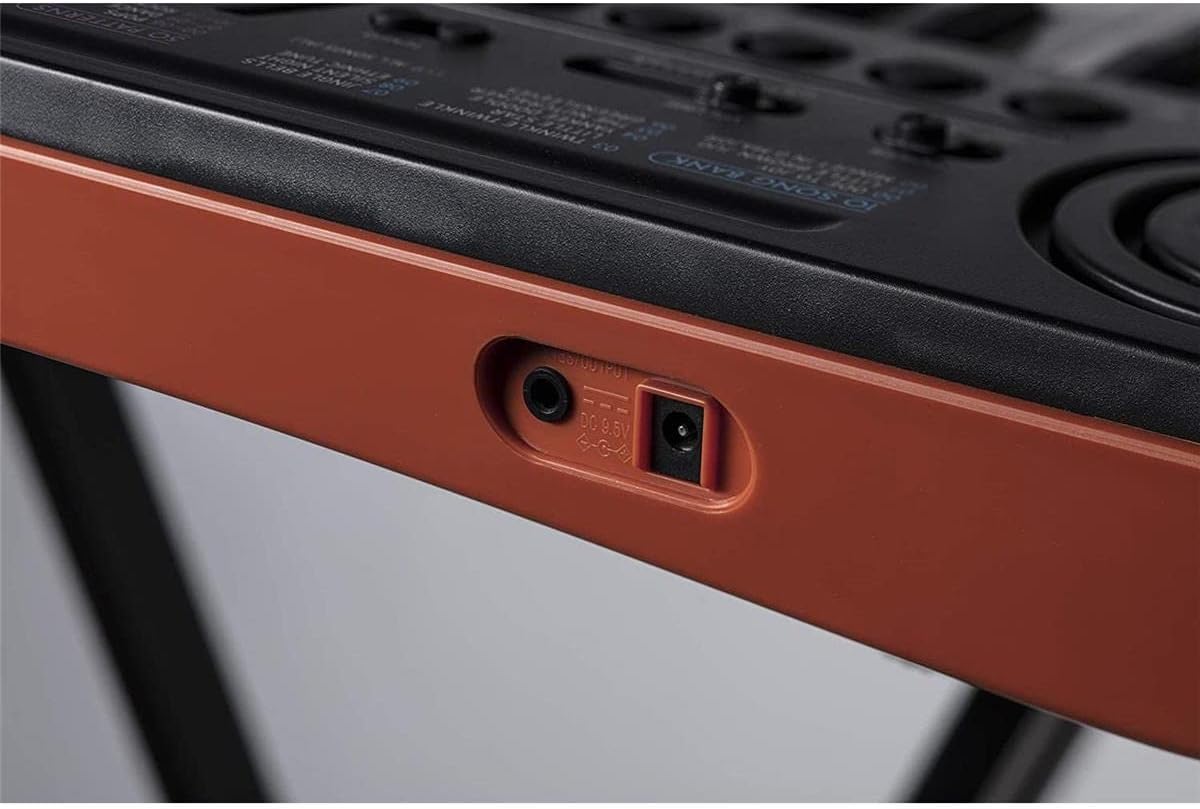
الشكل 2: الجانب view showing the headphone output and DC 9.5V power input jacks.
توصيل سماعات الرأس
To practice privately, connect standard 3.5mm stereo headphones to the headphone output jack located on the side of the keyboard. This will mute the internal speakers.
تعليمات التشغيل
عناصر التحكم الأساسية
The control panel features an LC display and various buttons for selecting tones, rhythms, and songs.
- تشغيل/إيقاف التشغيل: Use the ON/OFF switch to power the keyboard.
- التحكم في مستوى الصوت: Adjust the master volume using the sliding volume control.
- الإيقاع: Use the Tempo buttons to adjust the speed of rhythms and songs.

الشكل 3: مفصل view of the control panel with LCD and selection buttons.
اختيار النغمات
The SA-76 offers 100 different tones. Use the 'TONE' button and the numeric keypad (0-9) to select your desired instrument sound. Quick access buttons for Piano, Trumpet, and Drums are also available.
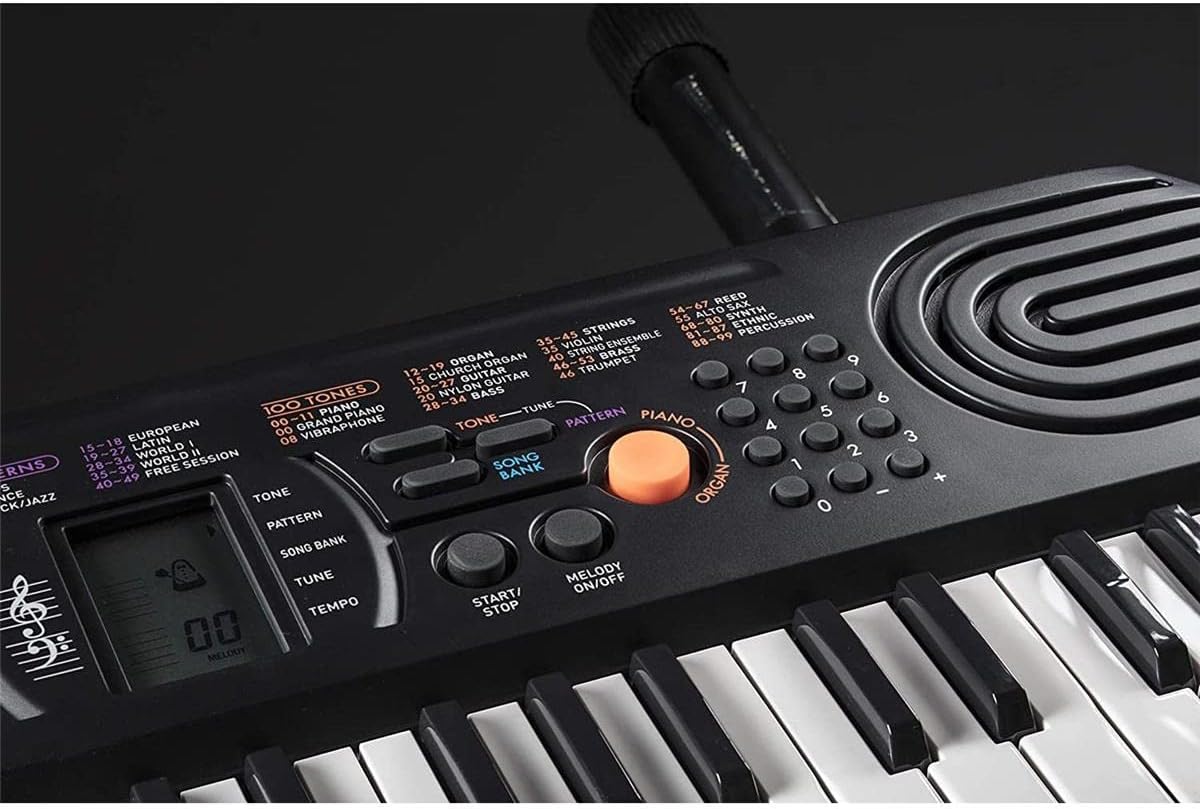
Figure 4: Tone selection area, including quick access buttons for Piano, Trumpet, and Drums.
Selecting Rhythms
Choose from 50 built-in rhythms using the 'RHYTHM' button and the numeric keypad. Categories include Pop, Rock/Jazz, European, Latin, and World music styles.
Playing Integrated Songs
The keyboard includes 10 integrated songs. Press the 'SONG BANK' button and use the numeric keypad to select a song. Press 'START/STOP' to begin or end playback. The 'MELODY ON/OFF' button allows you to mute the melody part of the song, enabling you to play along.

Figure 5: Song bank controls and power switch.
المميزات الخاصة
- Piano/Organ Switch: A dedicated orange button allows for quick switching between piano and organ modes.
- Sustain/Layer: Buttons for Sustain and Layer functions are available to enhance your playing.
- عرض LC: The LCD shows selected tone, rhythm, song number, tempo, and notes played on a musical staff.
فيديوهات المنتج
Casio SA-76 Overview
يقدم هذا الفيديو نظرة عامةview of the Casio SA-76 keyboard, demonstrating its features and portability. It highlights the ease of use and various sound options available.
Casio SA-81 Features Demonstration
This video demonstrates features of the Casio SA-81, a model very similar to the SA-76. It showcases the 44 mini-keys, 100 tones, 50 rhythms, 10 songs, and easy-to-use controls with an LCD display. It also highlights the headphone output and battery operation.
صيانة
تنظيف
Wipe the keyboard surface with a soft, dry cloth. Avoid using abrasive cleaners or solvents, which can damage the finish.
العناية بالبطارية
If the keyboard will not be used for an extended period, remove the batteries to prevent leakage and damage. The keyboard features an automatic shut-off function after 6 minutes of inactivity to conserve battery life.
استكشاف الأخطاء وإصلاحها
- لا يوجد صوت: Ensure the keyboard is powered on and the volume is turned up. If using headphones, confirm they are properly connected and functioning.
- Incorrect Display for Chords: The LCD may not accurately display chords involving black keys, showing only the white key equivalents. This is a known characteristic and not a malfunction. Single notes, including sharps/flats, are displayed correctly.
- قضايا الطاقة: If using batteries, check if they are correctly installed and have sufficient charge. If using an AC adapter, ensure it is securely connected and the power outlet is functional.
تحديد
- المفاتيح: 44 mini keys
- نغمات: 100
- إيقاعات: 50
- Integrated Songs: 10
- تعدد الأصوات: 8 ملاحظة
- مصدر الصوت: إل إس آي
- عرض: عرض LC
- مصدر الطاقة: 6 AA batteries (optional AC adapter)
- إخراج سماعات الرأس: 3.5mm Stereo mini jack
- الأبعاد (الطول × العرض × الارتفاع): حوالي 25.2 × 9.6 × 8.76 بوصة
- وزن: Lightweight construction (exact weight may vary, listed as 0.01 ounces in some data, but is functionally light for portability)
- الشركة المصنعة: كاسيو
- أول متاح: 16 يوليو 2010
الضمان والدعم
للحصول على معلومات الضمان ودعم العملاء، يرجى الرجوع إلى الوثائق المرفقة مع المنتج أو زيارة موقع كاسيو الرسمي. webالموقع. احتفظ بإيصال الشراء كإثبات للشراء.


