1. المقدمة
شكرا لك على الشراءasing the Atlanta 1669/19 Quartz Alarm Clock. This digital alarm clock features a silent movement, a light sensor for automatic display illumination, and a snooze function. This manual provides detailed instructions for setup, operation, and maintenance to ensure optimal performance and longevity of your device.
2. معلومات السلامة
- احفظ الجهاز بعيدًا عن الماء والرطوبة العالية.
- Avoid exposing the clock to direct sunlight or extreme temperatures.
- Do not attempt to disassemble or repair the clock yourself. Refer to qualified service personnel.
- تخلص من البطاريات المستعملة بطريقة مسؤولة وفقًا للوائح المحلية.
- لا تخلط بين البطاريات القديمة والجديدة أو أنواع مختلفة من البطاريات.
3. محتويات العبوة
- Atlanta 1669/19 Quartz Alarm Clock Unit
- دليل المستخدم (هذا المستند)
ملحوظة: البطاريات غير متضمنة ويجب شراؤها بشكل منفصل.
4. انتهى المنتجview
The Atlanta 1669/19 features a clear digital display, intuitive controls, and a light sensor for enhanced visibility in low-light conditions.
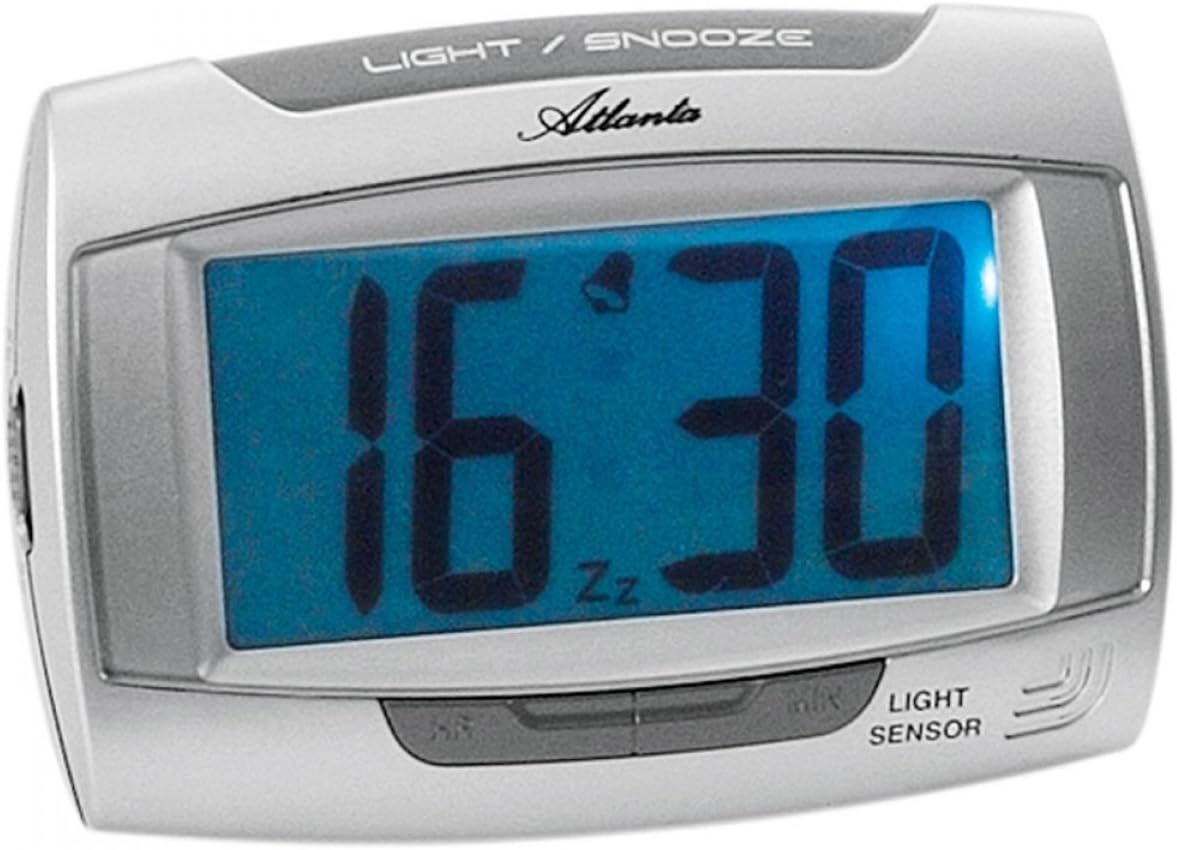
الشكل 1: أمام view of the Atlanta 1669/19 Quartz Alarm Clock. The clock features a large digital display, a "LIGHT / SNOOZE" button at the top, and a "LIGHT SENSOR" indicator at the bottom right. The display shows the time 16:30, with an alarm bell icon and 'Zz' indicating snooze functionality.
المكونات الرئيسية:
- عرض رقمي: Shows time and alarm status.
- LIGHT / SNOOZE Button: Activates temporary backlight and snooze function.
- مستشعر الضوء: Automatically illuminates the display in dark environments.
- Control Buttons (Rear/Side): لضبط الوقت والمنبه.
- Battery Compartment (Rear): يحمل البطاريات المطلوبة.
5. الإعداد
5.1. تركيب البطارية
- حدد مكان غطاء حجرة البطارية في الجزء الخلفي من ساعة المنبه.
- قم بإزالة الغطاء عن طريق سحبه أو رفعه.
- Insert the required batteries (typically 1x AA, refer to compartment markings) ensuring correct polarity (+ and -).
- أعد تركيب غطاء حجرة البطارية بشكل آمن.
5.2. ضبط الوقت الأولي
Upon battery installation, the display will typically show a default time. You will need to set the current time.
- Locate the time setting buttons, usually labeled "SET", "HOUR", and "MINUTE" or similar, on the back or side of the clock.
- Press the "SET" button (or equivalent) to enter time setting mode. The hour digits may start flashing.
- Use the "HOUR" button to adjust the hour.
- Press "SET" again to move to minute setting. The minute digits may start flashing.
- Use the "MINUTE" button to adjust the minutes.
- Press "SET" one more time to confirm and exit time setting mode.
6. تعليمات التشغيل
6.1. ضبط المنبه
- Locate the alarm setting buttons, typically labeled "ALARM SET", "ALARM HOUR", and "ALARM MINUTE" or similar.
- Press the "ALARM SET" button to enter alarm setting mode. The alarm hour digits may flash.
- Use the "ALARM HOUR" button to adjust the desired alarm hour.
- Press "ALARM SET" again to move to alarm minute setting. The alarm minute digits may flash.
- Use the "ALARM MINUTE" button to adjust the desired alarm minutes.
- Press "ALARM SET" one more time to confirm and exit alarm setting mode.
6.2. تفعيل/إلغاء تفعيل التنبيه
There is usually a switch or button to turn the alarm on or off. Look for a switch labeled "ALARM ON/OFF" or an alarm icon button. When the alarm is active, an alarm icon (e.g., a bell) will typically appear on the display.
6.3. وظيفة الغفوة
When the alarm sounds, press the large "LIGHT / SNOOZE" button located on the top of the clock. This will temporarily silence the alarm, and it will sound again after a few minutes (typically 5-9 minutes). The "Zz" icon on the display indicates that the snooze function is active.
6.4. Light Sensor and Display Backlight
- Automatic Backlight (Light Sensor): The clock is equipped with a light sensor. When enabled, the display will automatically illuminate with a soft, constant light in dark environments, making it easy to read the time at night without pressing any buttons. Look for a switch or button labeled "SENSOR ON/OFF" or similar to enable or disable this feature.
- Temporary Backlight: To briefly illuminate the display in any lighting condition, press the "LIGHT / SNOOZE" button on the top of the clock. The backlight will stay on for a few seconds and then turn off automatically.
7. الصيانة
- تنظيف: Wipe the clock with a soft, dry cloth. Do not use abrasive cleaners or solvents, as these may damage the casing أو العرض.
- استبدال البطارية: When the display dims or the clock stops functioning correctly, it is time to replace the batteries. Follow the battery installation steps in Section 5.1.
- تخزين: If the clock will not be used for an extended period, remove the batteries to prevent leakage and damage.
8. استكشاف الأخطاء وإصلاحها
| مشكلة | السبب المحتمل | حل |
|---|---|---|
| شاشة الساعة فارغة أو باهتة. | بطاريات منخفضة أو ميتة؛ تركيب البطارية بشكل غير صحيح. | استبدل البطاريات بأخرى جديدة، مع التأكد من القطبية الصحيحة. |
| لا يصدر صوت الإنذار. | Alarm is not activated; alarm time is incorrect; low batteries. | Ensure alarm is switched ON (bell icon visible); verify alarm time setting; replace batteries. |
| Automatic backlight not working. | Light sensor feature is disabled; insufficient darkness. | Ensure the light sensor switch is ON; test in a completely dark room. |
| الوقت غير صحيح. | Time was not set correctly; batteries were removed/replaced. | Reset the current time following Section 5.2. |
9. المواصفات
| نموذج | 1669/19 |
| ماركة | أتلانتا |
| وضع التشغيل | رقمي |
| المميزات الخاصة | Alarm, Lighting (Light Sensor) |
| مادة | بلاستيك |
| مادة الإطار | بلاستيك |
| نوع التركيب | سطح الطاولة |
| لون | Blue (display), Silver-coloured (case) |
| البطاريات المطلوبة | Yes (Type not specified, typically AA or AAA for such clocks) |
| البطاريات المتضمنة | لا |
| الأبعاد (تقريبًا) | 11 × 7 سم |
10. الضمان والدعم
للحصول على معلومات الضمان أو الدعم الفني، يرجى الرجوع إلى الوثائق المرفقة وقت الشراء أو الاتصال بالبائع. احتفظ بإثبات الشراء لتقديم أي مطالبات ضمان.


