1. انتهى المنتجview
The TP-Link TL-SF1008D Fast Ethernet Switch is designed to expand your network connectivity for small office or home office (SOHO) environments. This unmanaged switch offers 8 10/100 Mbps auto-negotiation RJ45 ports, providing a simple and efficient solution for adding more wired connections to your router or modem. Its plug-and-play design requires no configuration, making setup straightforward. The device incorporates innovative energy-efficient technology to reduce power consumption and features a fanless design for quiet operation.
المميزات الرئيسية:
- التوصيل والتشغيل: Easy setup with no configuration or software needed.
- 8 منفذ إيثرنت سريع: 8 10/100 Mbps auto-negotiation RJ45 ports for expanding network capacity.
- كفاءة الطاقة: Innovative green technology saves power consumption by up to 70%.
- تصميم بدون مروحة: Ensures quiet operation, ideal for any environment.
- Auto-MDI/MDIX: يزيل الحاجة إلى كابلات التقاطع.
- Reliable Data Transfer: IEEE 802.3x flow control provides dependable data transmission.
- تصميم مضغوط: Desktop or wall-mounting options for flexible placement.
2. محتويات العبوة
تأكد من أن الحزمة الخاصة بك تحتوي على العناصر التالية:
- TP-Link 8-Port 10/100Mbps Desktop Switch (TL-SF1008D)
- محول الطاقة
- دليل المستخدم
3. الوصف المادي
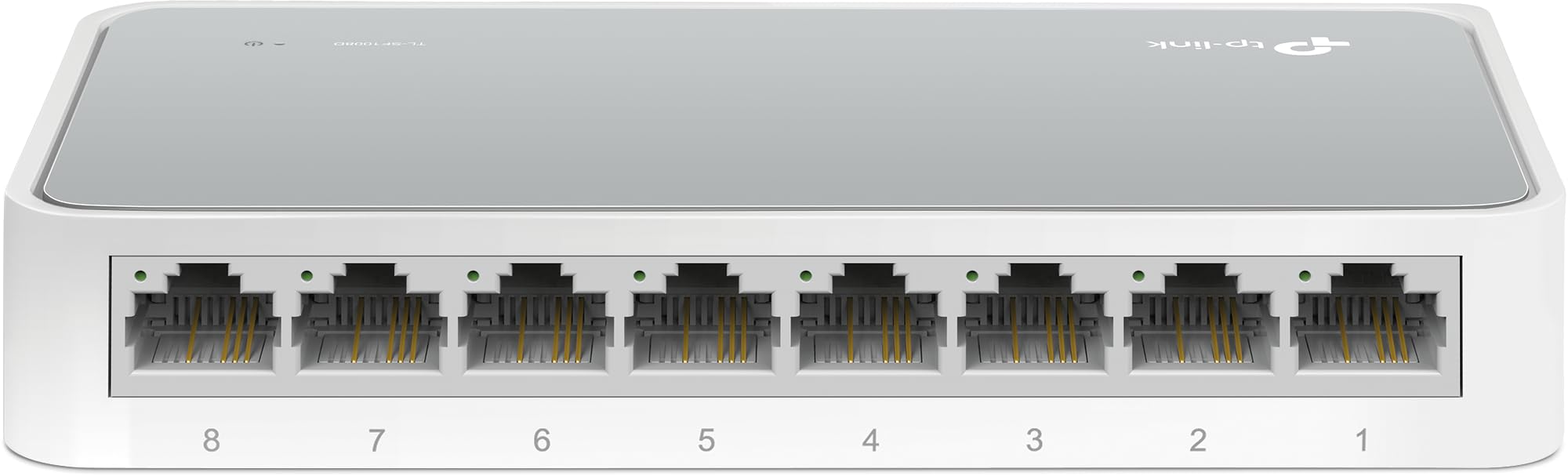
الشكل 1: زاوية من أعلى إلى أسفل view of the TP-Link TL-SF1008D 8-Port Fast Ethernet Switch, showing the compact white casing and the eight RJ45 ports on the front.

الشكل 2: بزاوية أمامية view of the TP-Link TL-SF1008D 8-Port Fast Ethernet Switch, highlighting the eight RJ45 ports labeled 1 through 8, and the power LED indicator.

الشكل 3: الجزء العلوي view of the TP-Link TL-SF1008D 8-Port Fast Ethernet Switch, showing the TP-Link logo, model number, and the power and link/activity LED indicators.
مؤشرات LED:
- مؤشر الطاقة LED: يشير إلى حالة الطاقة للمفتاح. يعمل عند توصيله بالكهرباء، وينطفئ عند عدم توصيله.
- مؤشرات LED للربط/التشغيل (1-8): Indicates the link status and network activity for each port. Solid green indicates a valid network link, blinking indicates data transmission.
4. الإعداد والتثبيت
The TL-SF1008D switch is designed for simple plug-and-play installation. No software configuration is required.
- قم بتوصيل محول الطاقة: Plug the provided power adapter into the switch's power port and then into a standard electrical outlet. Ensure the Power LED on the switch illuminates.
- اتصل بشبكتك: Connect an Ethernet cable from your router or modem to any of the 8 RJ45 ports on the switch. The corresponding Link/Act LED for that port should light up, indicating a successful connection.
- قم بتوصيل أجهزتك: Connect your network devices (e.g., computers, gaming consoles, printers, smart TVs) to the remaining RJ45 ports on the switch using Ethernet cables. The Link/Act LEDs for these connected devices should also light up.
The switch automatically detects the speed and cable type (Auto-MDI/MDIX) for each connected device, eliminating the need for manual configuration or special crossover cables.
5. تعليمات التشغيل
Once installed, the TL-SF1008D operates automatically. It functions as an unmanaged switch, meaning it requires no user intervention for basic network operation. Data packets are forwarded and filtered at full wire-speed for maximum throughput.
التفاوض التلقائي:
Each port on the switch supports auto-negotiation, which automatically determines the optimal connection speed (10 Mbps or 100 Mbps) and duplex mode (half or full duplex) with the connected device. This ensures compatibility and optimal performance without manual settings.
التحكم في التدفق:
The switch supports IEEE 802.3x flow control. This mechanism helps prevent data loss during periods of high network traffic by temporarily pausing data transmission from a congested device, ensuring reliable data transfer across your network.
6. الصيانة
To ensure optimal performance and longevity of your TP-Link TL-SF1008D switch, consider the following maintenance tips:
- الموقع: Place the switch in a well-ventilated area to prevent overheating. Avoid placing it near heat sources or in enclosed spaces.
- تنظيف: نظّف الجزء الخارجي من المفتاح بانتظام باستخدام قطعة قماش ناعمة وجافة. لا تستخدم المنظفات السائلة أو البخاخات.
- إدارة الكابلات: Ensure Ethernet cables are neatly organized and not excessively bent or kinked to prevent damage and maintain signal integrity.
- مزود الطاقة: استخدم فقط محول الطاقة المرفق بالجهاز.
7. استكشاف الأخطاء وإصلاحها
If you encounter issues with your TL-SF1008D switch, try the following basic troubleshooting steps:
- لا يوجد طاقة: Check if the power adapter is securely connected to the switch and a working electrical outlet. Verify the Power LED is on.
- لا يوجد رابط/نشاط على المنفذ:
- تأكد من توصيل كابل الإيثرنت بشكل آمن بمنفذ المحول والجهاز المتصل.
- Try using a different Ethernet cable to rule out a faulty cable.
- تأكد من أن الجهاز المتصل قيد التشغيل ويعمل بشكل صحيح.
- حاول توصيل الجهاز بمنفذ مختلف على المفتاح.
- سرعة الشبكة بطيئة:
- Ensure all connected devices and cables support 100 Mbps speeds for optimal performance.
- تحقق من وجود حركة مرور زائدة على الشبكة أو تطبيقات كثيفة النطاق الترددي تعمل على شبكتك.
للحصول على مزيد من المساعدة، يرجى الرجوع إلى معلومات الدعم في القسم 9.
8. المواصفات
| أبعاد المنتج | 5.3 بوصة طول × 5.3 بوصة عرض × 0.9 بوصة ارتفاع |
| وزن العنصر | 0.86 جنيه (13.8 أونصة) |
| المجلدtage | 110 فولت (تيار متردد) |
| مادة العلبة | Aluminum or Alloy Steel or Metal |
| تصنيف درجة الحرارة العليا | 40 درجة مئوية |
| نوع الواجهة | آر جيه 45 |
| معدل نقل البيانات | 100 ميجابت في الثانية |
| التقييم الحالي | 0.6 Amps |
| عدد المنافذ | 8 |
| لون | أبيض |
| الأجهزة المتوافقة | Desktop, Gaming console, Router, Printer, Laptop, Camera |
9. الضمان والدعم
TP-Link provides unlimited 24/7 technical support for free. For any issues or questions regarding your TL-SF1008D switch, please contact TP-Link support.
معلومات الاتصال:
- دعم الهاتف: (866) 225-8139
- Webموقع: myproducts.tp-link.com/us
- دعم البريد الإلكتروني: support.USA@tp-link.com
إخلاء المسؤولية القانونية:
Each item is provided AS IS, and there is no warranty on these items. If an item does not work, please contact the manufacturer directly, as we do not test every unit for reliability.


