مقدمة
This manual provides essential information for the safe and efficient installation, operation, and maintenance of your HP ATX 300W Power Supply, Model 366505-001. This power supply is designed to provide reliable power to compatible personal computer systems.
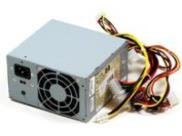
الصورة 1: الجبهة view of the HP ATX 300W Power Supply. This image displays the compact form factor and primary connectors of the power supply unit.
يرجى قراءة هذا الدليل بعناية قبل محاولة أي تثبيت أو تشغيل. احتفظ بهذا الدليل للرجوع إليه مستقبلًا.
معلومات السلامة
- المخاطر الكهربائية: Power supplies contain high voltagالمكونات الإلكترونية. لا تفتح وحدة التغذية الكهربائية.asinز. خطر الصدمة الكهربائية.
- تهوية: Ensure adequate ventilation around the power supply. Do not block air vents. Overheating can cause damage or fire.
- التأريض: قم دائمًا بتوصيل مصدر الطاقة بمأخذ كهربائي مؤرض بشكل صحيح.
- رُطُوبَة: لا تعرض مصدر الطاقة للماء أو الرطوبة الزائدة.
- التثبيت الاحترافي: If you are unsure about the installation process, seek assistance from a qualified technician.
- التوافق: Use only with compatible personal computer systems as specified.
الإعداد والتثبيت
Follow these steps for proper installation of the HP ATX 300W Power Supply into your personal computer system:
- تحضير:
- Turn off and unplug your computer from the wall outlet.
- Open the computer case according to your computer's manufacturer instructions.
- قم بتفريغ أي كهرباء ساكنة عن طريق لمس جسم معدني مؤرض قبل التعامل مع المكونات.
- قم بإزالة مصدر الطاقة القديم (إن وجد):
- Disconnect all cables from the existing power supply to the motherboard, graphics card, hard drives, and other components.
- Unscrew the old power supply from the computer case and carefully remove it.
- Install New Power Supply:
- Carefully place the HP ATX 300W Power Supply into the designated power supply bay in your computer case.
- Secure the power supply to the case using the appropriate screws.
- توصيل الكابلات:
- Connect the main 20+4 pin ATX connector to the motherboard.
- Connect the 4-pin or 8-pin CPU power connector to the motherboard.
- Connect SATA power connectors to hard drives, SSDs, and optical drives.
- Connect any necessary PCIe power connectors to graphics cards (if applicable).
- تأكد من أن جميع الوصلات محكمة ومثبتة بشكل صحيح.
- الخطوات النهائية:
- Organize cables to improve airflow and prevent interference.
- أغلق علبة الكمبيوتر.
- Plug the computer's power cord into the power supply and then into a grounded wall outlet.
عملية
Once installed, the HP ATX 300W Power Supply operates automatically with your computer system. When you power on your computer, the power supply will deliver stable and consistent power to all connected components.
- تشغيل/إيقاف التشغيل: The power supply is controlled by your computer's power button. Ensure the main power switch on the back of the power supply (if present) is in the 'ON' position before powering on the computer.
- تبريد: The integrated air cooling system will activate automatically to maintain optimal operating temperatures. Ensure the fan intake and exhaust are not obstructed.
- انتاج الطاقة: This unit provides a maximum output of 300 Watts. Ensure your system's total power requirements do not exceed this limit for stable operation.
صيانة
تساعد الصيانة الدورية على ضمان طول عمر وأداء مثالي لمصدر الطاقة الخاص بك:
- تنظيف: Periodically clean the exterior of the power supply and its fan vents to prevent dust buildup. Use compressed air to gently clear dust from the fan and internal components (with the computer powered off and unplugged).
- تقتيش: Occasionally inspect power cables for any signs of wear, fraying, or damage. Replace damaged cables immediately.
- بيئة: Operate the computer in a clean, dry, and well-ventilated environment to prevent dust accumulation and overheating.
استكشاف الأخطاء وإصلاحها
إذا واجهت مشكلات مع مصدر الطاقة لديك، ففكر في خطوات استكشاف الأخطاء وإصلاحها الشائعة التالية:
- لا يوجد طاقة:
- Check if the power cord is securely plugged into both the power supply and the wall outlet.
- تأكد من أن مفتاح الطاقة الرئيسي الموجود على وحدة التزويد بالطاقة في وضع "التشغيل".
- تأكد من أن مقبس الحائط يعمل عن طريق توصيل جهاز آخر.
- Check all internal power connections (motherboard, CPU, peripherals) are firmly seated.
- Intermittent Power/System Instability:
- Ensure the power supply's wattage (300W) is sufficient for all your computer components. Upgrading components may require a higher wattagإمداد الطاقة.
- Check for overheating. Ensure proper airflow and clean any dust from the power supply fan.
- Inspect for loose cable connections.
- ضوضاء غير عادية:
- A grinding or loud fan noise may indicate a failing fan. Consider professional inspection or replacement.
If problems persist after attempting these steps, contact HP customer support or a qualified computer technician.
تحديد
| ماركة | HP |
| اسم الموديل / الرقم | 366505-001 |
| عامل الشكل | ايه تي اكس |
| انتاج واتtage | 300 واط |
| نوع الموصل | ايه تي اكس |
| الأجهزة المتوافقة | كمبيوتر شخصي |
| طريقة التبريد | هواء |
| أبعاد المنتج (الطول × العرض × الارتفاع) | 9.5 × 12 × 4 بوصة |
| وزن العنصر | 5.59 جنيه (2.54 كيلوجرام) |
| ASIN | B001U0ICS6 |
| تاريخ أول توفر | 16 أغسطس 2010 |
الضمان والدعم
For information regarding the warranty coverage for your HP ATX 300W Power Supply, please refer to the warranty documentation provided with your original computer system or contact HP customer support directly. Warranty terms and conditions may vary based on region and purchase date.
For technical support, service, or further inquiries, please visit the official HP support website or contact their customer service department. Have your product model number (366505-001) and serial number (if applicable) ready when contacting support.
دعم HP Webموقع: www.hp.com/support