مقدمة
Welcome to the instruction manual for your Timex Men's Ironman Triathlon Endure 30 Shock 42mm Watch. This durable and lightweight timepiece is designed for active lifestyles, offering improved functionality and shock-resistant durability. It features a 100-hour chronograph, 30-lap memory, 24-hour countdown timer, multiple alarms, and is water-resistant up to 200m.

الشكل 1: الجبهة view of the Timex Men's Ironman Triathlon Endure 30 Shock 42mm Watch.

Figure 2: Timex brand philosophy emphasizing timeless watchmaking.
يثبت
ضبط الوقت والتاريخ
To set the time and date on your watch, follow these steps. The watch allows for two independent time zones (Time 1 and Time 2).
- From the timekeeping mode, press and hold the ضبط/استدعاء button (top-left) for a few seconds until the display shows "HOLD TO SET" and then "SET TIME".
- The current time zone (e.g., "TIME 1" or "TIME 2") will blink. Use the START / SPLIT button (bottom-middle) to increment the value or توقف / إعادة تعيين button (bottom-right) to decrement.
- اضغط على وضع button (bottom-left) to move to the hour setting. Adjust the hour using the START / SPLIT or توقف / إعادة تعيين buttons. Pay attention to the AM/PM indicator if using 12-hour format.
- يضعط وضع again to set the minutes, then seconds.
- تواصل الضغط وضع to cycle through and set the month, day, and year. The year setting is crucial for correct day-of-the-week display.
- بمجرد ضبط جميع الإعدادات، اضغط على ضبط/استدعاء button to exit the setup mode.
Video 1: Initial setup of time and date on the Timex Ironman watch.
تغيير تنسيق التاريخ
You can switch between Month-Day (MM-DD) and Day-Month (DD-MM) display formats.
- اضغط مع الاستمرار على ضبط/استدعاء button until you enter the setup mode.
- اضغط على وضع button repeatedly (about 7 times) until you see "DATE" and the current date format (e.g., "MM.DD" or "DD.MM") blinking.
- استخدم START / SPLIT or توقف / إعادة تعيين buttons to toggle between the available date formats.
- اضغط على ضبط/استدعاء زر لحفظ التغييرات والخروج.
Video 2: Adjusting the date display format.
التشغيل
Button Tones
The watch provides audible feedback (beeps) when buttons are pressed. You can enable or disable this feature.
- From the timekeeping mode, press and hold the ضبط/استدعاء button until you enter the setup mode.
- اضغط على وضع button repeatedly (about 10 times) until you see "BEEP" and either "ON" or "OFF" blinking.
- استخدم START / SPLIT or توقف / إعادة تعيين buttons to toggle the button tone feature on or off.
- اضغط على ضبط/استدعاء زر لحفظ التغييرات والخروج.
Video 3: Enabling or disabling button tones.
Time Format (12hr vs. 24hr)
You can choose to display the time in either 12-hour (with AM/PM indicator) or 24-hour format for each time zone.
- اضغط مع الاستمرار على ضبط/استدعاء button until you enter the setup mode.
- The current time zone (e.g., "TIME 1" or "TIME 2") will blink. If you want to change the format for the other time zone, use the START / SPLIT or توقف / إعادة تعيين buttons to select it.
- اضغط على وضع button repeatedly (about 7 times) until you see "TIME" and either "12HR" or "24HR" blinking.
- استخدم START / SPLIT or توقف / إعادة تعيين buttons to toggle between 12-hour and 24-hour format.
- اضغط على ضبط/استدعاء زر لحفظ التغييرات والخروج.
Video 4: Switching between 12-hour and 24-hour time formats.
Setting T2 (2nd Time Zone)
Your watch supports a second time zone (T2), which is useful for travelers. You can set T2 independently and quickly switch between T1 and T2 displays.
- From the timekeeping mode, press and hold the ضبط/استدعاء button until you enter the setup mode.
- استخدم START / SPLIT or توقف / إعادة تعيين buttons to select "TIME 2" if it's not already blinking.
- اضغط على وضع button to move to the hour setting for T2. Adjust the hour, minutes, and seconds as desired.
- تواصل الضغط وضع to cycle through and set the month, day, and year for T2.
- اضغط على ضبط/استدعاء button to exit the setup mode.
- To quickly toggle between T1 and T2 displays, press and hold the START / SPLIT button from the main timekeeping mode.
Video 5: Setting the second time zone (T2).
Stopwatch / Chronograph
The chronograph function allows you to measure elapsed time, including lap and split times.
- From the timekeeping mode, press the وضع button once to enter the Chronograph mode. The display will show "CHRONO" and "00:00:00".
- اضغط على START / SPLIT اضغط على الزر لبدء التوقيت.
- To record a lap time while the stopwatch is running, press the START / SPLIT button. The top display will show the lap time, and the bottom display will show the total elapsed time.
- To pause the stopwatch, press the توقف / إعادة تعيين button (bottom-right). Press START / SPLIT لاستئناف.
- لإعادة ضبط ساعة الإيقاف إلى الصفر، اضغط على توقف / إعادة تعيين button while it is paused, then press and hold it again until it resets.
- The watch stores up to 30 lap times. To recall stored lap times, press the ضبط/استدعاء button from the Chronograph mode while the stopwatch is stopped.
Video 6: Using the stopwatch/chronograph function.
عداد تنازلي
The countdown timer can be set for up to 24 hours and can be configured to stop or repeat when it reaches zero.
- From the timekeeping mode, press the وضع button twice to enter the Timer mode. The display will show "TIMER".
- To set the timer duration, press and hold the ضبط/استدعاء button. Adjust the hours, minutes, and seconds using the START / SPLIT or توقف / إعادة تعيين أزرار.
- يضعط وضع للتنقل بين الساعات والدقائق والثواني.
- بعد ضبط الوقت ، اضغط على وضع again to select the timer's action when it reaches zero: "AT END" (stops) or "REPEAT" (repeats the countdown).
- اضغط على ضبط/استدعاء زر لحفظ الإعدادات الخاصة بك.
- لبدء العد التنازلي، اضغط على START / SPLIT button. To pause, press توقف / إعادة تعيينللاستئناف، اضغط START / SPLIT.
- لإعادة ضبط المؤقت، اضغط على توقف / إعادة تعيين while it is paused, then press and hold it again.
Video 7: Setting and using the countdown timer.
إنذار
The watch features three daily, weekday, or weekend alarms.
- From the timekeeping mode, press the وضع button three times to enter the Alarm mode. The display will show "ALARM".
- لضبط وقت التنبيه، اضغط مع الاستمرار على ضبط/استدعاء button. Adjust the hour and minutes using the START / SPLIT or توقف / إعادة تعيين buttons. Pay attention to AM/PM.
- يضعط وضع to move between hour and minutes.
- بعد ضبط الوقت ، اضغط على وضع again to select the alarm frequency: "DAILY", "WEEKDAY", or "WEEKEND".
- اضغط على ضبط/استدعاء زر لحفظ الإعدادات الخاصة بك.
- لتنشيط أو إلغاء تنشيط التنبيه، اضغط على START / SPLIT button from the Alarm mode. An alarm icon will appear/disappear on the main display.
Video 8: Setting and managing the alarm.
Hourlإشارة y
هوurly signal (chime) provides an audible beep every hour on the hour.
- From the timekeeping mode, press and hold the ضبط/استدعاء button until you enter the setup mode.
- اضغط على وضع button repeatedly (about 9 times) until you see "CHIME" and either "ON" or "OFF" blinking.
- استخدم START / SPLIT or توقف / إعادة تعيين buttons to toggle the hourly chime on or off.
- اضغط على ضبط/استدعاء زر لحفظ التغييرات والخروج.
Video 9: Enabling or disabling the hourlذ تتناغم.
Backlight / Indiglo Night Mode
The Indiglo backlight illuminates the watch display for easy viewing in low-light conditions. Night Mode keeps the backlight active for a set period with any button press.
- To activate the Indiglo backlight, press the نيلي button (top-right). The light will stay on for approximately 3 seconds.
- To activate Night Mode, press and hold the نيلي button for 4 seconds. A moon icon will appear on the display.
- In Night Mode, any button press will activate the backlight for 3 seconds.
- Night Mode will automatically turn off after 8 hours, or you can deactivate it manually by pressing and holding the نيلي اضغط على الزر لمدة 4 ثواني مرة أخرى.
Video 10: Activating Indiglo backlight and Night Mode.
صيانة
مقاومة الماء
Your Timex Ironman watch is water-resistant to 200 meters (660 feet). This makes it suitable for professional marine activity and serious surface water sports. It is لا مناسب للغوص.
بطارية
The watch uses 1 Lithium Metal battery, which is included. Battery life varies depending on usage of features like the backlight and alarms.
التنظيف والعناية
To maintain your watch, regularly wipe the resin case and nylon strap with a soft, damp cloth. Avoid harsh chemicals or abrasive cleaners. Rinse with fresh water after exposure to salt water or chlorine.
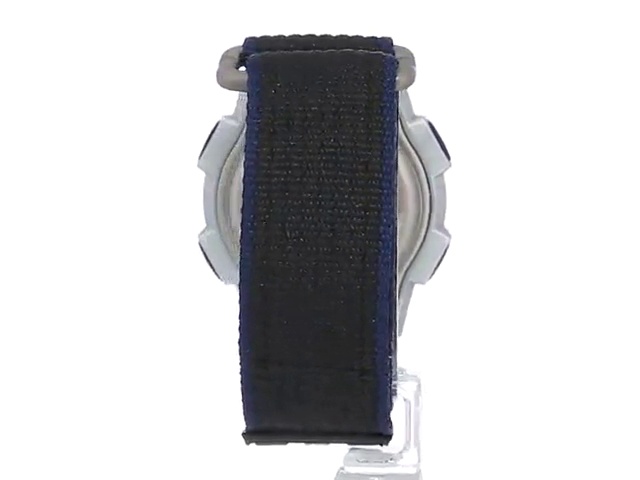
Figure 3: Close-up of the watch on a wrist, highlighting the durable strap.
استكشاف الأخطاء وإصلاحها
مشاكل العرض
- Blank or Faint Display: قد تكون البطارية ضعيفة أو فارغة. استبدلها.
- الوقت/التاريخ غير صحيح: ارجع إلى ضبط الوقت والتاريخ section to re-adjust. Ensure the correct year is set for accurate day-of-the-week display.
عطل زر
- الأزرار غير مستجيبة: Ensure the watch is not in a locked mode (if applicable, though this model does not have a specific lock feature). If unresponsive, a battery replacement might be needed, or a soft reset (refer to general digital watch reset procedures if not covered in this manual).
- No Button Tones: ارجع إلى Button Tones section to ensure they are enabled.
تحديد
- نموذج: T5K198SU
- مادة: Resin (case), Nylon (strap)
- أبعاد المنتج: 6 × 6 × 6 بوصة؛ 1.76 أونصة
- بطارية: 1 بطارية ليثيوم معدنية (متضمنة)
- مقاومة الماء: 200m (660 قدم)
- الشركة المصنعة: تايمكس
- تاريخ التوفر الأول: 1 أكتوبر 2001
الضمان والدعم
For detailed warranty information and further support, please refer to the official user manual PDF or visit the Timex Store.
- دليل المستخدم الرسمي (PDF): https://manuals.plus/m/037087c5d633048905b84795555d2880139e077b8ef3431925f6841ad2dfc006
- Visit the Timex Store: https://www.amazon.com/stores/Timex/page/4619EC3B-E9F4-40E0-B3AF-822D9645AEEC
الفيديو 11: المنتج الرسميview video from Timex.


