1. المقدمة
The Extech EX330 is a compact, autoranging digital multimeter designed for a wide range of electrical and electronic measurements. Its robust design and comprehensive features make it an essential tool for professionals and hobbyists alike. This manual provides detailed instructions for the safe and effective use of your EX330 multimeter.
Key features of the EX330 include:
- المدمج في التيار المتردد عدم الاتصال المجلدtage detector (NCV) for enhanced safety.
- Large 4000-count LCD display for clear readings.
- Automatic ranging for simplified operation.
- يقيس AC / DC Voltage, AC/DC Current, Resistance, Capacitance, Frequency, Duty Cycle, and Temperature.
- Diode test and Continuity check functions.
- Data Hold and Max Hold features.
- Durable rubber holster for protection.
- UL listed Cat III 600V safety rating.

2. البدء
2.1. تركيب البطارية
The EX330 multimeter requires two AAA batteries for operation. To install or replace batteries:
- تأكد من إيقاف تشغيل جهاز القياس المتعدد.
- حدد مكان حجرة البطارية في الجزء الخلفي من الوحدة.
- استخدم مفك براغي لفتح غطاء حجرة البطارية.
- أدخل بطاريتين من نوع AAA، مع مراعاة القطبية الصحيحة (+ و -) كما هو موضح داخل الحجرة.
- استبدل غطاء حجرة البطارية وثبته بالمسمار.
2.2. توصيل أسلاك الاختبار
The multimeter comes with a set of red and black test leads. Proper connection is crucial for accurate and safe measurements.
- قم دائمًا بتوصيل سلك الاختبار الأسود بـ كوم مقبس الإدخال (المشترك).
- بالنسبة لمعظم المجلداتtage, resistance, and continuity measurements, connect the red test lead to the V/Ω/µA/CAP/Hz/Temp جاك المدخلات.
- لإجراء قياسات التيار حتى 400 مللي أمبير، قم بتوصيل سلك الاختبار الأحمر بـ mA جاك المدخلات.
- For high current measurements up to 10A, connect the red test lead to the 10 أمبير جاك المدخلات.

3. تعليمات التشغيل
3.1. تشغيل/إيقاف التشغيل
To turn the multimeter on, rotate the function switch from the عن position to any desired measurement function. To turn the multimeter off, rotate the function switch back to the عن موضع.
3.2. Function Selection (Rotary Dial)
The large rotary dial on the front of the multimeter allows you to select the desired measurement function. The EX330 features automatic ranging, which simplifies operation by automatically selecting the correct measurement range.
- VAC / تDC: Measures AC or DC Voltage.
- mA / 10A: Measures AC or DC Current (milliampهنا أو ampإيري).
- Ω: Measures Resistance.
- كاب: Measures Capacitance.
- هرتز /٪: Measures Frequency and Duty Cycle.
- درجة فهرنهايت / درجة مئوية: Measures Temperature in Fahrenheit or Celsius.
- الصمام الثنائي / الاستمرارية: Tests diodes and checks for circuit continuity.
3.3. مجلد عدم الاتصالtagكشف (NCV).
تتيح ميزة NCV الكشف السريع عن جهد التيار المترددtage without direct contact, enhancing safety when working with electrical systems. To use the NCV function, press and hold the القيمة الوطنية button. The top of the meter will illuminate and an audible tone will sound if AC voltagتم الكشف عن ذلك.

3.4. المجلدtagالقياس (التيار المتردد/المستمر)
لقياس الحجمtage:
- اضبط القرص الدوار على VAC or VDC حسب الاقتضاء.
- قم بتوصيل سلك الاختبار الأسود بـ كوم جاك والاختبار الأحمر يؤديان إلى V/Ω/µA/CAP/Hz/Temp جاك.
- قم بتوصيل مجسات الاختبار بالتوازي عبر الدائرة أو المكون المراد قياسه.
- اقرأ المجلدtagقيمة e على شاشة LCD.

3.5. Temperature Measurement (Type K)
The EX330 includes a Type K temperature probe for accurate temperature readings.
- اضبط القرص الدوار على درجة فهرنهايت or درجة مئوية.
- Plug the Type K temperature probe into the V/Ω/µA/CAP/Hz/Temp و كوم مقابس الإدخال، مع مراعاة القطبية.
- ضع طرف مسبار درجة الحرارة على الجسم المراد قياس درجة حرارته أو بالقرب منه.
- Allow time for the reading to stabilize on the display.
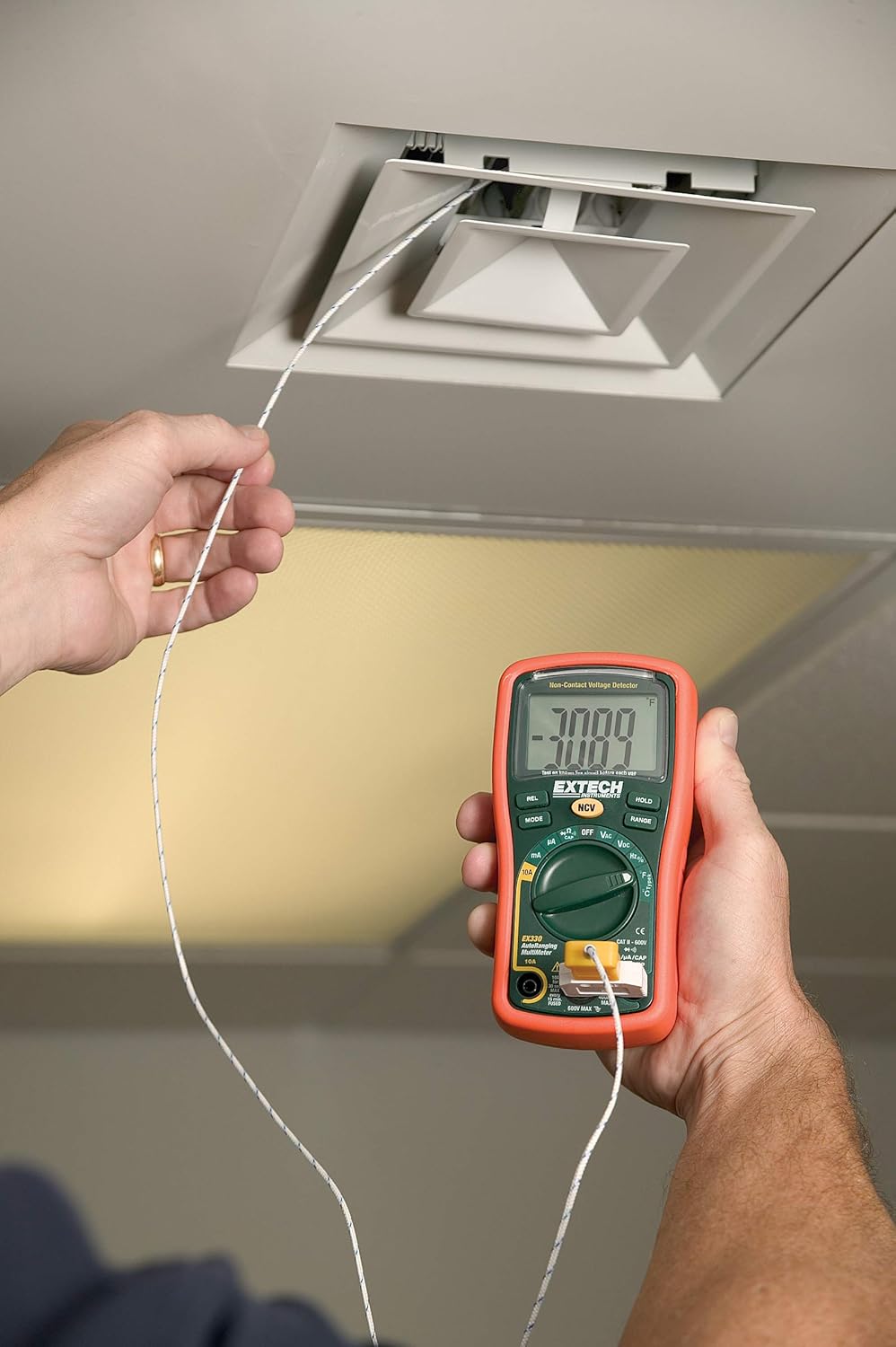
3.6. Data Hold and Max Hold
- اضغط على يمسك اضغط على الزر لتجميد القراءة الحالية على الشاشة. اضغط مرة أخرى لتحريره.
- اضغط على وضع button repeatedly while in certain functions to cycle through sub-functions or to activate الحد الأقصى للاحتفاظ, which captures and displays the maximum measured value.
3.7. ميزات المنتجview
شاهد هذا الفيديو للحصول على لمحة سريعةview of the Extech EX330's key features and applications.
الفيديو 3.1: انتهىview of Extech EX330 Multimeter features, including AC/DC voltage measurement, 4000-count display, built-in non-contact voltage detector, and Type K temperature measurement.
3.8. Accuracy Demonstration
This video demonstrates the accuracy and reliability of Extech multimeters, showcasing two units providing consistent readings when measuring voltage from a power supply.
Video 3.2: Demonstration of two Extech multimeters measuring voltage from a power supply, highlighting their consistent and accurate readings over time.
4. الصيانة والعناية
4.1. التنظيف
لتنظيف جهاز القياس المتعدد، استخدم قطعة قماش ناعمة و...amp cloth. Do not use abrasives or solvents. Ensure the unit is off and disconnected from any circuits before cleaning.
4.2. استبدال البطارية
When the battery indicator appears on the display, replace the batteries as described in Section 2.1. Prompt battery replacement ensures continued accuracy and proper operation.
4.3. استبدال الصمامات
If the multimeter fails to measure current, the fuse may need replacement. Refer to the specifications for the correct fuse type and rating. Fuse replacement should only be performed by qualified personnel.
5. استكشاف الأخطاء وإصلاحها
This section addresses common issues you might encounter with your EX330 multimeter.
| مشكلة | السبب المحتمل | حل |
|---|---|---|
| لا يوجد عرض أو عرض باهت | البطاريات الميتة أو المنخفضة | استبدل البطاريات (القسم 2.1) |
| قراءات غير صحيحة | Incorrect function selected, poor test lead connection, damaged test leads | Verify function, check connections, replace test leads if damaged |
| لا يوجد قياس حالي | فتيل منفوخ | استبدل الفيوز (القسم 4.3) |
| NCV لا يكتشف المجلدtage | المجلدtage too low, interference, or incorrect usage | تأكد من الحجمtage is within detectable range, minimize interference, follow NCV instructions (Section 3.3) |
6. المواصفات الفنية
| مواصفة | قيمة |
|---|---|
| عرض | شاشة LCD تتسع لـ 4000 عد |
| AC / DC Voltage | حتى 600 فولت |
| تيار متردد / تيار مستمر | حتى 10 أمبير |
| مقاومة | مقاومة تصل إلى 40 ميجا أوم |
| السعة | Up to 100µF |
| تكرار | حتى 10 ميجا هرتز |
| درجة الحرارة (النوع ك) | -4 إلى 1382 درجة فهرنهايت (-20 إلى 750 درجة مئوية) |
| حجم عدم الاتصالtagهـ (NCV) | 100 إلى 600 فولت تيار متردد |
| مصدر الطاقة | بطاريات آا شينومكس x (وشملت) |
| الأبعاد (الطول × العرض × الارتفاع) | 5.7 × 2.9 × 1.6 بوصة |
| وزن | 9.9 أوقية (0.28 كجم) |
| تصنيف السلامة | UL listed Cat III - 600V |
| بلد المنشأ | الصين |

7. الضمان والدعم
7.1. معلومات الضمان
The Extech EX330 Autoranging Mini Multimeter is covered by a ضمان لمدة 1 سنوات على الأجزاء والعمالة from the date of purchase. This warranty covers defects in materials and workmanship under normal use. It does not cover damage resulting from misuse, unauthorized modifications, accidents, or neglect.
7.2. دعم العملاء
For technical assistance, troubleshooting, or warranty claims, please contact Extech customer support. Refer to the official Extech webقم بزيارة الموقع أو عبوة المنتج الخاص بك للحصول على معلومات الاتصال الأكثر حداثة.


