1. المقدمة
Welcome to the user manual for your new Singing Machine SMVG-620 CD+G Karaoke System. This system is designed to provide hours of entertainment with its CD+G playback capabilities, built-in camera, 5.5-inch monitor, and AM/FM radio. Please read this manual thoroughly before operating your unit to ensure proper use and to maximize your enjoyment.
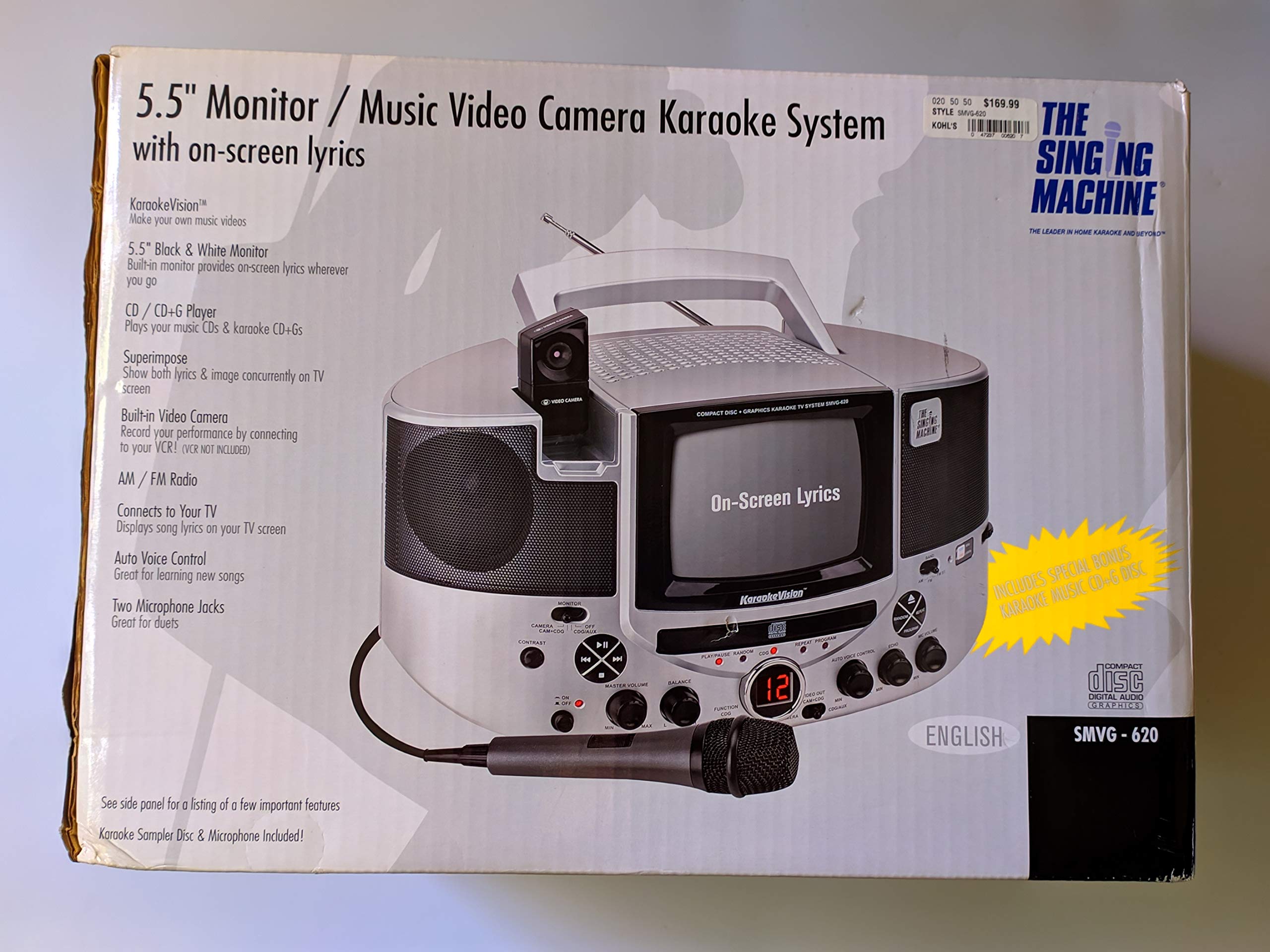
الشكل 1.1: The Singing Machine SMVG-620 CD+G Karaoke System.
For optimal performance and safety, always follow the instructions and warnings provided.
2. معلومات هامة حول السلامة
- اقرأ التعليمات: يجب قراءة جميع تعليمات السلامة والتشغيل قبل تشغيل الجهاز.
- الاحتفاظ بالتعليمات: ينبغي الاحتفاظ بتعليمات السلامة والتشغيل للرجوع إليها في المستقبل.
- إنتبه للتحذيرات: ينبغي الالتزام بجميع التحذيرات الموجودة على الجهاز وفي تعليمات التشغيل.
- اتبع التعليمات: ينبغي اتباع كافة تعليمات التشغيل والاستخدام.
- الماء والرطوبة: لا تستخدم هذا الجهاز بالقرب من الماء.
- تنظيف: نظف فقط بقطعة قماش جافة.
- تهوية: لا تسد أي فتحات تهوية. ثبّت المنتج وفقًا لتعليمات الشركة المصنعة.
- حرارة: لا تقم بالتثبيت بالقرب من أي مصادر للحرارة مثل المشعات أو فتحات التدفئة أو المواقد أو أي أجهزة أخرى (بما في ذلك ampالمُضخِّمات) التي تنتج الحرارة.
- حماية سلك الطاقة: احمِ سلك الطاقة من أن يدوس عليه أحد أو يضغط عليه، وخاصةً عند المقابس ومنافذ التوصيل الكهربائية ونقطة خروجها من الجهاز.
- المرفقات / الملحقات: استخدم فقط المرفقات/الملحقات المحددة من قبل الشركة المصنعة.
- البرق: افصل هذا الجهاز أثناء العواصف الرعدية أو عند عدم استخدامه لفترات طويلة من الزمن.
- الخدمة: قم بإحالة جميع أعمال الصيانة إلى موظفي الخدمة المؤهلين. الصيانة مطلوبة في حالة تعرض الجهاز للتلف بأي شكل من الأشكال.
3. محتويات العبوة
Carefully unpack your Singing Machine SMVG-620 system and ensure all items listed below are present and in good condition.
- SMVG-620 CD+G Karaoke System
- One (1) Microphone
- Sampler CD+G Disc
- كابلات RCA للصوت/الفيديو
- محول التيار المتردد
- دليل التعليمات

الشكل 3.1: Contents of the box, including the microphone, RCA cables, and the instruction manual.
4. انتهى المنتجview
Familiarize yourself with the various parts and controls of your SMVG-620 Karaoke System.

الشكل 4.1: مؤخرة view of the product packaging highlighting key features and components of the SMVG-620 system.
المميزات الرئيسية:
- 5.5" Black & White Monitor: For on-screen lyrics from CD+G discs.
- Built-in Color Camera: Allows you to see yourself on the monitor or connected TV.
- Dual Microphone Jacks: Connect two microphones for duets (one microphone included).
- راديو AM/FM: استمع إلى محطات الراديو المفضلة لديك.
- مشغل الأقراص المضغوطة + G: Plays standard audio CDs and CD+Graphics discs.
- التحكم الصوتي التلقائي (AVC): Helps maintain vocal balance by automatically reducing the main vocal track when you sing.
- التحكم بالصدى: Adds depth and resonance to your voice.
- Professional Style Microphone: For clear vocal pickup.
- إخراج الصوت والفيديو: Connects to your TV for larger screen display and enhanced audio.
5. الإعداد
5.1 توصيل الطاقة
- تأكد من وضع الوحدة على سطح مستوٍ وثابت.
- Connect the AC power adapter to the DC IN jack on the back of the SMVG-620 unit.
- Plug the other end of the AC power adapter into a standard wall outlet (AC 120V ~ 60Hz).
5.2 الاتصال بالتلفزيون
ل view lyrics on a larger screen and enhance audio, connect the SMVG-620 to your television using the supplied Audio/Video RCA cables.
- Locate the AUDIO OUT (white and red) and VIDEO OUT (yellow) jacks on the back of the SMVG-620.
- Connect the white plug of the RCA cable to the white AUDIO OUT jack on the karaoke system and to the white AUDIO IN jack on your TV.
- Connect the red plug of the RCA cable to the red AUDIO OUT jack on the karaoke system and to the red AUDIO IN jack on your TV.
- Connect the yellow plug of the RCA cable to the yellow VIDEO OUT jack on the karaoke system and to the yellow VIDEO IN jack on your TV.
- Turn on your TV and select the correct A/V input source (e.g., AV1, Video 1) that corresponds to the jacks you used.
5.3 توصيل الميكروفون
Plug the microphone into either the MIC 1 or MIC 2 jack on the front of the SMVG-620 unit.
6. التشغيل
6.1 تشغيل/إيقاف التشغيل
اضغط على قوة button located on the front panel to turn the unit ON or OFF.
6.2 CD+G Playback
- Open the CD compartment door and carefully place a CD+G disc (or standard audio CD) onto the spindle with the label side facing up. Close the door.
- يختار قرص مضغوط + ز mode using the FUNCTION selector.
- اضغط على تشغيل/إيقاف مؤقت زر لبدء التشغيل.
- ضبط المجلد الرئيسي اضبط المقبض على مستوى الاستماع الذي ترغب فيه.
- استخدم يتخطى أزرار (<< or >>) للتنقل بين المسارات.
- للتوقف مؤقتًا، اضغط على تشغيل/إيقاف مؤقت مرة أخرى. اضغط مرة أخرى للاستئناف.
- لإيقاف التشغيل ، اضغط على قف زر.
6.3 استخدام الميكروفون
- Ensure the microphone is connected to a MIC jack.
- ضبط حجم هيئة التصنيع العسكري knob to control the microphone's output level.
- أدر صدى knob to add an echo effect to your voice.
- ال AUTO VOICE CONTROL (AVC) switch can be toggled ON/OFF. When ON, the original vocal track on a CD+G disc will be reduced when you sing into the microphone.
راديو 6.4 AM/FM
- يختار AM or FM mode using the FUNCTION selector.
- قم بتمديد هوائي FM لتحسين الاستقبال.
- أدر ضبط زر لاختيار محطة الراديو التي ترغب بها.
- ضبط المجلد الرئيسي مقبض الباب.
6.5 وظيفة الكاميرا
The built-in camera allows you to display your image on the 5.5-inch monitor or a connected TV.
- Ensure the unit is powered on and connected to a TV if you wish to use an external display.
- The camera feed will automatically display when the unit is in CD+G or Video mode, or when no other video source is active.
7. الصيانة
7.1 تنظيف الوحدة
- افصل الوحدة دائمًا عن مأخذ التيار الكهربائي قبل التنظيف.
- استخدم قطعة قماش ناعمة وجافة لتنظيف الأسطح الخارجية.
- لا تستخدم المنظفات الكاشطة أو الشمع أو المذيبات لأنها قد تؤدي إلى إتلاف الطبقة النهائية.
- بالنسبة لعدسة الأقراص المضغوطة، استخدم قرص تنظيف عدسة الأقراص المضغوطة المتخصص.
7.2 العناية بالقرص المضغوط
- أمسك الأقراص المدمجة من حوافها لتجنب ترك بصمات الأصابع على سطح التشغيل.
- Keep discs in their cases when not in use to prevent scratches.
- قم بتنظيف الأقراص باستخدام قطعة قماش ناعمة وخالية من الوبر، وامسحها من المركز إلى الخارج.
8. استكشاف الأخطاء وإصلاحها
If you encounter any issues with your SMVG-620, please refer to the following common problems and solutions.
| مشكلة | السبب المحتمل | حل |
|---|---|---|
| لا يوجد طاقة | سلك الطاقة غير متصل بشكل صحيح. | تأكد من توصيل محول التيار المتردد بشكل آمن بالجهاز وبمأخذ حائط يعمل. |
| لا يوجد صوت من مكبرات الصوت | Master Volume is too low. Incorrect function mode selected. | Increase the MASTER VOLUME. Select the correct FUNCTION (CD+G, AM, FM). |
| لا يوجد صوت من الميكروفون | الميكروفون غير متصل. MIC VOLUME is too low. مفتاح الميكروفون في وضع الإيقاف. | Plug microphone into MIC 1 or MIC 2 jack. Increase the MIC VOLUME. Ensure microphone switch is ON. |
| No video on TV / No lyrics | RCA cables not connected correctly. Incorrect TV input selected. Not a CD+G disc. | Check all RCA cable connections (yellow for video). Select the correct A/V input on your TV. Ensure you are playing a CD+G disc for lyrics. |
| CD skipping | القرص متسخ أو مخدوش. الوحدة موجودة على سطح غير مستقر. | نظف القرص أو جرب قرصًا آخر. Place the unit on a stable, vibration-free surface. |
9. المواصفات
| رقم الموديل | SMVG-620 (SIN SMVG620) |
| مصدر الطاقة | AC 120V ~ 60Hz (via AC Adapter) |
| شاشة | 5.5-inch Black & White |
| عدد المتحدثين | 2 |
| الأجهزة المتوافقة | تلفزيون |
| نوع الوسائط | CD, CD+G |
| أبعاد المنتج (الطول × العرض × الارتفاع) | 35.8 x 20.8 x 19.3 cm (14.1 x 8.2 x 7.6 inches) |
| وزن العنصر | 3.9 كجم (8.6 رطل) |
10. الضمان والدعم
For warranty information and customer support, please refer to the warranty card included with your product or contact The Singing Machine directly. You may also consult your retailer for details regarding their return and warranty policies.
الشركة المصنعة: آلة الغناء


