1. المقدمة
شكرا لك على الشراءasing the Pentax Optio W10 Digital Camera. This manual provides essential information for the safe and effective use of your camera. The Optio W10 is a compact 6.0-megapixel digital camera featuring a 3x optical zoom lens, designed for capturing high-quality still images and video. Its robust design makes it suitable for various environments.
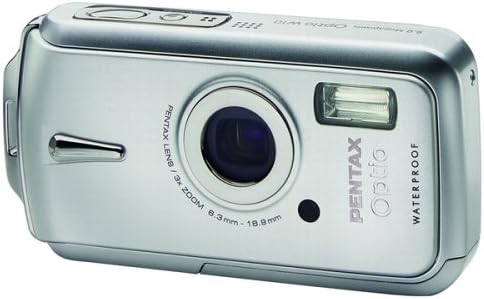
الشكل 1.1: الجبهة view of the Pentax Optio W10 Digital Camera, showcasing the lens, flash, and branding.
2. معلومات السلامة
Please read and understand all safety precautions before using the camera. Failure to do so may result in injury or damage to the product.
- لا تحاول تفكيك الكاميرا أو تعديلها.
- أبقِ الكاميرا بعيداً عن درجات الحرارة القصوى، وأشعة الشمس المباشرة، والرطوبة العالية.
- Ensure all compartment covers (battery, memory card) are securely closed and locked before exposing the camera to water or dust.
- Use only the specified battery type (Lithium-ion DL-I8) and charger.
- يحفظ بعيدًا عن متناول الأطفال.
3. محتويات العبوة
تأكد من وجود جميع العناصر في حقيبة الكاميرا الخاصة بك:
- Pentax Optio W10 Digital Camera
- Lithium-ion Battery DL-I8
- شاحن البطارية
- سلك الطاقة المتردد
- USB Cable (for computer connection)
- حزام
- القرص المضغوط للبرنامج
- دليل التعليمات (هذا المستند)
4. الإعداد
4.1. تركيب البطارية
- Locate the battery/memory card compartment cover on the bottom of the camera.
- Slide the lock switch to the 'OPEN' position and open the cover.
- Insert the Lithium-ion battery DL-I8 into the compartment, ensuring the correct orientation as indicated inside the compartment.
- Close the cover and slide the lock switch to the 'LOCK' position until it clicks securely.

الشكل 4.1: القاع view of the camera, illustrating the battery and SD card compartment with the lock switch.
4.2. تركيب بطاقة الذاكرة
The Pentax Optio W10 uses SD memory cards.
- Open the battery/memory card compartment cover as described in Section 4.1.
- Insert the SD memory card into the designated slot with the label facing the correct direction, pushing gently until it clicks into place.
- Close the cover and slide the lock switch to the 'LOCK' position.
4.3. التشغيل الأولي وضبط التاريخ والوقت
- اضغط على تشغيل/إيقاف الزر الموجود في الجزء العلوي من الكاميرا.
- Upon first power-on, the camera will prompt you to set the date and time. Use the directional buttons on the back of the camera to navigate and the OK زر للتأكيد.
- اتبع التعليمات التي تظهر على الشاشة لإكمال الإعداد الأولي.

الشكل 4.2: الجزء العلوي view of the camera, highlighting the ON/OFF button and 6.0 Megapixels branding.
5. تشغيل الكاميرا
5.1. التصوير الفوتوغرافي الأساسي
To take a still picture:
- قم بتشغيل الكاميرا بالضغط على تشغيل/إيقاف زر.
- قم بتأطير لقطتك باستخدام شاشة LCD مقاس 2.5 بوصات.
- اضغط زر الغالق حتى المنتصف للتركيز. سيتحول إطار التركيز إلى اللون الأخضر عند ضبط التركيز.
- اضغط على زر الغالق حتى النهاية لالتقاط الصورة.

الشكل 5.1: خلفي view شاشة الكاميرا، تعرض شاشة LCD وأزرار تحكم متنوعة للتنقل والإعدادات.
5.2. أوضاع التصوير
The Optio W10 offers various shooting modes accessible via the وضع button. Refer to the on-screen menu for specific options such as Program Auto, Scene Modes, and Movie Mode.
5.3. تسجيل الفيديو
لتسجيل مقطع فيديو:
- Switch to Movie Mode using the وضع زر.
- Press the shutter button to start recording. The camera can capture QuickTime motion JPEG videos at 640 x 480 resolution at 30 frames per second.
- اضغط على زر الغالق مرة أخرى لإيقاف التسجيل.
5.4. التشغيل
ل view الصور والفيديوهات الملتقطة:
- اضغط على التشغيل زر (يشار إليه عادةً برمز مثلث).
- Use the directional buttons to scroll through your photos and videos.
- اضغط على OK زر ل view مقطع فيديو أو تكبير صورة.
5.5. الاتصال بالكمبيوتر
To transfer images and videos to a computer:
- تأكد من إيقاف تشغيل الكاميرا.
- قم بتوصيل الكاميرا بجهاز الكمبيوتر الخاص بك باستخدام كابل USB المرفق.
- Turn on the camera. It should be recognized as a removable disk or a PTP device.
- Follow your computer's operating system instructions to access and transfer files.
6. الصيانة
6.1. التنظيف
- جسم الكاميرا: امسح بقطعة قماش ناعمة وجافة. وللأوساخ المستعصية، استخدم قطعة قماش ناعمة قليلاً.amp القماش ثم تجفيفه جيدا.
- عدسة: Use a lens brush or a soft, clean lens cloth. Avoid touching the lens surface with your fingers.
- شاشات الكريستال السائل: امسح برفق بقطعة قماش ناعمة وجافة. تجنب الضغط بقوة على الشاشة.
- الأختام للماء: Regularly inspect the rubber seals around the battery/memory card compartment for dirt, sand, or damage. Clean gently with a soft cloth. Do not use sharp objects.
6.2. التخزين
When not in use for extended periods, store the camera in a cool, dry, and well-ventilated place. Remove the battery to prevent leakage. Avoid storing in areas with high humidity or extreme temperature fluctuations.
7. استكشاف الأخطاء وإصلاحها
If you encounter issues with your Pentax Optio W10, refer to the following common solutions:
| مشكلة | السبب المحتمل / الحل |
|---|---|
| الكاميرا لا تعمل | Battery is depleted or incorrectly inserted. Recharge the battery or reinsert it correctly. |
| لا يمكن التقاط الصور | Memory card is full, locked, or not inserted. Delete unnecessary files, unlock the card, or insert it correctly. |
| الصور غير واضحة | Lens is dirty, camera shake, or incorrect focus. Clean the lens, hold the camera steady, or ensure proper focus. |
| Water inside compartment | Compartment cover not securely closed or seal is damaged. Ensure cover is locked. If seal is damaged, contact service. |
For further assistance, please refer to the official Pentax support webالموقع أو الاتصال بخدمة العملاء.
8. المواصفات
Key technical specifications for the Pentax Optio W10 Digital Camera:
- دقة ثابتة فعالة: 6.0 ميجا بكسل
- تقنية مستشعر الصور: CCD (1/2.5 بوصة)
- التكبير البصري: 3x
- التكبير الرقمي: 4x
- الحد الأقصى للطول البؤري: 114 ملم
- الحد الأدنى للطول البؤري: 38 ملم
- حجم شاشة LCD: 2.5 بوصة
- تثبيت الصورة: الرقمية والبصرية
- دقة الفيديو: 640 x 480, 30/15 fps (QuickTime Motion JPEG)
- مدعوم File شكل: JPEG (Still Images), MJPEG (Video)
- وسائط التخزين: SD/MMC card, Internal Memory
- نوع البطارية: Lithium-ion (DL-I8)
- ميزة خاصة: Waterproof (Note: Ensure all seals are properly closed before water exposure)
- الحد الأدنى لسرعة الغالق: ثانيتين
- أقصى سرعة للغالق: 1/2000 ثانية
- نطاق ISO: السيارات، شنومكس، شنومكس، شنومكس، شنومكس، شنومكس
- وزن السلعة: 5.6 أونصات
- رقم الموديل: 19033
9. الضمان والدعم
For information regarding warranty coverage, service, or technical support for your Pentax Optio W10 camera, please refer to the warranty card included with your product or visit the official Pentax webالموقع. احتفظ بإثبات الشراء الخاص بك لتقديم مطالبات الضمان.
الدعم عبر الإنترنت: Ricoh Imaging Global Support (Pentax is a brand of Ricoh Imaging)


