1. المقدمة
The Extech SDL200 is a versatile four-channel thermometer and data logger designed for precise temperature measurement and recording. It supports six types of thermocouples (J, K, E, T, R, S) and two channels for RTD (Pt100Ohm) probes, allowing for a wide range of applications. This device can display individual channel readings (T1, T2, T3, T4) or differential readings (T1-T2). It features an offset adjustment for relative measurements and can store up to 99 readings manually, with an extensive capacity of 20 million readings via a 2GB SD memory card. All recorded data is time-stamped and saved in an Excel-compatible format for easy transfer and analysis on a PC. The SDL200 also includes user-programmable sampling rates, Min/Max recording, Data Hold, Auto Power Off, and a built-in PC interface.
2. معلومات السلامة
Please read and understand all safety instructions before operating the Extech SDL200. Failure to follow these instructions may result in injury or damage to the device.
- لا تقم بتشغيل الجهاز إذا بدا تالفًا أو إذا كان العزل متضررًا.
- Ensure proper probe connection before taking measurements.
- تجنب تعريض الجهاز لدرجات حرارة شديدة أو رطوبة أو أشعة الشمس المباشرة.
- Use only specified battery types and ensure correct polarity during installation.
- Keep the device clean and dry. Refer to the maintenance section for cleaning instructions.
- لا تحاول إصلاح الجهاز أو تعديله. أحل جميع أعمال الصيانة إلى فنيين مؤهلين.
3. محتويات العبوة
تأكد من وجود جميع العناصر عند فك العبوة:
- Extech SDL200 Four-Channel Thermometer SD Logger unit
- بطاريتين AA
- Four general purpose Type K bead wire temperature probes
- SD memory card (2GB)
- حقيبة حمل صعبة

الشكل 3.1: Extech SDL200 unit with four Type K thermocouple probes inserted into the top ports. The display shows temperature readings for T1, T2, T3, and T4.

الشكل 3.2: The retail packaging box for the Extech SDL200, displaying the brand logo, model name, and UPC code (0793950432105).
4. انتهى المنتجview
The SDL200 features a clear digital display and intuitive button layout for easy operation. The top of the device includes four input ports for thermocouple probes. The side of the device houses connectivity ports for power and PC interface, along with RTD probe inputs.

الشكل 4.1: جانب view of the Extech SDL200, illustrating the DC 9V power input, RS232 serial port for PC connection, and two RTD (PT100Ohm) probe input ports labeled PT1 and PT2, protected by a rubber flap.

الشكل 4.2: A set of four yellow Type K bead wire temperature probes with standard mini-connectors, alongside a larger clamp-style temperature probe, demonstrating the variety of probes that can be used with the device.
5. الإعداد
5.1. تركيب البطارية
- افتح غطاء حجرة البطارية في الجزء الخلفي من الجهاز.
- Insert six (6) AA batteries, ensuring correct polarity as indicated inside the compartment.
- أغلق غطاء حجرة البطارية جيدًا.
5.2. توصيل المسبار
- For thermocouple probes (Type J, K, E, T, R, S), connect them to the four input jacks located at the top of the meter. Ensure the correct thermocouple type is selected in the device settings if applicable.
- For RTD (Pt100Ohm) probes, connect them to the PT1 and PT2 ports on the side of the device (refer to Figure 4.1).
5.3. إدخال بطاقة SD
- حدد موقع فتحة بطاقة SD، والتي عادة ما تكون على جانب الجهاز أو أسفله.
- Insert the provided 2GB SD memory card into the slot until it clicks into place.
- لإزالتها، ادفع البطاقة برفق إلى الداخل حتى تخرج.
6. تعليمات التشغيل
6.1. تشغيل/إيقاف التشغيل
اضغط على قوة زر لتشغيل الجهاز أو إيقاف تشغيله.
6.2. قياس درجة الحرارة الأساسي
- Connect the desired temperature probes.
- Power on the device. The display will show real-time temperature readings for the connected channels (T1, T2, T3, T4).
- اضغط على ت1-ت2 button to switch between individual channel display and differential temperature (T1-T2) display.
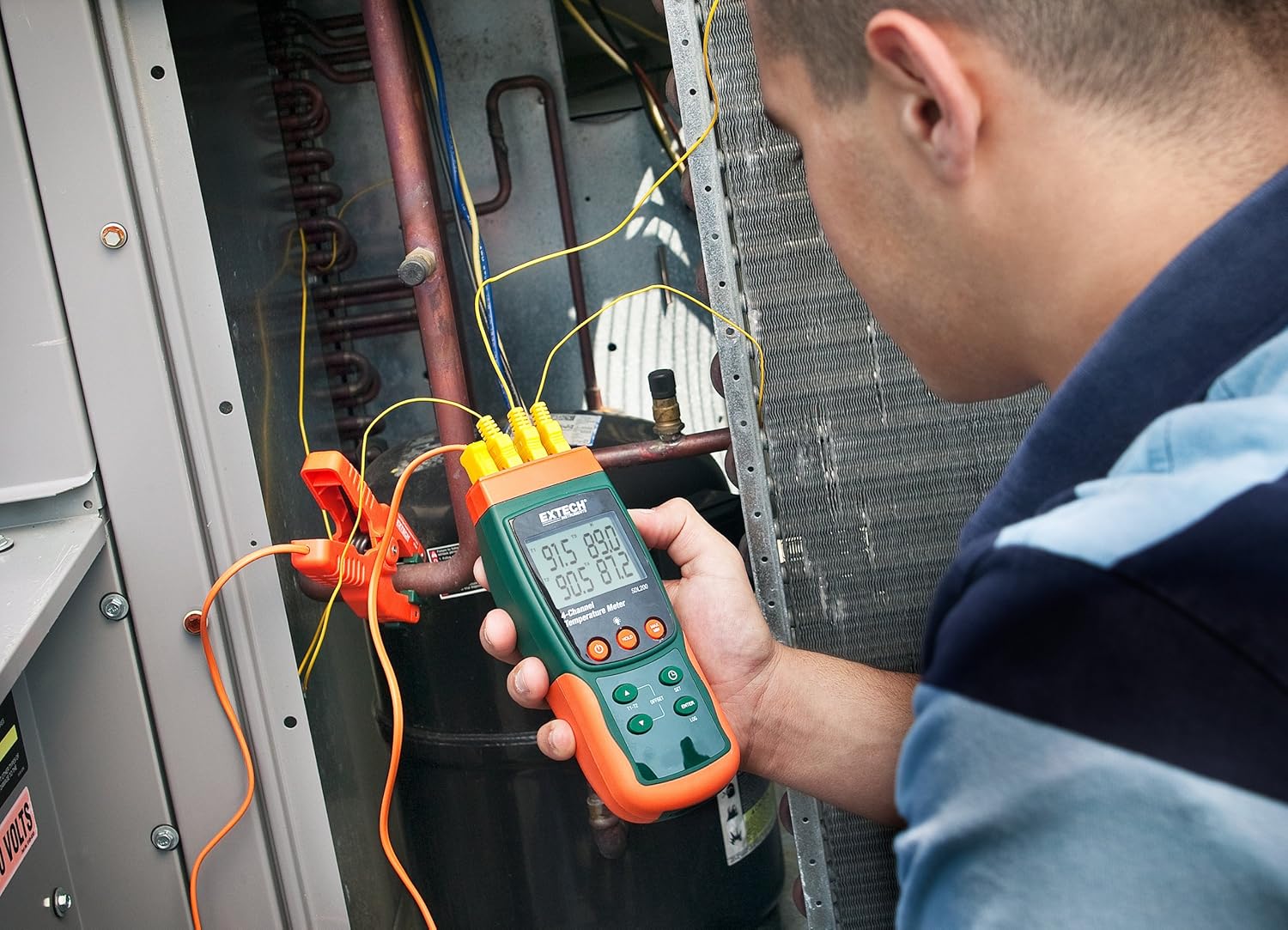
الشكل 6.1: A technician utilizing the Extech SDL200 to monitor multiple temperature points on an HVAC system, demonstrating its application in industrial and scientific settings.
6.3. تسجيل البيانات
The SDL200 can record temperature data to the SD card with a real date and time stamp.
- مجموعة سampمعدل لينغ: استخدم تعيين button to access settings and adjust the sampمعدل لينغ (1 إلى 3600 ثانية).
- بدء التسجيل: اضغط على سجل button to begin recording data to the SD card. A logging indicator will appear on the display.
- إيقاف التسجيل: اضغط على سجل button again to stop data recording.
- نقل البيانات: Remove the SD card and insert it into a computer to access the data, which is saved in Excel (.xls) format.
6.4. Min/Max and Data Hold
- الحد الأدنى - الحد الأقصى: اضغط على الحد الأقصى/الحد الأدنى button to display the maximum or minimum recorded temperature since the function was activated. Press again to cycle through Max, Min, and current readings.
- امسك المعلومات: اضغط على يمسك button to freeze the current readings on the display. Press again to release.
6.5. Offset Adjustment
استخدم الإزاحة button to perform a zero function for relative measurements. Consult the full manual for detailed calibration procedures.
6.6. إيقاف التشغيل التلقائي
The device features an Auto Power Off function to conserve battery life. This can typically be disabled or adjusted in the settings menu if continuous operation is required.
6.7. واجهة الحاسوب الشخصي
The built-in RS232 PC interface allows for real-time data streaming and advanced control using compatible software (sold separately or available for download from Extech's website). Connect the device to your PC using an appropriate RS232 cable.
7. الصيانة
7.1. التنظيف
امسح الجهاز بقطعة قماش ناعمة و...amp cloth. Do not use abrasive cleaners or solvents. Ensure the device is dry before storage or further use.
7.2. استبدال البطارية
استبدل البطاريات عند ظهور مؤشر انخفاض مستوى البطارية على الشاشة. راجع القسم 5.1 للاطلاع على تعليمات تركيب البطاريات.
7.3. التخزين
When not in use for extended periods, remove the batteries and store the device in its hard carrying case in a cool, dry place.
8. استكشاف الأخطاء وإصلاحها
- الجهاز لا يعمل: تحقق من تركيب البطارية وتأكد من عدم نفاذ شحنها. استبدلها إذا لزم الأمر.
- قراءات درجة حرارة غير صحيحة: Verify probe connections are secure and that the correct probe type is selected (if applicable). Ensure probes are not damaged.
- Data logging not working: Check if the SD card is properly inserted and has sufficient free space. Ensure the logging function is activated.
- PC connection issues: Verify the RS232 cable connection and ensure the correct drivers and software are installed on your PC.
9. المواصفات
| ميزة | مواصفة |
|---|---|
| ماركة | إكستيك |
| اسم الموديل | SDL200 |
| ميزة خاصة | 4-Channel Datalogging |
| نوع العرض | رقمي |
| تكنولوجيا الاتصال | USB (via RS232 interface) |
| مصدر الطاقة | يعمل بالبطارية (يتضمن بطاريتين AA) |
| تصنيف درجة الحرارة العليا | 2732 درجة فهرنهايت |
| وقت الاستجابة | 1 ثانية |
| سعة تسجيل البيانات | 20M readings via 2G memory card |
| Sampمعدل لينغ | 1 to 3600 seconds (user programmable) |
| أنواع الثرموكبل | J, K, E, T, R, S (4-channel) |
| مجسات RTD | Pt100Ohm (2-channel) |
| المكونات المضمنة | Batteries, Bead wire temperature probes, memory card, case |
| وزن العنصر | 1.1 رطل |
| طول العنصر | 7.2 بوصة |
| المواد الخارجية | البولي كربونات (PC) |
| التقى المواصفات | CE |
10. الضمان والدعم
Extech products are designed for reliability and performance. For warranty information, technical support, or service inquiries, please refer to the official Extech webالموقع الإلكتروني أو تواصل مع قسم خدمة العملاء. احتفظ بإيصال الشراء كإثبات للشراء في حال وجود أي مطالبات بالضمان.
للحصول على موارد إضافية، قم بزيارة متجر إكستك على أمازون.


