مقدمة
This manual provides comprehensive instructions for the setup, operation, and maintenance of your Coby CT-P9040 5.8 GHz Analog Cordless Phone. Please read this manual thoroughly before using your phone to ensure proper functionality and to prevent damage.
محتويات العبوة ومكوناتها
قبل أن تبدأ، تأكد من وجود جميع المكونات في العبوة:
- سماعة لاسلكية
- الوحدة الأساسية
- محول التيار المتردد
- سلك خط الهاتف
- حزمة بطارية قابلة لإعادة الشحن
- دليل المستخدم (هذا المستند)
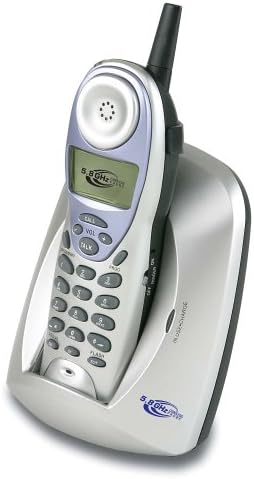
Image: The Coby CT-P9040 cordless phone, showing the handset docked in its silver base unit. The handset features a display screen, numeric keypad, and function buttons. The base unit has a charging cradle for the handset.
دليل الإعداد
1. تركيب البطارية
- حدد مكان حجرة البطارية في الجزء الخلفي من الهاتف.
- افتح غطاء حجرة البطارية.
- Connect the rechargeable battery pack connector to the jack inside the compartment.
- Place the battery pack into the compartment and close the cover securely.
2. توصيل الوحدة الأساسية
- Connect one end of the telephone line cord to the "LINE" jack on the back of the base unit.
- Connect the other end of the telephone line cord to a standard telephone wall jack.
- Connect the AC power adapter to the "DC IN" jack on the back of the base unit.
- قم بتوصيل محول الطاقة المتردد بمأخذ كهربائي قياسي.
3. الشحن الأولي
Place the handset in the base unit's charging cradle. Ensure the "IN CHARGE" indicator light on the base unit illuminates, indicating proper charging. For optimal battery performance, charge the handset for at least 12-14 hours before initial use.
تعليمات التشغيل
إجراء مكالمة
- Pick up the handset from the base unit or press the يتحدث زر.
- استمع إلى نغمة الاتصال.
- اتصل برقم الهاتف المطلوب.
- لإنهاء المكالمة، اضغط على يتحدث button again or place the handset back in the base unit.
الرد على المكالمة
عندما يرن الهاتف، التقط سماعة الهاتف أو اضغط على يتحدث زر للرد على المكالمة.
وظيفة إعادة الاتصال
لإعادة الاتصال بآخر رقم تم الاتصال به ، اضغط على إعادة زر على الهاتف.
ضبط مستوى الصوت
أثناء المكالمة، استخدم المجلد + و المجلد - buttons on the handset to adjust the earpiece volume.
وظيفة الفلاش
اضغط على فلاش button to use call waiting or transfer calls if supported by your telephone service provider.
Storing Phone Numbers (Speed Dial)
Your phone can store up to 10 numbers for frequently called contacts. Refer to the detailed instructions in the full manual for programming speed dial entries.
الصيانة والعناية
- أبقِ الهاتف بعيداً عن مصادر الحرارة وأشعة الشمس المباشرة والرطوبة.
- نظف أسطح الهاتف بقطعة قماش ناعمة و...amp القماش. لا تستخدم المنظفات أو المذيبات الكاشطة.
- Ensure the charging contacts on the handset and base unit are clean to maintain proper charging.
- إذا لم يتم استخدام الهاتف لفترة طويلة، فقم بإزالة البطارية من الجهاز.
استكشاف الأخطاء وإصلاحها
| مشكلة | السبب المحتمل | حل |
|---|---|---|
| لا يوجد نغمة اتصال | تم فصل سلك خط الهاتف. | تأكد من توصيل سلك خط الهاتف بشكل آمن بكل من الوحدة الأساسية ومقبس الحائط. |
| الهاتف لا يشحن | Handset not properly seated in cradle or dirty charging contacts. | Reseat the handset in the base unit. Clean the charging contacts on both the handset and base unit with a dry cloth. |
| جودة الصوت رديئة / ثابتة | Interference from other electronic devices or out of range. | Move the base unit away from other electronic devices (e.g., microwaves, Wi-Fi routers). Move closer to the base unit. |
| لا يمكن إجراء/استقبال المكالمات | Power adapter disconnected or battery low. | Check if the AC power adapter is securely plugged in. Ensure the handset battery is fully charged. |
تحديد
- نموذج: CT-P9040 SVR
- تكرار: 5.8 جيجاهرتز تناظري
- القنوات: 40 Channel Auto Scan
- ذاكرة: 10-number speed dial storage
- الوظائف: Flash, Redial, Pause, Tone/Pulse Switch
- مقبس سماعة الرأس: Built-in 2.5mm
- التركيب: Desk and Wall Mountable
- الأبعاد (الطول × العرض × الارتفاع): 5 × 8 × 4 بوصة
- وزن: 1.8 رطل
- لون: فضي
- معرف المتصل: غير مدعوم
- عملية متعددة الخطوط: عملية أحادية الخط
الضمان والدعم
For warranty information and technical support, please refer to the warranty card included with your product or visit the official Coby webالموقع. احتفظ بإيصال الشراء الخاص بك كإثبات للشراء في حالة مطالبات الضمان.
For further assistance, you may contact Coby customer service. Contact details are typically available on the manufacturer's webالموقع أو في عبوة المنتج.


