مقدمة
شكرا لك على الشراءasing the GPX C3960 Personal CD/MP3 Player. This manual provides detailed instructions for the proper setup, operation, and maintenance of your device. Please read this manual thoroughly before use and retain it for future reference.
محتويات الحزمة
تأكد من وجود جميع العناصر في العبوة:
- GPX C3960 Personal CD/MP3 Player
- سماعات أذن استريو
- دليل المستخدم (هذا المستند)
المنتج انتهىview
Familiarize yourself with the components and features of your GPX C3960 player.
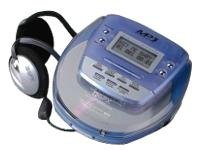
Image: The GPX C3960 Personal CD/MP3 Player, shown in a translucent blue casing, with a pair of silver over-ear headphones connected. The player features a small LCD screen and control buttons on its top surface.
المميزات الرئيسية:
- CD-R/RW and MP3 disc playback compatibility
- Anti-skip protection: 45 seconds for audio CDs, 120 seconds for MP3 CDs
- Dynamic Bass Boost (DBB) for enhanced audio output
- 24-track programmable memory
- Low battery alert indicator
- يعمل على 2 بطاريات AA
يثبت
1. تركيب البطارية
- Locate the battery compartment on the bottom of the player.
- حرك غطاء حجرة البطارية لفتحه.
- أدخل بطاريتين (2) من نوع AA، مع التأكد من صحة القطبية (+ و -) كما هو موضح داخل الحجرة.
- أغلق غطاء حجرة البطارية جيدًا.
- ملحوظة: Replace batteries when the low battery indicator appears on the display or when playback performance degrades.
2. توصيل سماعات الرأس
- Plug the stereo earbuds or your preferred headphones into the الهواتف jack located on the side of the player.
تعليمات التشغيل
1. تشغيل / إيقاف التشغيل
- للتشغيل ، اضغط على PLAY/PAUSE (►/‖‖) زر.
- لإيقاف التشغيل، اضغط على قف (■) button twice, or wait for the auto-power off feature to activate after a period of inactivity.
2. Loading a CD/MP3 Disc
- اضغط على يفتح button to open the disc compartment lid.
- Carefully place a CD or MP3 disc onto the center spindle with the label side facing up.
- Gently press the disc down until it clicks into place.
- Close the disc compartment lid firmly until it latches.
3. التشغيل الأساسي
- تشغيل/إيقاف مؤقت: يضعط PLAY/PAUSE (►/‖‖) لبدء التشغيل أو إيقافه مؤقتًا.
- توقف: يضعط قف (■) لإيقاف التشغيل.
- تخطي المسارات: يضعط تخطي للأمام (►►) or تخطي للخلف (◄◄) to move to the next or previous track.
- يبحث: اضغط مع الاستمرار تخطي للأمام (►►) or تخطي للخلف (◄◄) during playback to fast-forward or rewind within a track.
4. التحكم في مستوى الصوت
- ضبط مقدار dial located on the side of the player to increase or decrease the audio output level.
5. Dynamic Bass Boost (DBB)
- اضغط على DBB button to activate or deactivate the dynamic bass boost feature, which enhances low-frequency sounds.
6. الحماية من الانزلاق
The GPX C3960 features electronic anti-skip protection to prevent audio interruptions during movement. This provides approximately 45 seconds of protection for standard audio CDs and 120 seconds for MP3 CDs.
7. Programming Tracks
- With the player stopped, press the بروغ button. The program indicator will flash.
- استخدم تخطي للأمام (►►) or تخطي للخلف (◄◄) أزرار لتحديد المسار المطلوب.
- يضعط بروغ again to add the selected track to the program memory.
- Repeat steps 2 and 3 for up to 24 tracks.
- يضعط PLAY/PAUSE (►/‖‖) to start playback of the programmed sequence.
- To clear the program, open the disc compartment or press قف (■) مرتين.
صيانة
تنظيف الوحدة
- امسح الجزء الخارجي من الجهاز بقطعة قماش ناعمة وخفيفة.amp القماش. لا تستخدم المنظفات أو المذيبات الكاشطة.
- Never open the disc compartment while the player is operating.
- Keep the lens clean. If the lens becomes dirty, use a soft camera lens brush to gently remove dust.
العناية بالبطارية
- قم بإزالة البطاريات إذا لم يتم استخدام الوحدة لفترة طويلة لمنع التسرب.
- لا تخلط بين البطاريات القديمة والجديدة أو أنواع مختلفة من البطاريات.
التعامل مع القرص
- قم بمعالجة الأقراص من حوافها لتجنب بصمات الأصابع والخدوش.
- تخزين الأقراص في علبها عندما لا تكون قيد الاستعمال.
- قم بتنظيف الأقراص باستخدام قطعة قماش ناعمة وخالية من الوبر، وامسحها من المركز إلى الخارج.
استكشاف الأخطاء وإصلاحها
| مشكلة | السبب المحتمل | حل |
|---|---|---|
| لا يوجد طاقة | البطاريات فارغة أو تم إدخالها بشكل غير صحيح. | استبدل البطاريات بأخرى جديدة، مع التأكد من القطبية الصحيحة. |
| Disc not playing / "NO DISC" error | Disc is dirty, scratched, or inserted incorrectly. | Clean the disc. Reinsert the disc with the label side up. Try a different disc. |
| انقطاع الصوت أو تشوهه | Disc is dirty, scratched, or player is subjected to excessive vibration. | Clean the disc. Ensure the player is on a stable surface or reduce movement. |
| لا يوجد صوت من سماعات الرأس | Headphones not properly connected or volume too low. | Ensure headphones are fully plugged in. Increase volume. Test with different headphones. |
تحديد
- ماركة: جي بي اكس
- نموذج: سي3960
- الوسائط المدعومة: CD, CD-R, CD-RW, MP3-CD
- حماية ضد التخطي: 45 seconds (CD), 120 seconds (MP3-CD)
- مصدر الطاقة: بطاريتين AA
- ميزة خاصة: محمول
- وزن السلعة: حوالي 726 جرام
- أبعاد: Approximately 40.64 x 38.1 x 30.48 cm (Package Dimensions)
الضمان والدعم
For warranty information or technical support, please refer to the documentation included with your purchase or visit the official GPX webالموقع. احتفظ بإثبات الشراء الخاص بك لتقديم مطالبات الضمان.


