1. المقدمة
This manual provides detailed instructions for the setup, operation, and maintenance of your Sharp VC-H965U 4-Head Hi-Fi VCR. The VC-H965U is designed for recording and playback of VHS videocassettes, offering features such as a 4-head design for clear still-frame and slow-motion playback, hi-fi stereo sound, and Sharp Super Picture technology for enhanced image details. Please read this manual thoroughly before using your VCR to ensure proper operation and to maximize its performance.
2. معلومات هامة حول السلامة
اتبع احتياطات السلامة التالية لمنع الصدمات الكهربائية أو الحرائق أو إتلاف الوحدة.
- خطر الصدمة الكهربائية: Do not open the VCR casinز. إحالة جميع أعمال الصيانة إلى فنيي صيانة مؤهلين.
- مصدر الطاقة: Connect the VCR only to an AC 120V, 60Hz power supply.
- تهوية: تأكد من وجود تهوية كافية حول الوحدة. لا تسد فتحات التهوية.
- رُطُوبَة: Do not expose the VCR to rain or moisture.
- Analog Broadcast Tuner: This television receiver has only an analog broadcast tuner. After February 17, 2009, it requires a converter box to receive over-the-air broadcasts with an antenna due to the U.S. transition to digital broadcasting. Analog-only TVs should continue to work as before with cable and satellite TV services, gaming consoles, VCRs, and DVD players.
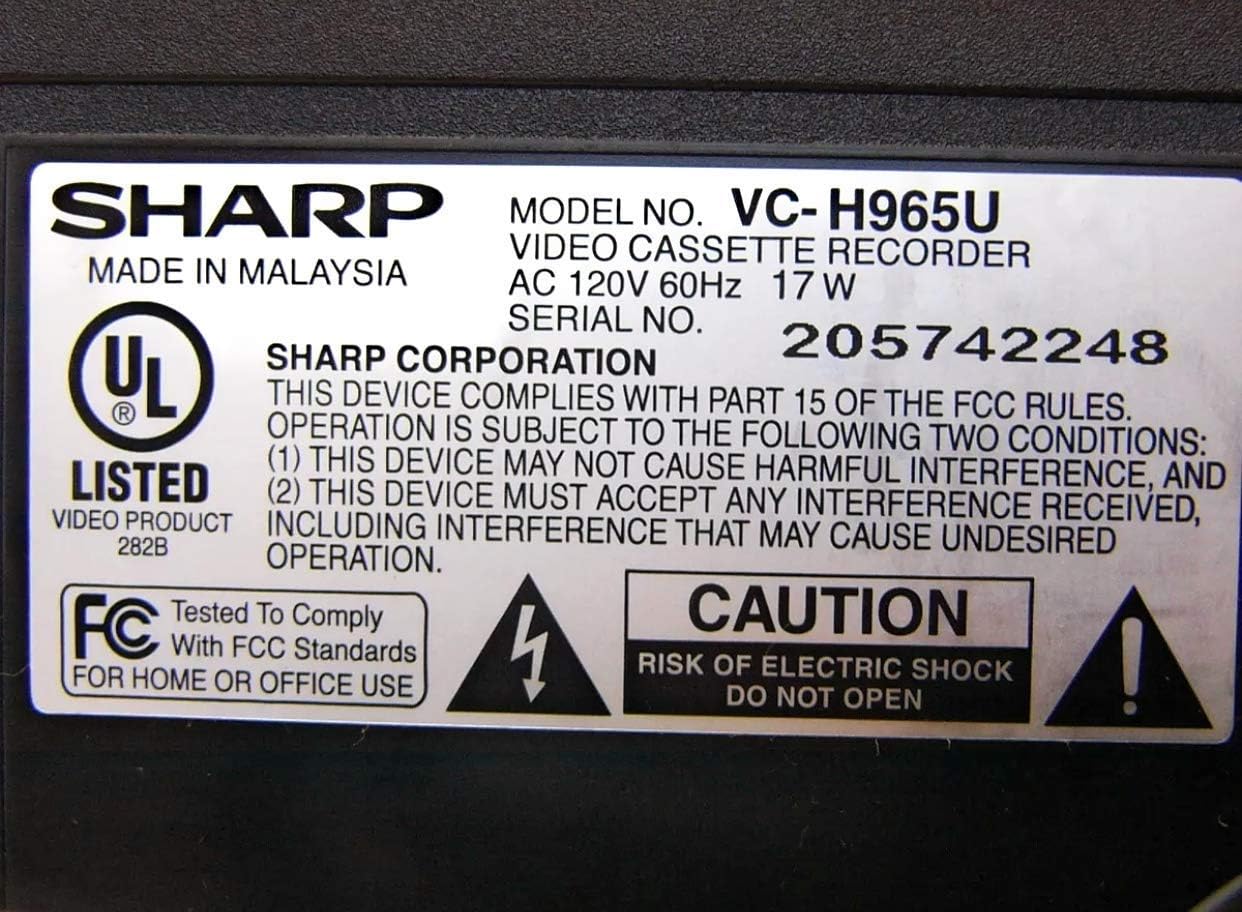
Figure 2.1: Product label with safety warnings and specifications.
3. الإعداد
3.1 التفريغ والتنسيب
Carefully remove the VCR from its packaging. Place the unit on a stable, flat surface, ensuring proper ventilation around all sides.

Figure 3.1: Front panel of the Sharp VC-H965U VCR.
3.2 Connecting to a Television and Other Devices
Connect the VCR to your television using appropriate audio/video cables. For optimal sound, use the stereo audio outputs to an AV receiver if available. The VCR also features front-panel AV inputs for easy connection of camcorders or gaming consoles.
- اتصال الفيديو: Connect the yellow VIDEO OUT jack on the VCR to the VIDEO IN jack on your TV.
- اتصال الصوت: Connect the white AUDIO L OUT and red AUDIO R OUT jacks on the VCR to the corresponding AUDIO IN jacks on your TV or AV receiver.
- اتصال الهوائي/الكابل: Connect your antenna or cable TV line to the VHF/UHF/CATV IN jack on the VCR. Then, connect the VHF/UHF/CATV OUT jack on the VCR to the antenna input on your TV.
- Front AV Inputs: For temporary connections like a camcorder, use the yellow VIDEO IN, white AUDIO L IN, and red AUDIO R IN jacks located on the front panel.

Figure 3.2: Rear panel connections of the Sharp VC-H965U VCR.

الشكل 3.3: مفصل view of rear AV and antenna connections.
3.3 Initial Setup and Channel Tuning (EZ Set Up)
The VC-H965U features an "EZ Set Up" function that automatically tunes and stores available channels. Follow these steps:
- Ensure the VCR is connected to your antenna or cable source.
- Turn on the VCR and your television.
- Access the VCR's menu system (refer to your remote control for the "MENU" button).
- Select the "EZ Set Up" or "Auto Channel Search" option.
- The VCR will automatically scan and store all available air and cable channels, and set the clock.
ملحوظة: If you experience issues with picture loss after setting up cable channels, especially if you have a live signal on channel 3, consult the troubleshooting section or contact customer support for specific guidance.
4. تعليمات التشغيل
4.1 التشغيل الأساسي
- Insert a VHS videocassette into the VCR.
- اضغط على يلعب الزر الموجود على جهاز VCR أو جهاز التحكم عن بعد.
- لإيقاف التشغيل ، اضغط على قف زر.
- لإيقاف التشغيل مؤقتًا، اضغط على وقفة / لا يزال اضغط مرة أخرى لاستئناف العملية.
4.2 برامج التسجيل
- Insert a recordable VHS videocassette.
- Tune the VCR to the desired channel.
- اضغط على ريك اضغط على الزر لبدء التسجيل. قف لإنهاء التسجيل.
- For timed recordings, use the VCR's timer programming function (refer to the remote control and on-screen menu for detailed steps).
4.3 ميزات التشغيل المتقدمة
- Slow-Motion Playback: The 4-head design allows for smooth slow-motion playback in both forward and reverse. Use the وقفة / لا يزال الزر ثم FF or ريو buttons to adjust speed.
- Clear Still-Frame: Achieve clear still images by pressing the وقفة / لا يزال زر أثناء التشغيل.
- Skip Search: أثناء التشغيل، اضغط على تخطي البحث button (if available on remote) to advance the tape in 30-second intervals, useful for bypassing commercials.
- إعادة التشغيل الفوري: اضغط على إعادة فورية button (if available on remote) to quickly rewind the tape in 20-second intervals and then resume playback.
- Fast Rewind/Forward: The VCR rewinds a T-120 tape in approximately 54 seconds. Note that rewind speed may vary for other tape lengths.
5. الصيانة
5.1 تنظيف مسجل الفيديو
للحفاظ على الأداء والمظهر الأمثل:
- امسح الجزء الخارجي من جهاز الفيديو بقطعة قماش ناعمة وجافة.
- Do not use liquid or aerosol cleaners, as they may damage the finish or internal components.
- Avoid inserting cleaning tapes frequently, as some can cause excessive wear on the video heads. Use only when necessary and follow the cleaning tape manufacturer's instructions.
5.2 العناية بالشريط اللاصق
Store videocassettes in their cases, away from direct sunlight, extreme temperatures, and magnetic fields, to preserve tape quality.
6. استكشاف الأخطاء وإصلاحها
If you encounter problems with your VCR, refer to the following common issues and solutions before seeking service.
| مشكلة | السبب المحتمل / الحل |
|---|---|
| لا يوجد طاقة | Ensure the power cord is securely plugged into the VCR and a working electrical outlet. |
| لا يوجد صورة أو صوت |
|
| Poor picture quality (noisy, ghosty, dark) |
|
| VCR is noisy during rewind | This model may exhibit a slightly louder rewind function compared to some other VCRs. This is generally normal operation. |
| Picture loss after cable channel setup | If you have a live signal on channel 3, this can sometimes interfere with the auto-set process. Refer to the manual's specific section on channel tuning or contact Sharp customer service for assistance. |
7. المواصفات
- ماركة: حاد
- رقم الموديل: VC-H965U (Internal Model: VCA965U)
- يكتب: 4-Head Hi-Fi VCR
- مزود الطاقة: تيار متردد 120 فولت ، 60 هرتز ، 17 واط
- وزن السلعة: حوالي 5 رطل
- أبعاد الحزمة: حوالي 14.1 × 8.3 × 3.6 بوصة
- Rewind Speed (T-120 tape): حوالي 54 ثانية
- سمات: Sharp Super Picture, 19 Micron Exact-Track heads, EZ Set Up, Skip Search, Instant Replay, Front-panel AV inputs.
- ASIN: B00006FXF5
- تاريخ التوفر الأول: 29 سبتمبر 2005
8. الضمان والدعم
للحصول على معلومات الضمان، يرجى الرجوع إلى الوثائق المرفقة مع عملية الشراء أو زيارة موقع شارب الرسمي. website. If you require technical assistance or have questions not covered in this manual, please contact Sharp customer service. Previous users have noted the customer service staff to be very polite and helpful.
يمكنك عادةً العثور على معلومات الاتصال بالدعم على الموقع الرسمي للشركة المصنعة website or by searching for "Sharp customer support" online.


